Open WebUI started as a clean frontend for Ollama, but it has grown into something more ambitious. The Pipelines framework and Functions system transform it from a chat interface into a programmable platform where you can intercept requests, modify responses, connect external APIs, implement RAG workflows, and build entirely custom tools — all without modifying the core codebase. If you have ever wanted your local LLM setup to do something it does not do out of the box, pipelines are how you get there.
This guide covers both the Pipelines system (separate containerized services that process requests) and the newer Functions system (Python code that runs directly inside Open WebUI). We will build practical examples: a pipeline that enriches prompts with system context, a function that queries a PostgreSQL database, a filter that enforces content policies, and a RAG pipeline using local embeddings. Everything runs on Linux with Ollama as the backend.
Understanding the Architecture
Open WebUI offers two mechanisms for extending its behavior, and the distinction matters for choosing the right approach. For the foundational setup, see our complete Ollama installation guide.
Pipelines run as separate services, typically in Docker containers. They communicate with Open WebUI through a standardized API. Pipelines are appropriate when you need heavy dependencies (like a full Python ML stack), isolation from the main process, or when your extension might crash and you do not want it taking down the UI.
Functions run inside the Open WebUI process itself. They are Python scripts that you write directly in the admin interface. Functions are simpler to create and deploy, have direct access to Open WebUI internals, but share the process space with the UI. A poorly written function can affect the entire application.
Both systems support three operation types: filters (modify requests before they reach the model or responses before they reach the user), tools (give the model new capabilities it can invoke), and pipes (act as model providers themselves, routing requests to external services or custom logic).
Setting Up the Pipelines Server
The Pipelines server runs alongside Open WebUI and Ollama. Add it to your Docker Compose stack.
# docker-compose.yml
services:
  ollama:
    image: ollama/ollama:latest
    # ... your existing Ollama config ...

  open-webui:
    image: ghcr.io/open-webui/open-webui:main
    ports:
      - "3000:8080"
    environment:
      - OLLAMA_BASE_URL=http://ollama:11434
    volumes:
      - webui_data:/app/backend/data
    depends_on:
      - ollama

  pipelines:
    image: ghcr.io/open-webui/pipelines:main
    container_name: pipelines
    restart: unless-stopped
    ports:
      - "9099:9099"
    volumes:
      - ./pipelines:/app/pipelines
    environment:
      - PIPELINES_DIR=/app/pipelines
    networks:
      - ollama-net
After starting the stack, register the Pipelines server in Open WebUI by navigating to Admin Settings, then Connections, and adding http://pipelines:9099 as an OpenAI-compatible endpoint. Open WebUI will discover available pipelines automatically.
Building Your First Filter Pipeline
Filters intercept messages between the user and the model. A common use case is enriching prompts with contextual information — timestamps, system status, user preferences — without the user having to include this information manually.
# pipelines/context_enrichment.py
from typing import Optional
from pydantic import BaseModel
import datetime
import subprocess

class Pipeline:
    class Valves(BaseModel):
        """Configuration options shown in the Open WebUI admin panel."""
        include_timestamp: bool = True
        include_hostname: bool = True
        include_uptime: bool = False
        priority: int = 0

    def __init__(self):
        self.name = "Context Enrichment Filter"
        self.valves = self.Valves()

    async def on_startup(self):
        print(f"Context Enrichment pipeline loaded")

    async def on_shutdown(self):
        pass

    async def inlet(self, body: dict, user: Optional[dict] = None) -> dict:
        """Process incoming messages before they reach the model."""
        context_parts = []

        if self.valves.include_timestamp:
            now = datetime.datetime.now().strftime("%Y-%m-%d %H:%M:%S %Z")
            context_parts.append(f"Current time: {now}")

        if self.valves.include_hostname:
            try:
                hostname = subprocess.check_output(
                    ["hostname"], timeout=5
                ).decode().strip()
                context_parts.append(f"Server hostname: {hostname}")
            except Exception:
                pass

        if context_parts and body.get("messages"):
            context = "\n".join(context_parts)
            system_msg = {
                "role": "system",
                "content": f"Context information:\n{context}"
            }
            body["messages"].insert(0, system_msg)

        return body

    async def outlet(self, body: dict, user: Optional[dict] = None) -> dict:
        return body
The Valves class defines configuration options that appear in the Open WebUI admin panel. Users with admin access can toggle features without editing code. The inlet method processes requests heading to the model, and outlet processes responses heading back to the user.
Building a Database Query Tool Function
Functions are written directly in the Open WebUI interface. Navigate to Workspace, then Functions, and click the plus button to create a new one. Here is a function that gives the model the ability to query a PostgreSQL database.
import psycopg2
from typing import Optional

class Tools:
    def __init__(self):
        self.db_config = {
            "host": "db.internal",
            "port": 5432,
            "database": "appdata",
            "user": "readonly_user",
            "password": "use_env_variable_in_production"
        }

    def query_database(
        self,
        sql_query: str,
        __user__: Optional[dict] = None
    ) -> str:
        """
        Execute a read-only SQL query against the application database.
        Only SELECT statements are allowed. Returns results as formatted text.

        :param sql_query: A SELECT SQL query to execute.
        :return: Query results formatted as a text table.
        """
        cleaned = sql_query.strip().upper()
        if not cleaned.startswith("SELECT"):
            return "Error: Only SELECT queries are permitted."

        dangerous_keywords = ["DROP", "DELETE", "INSERT", "UPDATE",
                            "ALTER", "CREATE", "TRUNCATE", "EXEC"]
        for keyword in dangerous_keywords:
            if keyword in cleaned:
                return f"Error: {keyword} operations are not permitted."

        try:
            conn = psycopg2.connect(**self.db_config)
            conn.set_session(readonly=True)
            cur = conn.cursor()
            cur.execute(sql_query)

            columns = [desc[0] for desc in cur.description]
            rows = cur.fetchmany(100)

            result = " | ".join(columns) + "\n"
            result += "-" * len(result) + "\n"
            for row in rows:
                result += " | ".join(str(v) for v in row) + "\n"

            cur.close()
            conn.close()
            return result
        except Exception as e:
            return f"Database error: {str(e)}"
When this function is enabled, the model can decide to query the database when a user asks data-related questions. The model generates the SQL based on the conversation context and the function description. The security checks are critical — you are giving an LLM the ability to run SQL, so defense in depth is not optional.
RAG Pipeline with Local Embeddings
Retrieval-Augmented Generation (RAG) enriches the model's responses with content from your own documents. Open WebUI has built-in RAG, but building a custom pipeline gives you control over the retrieval logic, chunking strategy, and embedding model.
# pipelines/custom_rag.py
import chromadb
import requests
from typing import Optional, List
from pydantic import BaseModel

class Pipeline:
    class Valves(BaseModel):
        ollama_url: str = "http://ollama:11434"
        embedding_model: str = "nomic-embed-text"
        collection_name: str = "documents"
        top_k: int = 5
        similarity_threshold: float = 0.7
        priority: int = 0

    def __init__(self):
        self.name = "Custom RAG Filter"
        self.valves = self.Valves()
        self.chroma_client = None

    async def on_startup(self):
        self.chroma_client = chromadb.PersistentClient(
            path="/app/pipelines/chroma_data"
        )

    def get_embedding(self, text: str) -> List[float]:
        response = requests.post(
            f"{self.valves.ollama_url}/api/embeddings",
            json={
                "model": self.valves.embedding_model,
                "prompt": text
            }
        )
        return response.json()["embedding"]

    async def inlet(self, body: dict, user: Optional[dict] = None) -> dict:
        messages = body.get("messages", [])
        if not messages:
            return body

        last_message = messages[-1]["content"]
        query_embedding = self.get_embedding(last_message)

        collection = self.chroma_client.get_or_create_collection(
            name=self.valves.collection_name
        )

        results = collection.query(
            query_embeddings=[query_embedding],
            n_results=self.valves.top_k
        )

        relevant_docs = []
        if results["distances"] and results["documents"]:
            for dist, doc in zip(
                results["distances"][0],
                results["documents"][0]
            ):
                similarity = 1 - dist
                if similarity >= self.valves.similarity_threshold:
                    relevant_docs.append(doc)

        if relevant_docs:
            context = "\n\n---\n\n".join(relevant_docs)
            system_msg = {
                "role": "system",
                "content": (
                    "Use the following retrieved documents to answer "
                    "the user query. If the documents do not contain "
                    "relevant information, say so.\n\n"
                    f"Retrieved documents:\n{context}"
                )
            }
            body["messages"].insert(0, system_msg)

        return body
This pipeline uses ChromaDB for vector storage and Ollama's embedding endpoint with the nomic-embed-text model. When a user sends a message, the pipeline generates an embedding, queries the vector store for similar documents, and injects the relevant ones into the system prompt before the message reaches the LLM.
Content Policy Filter
For shared deployments, you may want to enforce content policies — blocking certain topics, logging sensitive queries, or adding disclaimers to outputs.
# As an Open WebUI Function (filter type)
from typing import Optional
import re

class Filter:
    def __init__(self):
        self.blocked_patterns = [
            r"password\s+for\s+production",
            r"ssh\s+key\s+for",
            r"api[_\s]?key\s+for",
        ]

    def inlet(self, body: dict, __user__: Optional[dict] = None) -> dict:
        messages = body.get("messages", [])
        if not messages:
            return body

        last_content = messages[-1].get("content", "").lower()

        for pattern in self.blocked_patterns:
            if re.search(pattern, last_content, re.IGNORECASE):
                raise Exception(
                    "This query was blocked by the content policy. "
                    "Requests for production credentials or keys "
                    "through the AI assistant are not permitted."
                )

        return body

    def outlet(self, body: dict, __user__: Optional[dict] = None) -> dict:
        messages = body.get("messages", [])
        for msg in messages:
            if msg.get("role") == "assistant":
                content = msg.get("content", "")
                if any(cmd in content for cmd in ["sudo", "rm -rf", "chmod 777"]):
                    msg["content"] += (
                        "\n\n---\nWarning: This response contains "
                        "system commands. Review carefully before "
                        "executing on production systems."
                    )
        return body
Model Routing Pipe
Pipes act as model providers. You can create a pipe that appears as a model in the Open WebUI dropdown but routes requests to different backends based on custom logic.
# As an Open WebUI Function (pipe type)
import requests
from typing import Optional, Generator

class Pipe:
    def __init__(self):
        self.ollama_url = "http://ollama:11434"

    def pipes(self):
        """Return the list of models this pipe provides."""
        return [
            {"id": "auto-router", "name": "Auto Router (Best Model)"},
        ]

    def pipe(self, body: dict, __user__: Optional[dict] = None) -> Generator:
        messages = body.get("messages", [])
        last_msg = messages[-1]["content"] if messages else ""

        code_keywords = ["code", "function", "debug", "script",
                        "program", "compile", "error", "traceback"]
        is_code = any(kw in last_msg.lower() for kw in code_keywords)

        model = "codellama:13b" if is_code else "llama3.1:8b"

        body["model"] = model
        response = requests.post(
            f"{self.ollama_url}/api/chat",
            json=body,
            stream=True
        )

        for line in response.iter_lines():
            if line:
                yield line.decode("utf-8")
This pipe appears as a single model called "Auto Router" in the model selector. When a user sends a message, it analyzes the content and routes coding questions to CodeLlama and general questions to Llama 3.1. You could extend this with more sophisticated classification, load balancing across multiple Ollama instances, or fallback logic when a model is unavailable.
Deploying and Testing Pipelines
After creating pipeline files in the ./pipelines directory, restart the pipelines container for it to pick them up.
# Restart the pipelines service
docker compose restart pipelines

# Check logs for startup errors
docker compose logs -f pipelines

# Verify the pipeline registered with Open WebUI
# Navigate to Admin Settings > Connections and check the pipelines endpoint

# For Functions, no restart is needed — they take effect immediately
# after saving in the Open WebUI admin panel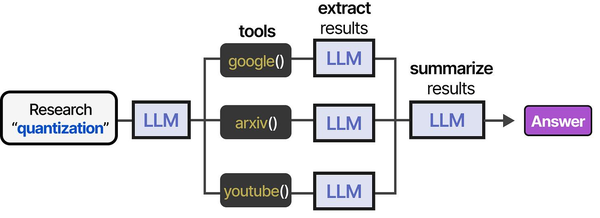
Open WebUI's custom pipeline system embodies the tool orchestration concepts presented in An Illustrated Guide to AI Agents by Grootendorst and Alammar. The book's tool usage pipeline — spanning research, tool selection, extraction, and summarization — mirrors how Open WebUI pipelines chain together processing stages to extend LLM capabilities on Linux.
Related Articles
- Deploy a Private ChatGPT on Your Linux Server with Ollama and Open WebUI
- Open WebUI vs Text Generation WebUI: Side-by-Side Linux Server Comparison
- LibreChat on Linux: Complete Installation and Multi-Provider Configuration Guide
- Build a Self-Hosted RAG Pipeline on Linux: Chat with Your Documentation
Further Reading
- An Illustrated Guide to AI Agents by Maarten Grootendorst and Jay Alammar — Visual guide to agent memory, tools, and reasoning.
- LLMs in Production by Christopher Brousseau and Matthew Sharp — Practical deployment of language models from training to production.
- Agentic AI in Enterprise by Sumit Ranjan, Divya Chembachere, and Lanwin Lobo — Enterprise architecture patterns for agentic AI systems.
Frequently Asked Questions
What is the difference between Pipelines and Functions in Open WebUI?
Pipelines run as separate Docker containers with their own dependencies and process isolation. They are better for heavy workloads, complex dependencies, or extensions that might crash. Functions run inside the Open WebUI process, are created through the web interface, and have direct access to the application context. Functions are simpler to write and deploy but share resources with the main application. For most extensions, start with Functions and move to Pipelines only when you need isolation or heavy dependencies.
Can I use external Python packages in Open WebUI Functions?
Yes, but the packages must be available in the Open WebUI container. You can install them by exec-ing into the container (docker exec -it open-webui pip install package-name) or by building a custom Docker image that includes your required packages. Pipelines are more flexible here because they have their own container where you control the entire dependency tree without affecting the main application.
How do I debug a pipeline that is not working?
Start with the pipeline container logs: docker compose logs pipelines. Add print statements to your pipeline code — they appear in the container logs. Verify the pipeline server is reachable from Open WebUI by checking the connection status in Admin Settings. Test the pipeline endpoint directly with curl: curl http://localhost:9099/v1/models should list your registered pipelines. For Functions, errors appear in the Open WebUI server logs and sometimes as user-facing error messages in the chat interface.


