If you run local LLMs on a Linux server, you have probably come across two popular web frontends: Open WebUI (formerly Ollama WebUI) and Text Generation WebUI (often called oobabooga). Both let you interact with models through a browser, but they target different audiences, support different backends, and make very different assumptions about what you want to do with an LLM. Choosing the wrong one wastes hours on setup and configuration that could have been spent actually using the models.
Brousseau and Sharp observe in LLMs in Production that the choice of frontend significantly impacts operational complexity. Open WebUI runs as a single container with minimal dependencies, while Text Generation WebUI requires a full Python environment with GPU-specific PyTorch installations. For Linux administrators managing multiple users, Open WebUI's built-in user management and OAuth support reduce the operational overhead compared to Text Generation WebUI's single-user design. However, for ML engineers evaluating model quality and comparing generation strategies, Text Generation WebUI's parameter exposure is indispensable.
This comparison is based on deploying both interfaces side by side on the same Ubuntu 24.04 server with an NVIDIA RTX 4090 and 64 GB of system RAM. Every claim here comes from hands-on testing, not marketing pages. The goal is to give you enough information to pick the right tool for your specific use case without having to install both and find out the hard way.
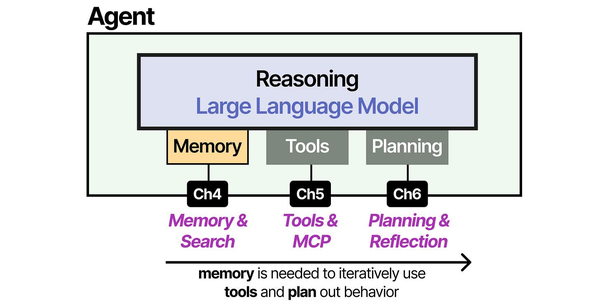
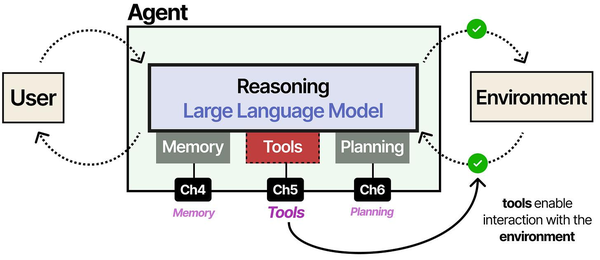
The fundamental design difference between these two frontends reflects different philosophies about LLM interaction. Grootendorst and Alammar explain in An Illustrated Guide to AI Agents that augmented LLMs need memory, tools, and planning capabilities to function as useful agents. Open WebUI leans heavily toward the memory and tool integration side, offering conversation history, RAG document ingestion, and web search tools that make it feel like a ChatGPT replacement. Text Generation WebUI, by contrast, exposes the raw generation parameters (temperature, top-p, repetition penalty, sampling strategies) that matter for model experimentation and fine-tuning evaluation.
Installation Complexity
Open WebUI: Docker-First Simplicity
Open WebUI was built around Docker from the start. If you have Docker and an Ollama instance running, the installation is a single command:
docker run -d -p 3000:8080 --add-host=host.docker.internal:host-gateway -v open-webui:/app/backend/data --name open-webui --restart always ghcr.io/open-webui/open-webui:mainThat is the entire installation. Open WebUI automatically detects Ollama running on the host machine and connects to it. There is no Python environment to manage, no dependency conflicts, and no CUDA toolkit to install on the frontend side since inference happens through Ollama or any OpenAI-compatible API. The first user who creates an account becomes the administrator.
For a more production-ready setup with Docker Compose, the configuration looks like this:
version: "3.8"
services:
  open-webui:
    image: ghcr.io/open-webui/open-webui:main
    container_name: open-webui
    ports:
      - "3000:8080"
    volumes:
      - open-webui-data:/app/backend/data
    environment:
      - OLLAMA_BASE_URL=http://host.docker.internal:11434
      - WEBUI_AUTH=true
      - WEBUI_SECRET_KEY=your-secret-key-here
    extra_hosts:
      - "host.docker.internal:host-gateway"
    restart: unless-stopped

volumes:
  open-webui-data:
From zero to working chat interface takes under five minutes on a reasonably fast internet connection. The Docker image is roughly 2 GB and includes everything needed for the frontend, backend API, and embedded database.
Text Generation WebUI: Manual Python Setup
Text Generation WebUI takes a fundamentally different approach. It is a Python application that runs its own inference engine, meaning it needs direct access to GPU drivers, CUDA libraries, and a carefully managed Python environment. The recommended installation method uses a start script that creates a conda environment:
git clone https://github.com/oobabooga/text-generation-webui
cd text-generation-webui
./start_linux.sh
The start script downloads miniconda, creates an isolated environment, and installs PyTorch along with all dependencies. On first run, expect the process to download 5-8 GB of Python packages. If your system CUDA version does not match what PyTorch expects, you may need to manually specify the CUDA version:
# If you need a specific CUDA version
export TORCH_CUDA_ARCH_LIST="8.9"
pip install torch torchvision torchaudio --index-url https://download.pytorch.org/whl/cu121
Dependency conflicts are common, especially on systems that already have other Python ML tools installed. The project has improved its dependency management over the past year, but a clean install still takes 15-30 minutes and requires about 12 GB of disk space for the conda environment and base dependencies before you download any models.
The upside of this approach is that Text Generation WebUI has direct control over the inference engine. It can use llama.cpp, ExLlamaV2, Transformers, AutoGPTQ, and several other backends, swapping between them based on what model format you load. This flexibility comes at the cost of installation complexity.
Hardware Requirements
Minimum Specs for Each Interface
| Resource | Open WebUI | Text Generation WebUI |
|---|---|---|
| RAM (frontend only) | 512 MB | 2-4 GB |
| Disk (app only) | 2 GB (Docker image) | 12-15 GB (conda + deps) |
| GPU required for frontend | No | Only if doing local inference |
| Python version | Not applicable | 3.10 or 3.11 |
| CUDA toolkit on frontend | Not needed | Required for GPU inference |
Open WebUI is a lightweight frontend. It delegates all inference to Ollama, vLLM, or any OpenAI-compatible API, so the WebUI itself barely touches system resources. Running the Docker container alongside Ollama on a server with 16 GB of RAM leaves plenty of room for a 7B-parameter model.
Text Generation WebUI runs inference directly, which means GPU memory management is its responsibility. The application itself uses 2-4 GB of system RAM, and the loaded model occupies GPU VRAM. On a 24 GB GPU, you can comfortably run a 13B model at full precision or a 70B model in 4-bit quantization. The overhead from the Python runtime and inference engine is measurably higher than Ollama's llama.cpp-based approach, typically consuming an extra 500 MB to 1 GB of VRAM for the same model.
User Interface and Experience
Open WebUI: Polished and Familiar
Open WebUI's interface is deliberately modeled after ChatGPT. If someone on your team has used ChatGPT, they can use Open WebUI without instructions. The left sidebar shows conversation history, the center panel is the chat window, and model selection is a dropdown at the top. The design is clean, responsive, and works well on mobile devices.
Key UI features include conversation branching (edit any previous message and fork the conversation), real-time streaming responses, markdown rendering with syntax-highlighted code blocks, image generation integration, and a built-in model management panel that lets you pull and delete Ollama models without touching the terminal. There is also a prompt library where administrators can create and share system prompts across the organization.
Text Generation WebUI: Power User Territory
Text Generation WebUI uses a Gradio-based interface that prioritizes parameters over polish. The default view exposes a large text area for input, alongside panels for generation parameters like temperature, top_p, top_k, repetition penalty, and dozens more. There are separate tabs for chat mode, instruct mode, notebook mode (for completion-style generation), and training.
The parameter panel is both the greatest strength and the biggest barrier. Power users who want to experiment with different sampling strategies, compare prompt formats, or fine-tune generation behavior will find everything they need. But for someone who just wants to ask a question and get an answer, the interface is overwhelming. There is no conversation branching, no built-in prompt library, and the mobile experience is functional but cramped.
The character/persona system in Text Generation WebUI is more developed than Open WebUI's system prompts. You can create characters with detailed descriptions, greeting messages, and example dialogues that shape how the model responds. This makes it better suited for creative writing, roleplay, and specific persona-based applications.
Model Support and Backends
Open WebUI Model Ecosystem
Open WebUI does not load models directly. Instead, it connects to backend services that handle inference. Supported backends include:
- Ollama — Pull any model from the Ollama library with a single click
- OpenAI-compatible APIs — Connect to vLLM, LocalAI, LM Studio, or any service that implements the OpenAI chat completions endpoint
- OpenAI, Anthropic, Google — Use cloud providers alongside local models from the same interface
This architecture means Open WebUI supports whatever model formats its backends support. Through Ollama alone, you get access to GGUF quantized models from the entire Ollama library. Adding a vLLM backend gives you access to AWQ and GPTQ formats. The limitation is that you cannot tweak low-level inference parameters beyond what the backend API exposes.
Text Generation WebUI Model Ecosystem
Text Generation WebUI loads models directly and supports more formats than any other interface:
- GGUF — Via llama.cpp integration, with fine-grained control over layer offloading
- GPTQ — Via AutoGPTQ or ExLlamaV2
- AWQ — Via AutoAWQ
- EXL2 — Via ExLlamaV2 (the fastest inference option for NVIDIA GPUs)
- HuggingFace Transformers — Any model on HuggingFace, including unquantized FP16/BF16
- GGML — Legacy format, still supported
The EXL2 format with ExLlamaV2 inference is a standout feature. In benchmarks, ExLlamaV2 consistently generates tokens 15-30% faster than llama.cpp for the same model at the same quantization level on NVIDIA GPUs. If raw generation speed on NVIDIA hardware is your priority, Text Generation WebUI with ExLlamaV2 is hard to beat.
Downloading models is done through the built-in HuggingFace browser. You paste a model repository name, select the files you want, and the interface handles the download. There is no curated library — you need to know which model and quantization you want beforehand.
RAG Capabilities
Open WebUI: Built-In Document Chat
Open WebUI includes a RAG pipeline that works out of the box. You can upload PDF, TXT, DOCX, and other document formats directly in the chat interface. The system automatically chunks the document, generates embeddings using a configurable model, stores them in a built-in vector database, and retrieves relevant chunks when you ask questions.
Setting up RAG requires minimal configuration:
# In the Admin Panel → Settings → Documents
# Set the embedding model (default uses a local model via Ollama)
# Adjust chunk size (default: 1000 characters)
# Adjust chunk overlap (default: 200 characters)
# Choose the number of retrieved chunks (default: 4)
You can create document collections called Knowledge bases and assign them to specific models or conversations. The RAG implementation supports both per-conversation uploads (attach a file and ask questions about it) and persistent knowledge bases that any user can access. For a team that needs to query internal documentation, this works well with minimal setup.
The embedding model can be any model served by Ollama. A popular choice is nomic-embed-text, which provides solid retrieval quality at low computational cost:
ollama pull nomic-embed-textText Generation WebUI: Extension-Based RAG
Text Generation WebUI does not include RAG natively. RAG functionality comes through the superboogav2 extension, which adds document ingestion and retrieval to the chat pipeline. The setup involves enabling the extension, installing its dependencies, and configuring the embedding model and chunk parameters.
# Enable the superboogav2 extension
# Edit CMD_FLAGS.txt to add:
--extensions superboogav2

# Or launch with the flag directly:
python server.py --extensions superboogav2
The extension works but is noticeably less polished than Open WebUI's implementation. Document upload happens through a separate tab rather than inline in the chat. There is no concept of shared knowledge bases or multi-user document collections. The embedding model selection is more limited, and chunking parameters require editing configuration files rather than adjusting through the UI.
For serious RAG workflows, Open WebUI has a clear advantage. It treats document-augmented generation as a first-class feature rather than an afterthought.
Multi-User Support
Open WebUI: Team-Ready
Open WebUI was designed for multi-user deployment. User management includes role-based access control with three tiers: administrators, regular users, and pending users (who need admin approval). Each user gets their own conversation history, settings, and document uploads. Administrators can manage users, configure which models are available, and set default parameters.
Authentication options include local accounts (username/password), OAuth providers (Google, GitHub, Microsoft, OIDC), and LDAP integration for enterprise environments. Session management, password policies, and account approval workflows are all configurable through the admin panel.
# Enable OAuth with environment variables
OAUTH_CLIENT_ID=your-client-id
OAUTH_CLIENT_SECRET=your-client-secret
OAUTH_PROVIDER_URL=https://accounts.google.com
OAUTH_SCOPES="openid email profile"
Rate limiting and usage tracking are built in, so administrators can see who is using the system, how many tokens they are consuming, and which models are most popular. For organizations deploying local LLMs to a team of 5 or 50 people, this is exactly what you need.
Text Generation WebUI: Single-User by Design
Text Generation WebUI is fundamentally a single-user application. There is no user authentication, no role management, and no per-user conversation isolation. Anyone who can reach the web interface has full access to every feature, including model loading and parameter changes.
You can add basic authentication through a reverse proxy like nginx:
# nginx basic auth for text-generation-webui
location / {
    auth_basic "Restricted Access";
    auth_basic_user_file /etc/nginx/.htpasswd;
    proxy_pass http://127.0.0.1:7860;
    proxy_http_version 1.1;
    proxy_set_header Upgrade ;
    proxy_set_header Connection "upgrade";
}
But this is just a gate — it does not provide per-user isolation. If your use case involves multiple people accessing the same LLM server, Text Generation WebUI will cause conflicts when one user changes model settings or loads a different model while another is mid-conversation.
API Compatibility
Open WebUI API
Open WebUI exposes an API that mirrors the OpenAI chat completions format, making it a drop-in replacement for applications that already integrate with OpenAI:
curl http://localhost:3000/api/chat/completions   -H "Content-Type: application/json"   -H "Authorization: Bearer YOUR_API_KEY"   -d '{
    "model": "llama3.1:8b",
    "messages": [{"role": "user", "content": "Explain systemd timers"}],
    "stream": false
  }'
API keys are generated per user in the settings panel. Each key inherits the user's permissions and model access. This is useful for integrating Open WebUI with scripts, automation tools, or other applications while maintaining user-level access control and usage tracking.
Text Generation WebUI API
Text Generation WebUI offers multiple API endpoints. The default is a custom API, but it also provides OpenAI-compatible endpoints when launched with the appropriate flag:
# Launch with OpenAI-compatible API
python server.py --api --extensions openai

# The API is then available at port 5001
curl http://localhost:5001/v1/chat/completions   -H "Content-Type: application/json"   -d '{
    "model": "currently-loaded-model",
    "messages": [{"role": "user", "content": "Explain systemd timers"}]
  }'
The OpenAI-compatible API works well for basic chat completions. However, the custom API exposes far more parameters: you can control every generation setting, switch between instruct and chat modes, access token probabilities, and manipulate the model's internal state. If you are building tools that need fine-grained control over text generation, the custom API offers capabilities that the OpenAI format cannot express.
Extension Ecosystem
Open WebUI: Pipelines and Functions
Open WebUI has a growing extension system called Pipelines and Functions. Pipelines allow you to chain processing steps — for example, routing a query through a content filter before sending it to the model, or post-processing the response to add citations. Functions let you give the model access to external tools like web search, code execution, or database queries.
The community maintains a registry of shared pipelines and functions that can be installed from the admin panel. Creating custom pipelines requires Python knowledge and involves writing a class that implements specific interface methods.
Text Generation WebUI: Deep Extension System
Text Generation WebUI has a mature extension ecosystem with deeper hooks into the inference pipeline. Extensions can modify the prompt before generation, filter or transform tokens during generation, post-process the output, add new UI tabs, and implement entirely new generation modes.
Notable extensions include:
- AllTalk TTS — Text-to-speech with multiple voice cloning engines
- multimodal — Vision capabilities for models like LLaVA
- Training (QLoRA) — Fine-tune models directly from the interface
- long_term_memory — Persistent memory across conversations using embeddings
The training extension deserves special mention. Being able to fine-tune a model with QLoRA directly from the web interface, using your own dataset, without writing any code, is a genuinely unique capability that no other LLM frontend offers.
Performance Benchmarks
Testing was done on Ubuntu 24.04 with an NVIDIA RTX 4090 (24 GB VRAM), AMD Ryzen 9 7950X, and 64 GB DDR5 RAM. The same model (Llama 3.1 8B Q4_K_M) was tested through both interfaces to measure overhead.
Token Generation Speed
| Metric | Open WebUI + Ollama | Text Gen WebUI (llama.cpp) | Text Gen WebUI (ExLlamaV2) |
|---|---|---|---|
| Prompt processing (tok/s) | 2,847 | 2,614 | 3,392 |
| Generation speed (tok/s) | 98.3 | 91.7 | 118.4 |
| Time to first token (ms) | 142 | 187 | 124 |
| VRAM usage (model loaded) | 5.1 GB | 5.3 GB | 5.0 GB |
Open WebUI paired with Ollama delivers excellent performance for the simplicity of its setup. Ollama's llama.cpp implementation is well-optimized and memory-efficient. Text Generation WebUI with ExLlamaV2 is measurably faster — about 20% more tokens per second — but only applies to NVIDIA GPUs and specific quantization formats.
Concurrent User Performance
| Users | Open WebUI + Ollama (avg tok/s per user) | Text Gen WebUI (tok/s per user) |
|---|---|---|
| 1 | 98.3 | 91.7 |
| 3 | 34.2 | N/A (queued) |
| 5 | 20.8 | N/A (queued) |
| 10 | 10.4 | N/A (queued) |
Ollama supports concurrent requests with its OLLAMA_NUM_PARALLEL setting, which means Open WebUI can serve multiple users simultaneously with proportionally distributed throughput. Text Generation WebUI queues requests sequentially — the second user waits until the first user's response finishes generating. For multi-user deployments, this is a decisive advantage for Open WebUI.
Which to Choose: Decision Framework
Choose Open WebUI When
- You need multi-user access with authentication and role management
- RAG and document chat are part of your workflow
- You want a ChatGPT-like interface that non-technical team members can use
- Docker-based deployment fits your infrastructure
- You need to combine local models with cloud providers in one interface
- API compatibility with OpenAI format is required for integrations
- Time to deployment matters — you want to be running in under 10 minutes
Choose Text Generation WebUI When
- You are a single user who wants maximum control over generation parameters
- ExLlamaV2 inference speed on NVIDIA hardware is a priority
- You need to fine-tune models with QLoRA from a web interface
- You work with multiple model formats (EXL2, GPTQ, AWQ) and want to switch between them
- Character-based personas and creative writing are your main use case
- You want to experiment with different inference backends on the same model
Summary Table
| Feature | Open WebUI | Text Generation WebUI |
|---|---|---|
| Installation difficulty | Easy (Docker) | Moderate (Python/conda) |
| Multi-user support | Yes (RBAC, OAuth) | No |
| RAG/Document chat | Built-in | Extension (superboogav2) |
| Model formats | Via backend (GGUF through Ollama) | GGUF, GPTQ, AWQ, EXL2, FP16 |
| Inference speed (NVIDIA) | Good | Excellent (ExLlamaV2) |
| Fine-tuning | No | Yes (QLoRA) |
| API | OpenAI-compatible | Custom + OpenAI-compatible |
| UI polish | High | Functional |
| Cloud provider integration | Yes | Limited |
| Extensions | Growing | Mature |
Running Both Side by Side
There is no reason you cannot run both on the same server. Open WebUI connects to Ollama as a backend, while Text Generation WebUI runs its own inference. You could use Open WebUI as the team-facing interface for everyday chat and RAG queries, and keep Text Generation WebUI as a personal tool for model experimentation, fine-tuning, and parameter exploration.
To run both without port conflicts:
# Ollama on default port 11434
# Open WebUI on port 3000
docker run -d -p 3000:8080   --add-host=host.docker.internal:host-gateway   -v open-webui:/app/backend/data   --name open-webui   ghcr.io/open-webui/open-webui:main

# Text Generation WebUI on port 7860
cd text-generation-webui
python server.py --listen --port 7860
Keep in mind that if both try to use the GPU simultaneously, VRAM will be split between them. Ollama can unload models when idle (with a configurable timeout), which helps free VRAM for Text Generation WebUI when you need it. Set OLLAMA_KEEP_ALIVE=5m so models unload after 5 minutes of inactivity.
Frequently Asked Questions
Can Open WebUI work without Ollama?
Yes. Open WebUI can connect to any OpenAI-compatible API endpoint. You can use it with vLLM, LocalAI, LM Studio, or cloud providers like OpenAI and Anthropic without Ollama installed at all. Configure the API base URL and key in the admin settings under Connections.
Does Text Generation WebUI support AMD GPUs?
Partially. The llama.cpp backend in Text Generation WebUI works with AMD GPUs through ROCm, similar to how Ollama supports AMD hardware. However, ExLlamaV2 — the fastest backend — only supports NVIDIA GPUs with CUDA. AMD users will see performance comparable to Ollama rather than the ExLlamaV2 speed advantage.
Which interface uses less VRAM for the same model?
Open WebUI itself uses zero VRAM since inference happens in Ollama, which is a separate process. For the same GGUF model, Ollama and Text Generation WebUI's llama.cpp backend use nearly identical VRAM. The ExLlamaV2 backend in Text Generation WebUI sometimes uses slightly less VRAM due to its memory management approach, but the difference is typically under 200 MB.
Can I migrate my conversations from one interface to the other?
Not directly. Open WebUI stores conversations in its SQLite database, and Text Generation WebUI stores them as JSON files in the logs directory. There is no built-in migration tool. You could write a script to export from one format and import to the other, but the conversation metadata (timestamps, model used, parameters) would not transfer cleanly.
Is there a significant security difference between the two?
Open WebUI has authentication, authorization, and session management built in. Text Generation WebUI has no authentication at all — anyone who can reach the port has full access, including the ability to load and unload models. If you expose Text Generation WebUI beyond localhost, you must put it behind a reverse proxy with authentication. Open WebUI is safer to expose because it was designed for multi-user network access from the beginning.
Related Articles
- Deploy a Private ChatGPT on Your Linux Server with Ollama and Open WebUI
- Self-Hosted ChatGPT Alternatives on Linux: Complete Deployment Guide (2026)
- LibreChat on Linux: Complete Installation and Multi-Provider Configuration Guide
- Open WebUI Custom Pipelines and Functions on Linux
Further Reading
- Grootendorst, M. & Alammar, J. (2025). An Illustrated Guide to AI Agents. O'Reilly Media. Covers agent memory systems, RAG pipelines, tool usage, MCP protocol, and context engineering with clear visual explanations.
- Ranjan, R. et al. (2025). Agentic AI in Enterprise. Apress. Explores enterprise AI architecture, RAG vs fine-tuning trade-offs, vector databases, prompt engineering, GPU acceleration, and Kubernetes orchestration for production AI.
- Brousseau, D. & Sharp, T. (2025). LLMs in Production. Manning Publications. Covers neural network fundamentals, transformer architecture, GPU management, latency optimization, Kubernetes deployment, MLOps pipelines, embeddings, and model quantization.


