AI coding assistants for the terminal have gone from experimental curiosities to daily-driver tools for Linux developers and sysadmins. Unlike GUI-based copilots embedded in VS Code or JetBrains, terminal-based assistants work everywhere — over SSH sessions, in tmux panes, inside containers, and on headless servers where there is no desktop environment. They read your codebase, generate patches, run commands, and iterate on code with you in a conversational workflow that fits how Linux people already work.
This article is a hands-on comparison of the five most capable AI coding assistants that run in the Linux terminal as of 2026. We install each one, test it against the same set of real-world tasks, measure what matters (speed, accuracy, context handling), and give an honest assessment of where each tool excels and where it falls short.
The Contenders
We are comparing five tools that all share one thing in common: you use them from the command line, and they can read and modify files in your project.
- Claude Code — Anthropic's official CLI agent. Uses Claude models (cloud or via API key). Agentic — it reads files, runs commands, and makes edits autonomously.
- Aider — Open-source pair programming tool. Works with OpenAI, Anthropic, Ollama, and many other backends. Git-aware, creates commits automatically.
- Continue.dev (CLI mode) — Open-source coding assistant primarily known for its VS Code extension, but also supports terminal usage and can connect to local models.
- Ollama + Open Interpreter — Open Interpreter is a code-executing AI assistant that can use Ollama for fully local, private operation. Runs code directly on your machine.
- Cline (CLI) — Originally a VS Code extension, now available as a CLI tool. Supports multiple model providers including local Ollama models.
Installation
Claude Code
# Requires Node.js 18+
npm install -g @anthropic-ai/claude-code

# Launch in your project directory
cd /path/to/your/project
claude
Claude Code requires an Anthropic API key or a Claude subscription. It connects to Anthropic's cloud infrastructure — there is no local model option.
Aider
# Install via pip
pip install aider-chat

# With Ollama (local models)
aider --model ollama/llama3.1:8b

# With Anthropic
export ANTHROPIC_API_KEY=sk-ant-...
aider --model claude-3-5-sonnet-20241022

# With OpenAI
export OPENAI_API_KEY=sk-...
aider --model gpt-4o
Aider is the most flexible in terms of model support. It works with virtually any LLM provider, including fully local setups via Ollama.
Continue.dev
# Install the CLI
pip install continuedev

# Configure in ~/.continue/config.json
{
  "models": [
    {
      "title": "Ollama Llama 3.1",
      "provider": "ollama",
      "model": "llama3.1:8b",
      "apiBase": "http://localhost:11434"
    }
  ]
}
Open Interpreter with Ollama
# Install Open Interpreter
pip install open-interpreter

# Run with Ollama
interpreter --model ollama/llama3.1:8b

# Run with local mode (extra safety prompts)
interpreter --local --model ollama/codellama:13b
Cline CLI
# Install Cline
npm install -g @anthropic-ai/cline

# Or build from source for the latest version
git clone https://github.com/cline/cline.git
cd cline && npm install && npm run build
Test Methodology
We test each tool against five real-world tasks that represent common Linux development and administration work. Each tool gets the same prompt, and we evaluate:
- Accuracy: Does the generated code work correctly?
- Context awareness: Does the tool read existing code and produce consistent additions?
- Iteration speed: How quickly can you refine the result through conversation?
- Autonomy: Does the tool handle the task end-to-end or need hand-holding?
Task 1: Write a Bash Script
Prompt: "Write a bash script that monitors a directory for new .log files, rotates files over 100MB by compressing and timestamping them, and sends a notification via a webhook when rotation happens."
Task 2: Debug a Python Error
Prompt: "This Flask app crashes with a 500 error when uploading files over 10MB. Find the bug and fix it." (Given a codebase with a deliberate bug in the upload handler.)
Task 3: Refactor Existing Code
Prompt: "Refactor this 400-line Python script into a proper module structure with separate files for configuration, database operations, and API routes."
Task 4: Write systemd Service Configuration
Prompt: "Create a systemd service and timer for this Python backup script. It should run daily at 2 AM, have proper restart policies, resource limits, and send an email on failure."
Task 5: Generate Tests
Prompt: "Write pytest tests for the database module. Cover the CRUD operations, edge cases, and error handling. Mock the database connection."
Results and Comparison
Claude Code
Claude Code is the most autonomous tool in this comparison. Give it a task and it reads the relevant files, reasons about the approach, writes the code, and can even run tests to verify its work — all without being told which files to look at. The agent loop means you describe what you want, and it figures out the how.
Strengths: Best-in-class context understanding. It reads your entire project structure and produces code that matches your existing style, naming conventions, and patterns. The agentic workflow means it handles multi-file refactoring tasks that other tools struggle with. Excellent at the systemd and bash tasks because it understands Linux administration deeply.
Weaknesses: Requires a cloud API connection — no local model option. Token costs add up for large codebases (reading many files consumes input tokens). Can be slow on complex tasks that require multiple agent steps.
Best for: Complex, multi-file tasks where context understanding matters most. Linux administration tasks. Projects where you want the AI to drive the workflow rather than you directing every step.
Aider
Aider is the most mature open-source option and the one most Linux developers reach for first. Its killer feature is git integration — every change is automatically committed with a descriptive message, and you can undo changes with a simple /undo command.
Strengths: Excellent git workflow. Works with local models through Ollama, making it viable for air-gapped environments. The /add command for explicitly including files in context is intuitive. Supports pair-programming style where you and the AI alternate edits. Strong results on the refactoring task because it understands project structure.
Weaknesses: Requires you to manually add files to context — it does not discover relevant files on its own. With local 8B models, quality degrades noticeably on complex tasks. The diff-based editing format confuses some models, leading to malformed patches.
Best for: Developers who want a git-native workflow. Teams that need to use local models. Projects where you know which files need to change and want precise control over context.
Continue.dev
Continue.dev started as a VS Code extension and its terminal capabilities are more limited than dedicated CLI tools. However, it has a strong model configuration system and works well with local models.
Strengths: Seamless switching between VS Code and terminal workflows. Good model configuration flexibility. Tab-completion integration works well. Custom slash commands let you build reusable workflows.
Weaknesses: CLI mode is less polished than the VS Code experience. Limited autonomous capabilities — it is more of a chat-with-code-context tool than an agent. Context window management is manual. Did not perform well on the multi-file refactoring task.
Best for: Developers who switch between VS Code and terminal frequently. Teams standardizing on one tool across both environments.
Open Interpreter with Ollama
Open Interpreter's defining feature is that it executes code directly on your machine. Where other tools generate code for you to review and run, Open Interpreter runs it immediately (with confirmation prompts by default).
Strengths: Can execute commands and see the results, making it excellent for iterative debugging. Fully local with Ollama — no data leaves your machine. Great for the debugging task because it can run the code, see the error, and fix it in a loop. Natural conversational interface.
Weaknesses: Code execution is powerful but risky — a wrong command can modify or delete files. With local models, the reasoning quality is noticeably lower than cloud-backed tools. Does not understand project structure well; it treats each request somewhat independently. Poor results on the refactoring task.
Best for: Interactive debugging sessions. System administration tasks where you need to execute and verify commands. Environments requiring complete data privacy with local models.
Cline CLI
Cline brings agentic capabilities similar to Claude Code but with support for multiple model providers including local models. It reads files, creates files, runs commands, and iterates autonomously.
Strengths: Agentic workflow with local model support (via Ollama). Reads project files automatically. Good at multi-file tasks. Transparent about what it is doing — shows each file read and command executed. Strong results on the systemd task.
Weaknesses: Newer tool with rougher edges than Aider or Claude Code. Token consumption is high because the agentic loop sends lots of context. Performance with small local models (8B) is inconsistent — the agent loop sometimes gets stuck in retry patterns. Better with 70B+ models or cloud APIs.
Best for: Teams wanting an agentic workflow but with local model flexibility. Users who like Claude Code's approach but need to use different model providers.
Summary Table
| Feature | Claude Code | Aider | Continue | Open Interp. | Cline |
|---|---|---|---|---|---|
| Local model support | No | Yes | Yes | Yes | Yes |
| Agentic (autonomous) | Yes | Partial | No | Partial | Yes |
| Git integration | Yes | Excellent | Basic | No | Yes |
| Code execution | Yes | No | No | Yes | Yes |
| Multi-file refactoring | Excellent | Good | Fair | Poor | Good |
| Works over SSH | Yes | Yes | Yes | Yes | Yes |
| Open source | Yes | Yes | Yes | Yes | Yes |
| Cost | API usage | Free/API | Free/API | Free (local) | Free/API |
Recommendations
There is no single "best" tool — the right choice depends on your constraints:
- Best overall experience: Claude Code, if you are comfortable with a cloud API and the associated costs. The context understanding and autonomous workflow are unmatched.
- Best open-source, git-native workflow: Aider. The automatic commits and undo functionality fit naturally into how most developers work.
- Best for fully local, private operation: Aider with Ollama or Open Interpreter with Ollama. Both work without any external API calls.
- Best for system administration tasks: Claude Code or Open Interpreter. Both can execute commands and iterate on results, which is essential for sysadmin work.
- Best for budget-conscious teams: Aider with a mix of local models (for simple tasks) and a cloud API (for complex tasks). The flexible model switching lets you optimize cost per task.
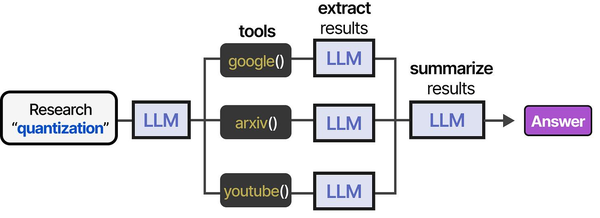
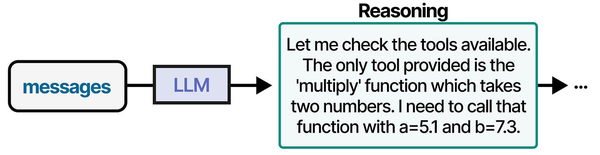
Terminal-based AI coding assistants represent the most Linux-native implementation of the agentic tool-use patterns described in An Illustrated Guide to AI Agents. Grootendorst and Alammar illustrate how AI agents interact with tools through a structured pipeline of definition, selection, execution, and evaluation — terminal assistants like Aider, Claude Code, and Continue.dev implement this exact pattern with tools mapped to shell commands, file operations, and code analysis functions. Brousseau and Sharp in LLMs in Production note that terminal-based interfaces often achieve lower latency than IDE plugins because they eliminate the GUI rendering overhead, making them particularly effective for Linux power users who already live in the terminal.
Related Articles
- Continue.dev and Ollama: Self-Hosted AI Coding Assistant for VS Code on Linux
- Model Context Protocol (MCP) on Linux with Ollama: Connect AI to Your Tools
- Ollama Python API: Build Linux Administration Tools with Local LLMs
- How to Install Ollama on Linux: Complete Guide for Ubuntu, Fedora, and RHEL (2026)
Further Reading
- An Illustrated Guide to AI Agents by Maarten Grootendorst and Jay Alammar — Visual guide to agent memory, tools, and reasoning.
- LLMs in Production by Christopher Brousseau and Matthew Sharp — Practical deployment of language models from training to production.
- Agentic AI in Enterprise by Sumit Ranjan, Divya Chembachere, and Lanwin Lobo — Enterprise architecture patterns for agentic AI systems.
Frequently Asked Questions
Can I use these tools over an SSH session on a remote server?
Yes, all five tools work over SSH because they run in the terminal. They do not require a GUI. The main consideration is network latency — tools that call cloud APIs add round-trip time to every request, which is noticeable on high-latency connections. For remote servers, locally-backed tools (Aider or Open Interpreter with Ollama running on the same server) provide the most responsive experience. Claude Code and cloud-backed Aider work fine but feel slower on connections with more than 100ms latency.
Which tool is best for pair programming with another developer?
Aider in a shared tmux session is the most natural setup for pair programming. Both developers see the same terminal, can type prompts to the AI, and changes are committed to git automatically. The /undo command makes it safe to experiment. Claude Code also works well in tmux but its agentic behavior can be harder to follow when two people are watching — the AI is making decisions and running commands that both developers need to track. For pair programming, a tool where the human stays more in control (like Aider) tends to work better than a fully autonomous agent.
Do local models produce usable results for coding tasks?
For straightforward tasks — writing bash scripts, generating boilerplate, simple bug fixes, writing tests for well-defined functions — an 8B model through Ollama produces usable results roughly 70% of the time. For complex tasks — multi-file refactoring, architectural decisions, debugging subtle concurrency issues — the success rate drops below 40% with small models. The sweet spot is a 32B-70B model if your hardware supports it, which closes much of the gap with cloud models. Use local models for routine work and switch to a cloud model when the task requires deeper reasoning.