Running your own AI infrastructure means assembling a stack of components that work together reliably: an inference engine to serve models, a web interface for users, a vector database for retrieval-augmented generation, a reverse proxy for TLS and access control, storage for model files, monitoring for the whole thing, and enough automation to keep it running without constant babysitting. Each component has multiple open-source options, and the choices you make affect performance, security, and operational complexity.
This reference architecture documents a production-tested stack that balances capability with maintainability. Every component is open source, every service runs on Linux, and the entire system operates on your own hardware without external API dependencies. The architecture has been deployed in environments ranging from a single-GPU workstation to a multi-server cluster, and the guide covers scaling decisions for each tier.
This is not a tutorial for installing each tool in isolation — those guides exist elsewhere. This is the architecture document that explains how the pieces fit together, why certain choices were made over alternatives, what the network topology looks like, how data flows between components, and what breaks first when you push the system under load.
Architecture Diagram and Component Overview
# Reference Architecture: Self-Hosted AI Stack
#
# ┌─────────────────────────────────────────────────┐
# │                   Clients                        │
# │        (Browsers, API consumers, scripts)        │
# └──────────────────────┬──────────────────────────┘
#                        │ HTTPS (443)
# ┌──────────────────────▼──────────────────────────┐
# │              Nginx Reverse Proxy                 │
# │         TLS termination, rate limiting,          │
# │         auth forwarding, path routing            │
# ├─────────────┬───────────────────┬───────────────┤
# │  /chat/*    │    /api/v1/*      │  /ollama/*    │
# │             │                   │               │
# │  ┌─────────▼─────┐  ┌─────────▼───────┐       │
# │  │  Open WebUI    │  │  Custom API     │       │
# │  │  (Port 3000)   │  │  (Port 8080)    │       │
# │  └───────┬────────┘  └───────┬─────────┘       │
# │          │                   │                  │
# │  ┌───────▼───────────────────▼─────────┐       │
# │  │         Ollama (Port 11434)          │       │
# │  │     Model serving + inference        │       │
# │  │     GPU: NVIDIA / AMD                │       │
# │  └───────────────┬─────────────────────┘       │
# │                  │                              │
# │  ┌───────────────▼─────────────────────┐       │
# │  │     ChromaDB (Port 8000)             │       │
# │  │     Vector store for RAG             │       │
# │  └─────────────────────────────────────┘       │
# │                                                 │
# │  ┌─────────────────────────────────────┐       │
# │  │     Prometheus + Grafana             │       │
# │  │     Monitoring and alerting          │       │
# │  └─────────────────────────────────────┘       │
# └─────────────────────────────────────────────────┘
#
# Storage:
#   /var/lib/ollama/models   — Model files (100GB-1TB)
#   /var/lib/chromadb         — Vector embeddings
#   /var/lib/open-webui       — User data, chat history
Component Selection Rationale
Inference Engine: Ollama
Ollama was chosen over vLLM, llama.cpp server, and LocalAI for this reference architecture because it offers the best balance of ease of operation, model compatibility, and API stability. vLLM delivers higher throughput for concurrent requests, but its operational complexity is significantly higher — it requires specific CUDA toolkit versions, has a more complex deployment model, and is designed for multi-GPU multi-tenant scenarios that most self-hosted deployments do not need. llama.cpp server is lighter but lacks Ollama's model management, automatic quantization selection, and OpenAI-compatible API endpoints. LocalAI is capable but tries to be everything (TTS, image generation, embeddings) in a single binary, which complicates resource management.
Web Interface: Open WebUI
Open WebUI (formerly Ollama WebUI) provides a ChatGPT-like interface that connects directly to Ollama's API. It handles user authentication, conversation history, model selection, system prompts, and RAG integration. The alternatives — LibreChat, LobeChat, and text-generation-webui — are all viable. Open WebUI was chosen because it is the most actively maintained, has the tightest Ollama integration, and is the simplest to deploy (single Docker container with SQLite backend).
Vector Database: ChromaDB
For RAG workloads, you need a vector database to store and query document embeddings. ChromaDB is the simplest option — it runs as a single Python process, persists to disk, and has a straightforward Python client. For production deployments with larger datasets, Qdrant or Milvus offer better performance and clustering. ChromaDB is suitable for up to about 1 million vectors on a single server.
Hardware Planning
Hardware requirements depend almost entirely on the models you plan to serve. The inference engine and GPU are the bottleneck; everything else is lightweight.
Single-Server Configuration
# Minimum viable self-hosted AI server:
# - CPU: 8+ cores (Intel Xeon or AMD EPYC)
# - RAM: 32 GB (64 GB recommended)
# - GPU: NVIDIA with 12+ GB VRAM (RTX 3060 12GB minimum)
# - Storage: 500 GB NVMe SSD
# - Network: 1 Gbps
#
# This handles: 7B-13B parameter models, 1-4 concurrent users
#
# Recommended production configuration:
# - CPU: 16+ cores
# - RAM: 64-128 GB
# - GPU: NVIDIA with 24-48 GB VRAM (RTX 4090, A5000, or L40S)
# - Storage: 1-2 TB NVMe SSD
# - Network: 10 Gbps
#
# This handles: Up to 70B parameter models, 5-20 concurrent users

# Check your current hardware
lscpu | grep -E "^CPU|^Thread|^Core|^Socket"
free -h
nvidia-smi
lsblk -d -o NAME,SIZE,TYPE,TRAN
Storage Planning
# Model storage requirements (approximate, Q4_K_M quantization):
# 7B models:   ~4 GB each
# 13B models:  ~8 GB each
# 34B models:  ~20 GB each
# 70B models:  ~40 GB each
#
# Plan for 3-5 models = 50-200 GB for model storage
# Plus vector database: 1-10 GB typical
# Plus user data (Open WebUI): 1-5 GB
# Plus logs and monitoring data: 10-20 GB
# Plus OS and packages: 20 GB
#
# Total: 200-500 GB minimum, 1 TB recommended

# Create the directory structure
sudo mkdir -p /var/lib/ollama/models
sudo mkdir -p /var/lib/chromadb
sudo mkdir -p /var/lib/open-webui
sudo mkdir -p /etc/ai-stack

# Set ownership
sudo useradd -r -s /usr/sbin/nologin ollama
sudo useradd -r -s /usr/sbin/nologin chromadb
sudo chown ollama:ollama /var/lib/ollama -R
sudo chown chromadb:chromadb /var/lib/chromadb -R
Deploying the Stack
Option 1: Docker Compose (Recommended for Most Deployments)
# /etc/ai-stack/docker-compose.yml
version: '3.8'

services:
  ollama:
    image: ollama/ollama:latest
    container_name: ollama
    restart: unless-stopped
    ports:
      - "127.0.0.1:11434:11434"
    volumes:
      - /var/lib/ollama:/root/.ollama
    deploy:
      resources:
        reservations:
          devices:
            - driver: nvidia
              count: all
              capabilities: [gpu]
    environment:
      - OLLAMA_NUM_PARALLEL=4
      - OLLAMA_MAX_LOADED_MODELS=2
      - OLLAMA_KEEP_ALIVE=10m
    healthcheck:
      test: ["CMD", "curl", "-f", "http://localhost:11434/api/tags"]
      interval: 30s
      timeout: 10s
      retries: 3

  open-webui:
    image: ghcr.io/open-webui/open-webui:main
    container_name: open-webui
    restart: unless-stopped
    ports:
      - "127.0.0.1:3000:8080"
    volumes:
      - /var/lib/open-webui:/app/backend/data
    environment:
      - OLLAMA_BASE_URL=http://ollama:11434
      - WEBUI_AUTH=true
      - WEBUI_NAME=AI Assistant
      - ENABLE_RAG_WEB_SEARCH=false
      - ENABLE_IMAGE_GENERATION=false
    depends_on:
      ollama:
        condition: service_healthy

  chromadb:
    image: chromadb/chroma:latest
    container_name: chromadb
    restart: unless-stopped
    ports:
      - "127.0.0.1:8000:8000"
    volumes:
      - /var/lib/chromadb:/chroma/chroma
    environment:
      - ANONYMIZED_TELEMETRY=false
      - IS_PERSISTENT=true
# Deploy the stack
cd /etc/ai-stack
docker compose up -d
# Verify all services are running
docker compose ps
docker compose logs --tail 20
# Pull your first model
docker exec ollama ollama pull llama3.1:8b
# Access Open WebUI at http://localhost:3000
# First user to register becomes the adminOption 2: Native Installation (Better Performance, More Control)
# Install Ollama natively (better GPU performance, no container overhead)
curl -fsSL https://ollama.com/install.sh | sh
sudo systemctl enable --now ollama

# Install Open WebUI via pip
python3 -m venv /opt/open-webui
source /opt/open-webui/bin/activate
pip install open-webui

# Create systemd service for Open WebUI
sudo tee /etc/systemd/system/open-webui.service <<'EOF'
[Unit]
Description=Open WebUI
After=network.target ollama.service

[Service]
Type=simple
User=www-data
WorkingDirectory=/opt/open-webui
Environment=OLLAMA_BASE_URL=http://127.0.0.1:11434
Environment=DATA_DIR=/var/lib/open-webui
ExecStart=/opt/open-webui/bin/open-webui serve --host 127.0.0.1 --port 3000
Restart=on-failure

[Install]
WantedBy=multi-user.target
EOF

# Install ChromaDB
python3 -m venv /opt/chromadb
source /opt/chromadb/bin/activate
pip install chromadb

# Start ChromaDB as a service
sudo tee /etc/systemd/system/chromadb.service <<'EOF'
[Unit]
Description=ChromaDB Vector Database
After=network.target

[Service]
Type=simple
User=chromadb
ExecStart=/opt/chromadb/bin/chroma run --host 127.0.0.1 --port 8000 --path /var/lib/chromadb
Restart=on-failure

[Install]
WantedBy=multi-user.target
EOF

sudo systemctl daemon-reload
sudo systemctl enable --now open-webui chromadb
Nginx Reverse Proxy Configuration
All services bind to localhost. Nginx provides TLS termination, authentication, rate limiting, and path-based routing.
# /etc/nginx/sites-available/ai-stack.conf
upstream ollama_backend {
    server 127.0.0.1:11434;
    keepalive 32;
}

upstream webui_backend {
    server 127.0.0.1:3000;
    keepalive 16;
}

# Rate limiting zones
limit_req_zone $binary_remote_addr zone=api_limit:10m rate=30r/m;
limit_req_zone $binary_remote_addr zone=chat_limit:10m rate=10r/s;

server {
    listen 443 ssl http2;
    server_name ai.internal.company.com;

    ssl_certificate /etc/ssl/certs/ai-stack.crt;
    ssl_certificate_key /etc/ssl/private/ai-stack.key;

    # Security headers
    add_header X-Content-Type-Options nosniff always;
    add_header X-Frame-Options DENY always;
    add_header X-XSS-Protection "1; mode=block" always;
    add_header Referrer-Policy strict-origin-when-cross-origin always;

    # Open WebUI (chat interface)
    location / {
        limit_req zone=chat_limit burst=20 nodelay;
        proxy_pass http://webui_backend;
        proxy_set_header Host $host;
        proxy_set_header X-Real-IP $remote_addr;
        proxy_set_header X-Forwarded-For $proxy_add_x_forwarded_for;
        proxy_set_header X-Forwarded-Proto $scheme;

        # WebSocket support for streaming responses
        proxy_http_version 1.1;
        proxy_set_header Upgrade $http_upgrade;
        proxy_set_header Connection "upgrade";
        proxy_read_timeout 300s;
    }

    # Direct Ollama API access (for scripts and applications)
    location /ollama/ {
        limit_req zone=api_limit burst=10 nodelay;

        # Basic auth for API access
        auth_basic "AI API";
        auth_basic_user_file /etc/nginx/.htpasswd-ai;

        rewrite ^/ollama/(.*) /$1 break;
        proxy_pass http://ollama_backend;
        proxy_set_header Host $host;
        proxy_read_timeout 300s;
    }

    # Health check endpoint (no auth required)
    location /health {
        proxy_pass http://ollama_backend/api/tags;
        access_log off;
    }

    # Block direct model management from external access
    location /ollama/api/pull {
        deny all;
    }
    location /ollama/api/delete {
        deny all;
    }
}

# Redirect HTTP to HTTPS
server {
    listen 80;
    server_name ai.internal.company.com;
    return 301 https://$host$request_uri;
}
# Create API authentication
sudo apt install -y apache2-utils
sudo htpasswd -c /etc/nginx/.htpasswd-ai apiuser
# Test and reload nginx
sudo nginx -t
sudo systemctl reload nginxMonitoring the Stack
Each component needs monitoring. At minimum, track service health, response times, GPU utilization, and error rates.
# Prometheus scrape configuration for the AI stack
# Add to /etc/prometheus/prometheus.yml

scrape_configs:
  - job_name: 'ollama'
    metrics_path: /metrics
    static_configs:
      - targets: ['localhost:11434']

  - job_name: 'node'
    static_configs:
      - targets: ['localhost:9100']

  - job_name: 'nvidia-gpu'
    static_configs:
      - targets: ['localhost:9835']  # nvidia_gpu_exporter
# Install nvidia-gpu-exporter for GPU metrics
wget https://github.com/utkuozdemir/nvidia_gpu_exporter/releases/latest/download/nvidia_gpu_exporter_linux_amd64.tar.gz
tar xzf nvidia_gpu_exporter_linux_amd64.tar.gz
sudo mv nvidia_gpu_exporter /usr/local/bin/
sudo tee /etc/systemd/system/nvidia-gpu-exporter.service <<'EOF'
[Unit]
Description=NVIDIA GPU Prometheus Exporter
After=nvidia-persistenced.service
[Service]
Type=simple
ExecStart=/usr/local/bin/nvidia_gpu_exporter --web.listen-address=:9835
Restart=on-failure
[Install]
WantedBy=multi-user.target
EOF
sudo systemctl enable --now nvidia-gpu-exporterBackup Strategy
The critical data in this stack is user conversations (Open WebUI database), custom model files, and vector embeddings. Model files downloaded from Ollama's registry can be re-pulled, but custom fine-tuned models and Modelfiles need backup.
#!/bin/bash
# /opt/ai-stack/backup.sh — Daily backup of AI stack data

BACKUP_DIR="/backup/ai-stack"
DATE=$(date +%Y%m%d_%H%M%S)
mkdir -p "$BACKUP_DIR"

# Back up Open WebUI data (SQLite database + uploads)
tar czf "$BACKUP_DIR/open-webui_${DATE}.tar.gz" /var/lib/open-webui/

# Back up ChromaDB data
tar czf "$BACKUP_DIR/chromadb_${DATE}.tar.gz" /var/lib/chromadb/

# Back up custom Modelfiles (not the downloaded model weights)
tar czf "$BACKUP_DIR/ollama-config_${DATE}.tar.gz" \
  /var/lib/ollama/models/manifests/ \
  /etc/ai-stack/

# Retain backups for 30 days
find "$BACKUP_DIR" -name "*.tar.gz" -mtime +30 -delete

echo "Backup completed: $BACKUP_DIR/*_${DATE}.tar.gz"
Scaling Considerations
When a single server cannot handle the load, the stack scales horizontally in specific ways.
Ollama scales vertically first. Add a faster GPU before adding more servers. A single A100 80GB handles more concurrent users than two RTX 3090 24GB servers because it avoids model duplication and network latency between load balancer and backends.
Open WebUI scales horizontally. Multiple instances behind a load balancer work if you switch from SQLite to PostgreSQL for the shared database. Session affinity is recommended for WebSocket connections.
ChromaDB scales by sharding. For datasets larger than a single server can handle, switch to Qdrant or Milvus, which support distributed deployments natively.
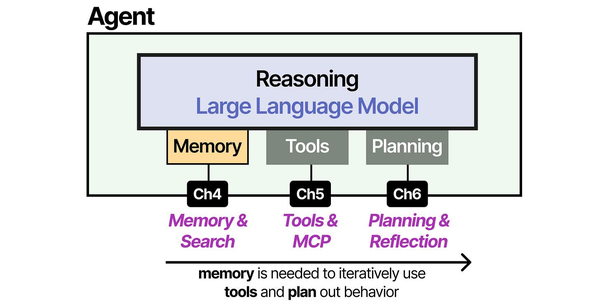

Building a complete self-hosted AI stack requires understanding how each architectural layer interacts. Grootendorst and Alammar in An Illustrated Guide to AI Agents provide the definitive visual decomposition of agent architectures: the inference layer (served by Ollama or vLLM), the memory layer (vector databases like ChromaDB or Qdrant), the tool layer (function calling and API integrations), and the orchestration layer (frameworks like LangChain or LlamaIndex) that ties everything together. Their analysis of the Model Context Protocol shows how emerging standards are unifying these components. Ranjan, Chembachere, and Lobo extend this in Agentic AI in Enterprise with production patterns for scaling each layer independently on Linux infrastructure.
Related Articles
- Private LLM for Enterprise: Linux Deployment Architecture and Security Guide
- vLLM on Linux: Production Deployment Guide for High-Throughput Inference
- Kubernetes Ollama Deployment: Production GPU Scheduling and Scaling Guide
- LLM Security on Linux: Prompt Injection, API Auth, and Network Isolation
Further Reading
- An Illustrated Guide to AI Agents by Maarten Grootendorst and Jay Alammar — Visual guide to agent memory, tools, and reasoning.
- LLMs in Production by Christopher Brousseau and Matthew Sharp — Practical deployment of language models from training to production.
- Agentic AI in Enterprise by Sumit Ranjan, Divya Chembachere, and Lanwin Lobo — Enterprise architecture patterns for agentic AI systems.
Frequently Asked Questions
What is the minimum budget for a self-hosted AI server?
A used workstation with an NVIDIA RTX 3060 12GB (approximately 250-300 EUR used) runs 7B and 13B models well. Add 64 GB RAM and a 1TB NVMe SSD, and you have a complete AI server for under 800 EUR. This handles 1-5 concurrent users running small to medium models. For a team of 20+ users running 30B+ models, budget 3,000-5,000 EUR for a server with an RTX 4090 or used A5000, or 8,000-15,000 EUR for an enterprise setup with A100 or L40S GPUs.
Docker or native installation — which performs better?
Native Ollama installation delivers 5-10% better GPU inference throughput compared to Docker with the NVIDIA Container Toolkit. The difference comes from reduced overhead in GPU memory management and device access. For most deployments, this difference is not significant enough to offset Docker's operational advantages (easier upgrades, consistent environments, simpler multi-service management). Choose Docker unless you are optimizing for every last token per second.
How do I handle user authentication without an existing identity provider?
Open WebUI includes built-in authentication with local accounts. For small teams (under 20 users), this is sufficient. For larger deployments, Open WebUI supports OIDC (OpenID Connect), which you can connect to Keycloak (self-hosted), Authelia, or any OIDC-compatible provider. Running Keycloak alongside the AI stack adds another service to manage but gives you centralized user management, MFA, and SSO.
What is the expected power consumption of this stack?
Power consumption is dominated by the GPU. An RTX 4090 under sustained inference load draws 350-450W. An A100 draws 250-300W. Add 100-150W for the rest of the system (CPU, RAM, storage, fans). A typical single-GPU AI server runs at 400-600W under load, which translates to roughly 300-450 kWh per month of continuous operation. At European electricity prices (approximately 0.30 EUR/kWh), that is 90-135 EUR per month — significantly less than cloud API costs for equivalent usage.


