Every conversation about large language models in the enterprise eventually hits the same wall: the data cannot leave the building. Legal reviewed the vendor agreement and flagged the training data clause. Compliance mapped the data flows and found that sending customer support tickets to an external API violates the data processing agreement. The CISO pointed out that API keys to a third-party inference service create a single point of compromise. These are not theoretical concerns — they are the reasons that private llm enterprise linux deployments are becoming standard infrastructure in regulated industries.
This guide is the architecture and security reference for deploying LLMs on your own Linux servers. It covers the full stack: why self-hosting makes sense (and when it does not), reference architectures for different scales, hardware sizing that actually maps to concurrent user counts, network topology, security controls from TLS to audit logging, high availability patterns, compliance considerations for GDPR and HIPAA, and an honest cost model that compares self-hosting economics against API services at enterprise scale. This is not a tutorial for running Ollama on a laptop — it is the blueprint for production LLM infrastructure that a security auditor would approve.
Why Enterprises Self-Host LLMs
The motivations for self-hosting fall into four categories, and most enterprises have at least two of them.
Data Sovereignty and Privacy
When an employee sends a prompt to an external LLM API, the prompt content traverses the public internet and is processed on infrastructure controlled by a third party. Even with contractual guarantees about data handling, the data has left the organization's control boundary. For companies subject to GDPR, HIPAA, ITAR, or financial regulations, this is often a non-starter. Self-hosted LLMs process every token on infrastructure within the organization's security perimeter. The data never leaves. There is no third-party data processing agreement to negotiate, no sub-processor list to monitor, and no risk of a vendor changing their data retention policies.
Compliance and Audit Requirements
Regulated industries need to demonstrate that their data processing meets specific standards. SOC 2 Type II audits, HIPAA security assessments, and PCI DSS reviews all require documented controls over data at rest, data in transit, and data processing. With a self-hosted LLM, these controls are the same controls that protect the rest of your infrastructure — your existing audit framework extends naturally to cover the LLM. With an external API, you inherit the vendor's compliance posture and need to validate it separately.
Cost Predictability at Scale
API-based LLM services charge per token. At low volumes, this is economical. At enterprise scale — hundreds of users making dozens of requests per day, automated pipelines processing thousands of documents — the cost curve becomes steep and unpredictable. A self-hosted deployment converts variable per-token costs into fixed infrastructure costs that are predictable months in advance. The crossover point depends on usage volume, and we will calculate it precisely in the cost modeling section.
Customization and Control
Self-hosting gives you control over model selection, fine-tuning, prompt templates, and inference parameters that API services may not expose. You can run models fine-tuned on your domain data, switch between models instantly for different use cases, and modify inference behavior without waiting for a vendor feature request. You also eliminate vendor lock-in — if a better model is released by a different lab, you swap it in without changing your API or client code.
Reference Architecture
The architecture for a private LLM deployment follows the same patterns as any high-availability web service, with one critical difference: the inference servers need GPUs, which are expensive and have different scaling characteristics than CPU servers.
Small Deployment (10-50 Concurrent Users)
This architecture suits a department or small organization. A single inference server behind an API gateway handles all requests, with a standby server for failover.
# Architecture: Small deployment
#
# [Users] --> [Reverse Proxy / TLS Termination]
#                      |
#              [API Gateway + Auth]
#                      |
#              [Inference Server]
#                (1x GPU server)
#                      |
#              [Model Storage]
#                (NFS or local)

# Hardware:
# - 1x inference server: 2x NVIDIA RTX 4090 (48 GB total VRAM)
#   or 1x NVIDIA A6000 (48 GB VRAM)
# - 1x standby server (identical hardware)
# - 1x API gateway / proxy server (4 vCPU, 8 GB RAM, no GPU)

# Software stack:
# - Inference: Ollama or vLLM
# - Proxy: nginx with TLS
# - Auth: OAuth2 proxy or custom middleware
# - Monitoring: Prometheus + Grafana
Medium Deployment (50-200 Concurrent Users)
# Architecture: Medium deployment
#
# [Users] --> [Load Balancer (HAProxy)]
#                      |
#         +------------+------------+
#         |            |            |
#    [API GW 1]   [API GW 2]   [API GW 3]
#         |            |            |
#         +------+-----+-----+-----+
#                |           |
#         [Inference 1] [Inference 2]
#          (2x A6000)    (2x A6000)
#                |           |
#         [Shared Model Storage - NFS/Ceph]

# Hardware:
# - 2-4x inference servers: 2x NVIDIA A6000 each (96 GB VRAM per server)
#   or 1x NVIDIA A100 80GB each
# - 3x API gateway servers (8 vCPU, 16 GB RAM)
# - 1x load balancer (HAProxy, 4 vCPU, 8 GB RAM)
# - Shared storage: NFS server or Ceph cluster for model files

# This scale supports:
# - 70B parameter models at Q4 quantization (needs ~40 GB VRAM)
# - Multiple smaller models running simultaneously
# - Rolling updates without downtime
Large Deployment (200-1000+ Concurrent Users)
# Architecture: Large deployment
#
# [Users] --> [External LB (F5/HAProxy)]
#                      |
#              [DMZ / WAF Layer]
#                      |
#              [Internal LB]
#                      |
#         +-----+-----+-----+-----+
#         |     |     |     |     |
#       [Inference Pool: 4-8 GPU servers]
#       (each: 2-4x A100 80GB or H100)
#                      |
#         [High-Speed Model Storage]
#         (NVMe-oF or InfiniBand-attached)
#                      |
#         [Model Registry / Version Control]

# Additional components at this scale:
# - Request queue (Redis or RabbitMQ) for traffic shaping
# - Autoscaling based on queue depth
# - Separate inference pools for different model sizes
# - Dedicated monitoring and logging infrastructure
# - Backup inference pool in a separate availability zone
Hardware Sizing Guide
Getting hardware sizing right is the most expensive decision in a private LLM deployment. Under-provisioning leads to unacceptable latency. Over-provisioning wastes capital that could fund additional projects. The key variables are model size, quantization level, concurrent request count, and acceptable latency.
VRAM Requirements by Model Size
| Model Parameters | FP16 VRAM | Q8 VRAM | Q4 VRAM | Suitable GPUs |
|---|---|---|---|---|
| 7-8B | 16 GB | 8 GB | 5 GB | RTX 4090, A6000, L4 |
| 13B | 26 GB | 14 GB | 8 GB | RTX 4090, A6000, A100 40GB |
| 34B | 68 GB | 36 GB | 20 GB | A6000 (Q4), A100 80GB, 2x RTX 4090 |
| 70B | 140 GB | 72 GB | 40 GB | A100 80GB (Q4), 2x A6000 (Q4), H100 |
| 120-180B (MoE) | 240-360 GB | 120-180 GB | 70-100 GB | Multi-GPU: 2-4x H100 or 4-8x A100 |
These numbers represent model weight storage only. Actual VRAM usage is higher because the inference engine also needs memory for KV cache (which grows with context length and concurrent requests), CUDA kernels, and framework overhead. A practical rule of thumb: reserve 20-30% VRAM above the model size for inference overhead. For long-context use cases (32K+ tokens), the KV cache alone can consume several gigabytes per concurrent request.
Throughput Estimation
# Rough throughput estimates (tokens/second per GPU)
# These vary significantly based on model, quantization, batch size, and prompt length

# Single RTX 4090 (24 GB, consumer)
# Llama 3.1 8B Q4:    ~80-120 tokens/sec (single user)
# Llama 3.1 8B Q4:    ~200-300 tokens/sec (batched, 8 concurrent)
# Llama 3.1 70B Q4:   Does not fit (needs 2 GPUs)

# Single A100 80GB (datacenter)
# Llama 3.1 8B FP16:  ~150-200 tokens/sec (single user)
# Llama 3.1 70B Q4:   ~30-50 tokens/sec (single user)
# Llama 3.1 70B Q4:   ~100-150 tokens/sec (batched, 8 concurrent)

# Single H100 80GB (latest datacenter)
# Llama 3.1 8B FP16:  ~300-400 tokens/sec (single user)
# Llama 3.1 70B Q4:   ~60-100 tokens/sec (single user)
# Llama 3.1 70B FP16: ~40-60 tokens/sec (single user, tensor parallelism with 2x H100)

# To estimate server count:
# 1. Determine target tokens/sec per user (~30 tok/s feels responsive)
# 2. Determine concurrent users at peak
# 3. Concurrent users * 30 = total tokens/sec needed
# 4. Divide by per-GPU throughput (batched) = GPUs needed
# Example: 100 concurrent users * 30 tok/s = 3000 tok/s
#          3000 / 300 (batched 8B on A100) = 10 A100 GPUs = 5 dual-A100 servers
Network Architecture
The network design for a private LLM deployment must balance security with performance. LLM inference generates large responses (thousands of tokens), and the streaming nature of token generation means persistent connections are the norm.
DMZ and Internal Network Separation
# Network zones:
#
# Zone 1: DMZ (accessible from corporate network)
# - Reverse proxy / load balancer
# - WAF (Web Application Firewall)
# - TLS termination
# - Rate limiting
#
# Zone 2: Application tier (internal only)
# - API gateway with authentication
# - Request queuing
# - Logging and audit
#
# Zone 3: Inference tier (isolated)
# - GPU inference servers
# - Inter-GPU communication (for tensor parallelism)
# - Model storage access
#
# Zone 4: Storage tier (isolated)
# - Model file storage (NFS/Ceph)
# - Log aggregation
# - Metrics database

# Firewall rules (simplified):
# DMZ -> App tier: TCP 443 only (HTTPS)
# App tier -> Inference: TCP 11434 (Ollama) or TCP 8000 (vLLM)
# Inference -> Storage: TCP 2049 (NFS) or TCP 6789 (Ceph)
# Inference <-> Inference: TCP 29500 (NCCL) for multi-node GPU communication
# All zones -> Monitoring: TCP 9090 (Prometheus), UDP 514 (syslog)
TLS Configuration
# nginx reverse proxy with TLS termination
# /etc/nginx/conf.d/llm-api.conf

upstream inference_backend {
    least_conn;
    server inference-01:11434 max_fails=3 fail_timeout=30s;
    server inference-02:11434 max_fails=3 fail_timeout=30s;
    keepalive 32;
}

server {
    listen 443 ssl http2;
    server_name llm-api.internal.company.com;

    ssl_certificate     /etc/ssl/certs/llm-api.crt;
    ssl_certificate_key /etc/ssl/private/llm-api.key;
    ssl_protocols       TLSv1.3;
    ssl_ciphers         TLS_AES_256_GCM_SHA384:TLS_CHACHA20_POLY1305_SHA256;
    ssl_prefer_server_ciphers on;

    # Strict transport security
    add_header Strict-Transport-Security "max-age=63072000; includeSubDomains" always;

    # Rate limiting
    limit_req_zone $binary_remote_addr zone=llm_api:10m rate=10r/s;

    location /api/ {
        limit_req zone=llm_api burst=20 nodelay;

        proxy_pass http://inference_backend;
        proxy_http_version 1.1;
        proxy_set_header Connection "";
        proxy_set_header Host $host;
        proxy_set_header X-Real-IP $remote_addr;
        proxy_set_header X-Forwarded-For $proxy_add_x_forwarded_for;

        # Streaming support (essential for LLM token streaming)
        proxy_buffering off;
        proxy_read_timeout 300s;
        proxy_send_timeout 300s;

        # Request size limit (prevent abuse with huge prompts)
        client_max_body_size 1m;
    }
}
Security Controls
A private LLM deployment handles sensitive data by definition — that is why it is private. The security controls need to match the sensitivity of the data being processed.
Authentication and Authorization
# Option 1: OAuth2 Proxy in front of the inference API
# This integrates with your existing SSO (Okta, Azure AD, Keycloak)

# docker-compose.yml for OAuth2 Proxy
services:
  oauth2-proxy:
    image: quay.io/oauth2-proxy/oauth2-proxy:latest
    ports:
      - "4180:4180"
    environment:
      - OAUTH2_PROXY_PROVIDER=oidc
      - OAUTH2_PROXY_OIDC_ISSUER_URL=https://sso.company.com/realms/internal
      - OAUTH2_PROXY_CLIENT_ID=llm-api
      - OAUTH2_PROXY_CLIENT_SECRET_FILE=/run/secrets/oauth_secret
      - OAUTH2_PROXY_COOKIE_SECRET_FILE=/run/secrets/cookie_secret
      - OAUTH2_PROXY_UPSTREAM=http://inference:11434
      - OAUTH2_PROXY_EMAIL_DOMAINS=company.com
      - OAUTH2_PROXY_PASS_ACCESS_TOKEN=true
    secrets:
      - oauth_secret
      - cookie_secret

# Option 2: API key authentication with a lightweight gateway
# This works better for service-to-service communication

# Simple API key validation with nginx (for non-SSO use cases)
# Check API key in X-API-Key header against a file of valid keys
map $http_x_api_key $api_key_valid {
    default 0;
    "sk-prod-abc123def456" 1;
    "sk-prod-ghi789jkl012" 1;
}

server {
    location /api/ {
        if ($api_key_valid = 0) {
            return 401 '{"error": "Invalid API key"}';
        }
        proxy_pass http://inference_backend;
    }
}
Audit Logging
Every interaction with the LLM should be logged for compliance and security review. The audit log must capture who made the request, when, what they asked, and what the model responded (or at minimum, that a response was generated).
# Structured audit logging middleware example (Python/FastAPI)
# This sits between the API gateway and the inference server

import json
import time
import logging
from datetime import datetime, timezone

audit_logger = logging.getLogger("llm_audit")
audit_handler = logging.FileHandler("/var/log/llm/audit.jsonl")
audit_logger.addHandler(audit_handler)

def log_llm_request(user_id, request_data, response_data, duration_ms):
    audit_entry = {
        "timestamp": datetime.now(timezone.utc).isoformat(),
        "user_id": user_id,
        "model": request_data.get("model", "unknown"),
        "prompt_length": len(request_data.get("prompt", "")),
        "response_length": len(response_data.get("response", "")),
        "tokens_generated": response_data.get("eval_count", 0),
        "duration_ms": duration_ms,
        "source_ip": request_data.get("source_ip"),
        "action": "inference",
        # Do NOT log the actual prompt/response content in the audit log
        # unless required by policy — it may contain sensitive data
        # Log a hash instead for correlation:
        "prompt_hash": hashlib.sha256(
            request_data.get("prompt", "").encode()
        ).hexdigest()[:16]
    }
    audit_logger.info(json.dumps(audit_entry))
# Log rotation for audit logs
# /etc/logrotate.d/llm-audit
/var/log/llm/audit.jsonl {
daily
rotate 365
compress
delaycompress
missingok
notifempty
create 0640 llm-service llm-service
postrotate
systemctl reload llm-audit-proxy
endscript
}
# Ship audit logs to your SIEM
# Example: Filebeat configuration for shipping to Elasticsearch
# /etc/filebeat/modules.d/llm-audit.yml
- module: llm-audit
access:
enabled: true
var.paths: ["/var/log/llm/audit.jsonl"]Data Classification and Input Filtering
# Prevent sensitive data patterns from being sent to the LLM
# This is a defense-in-depth measure — users should be trained,
# but technical controls catch mistakes

# Pattern matching for common sensitive data types
SENSITIVE_PATTERNS = [
    r'\b\d{3}-\d{2}-\d{4}\b',              # US SSN
    r'\b\d{4}[\s-]?\d{4}[\s-]?\d{4}[\s-]?\d{4}\b',  # Credit card
    r'-----BEGIN (?:RSA )?PRIVATE KEY-----',  # Private keys
    r'\b[A-Za-z0-9+/]{40,}\b',              # Base64 encoded secrets (heuristic)
]

# DLP (Data Loss Prevention) integration:
# If your organization uses a DLP solution (Symantec, Microsoft Purview, etc.),
# integrate the LLM API gateway with the DLP scanning API.
# Scan prompts before they reach the inference server.
# Log and block prompts that contain classified data.
High Availability Design
GPU servers fail. Drivers crash. Models get corrupted on disk. The high availability design must handle these failures without dropping user requests.
Health Checks
# HAProxy configuration with GPU-aware health checks
# /etc/haproxy/haproxy.cfg

frontend llm_frontend
    bind *:443 ssl crt /etc/ssl/llm-api.pem
    default_backend llm_inference

backend llm_inference
    balance leastconn
    option httpchk GET /api/tags
    http-check expect status 200

    # Health check every 5 seconds, mark down after 3 failures
    server inference-01 10.0.1.11:11434 check inter 5s fall 3 rise 2
    server inference-02 10.0.1.12:11434 check inter 5s fall 3 rise 2
    server inference-03 10.0.1.13:11434 check inter 5s fall 3 rise 2

    # Slow start: gradually increase traffic to a recovered server
    # Prevents thundering herd when a server comes back
    server inference-01 10.0.1.11:11434 check slowstart 60s
Model Preloading and Warm Standby
# Problem: When an inference server starts, loading a 70B model
# into GPU memory takes 30-90 seconds. During this time,
# the server cannot handle requests.

# Solution: Preload models at startup and use health checks
# that verify the model is actually loaded, not just that
# the server process is running.

# Ollama preload script (/usr/local/bin/ollama-preload.sh)
#!/bin/bash
# Wait for Ollama to start
until curl -sf http://localhost:11434/api/tags > /dev/null 2>&1; do
    sleep 1
done

# Load the production model into GPU memory
curl -s http://localhost:11434/api/generate \
  -d '{"model": "llama3.1:70b-instruct-q4_K_M", "prompt": "warmup", "stream": false}'

echo "Model preloaded and ready"

# Systemd service that runs after Ollama starts
# /etc/systemd/system/ollama-preload.service
[Unit]
Description=Preload Ollama model
After=ollama.service
Requires=ollama.service

[Service]
Type=oneshot
ExecStart=/usr/local/bin/ollama-preload.sh
RemainAfterExit=yes

[Install]
WantedBy=multi-user.target
Rolling Updates
# Update procedure for zero-downtime model upgrades:
#
# 1. Drain one inference server from the load balancer
haproxy_cmd="echo 'set server llm_inference/inference-01 state drain' | socat stdio /var/run/haproxy/admin.sock"

# 2. Wait for active requests to complete (watch connection count)
# haproxy stats show active connections per server

# 3. Stop the inference server, update the model
ssh inference-01 "ollama pull llama3.1:70b-instruct-q4_K_M"

# 4. Restart and preload
ssh inference-01 "systemctl restart ollama && systemctl start ollama-preload"

# 5. Wait for health check to pass, then re-enable
haproxy_cmd="echo 'set server llm_inference/inference-01 state ready' | socat stdio /var/run/haproxy/admin.sock"

# 6. Repeat for each server
Compliance Considerations
GDPR
If the LLM processes personal data of EU residents (which it almost certainly will if employees use it for customer-related work), GDPR applies. Key requirements: document the LLM in your Records of Processing Activities (ROPA), conduct a Data Protection Impact Assessment (DPIA) since the processing uses new technology at scale, ensure prompts and responses are not retained longer than necessary (configure inference server log retention accordingly), and provide a mechanism for data subject access requests that includes any stored LLM interaction data.
HIPAA
For healthcare organizations, the LLM infrastructure is a system that handles ePHI (electronic Protected Health Information) if clinicians use it for patient-related queries. Requirements: encrypt data at rest (model storage, logs, any cached data) and in transit (TLS 1.3), implement access controls with unique user identification, maintain audit logs for six years, ensure the inference servers are within the organization's BAA-covered infrastructure, and include the LLM system in your risk assessment.
SOC 2
# SOC 2 control mapping for LLM infrastructure:
#
# CC6.1 (Logical Access): API authentication, RBAC for model management
# CC6.2 (Credentials): API key rotation, certificate management
# CC6.3 (New Access): Onboarding process for LLM API access
# CC6.6 (External Threats): WAF, rate limiting, input validation
# CC6.7 (Data Transmission): TLS 1.3 for all API traffic
# CC6.8 (Unauthorized Software): Container image scanning, signed images
# CC7.1 (Monitoring): GPU monitoring, access logging, anomaly detection
# CC7.2 (Incident Detection): Alerting on unusual usage patterns
# CC8.1 (Change Management): Model version control, deployment pipeline
# A1.2 (Recovery): Backup inference servers, model storage redundancy
Cost Modeling: Self-Hosted vs. API
The economics depend entirely on usage volume. Here is a concrete comparison using real-world pricing as of early 2026.
API Cost (OpenAI GPT-4o)
# GPT-4o pricing (March 2026):
# Input:  $2.50 per 1M tokens
# Output: $10.00 per 1M tokens
#
# Average enterprise request:
# - 500 input tokens (prompt + system context)
# - 300 output tokens (response)
#
# Cost per request: (500/1M * $2.50) + (300/1M * $10.00) = $0.00425
#
# Monthly cost at different usage levels:
# 1,000 requests/day  = $127.50/month
# 10,000 requests/day = $1,275/month
# 50,000 requests/day = $6,375/month
# 100,000 requests/day = $12,750/month
Self-Hosted Cost (Llama 3.1 70B on 2x A100)
# Hardware (amortized over 3 years):
# 2x NVIDIA A100 80GB:        $30,000 ($833/month)
# Server (CPU, RAM, storage):  $8,000  ($222/month)
# Standby server (HA):         $38,000 ($1,055/month)
# Network equipment:           $3,000  ($83/month)
# Total hardware:              $2,193/month
#
# Operating costs:
# Power (2 servers, ~1.2 kW each, $0.12/kWh): $207/month
# Cooling (estimated 40% of power):            $83/month
# Hosting/rack space:                          $200/month
# Staff time (0.1 FTE at $150k/year):          $1,250/month
# Total operating:                             $1,740/month
#
# Total monthly cost: $3,933/month
#
# At this cost, self-hosting breaks even with API pricing at:
# $3,933 / $0.00425 per request = ~925,000 requests/month
# = ~30,800 requests/day
#
# Below 30K requests/day: API is cheaper
# Above 30K requests/day: Self-hosting is cheaper
# At 100K requests/day: Self-hosting saves ~$8,800/month
These calculations assume comparable model quality. Llama 3.1 70B is competitive with GPT-4o for many enterprise use cases (summarization, code generation, document Q&A) but may lag on specialized tasks. The cost model also ignores the time value of faster deployment with APIs versus the lead time for procuring and setting up GPU servers. For most enterprises, the decision is driven by compliance requirements first and cost second.
Implementation Checklist
# Phase 1: Foundation (Week 1-2)
# [ ] Define data classification policy for LLM usage
# [ ] Select model(s) based on use case requirements
# [ ] Procure GPU hardware and rack space
# [ ] Set up base OS (Ubuntu 22.04 LTS or RHEL 9)
# [ ] Install NVIDIA drivers and container toolkit
# [ ] Deploy inference server (Ollama or vLLM)
# [ ] Validate model inference on bare metal

# Phase 2: Security (Week 2-3)
# [ ] Configure TLS with internal CA certificates
# [ ] Deploy API gateway with authentication
# [ ] Implement audit logging
# [ ] Configure network segmentation and firewall rules
# [ ] Set up input validation / DLP scanning
# [ ] Conduct initial security review

# Phase 3: Production Readiness (Week 3-4)
# [ ] Deploy load balancer with health checks
# [ ] Configure HA with standby servers
# [ ] Set up monitoring (Prometheus + Grafana)
# [ ] Configure alerting (VRAM, temperature, latency, errors)
# [ ] Document operational runbooks
# [ ] Conduct load testing at 2x expected peak

# Phase 4: Compliance (Week 4-5)
# [ ] Complete DPIA (GDPR) or risk assessment (HIPAA)
# [ ] Update ROPA with LLM processing activities
# [ ] Document controls for audit framework
# [ ] Conduct penetration test of API surface
# [ ] Review and sign off with CISO / DPO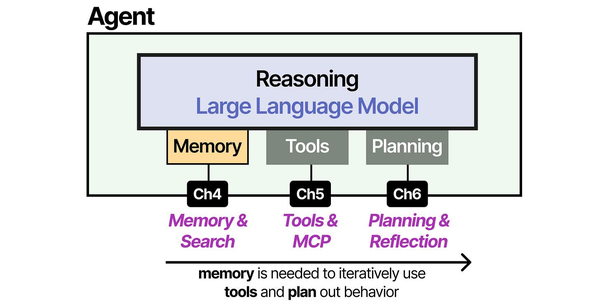
Enterprise LLM deployment requires a holistic architecture that combines memory management, tool integration, and planning — the three pillars of modern AI agents described in An Illustrated Guide to AI Agents by Grootendorst and Alammar. Understanding these components helps architects design private LLM systems that are both capable and secure within enterprise Linux environments.
Related Articles
- LLM Security on Linux: Prompt Injection, API Auth, and Network Isolation
- Self-Hosted AI Stack for Linux Sysadmins: Complete Reference Architecture
- Ollama Behind Nginx: Reverse Proxy with Authentication, SSL, and Rate Limiting
- vLLM on Linux: Production Deployment Guide for High-Throughput Inference
Further Reading
- An Illustrated Guide to AI Agents by Maarten Grootendorst and Jay Alammar — Visual guide to agent memory, tools, and reasoning.
- LLMs in Production by Christopher Brousseau and Matthew Sharp — Practical deployment of language models from training to production.
- Agentic AI in Enterprise by Sumit Ranjan, Divya Chembachere, and Lanwin Lobo — Enterprise architecture patterns for agentic AI systems.
Frequently Asked Questions
What model should we use for a private enterprise deployment?
For general-purpose enterprise use (summarization, drafting, Q&A, code assistance), Llama 3.1 70B Instruct at Q4 quantization offers the best balance of quality and hardware requirements. It runs on a single server with 2x A100 80GB GPUs. If your use case is more specialized — medical, legal, financial — look at fine-tuned variants or consider fine-tuning the base model on your domain data. For lighter workloads where lower latency matters more than quality (like autocomplete or classification), Llama 3.1 8B is fast enough for real-time use on a single RTX 4090. Start with the 8B model to validate the architecture, then scale up to 70B once the infrastructure is proven.
How do we handle model updates without disrupting users?
Use a blue-green or rolling deployment strategy. With at least two inference servers behind a load balancer, drain one server from the pool, update its model, verify inference quality with a test suite, then add it back and repeat for the remaining servers. Keep the previous model version available as a rollback target — do not delete old model files until the new version has been stable for at least a week. Version your models with clear naming conventions (e.g., company-llama3.1-70b-v2.1) and maintain a model registry that tracks which version is deployed where.
What is the minimum viable infrastructure for a proof of concept?
A single server with one NVIDIA RTX 4090 (24 GB VRAM), 64 GB system RAM, and a 1 TB NVMe SSD. This runs Llama 3.1 8B at full speed or Llama 3.1 70B at Q4 quantization with slower performance (the model fits in 24 GB VRAM at aggressive quantization but token generation is slower than on datacenter GPUs). Install Ubuntu 22.04, the NVIDIA driver, Docker with the NVIDIA Container Toolkit, and Ollama. Add nginx with self-signed TLS and basic API key authentication. Total hardware cost: approximately $3,000-4,000. This is sufficient to demonstrate the concept to stakeholders and test integration with internal applications before committing to production hardware.
How do we prevent employees from sending sensitive data to the LLM?
Defense in depth. First, policy: create an acceptable use policy that defines what data categories can and cannot be submitted to the LLM. Second, training: ensure users understand the policy and why it exists. Third, technical controls: deploy input filtering that scans prompts for patterns matching sensitive data (SSNs, credit card numbers, private keys). Fourth, DLP integration: if you use an enterprise DLP solution, integrate it into the API pipeline. Fifth, audit: log all interactions and periodically review a sample for policy violations. The advantage of self-hosting is that even if sensitive data reaches the LLM, it stays within your infrastructure — but you still want controls to prevent unnecessary exposure of sensitive data to systems and people who do not need it.
Is it realistic to run a private LLM that matches GPT-4 quality?
For specific enterprise tasks, yes. For general-purpose chat that matches GPT-4 across every domain, no — not at a reasonable hardware budget. The practical approach is to match or exceed GPT-4 on the specific tasks your organization needs. Llama 3.1 70B matches GPT-4-level quality on code generation, summarization, and structured data extraction. For domain-specific tasks (medical diagnosis support, legal document analysis), a fine-tuned 70B model can outperform GPT-4 because it has been trained on your domain data. Where self-hosted models consistently lag behind the frontier commercial models is in very long context reasoning (100K+ tokens) and multimodal tasks (image understanding). If those capabilities are critical, a hybrid approach — self-hosted for standard tasks, API for specialized tasks — is pragmatic.


