If you have spent any time pulling models with Ollama, you have seen GGUF files. Every model you download — whether it is Llama 3, Mistral, Phi, or CodeGemma — arrives as a GGUF file containing the model weights in a specific quantization format. Understanding GGUF and quantization is not academic trivia. It directly determines how much RAM and VRAM your models consume, how fast they generate tokens, and the quality of their output. Choosing between Q4_K_M and Q5_K_S for a 13B model can mean the difference between running it on your hardware or not running it at all.
This guide explains what GGUF actually is, how quantization works at a practical level, what the different quantization formats mean, and how to choose the right one for your hardware and use case. We cover the full spectrum from Q2 (tiny, lossy) through F16 (full precision, enormous), with real measurements of file size, memory usage, and quality impact.
What Is GGUF?
GGUF stands for GPT-Generated Unified Format. It was created by Georgi Gerganov (the "GG") as part of the llama.cpp project — the C/C++ inference engine that made running LLMs on consumer hardware practical. GGUF replaced the older GGML format in August 2023, and every modern local inference tool uses it: Ollama, LM Studio, llama.cpp, koboldcpp, and others. For the foundational setup, see our complete Ollama installation guide. For GPU driver setup, see our NVIDIA driver and CUDA installation guide.
A GGUF file is a self-contained binary that packages everything needed to run a model: the model architecture metadata, tokenizer configuration, hyperparameters, and the actual weight tensors. Unlike the original PyTorch or SafeTensors format used during training, GGUF files are optimized for inference on CPUs and consumer GPUs. The key optimization is quantization — reducing the precision of weight values to shrink the model and speed up computation.
Why Not Use the Original Model Files?
Training formats like PyTorch's .pt files store weights in FP32 (32-bit floating point) or BF16 (brain float 16). A 7B parameter model in FP32 uses approximately 28GB of memory. In BF16, that drops to 14GB. These are still far too large for most consumer hardware, and the inference code paths are optimized for GPU clusters, not single machines.
GGUF quantization compresses a 7B model to as little as 2.5GB (Q2 quantization) while retaining usable quality. More balanced quantization levels like Q4_K_M give you a 7B model at about 4.4GB with quality that is remarkably close to the full-precision original.
How Quantization Works
Neural network weights are floating-point numbers, typically ranging from about -1 to +1 with many decimal places. Full precision (FP16) uses 16 bits to represent each weight, which gives fine-grained distinctions between similar values. Quantization reduces the number of bits per weight, which means grouping similar values into fewer "bins."
Think of it like color depth in images. A 24-bit image can display 16.7 million colors. Reduce it to 8-bit and you get 256 colors. The image is recognizable but you can see banding in gradients. Reduce to 4-bit (16 colors) and it is still identifiable but clearly degraded. LLM quantization follows the same principle — fewer bits means less precision but dramatically smaller files and faster computation.
Block Quantization
Modern GGUF quantization does not simply truncate bits from each weight independently. It uses block quantization: weights are grouped into blocks (typically 32 or 256 values), and each block gets its own scale factor and zero point. This means the quantization adapts to the local distribution of weights rather than applying a global compression. Blocks where weights vary a lot get a wider range; blocks where weights are clustered get finer distinctions within that cluster.
The "K" variants (Q4_K_M, Q5_K_S, etc.) use k-quant, an improved quantization method that applies different precision levels to different parts of the model. Attention layers, which have the most impact on output quality, get higher precision. Feed-forward layers, which are more tolerant of approximation, get lower precision. This is why Q4_K_M produces noticeably better output than plain Q4_0 at nearly the same file size.
Quantization Levels Explained
Here is what each quantization level means, with approximate sizes for a 7B parameter model.
Q2_K — 2-bit (Extreme Compression)
File size: ~2.5GB for 7B. Memory: ~3GB. This is the most aggressive quantization. Quality degrades significantly — expect more hallucinations, weaker reasoning, and less coherent long-form output. Useful only when you absolutely must fit a model into very limited memory and can tolerate lower quality. Not recommended for anything requiring accuracy.
Q3_K_S / Q3_K_M / Q3_K_L — 3-bit Variants
File size: ~3.0-3.4GB for 7B. Memory: ~3.5-4GB. The S/M/L suffixes indicate small, medium, and large, referring to how many tensor types get higher-precision treatment. Q3_K_L keeps more layers at higher precision and produces better output than Q3_K_S, at a slight size increase. Q3_K_M is the balanced middle ground. These are usable for general chat but you will notice degradation on complex reasoning tasks compared to Q4 variants.
Q4_0 — 4-bit (Legacy)
File size: ~3.8GB for 7B. The original 4-bit quantization without k-quant optimizations. Superseded by Q4_K variants in almost every scenario. Included in some older model repositories but there is no reason to choose it over Q4_K_M for new deployments.
Q4_K_S / Q4_K_M — 4-bit K-Quant (Recommended Balance)
File size: ~4.1-4.4GB for 7B. Memory: ~4.5-5GB. This is the sweet spot for most users. Q4_K_M is the most popular quantization level across the Ollama and Hugging Face ecosystems, and for good reason. Quality is close to the full-precision model for most tasks. Perplexity benchmarks typically show less than 1% degradation from FP16. When Ollama downloads a model without a specific quantization tag, it usually pulls the Q4_K_M variant.
Q5_K_S / Q5_K_M — 5-bit K-Quant
File size: ~4.8-5.1GB for 7B. Memory: ~5.5-6GB. If you have the extra memory, Q5_K_M provides a measurable quality improvement over Q4_K_M, particularly in tasks requiring precise language (code generation, technical writing, mathematical reasoning). The size increase is modest — about 15-20% more than Q4_K_M. A strong choice when memory is available but not abundant.
Q6_K — 6-bit K-Quant
File size: ~5.5GB for 7B. Memory: ~6.5GB. Very close to full precision in quality benchmarks. Diminishing returns compared to Q5_K_M — the quality improvement is small while memory usage increases noticeably. Choose Q6_K when you need the absolute best quality from a quantized model and have comfortable memory margins.
Q8_0 — 8-bit
File size: ~7.2GB for 7B. Memory: ~8GB. Practically indistinguishable from FP16 in output quality. At this point, the overhead of quantization provides minimal file size benefit. Q8_0 is useful as a reference for comparing lower quantization levels, or when you want near-perfect quality and have the memory for it.
F16 — Full 16-bit Precision
File size: ~14GB for 7B. Memory: ~15GB. The original model weights without quantization. Maximum quality, maximum size. Only practical on systems with substantial GPU VRAM or for creating custom quantizations from the source weights.
Choosing the Right Quantization for Your Hardware
The primary constraint is available memory. Ollama loads the entire model into memory (GPU VRAM preferred, with overflow to system RAM). Here are practical recommendations.
# Check available GPU memory
nvidia-smi --query-gpu=memory.free --format=csv,noheader

# Check available system RAM
free -h

# See what Ollama is currently using
ollama ps
Hardware-Based Recommendations
8GB VRAM (RTX 3060/4060): 7B models at Q4_K_M or Q5_K_M fit comfortably. 13B models at Q4_K_M fit tightly. Avoid loading multiple models simultaneously.
12GB VRAM (RTX 3060 12GB/4070): 7B at Q5_K_M or Q6_K with room for parallel requests. 13B at Q4_K_M with reasonable headroom. Possible to load two 7B models simultaneously.
16GB VRAM (RTX 4080): 13B at Q5_K_M or Q6_K comfortably. 7B at Q8_0 if quality matters more than size. Two 7B models at Q4_K_M with parallel request support.
24GB VRAM (RTX 3090/4090): 13B at Q6_K or Q8_0. 34B models at Q4_K_M. Two 13B models at Q4_K_M simultaneously. This is the sweet spot for serious local LLM work.
CPU-only (system RAM): Inference works but is dramatically slower. Budget about 1.5x the model file size for memory. A 7B Q4_K_M (4.4GB file) needs roughly 6-7GB of free RAM. Speed depends on your CPU's AVX2/AVX-512 support and memory bandwidth.
Working with GGUF Files in Ollama
Ollama abstracts most GGUF details behind its model library, but you can work directly with GGUF files when needed.
Pulling Specific Quantizations
# Default pull (usually Q4_K_M)
ollama pull llama3.1:8b

# Pull a specific quantization
ollama pull llama3.1:8b-instruct-q5_K_M
ollama pull llama3.1:8b-instruct-q8_0

# List available tags for a model
# Check the Ollama library page for available quantization tags
Using Custom GGUF Files
# Download a GGUF file from Hugging Face
wget https://huggingface.co/TheBloke/Mistral-7B-Instruct-v0.2-GGUF/resolve/main/mistral-7b-instruct-v0.2.Q5_K_M.gguf

# Create a Modelfile to import it into Ollama
cat > Modelfile <<EOF
FROM ./mistral-7b-instruct-v0.2.Q5_K_M.gguf

TEMPLATE """{{ if .System }}<|im_start|>system
{{ .System }}<|im_end|>
{{ end }}{{ if .Prompt }}<|im_start|>user
{{ .Prompt }}<|im_end|>
{{ end }}<|im_start|>assistant
"""

PARAMETER stop "<|im_end|>"
PARAMETER temperature 0.7
PARAMETER num_ctx 4096
EOF

# Create the model in Ollama
ollama create my-mistral -f Modelfile

# Run it
ollama run my-mistral
Creating Your Own Quantizations
If you need a quantization level that is not available in the Ollama library, you can create it from the full-precision model using llama.cpp's quantize tool.
# Clone llama.cpp and build the quantize tool
git clone https://github.com/ggerganov/llama.cpp.git
cd llama.cpp
make quantize

# Convert a Hugging Face model to GGUF (F16 first)
python3 convert_hf_to_gguf.py /path/to/model --outtype f16 --outfile model-f16.gguf

# Quantize to your desired level
./quantize model-f16.gguf model-q4_k_m.gguf Q4_K_M
./quantize model-f16.gguf model-q5_k_m.gguf Q5_K_M
./quantize model-f16.gguf model-q6_k.gguf Q6_K

# Verify the quantized model
./main -m model-q4_k_m.gguf -p "Test prompt" -n 50
Measuring Quantization Quality
Perplexity is the standard metric for comparing quantization quality. Lower perplexity means the model better predicts the next token in a test corpus.
# Run perplexity test with llama.cpp
./perplexity -m model-q4_k_m.gguf -f wiki.test.raw

# Compare across quantizations to see the quality vs size tradeoff
# Typical results for a 7B model on WikiText-2:
# F16:     ~5.80 perplexity
# Q8_0:    ~5.81 perplexity (+0.01)
# Q6_K:    ~5.83 perplexity (+0.03)
# Q5_K_M:  ~5.87 perplexity (+0.07)
# Q4_K_M:  ~5.96 perplexity (+0.16)
# Q3_K_M:  ~6.18 perplexity (+0.38)
# Q2_K:    ~6.71 perplexity (+0.91)
The numbers tell an interesting story. The jump from F16 to Q4_K_M costs only 0.16 perplexity points while cutting file size by 70%. The jump from Q4_K_M to Q2_K saves another 40% in size but costs 0.75 perplexity points — a much worse trade. This is why Q4_K_M is the default: it sits at the knee of the quality-versus-size curve.
GGUF File Inspection
You can examine GGUF file metadata to understand exactly what quantization was used and how the model was configured.
# Using gguf-dump from llama.cpp
python3 gguf-py/scripts/gguf-dump.py model.gguf

# Or use the gguf Python package directly
pip install gguf
python3 -c "
from gguf import GGUFReader
reader = GGUFReader('model.gguf')
for field in reader.fields.values():
    if len(field.parts) > 0:
        print(f'{field.name}: {field.parts[-1]}')
"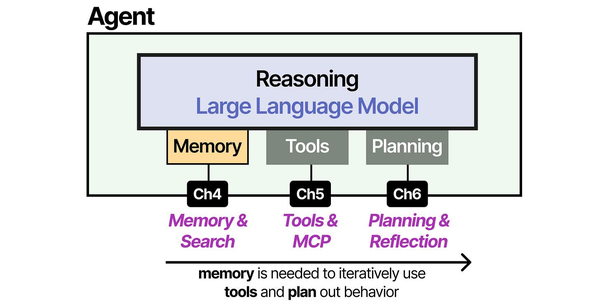
Understanding GGUF model formats and quantization is critical for optimizing the memory component of AI agents. As shown in An Illustrated Guide to AI Agents by Grootendorst and Alammar, the agent's memory architecture must balance capability with resource constraints — and choosing the right quantization level for GGUF models directly determines how effectively agents can operate within available hardware.
Related Articles
- Best Ollama Models for Linux Servers: 2026 Benchmarks and Recommendations
- LLM Context Windows Explained: How Token Limits Affect Linux Server RAM
- Ollama vs llama.cpp: Performance, Setup, and When to Use Each on Linux
- LLM Benchmarking on Linux: How to Test and Compare Model Performance
Further Reading
- An Illustrated Guide to AI Agents by Maarten Grootendorst and Jay Alammar — Visual guide to agent memory, tools, and reasoning.
- LLMs in Production by Christopher Brousseau and Matthew Sharp — Practical deployment of language models from training to production.
- Agentic AI in Enterprise by Sumit Ranjan, Divya Chembachere, and Lanwin Lobo — Enterprise architecture patterns for agentic AI systems.
Frequently Asked Questions
Is Q4_K_M good enough for production use, or should I always use higher quantization?
Q4_K_M is genuinely good enough for the vast majority of use cases, including code generation, technical writing, and conversational AI. Perplexity benchmarks show less than 3% degradation from full precision. Where higher quantization matters is in tasks requiring precise numerical reasoning, very long context coherence, or multilingual accuracy (especially for lower-resource languages). If you are running a coding assistant or a general-purpose chatbot, Q4_K_M delivers excellent results at a practical memory footprint. If you are doing legal document analysis or scientific writing where every nuance matters, consider Q5_K_M or Q6_K.
Can I mix quantization levels for different layers of the same model?
This is essentially what the K-quant variants already do. Q4_K_M applies different quantization levels to different tensor types — attention layers get higher precision while feed-forward layers get lower precision. Creating fully custom per-layer quantization requires modifying the llama.cpp quantize tool, which some researchers do for specific use cases. For practical purposes, the K-quant system already provides excellent selective quantization, and the standard variants cover the useful range of quality-size tradeoffs.
Why does my model use more memory than the GGUF file size suggests?
Several factors contribute to memory usage beyond the raw weights. The KV cache (which stores attention state for the context window) adds significant memory, proportional to context length. A 7B model with an 8K context window adds roughly 1-2GB for the KV cache alone. Ollama also allocates memory for the computation graph, intermediate activations, and the tokenizer. As a rule of thumb, budget 1.2-1.5x the GGUF file size for total memory consumption, and add more if you use large context windows or parallel request processing.


