Model Context Protocol (MCP) is an open standard that defines how AI applications communicate with external data sources and tools. Think of it as a USB-C port for AI — a universal connector that lets any MCP-compatible client talk to any MCP-compatible server, regardless of the underlying model or tool implementation. Instead of writing custom integration code for every combination of LLM and external service, you build MCP servers that expose capabilities through a standardized JSON-RPC interface, and any MCP client can discover and use them automatically.
This article shows you how to set up MCP on Linux with Ollama as the model backend. We cover the protocol fundamentals, install the MCP SDK, build custom MCP servers that expose Linux system tools, connect everything to Ollama through an MCP-compatible client, and deploy the stack as a set of systemd services.
What MCP Actually Does
MCP defines three primitives that a server can expose to a client: For GPU driver setup, see our NVIDIA driver and CUDA installation guide.
- Tools: Functions the model can call. Examples: query a database, search files, run a shell command, create a Jira ticket. Tools have input schemas (JSON Schema) and return structured results.
- Resources: Data the model can read. Examples: file contents, database rows, API responses. Resources have URIs and can be static or dynamic.
- Prompts: Reusable prompt templates. Examples: a "summarize this document" template, a "generate SQL from natural language" template. Prompts accept arguments and return formatted messages.
The protocol uses JSON-RPC 2.0 over stdio (for local servers) or HTTP with Server-Sent Events (for remote servers). A client connects to one or more MCP servers, discovers their capabilities, and then uses those capabilities during conversations with the LLM.
Why This Matters for Linux Administrators
Before MCP, connecting an LLM to your infrastructure meant writing brittle glue code specific to each tool and each model. If you wanted your AI assistant to query your monitoring stack, check server logs, and create tickets, you needed custom integrations for each system. MCP standardizes this. You build an MCP server for Prometheus once, and any MCP client — whether it is backed by Ollama, Claude, GPT, or any other model — can use it.
Setting Up the MCP Environment on Linux
Prerequisites
You need Python 3.10+, Ollama installed and running, and Node.js 18+ (some MCP servers are written in TypeScript). Install the basics:
# Ubuntu/Debian
sudo apt update && sudo apt install -y python3 python3-pip python3-venv nodejs npm

# Fedora/RHEL
sudo dnf install -y python3 python3-pip nodejs npm

# Verify Ollama is running
systemctl status ollama
ollama list
Install the MCP Python SDK
mkdir -p ~/mcp-project && cd ~/mcp-project
python3 -m venv venv
source venv/bin/activate
pip install mcp anthropic-mcp langchain-mcp-adapters langchain-ollama
The mcp package is the official MCP SDK. The langchain-mcp-adapters package lets you use MCP tools inside LangChain agents, which is how we will connect them to Ollama.
Building Your First MCP Server
An MCP server is a program that exposes tools, resources, or prompts through the MCP protocol. Here is a server that provides Linux system information tools:
#!/usr/bin/env python3
# system_info_server.py - MCP server for Linux system information

from mcp.server import Server
from mcp.server.stdio import stdio_server
from mcp.types import Tool, TextContent
import psutil
import subprocess
import json

server = Server("linux-system-info")

@server.list_tools()
async def list_tools():
    return [
        Tool(
            name="get_disk_usage",
            description="Get disk usage for all mounted filesystems",
            inputSchema={
                "type": "object",
                "properties": {},
                "required": []
            }
        ),
        Tool(
            name="get_memory_info",
            description="Get system memory usage statistics",
            inputSchema={
                "type": "object",
                "properties": {},
                "required": []
            }
        ),
        Tool(
            name="get_service_status",
            description="Check the status of a systemd service",
            inputSchema={
                "type": "object",
                "properties": {
                    "service_name": {
                        "type": "string",
                        "description": "Name of the systemd service (without .service suffix)"
                    }
                },
                "required": ["service_name"]
            }
        ),
        Tool(
            name="search_logs",
            description="Search journald logs for a pattern in the last N hours",
            inputSchema={
                "type": "object",
                "properties": {
                    "pattern": {"type": "string", "description": "Text pattern to search for"},
                    "hours": {"type": "integer", "description": "How many hours back to search", "default": 1}
                },
                "required": ["pattern"]
            }
        )
    ]

@server.call_tool()
async def call_tool(name: str, arguments: dict):
    if name == "get_disk_usage":
        partitions = psutil.disk_partitions()
        results = []
        for p in partitions:
            try:
                usage = psutil.disk_usage(p.mountpoint)
                results.append({
                    "mount": p.mountpoint,
                    "device": p.device,
                    "total_gb": round(usage.total / (1024**3), 1),
                    "used_gb": round(usage.used / (1024**3), 1),
                    "free_gb": round(usage.free / (1024**3), 1),
                    "percent": usage.percent
                })
            except PermissionError:
                continue
        return [TextContent(type="text", text=json.dumps(results, indent=2))]

    elif name == "get_memory_info":
        mem = psutil.virtual_memory()
        swap = psutil.swap_memory()
        info = {
            "ram_total_gb": round(mem.total / (1024**3), 1),
            "ram_available_gb": round(mem.available / (1024**3), 1),
            "ram_used_percent": mem.percent,
            "swap_total_gb": round(swap.total / (1024**3), 1),
            "swap_used_percent": swap.percent
        }
        return [TextContent(type="text", text=json.dumps(info, indent=2))]

    elif name == "get_service_status":
        svc = arguments["service_name"]
        result = subprocess.run(
            ["systemctl", "show", svc, "--no-page",
             "--property=ActiveState,SubState,MainPID,MemoryCurrent"],
            capture_output=True, text=True
        )
        return [TextContent(type="text", text=result.stdout)]

    elif name == "search_logs":
        hours = arguments.get("hours", 1)
        pattern = arguments["pattern"]
        result = subprocess.run(
            ["journalctl", f"--since={hours} hours ago", "--no-pager",
             "-q", "--grep", pattern],
            capture_output=True, text=True
        )
        output = result.stdout[:3000] if result.stdout else "No matches found"
        return [TextContent(type="text", text=output)]

async def main():
    async with stdio_server() as (read, write):
        await server.run(read, write, server.create_initialization_options())

if __name__ == "__main__":
    import asyncio
    asyncio.run(main())
Connecting MCP to Ollama via LangChain
Now connect the MCP server to Ollama. The langchain-mcp-adapters package converts MCP tools into LangChain-compatible tools that can be used in agent workflows:
#!/usr/bin/env python3
# mcp_ollama_agent.py

import asyncio
from langchain_mcp_adapters.client import MultiServerMCPClient
from langchain_ollama import ChatOllama
from langgraph.prebuilt import create_react_agent

async def main():
    llm = ChatOllama(model="llama3.1:8b", temperature=0.1)

    async with MultiServerMCPClient(
        {
            "system-info": {
                "command": "python3",
                "args": ["/opt/mcp-servers/system_info_server.py"],
                "transport": "stdio",
            }
        }
    ) as client:
        tools = client.get_tools()
        print(f"Loaded {len(tools)} MCP tools")

        agent = create_react_agent(llm, tools)

        result = agent.invoke({
            "messages": [("user",
                "Check the disk usage and memory on this system. "
                "Also check if nginx and ollama services are running. "
                "Give me a brief health summary."
            )]
        })

        print(result["messages"][-1].content)

asyncio.run(main())
Run this and the agent will automatically discover the MCP server's tools, call them as needed, and produce a system health summary using Ollama for reasoning.
Building a Database Query MCP Server
Here is a more practical MCP server that lets an LLM query a SQLite database — useful for building natural-language interfaces to your application data:
#!/usr/bin/env python3
# database_server.py - MCP server for SQLite queries

from mcp.server import Server
from mcp.server.stdio import stdio_server
from mcp.types import Tool, TextContent, Resource
import sqlite3
import json

DB_PATH = "/var/lib/myapp/data.sqlite"
server = Server("database-query")

@server.list_tools()
async def list_tools():
    return [
        Tool(
            name="query_database",
            description="Execute a read-only SQL query against the application database. Only SELECT statements are allowed.",
            inputSchema={
                "type": "object",
                "properties": {
                    "sql": {"type": "string", "description": "SQL SELECT query to execute"}
                },
                "required": ["sql"]
            }
        ),
        Tool(
            name="list_tables",
            description="List all tables in the database with their column names",
            inputSchema={"type": "object", "properties": {}, "required": []}
        )
    ]

@server.call_tool()
async def call_tool(name: str, arguments: dict):
    conn = sqlite3.connect(DB_PATH)
    conn.row_factory = sqlite3.Row
    try:
        if name == "list_tables":
            cursor = conn.execute("SELECT name FROM sqlite_master WHERE type='table'")
            tables = {}
            for row in cursor:
                tbl = row["name"]
                cols = conn.execute(f"PRAGMA table_info({tbl})").fetchall()
                tables[tbl] = [{"name": c["name"], "type": c["type"]} for c in cols]
            return [TextContent(type="text", text=json.dumps(tables, indent=2))]

        elif name == "query_database":
            sql = arguments["sql"].strip()
            if not sql.upper().startswith("SELECT"):
                return [TextContent(type="text", text="Error: Only SELECT queries are allowed")]
            cursor = conn.execute(sql)
            rows = [dict(r) for r in cursor.fetchmany(100)]
            return [TextContent(type="text", text=json.dumps(rows, indent=2))]
    finally:
        conn.close()

async def main():
    async with stdio_server() as (read, write):
        await server.run(read, write, server.create_initialization_options())

if __name__ == "__main__":
    import asyncio
    asyncio.run(main())
MCP Server Configuration and Security
When deploying MCP servers in production, security is paramount. These servers execute actions on your infrastructure, so they need the same controls you would apply to any privileged service:
- Run each server as a dedicated system user with minimal permissions. The database server should only have read access to the database file. The system info server should not have root privileges.
- Validate all inputs. SQL injection through an MCP tool is a real risk. Parameterize queries or restrict to read-only operations as shown in the database example.
- Set resource limits. Use systemd's
MemoryMax,CPUQuota, andTimeoutSecto prevent a runaway MCP server from consuming all system resources. - Log all tool calls. Write every MCP tool invocation to a log file with timestamps, arguments, and results. This gives you an audit trail of what the AI did on your system.
# systemd service for an MCP server
sudo tee /etc/systemd/system/mcp-sysinfo.service > /dev/null << EOF
[Unit]
Description=MCP System Info Server
After=network.target

[Service]
Type=simple
User=mcp-sysinfo
Group=mcp-sysinfo
ExecStart=/opt/mcp-servers/venv/bin/python /opt/mcp-servers/system_info_server.py
Restart=always
MemoryMax=256M
CPUQuota=25%

[Install]
WantedBy=multi-user.target
EOF
Multi-Server Architecture
Real deployments typically use multiple MCP servers, each responsible for a different domain. The MCP client connects to all of them and presents their combined tools to the LLM:
async with MultiServerMCPClient(
    {
        "system-info": {
            "command": "python3",
            "args": ["/opt/mcp-servers/system_info_server.py"],
            "transport": "stdio",
        },
        "database": {
            "command": "python3",
            "args": ["/opt/mcp-servers/database_server.py"],
            "transport": "stdio",
        },
        "monitoring": {
            "url": "http://monitoring-server:8080/mcp",
            "transport": "sse",
        }
    }
) as client:
    tools = client.get_tools()
    # All tools from all servers are available to the agent
The stdio transport starts the server as a child process. The SSE transport connects to a remote server over HTTP. You can mix both in the same client, which lets you run some MCP servers locally and others on dedicated infrastructure.

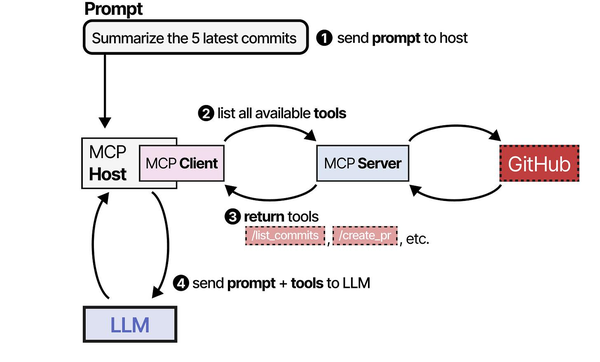
The Model Context Protocol (MCP) is a foundational standard for agent-tool communication, thoroughly covered in An Illustrated Guide to AI Agents by Grootendorst and Alammar. The book's detailed breakdown of MCP components and flow diagrams provides essential context for understanding how Ollama integrates with MCP servers on Linux to create powerful, tool-augmented AI systems.
Related Articles
- Ollama and LangChain on Linux: Build AI Agents with Local Models
- Ollama Python API: Build Linux Administration Tools with Local LLMs
- Continue.dev and Ollama: Self-Hosted AI Coding Assistant for VS Code on Linux
- Ollama REST API Reference: Complete Endpoint Guide for Linux Developers
Further Reading
- An Illustrated Guide to AI Agents by Maarten Grootendorst and Jay Alammar — Visual guide to agent memory, tools, and reasoning.
- LLMs in Production by Christopher Brousseau and Matthew Sharp — Practical deployment of language models from training to production.
- Agentic AI in Enterprise by Sumit Ranjan, Divya Chembachere, and Lanwin Lobo — Enterprise architecture patterns for agentic AI systems.
Frequently Asked Questions
Which Ollama models work best with MCP tool-calling?
MCP itself is model-agnostic — it defines the tool interface, not how the model decides to use tools. The model quality for tool-calling depends on the LangChain (or other framework) integration. Llama 3.1 8B and Mistral 7B handle structured tool calls reliably. For complex multi-tool workflows where the model needs to plan several steps ahead, Llama 3.1 70B or Qwen 2.5 72B produce better results but require significantly more hardware.
Can MCP servers run on different machines from the LLM?
Yes. Use the SSE (Server-Sent Events) transport instead of stdio. The MCP server runs as an HTTP service on one machine, and the MCP client connects to it over the network. This is the recommended architecture for production — keep your MCP servers close to the resources they access (databases, monitoring systems) and the LLM on a GPU-equipped machine.
How does MCP compare to LangChain tools or OpenAI function calling?
LangChain tools and OpenAI function calling are framework-specific mechanisms for models to call functions. MCP is a transport protocol that sits beneath these frameworks. You can expose an MCP server's tools as LangChain tools, as OpenAI-compatible functions, or through any other agent framework. The advantage is that you write the tool server once and use it from any client. Without MCP, you would rewrite the same tool integration for every framework you use.


