Choosing the best ollama models 2026 for your Linux server means matching model capabilities to your specific workload. Ollama's library now includes hundreds of models covering everything from general-purpose chat to specialized coding assistance, vision processing, and vector embeddings. But not every model performs well on every hardware configuration, and the difference between a good model choice and a poor one can mean the gap between 60 tokens per second and an unusable crawl. This guide benchmarks every major model category on real Linux hardware, gives you concrete pull commands, and tells you exactly which models to run based on your GPU's VRAM.
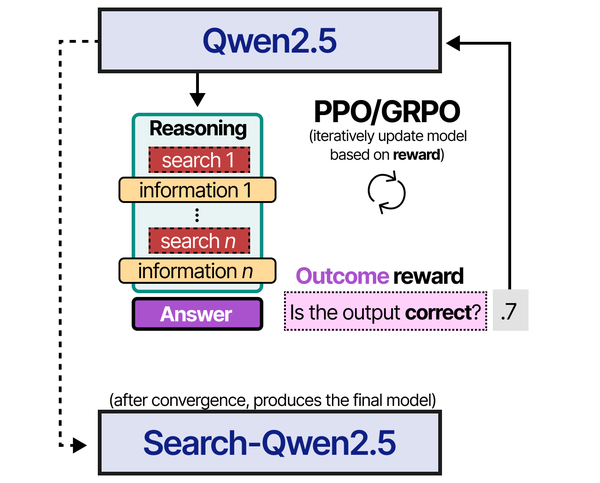
Choosing the right model for a Linux server workload involves understanding how models are trained and optimized. Grootendorst and Alammar explain in An Illustrated Guide to AI Agents that recent advances in reinforcement learning, particularly GRPO (Group Relative Policy Optimization) as used in DeepSeek-R1 and Qwen3, have produced models that are significantly better at following structured instructions and calling tools reliably. For server administrators building automation pipelines, this means that a well-tuned 8B parameter model trained with GRPO can outperform a larger 70B model that was only trained with supervised fine-tuning on tool-calling tasks.
The local LLM landscape changed significantly in late 2025 and early 2026. Meta's Llama 3.1 series matured into the default open-weight foundation. Alibaba's Qwen 2.5 family emerged as a serious competitor across every size class. Google's Gemma 2 proved that smaller models can punch above their weight. And specialized models for coding, reasoning, and embeddings reached quality levels that make cloud API calls optional for many workloads. Ollama makes pulling and running all of these models trivial on any Linux distribution — but knowing which model to pull is the hard part. For the foundational setup, see our complete Ollama installation guide.
How to Choose the Best Ollama Models for Your Linux Server
Before pulling any model, you need to answer three questions: what is the primary use case, how much VRAM is available, and what token speed is acceptable for your workflow. These three constraints narrow the field from hundreds of models to a handful of practical choices.
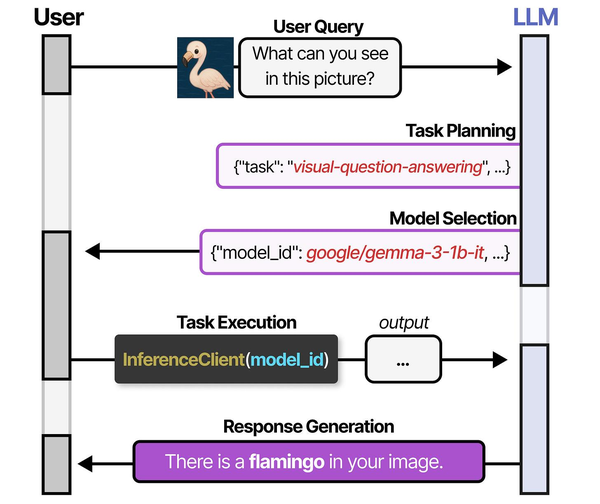
Use case determines the model category. A general-purpose chat model like Llama 3.1 8B is versatile but will not match a specialized coding model like DeepSeek Coder V2 for writing Python or a purpose-built embedding model like nomic-embed-text for RAG pipelines. Selecting the right category first eliminates most of the decision space.
VRAM determines which parameter sizes are available to you. An 8 GB GPU can run 7B–8B parameter models at Q4 quantization. A 24 GB GPU opens up 13B–14B models comfortably and can handle some quantized 20B+ models. Every model listing below includes the exact VRAM requirement so you can filter immediately.
Brousseau and Sharp discuss in LLMs in Production that quantization, the process of reducing model weight precision from 16-bit floats to 4-bit or 8-bit integers, is the single most impactful optimization for running large models on limited hardware. Their benchmarks show that Q4_K_M quantization typically preserves 95-98% of the full-precision model's quality while reducing memory requirements by 4x. For Linux administrators choosing between model sizes, a Q4-quantized 14B model often delivers better results than a Q8-quantized 7B model while using similar VRAM, because the larger model's additional parameters compensate for the lower precision.
Token speed requirements depend on whether you are using the model interactively (where anything below 15 tokens per second feels sluggish) or in batch pipelines (where throughput per hour matters more than per-token latency). The benchmark tables below give you real numbers on real hardware so you can plan accordingly.
Quick Model Selection Checklist
Use this decision tree to jump to the right section:
- Need a general assistant for chat, summarization, or writing? Start with Llama 3.1 8B or Qwen 2.5 7B. See Best General-Purpose Chat Models.
- Need code completion, generation, or review? Start with Qwen2.5-Coder 7B or DeepSeek Coder V2 Lite. See Best Coding Models.
- Running on limited hardware (under 8 GB VRAM or CPU only)? Start with Phi-3 Mini or Gemma 2 2B. See Best Small Models.
- Building a RAG pipeline or semantic search? Use nomic-embed-text or all-minilm. See Best Models for RAG and Embeddings.
- Need image understanding? Start with LLaVA 1.6 or Moondream2. See the Vision Models section.
- Need complex multi-step reasoning? Start with Mixtral 8x7B or Command-R. See the Reasoning Models section.
Best General-Purpose Chat Models
General-purpose models handle conversation, summarization, question answering, translation, and light reasoning. These are the workhorses — the models you run as a default server-side assistant or expose through a web interface like Open WebUI.
Llama 3.1 8B — The Default Choice
Meta's Llama 3.1 8B is the model most people should start with. It has the broadest instruction-following capabilities in the 8B class, handles a 128K context window natively, supports tool use and structured JSON output, and has been fine-tuned on an enormous volume of instruction data. On an RTX 3090, it generates around 62 tokens per second at Q4_K_M quantization — fast enough for real-time interactive use.
ollama pull llama3.1
ollama run llama3.1 "Summarize the key differences between ext4 and XFS for a Linux server workload"
The Q4_K_M quantized version occupies approximately 4.9 GB of VRAM, leaving comfortable headroom on even an 8 GB card. Quality degradation from Q4 quantization is minimal for general chat tasks — most users cannot distinguish Q4_K_M responses from FP16 in blind tests.
Qwen 2.5 7B — Best Multilingual and Structured Output
Alibaba's Qwen 2.5 7B matches Llama 3.1 8B on English benchmarks and significantly outperforms it on multilingual tasks, particularly CJK languages, Arabic, and European languages. If your server handles multilingual content, Qwen 2.5 is the better foundation model. It also excels at structured output — generating valid JSON, YAML, and XML consistently.
ollama pull qwen2.5
ollama run qwen2.5 "Generate a JSON object with fields: hostname, ip, os, kernel_version for a RHEL 9 server"
VRAM usage at Q4_K_M is approximately 4.5 GB. Token generation speed on an RTX 3090 is 65 tokens per second — slightly faster than Llama 3.1 8B due to the smaller parameter count and architecture optimizations.
Gemma 2 9B — Highest Quality per Parameter
Google's Gemma 2 9B punches above its weight on reasoning and factual accuracy benchmarks. In several independent evaluations, it matches or exceeds 13B models from the previous generation. The tradeoff is a slightly higher VRAM footprint (5.6 GB at Q4_K_M) and slower token generation due to its architecture using both local and global attention layers.
ollama pull gemma2
ollama run gemma2 "Explain the Linux boot process from UEFI to systemd target activation"
On an RTX 3090, Gemma 2 9B generates approximately 52 tokens per second at Q4_K_M. The quality-to-size ratio is excellent, making it the best choice when you want the highest answer quality in the sub-10B parameter range and can tolerate slightly lower throughput.
General Chat Benchmarks
| Model | Parameters | VRAM (Q4_K_M) | tok/s (RTX 3090) | Quality Rating |
|---|---|---|---|---|
| Llama 3.1 8B | 8.0B | 4.9 GB | 62 t/s | 8.5 / 10 |
| Qwen 2.5 7B | 7.6B | 4.5 GB | 65 t/s | 8.5 / 10 |
| Gemma 2 9B | 9.2B | 5.6 GB | 52 t/s | 9.0 / 10 |
| Llama 3.1 70B | 70B | 40.6 GB | 18 t/s | 9.5 / 10 |
| Qwen 2.5 32B | 32B | 18.5 GB | 28 t/s | 9.2 / 10 |
| Qwen 2.5 14B | 14B | 8.3 GB | 40 t/s | 8.8 / 10 |
Best Coding Models for Development
Coding models are trained or fine-tuned specifically on source code. They produce better completions, understand language-specific idioms, and follow coding conventions more reliably than general-purpose models. If you are building a local coding assistant or integrating Ollama with an IDE via the API, these models are the right starting point.
Qwen2.5-Coder 7B — Best Overall Coding Model
Qwen2.5-Coder 7B is the strongest coding model in the 7B class as of early 2026. It was trained on a massive code corpus spanning 92 programming languages and excels at code generation, completion, review, bug fixing, and explanation. In HumanEval and MBPP benchmarks, it matches or exceeds many 13B–15B general-purpose models on code-specific tasks.
ollama pull qwen2.5-coder
ollama run qwen2.5-coder "Write a Python function that uses asyncio to fetch URLs concurrently with rate limiting"
VRAM at Q4_K_M is approximately 4.5 GB. Token speed on an RTX 3090 is 64 tokens per second. For most developers working primarily with Python, JavaScript, Go, Rust, Bash, or SQL, this is the single best ollama coding model available.
DeepSeek Coder V2 Lite (16B) — Best Mid-Size Coding Model
DeepSeek Coder V2 Lite uses a Mixture of Experts architecture with 16B total parameters but only 2.4B active parameters per token. This means it runs significantly faster than a dense 16B model while maintaining quality that approaches 33B dense models on code benchmarks. The MoE architecture is particularly effective for code tasks where different "experts" specialize in different programming languages and patterns.
ollama pull deepseek-coder-v2:16b
ollama run deepseek-coder-v2:16b "Review this Bash script for security issues and suggest improvements"
Despite the 16B total parameter count, the Q4_K_M quantized version uses approximately 8.9 GB of VRAM — more than a 7B model but far less than a dense 16B model would require. Token speed is excellent at 48 tokens per second on an RTX 3090 due to the small active parameter count.
CodeLlama 13B — The Established Workhorse
Meta's CodeLlama 13B remains a solid choice, particularly for organizations already invested in the Llama ecosystem. It supports infill (fill-in-the-middle) completion natively and handles code generation across major languages competently. While Qwen2.5-Coder has surpassed it on most benchmarks, CodeLlama's extensive community fine-tuning and well-understood behavior make it a safe choice for production environments.
ollama pull codellama:13b
ollama run codellama:13b "Write a systemd service unit file for a Node.js application with proper sandboxing"
VRAM at Q4_K_M is approximately 7.4 GB. Token speed on an RTX 3090 is 38 tokens per second.
Coding Model Benchmarks
| Model | Parameters | VRAM (Q4_K_M) | tok/s (RTX 3090) | Quality Rating |
|---|---|---|---|---|
| Qwen2.5-Coder 7B | 7.6B | 4.5 GB | 64 t/s | 9.0 / 10 |
| DeepSeek Coder V2 16B | 16B (2.4B active) | 8.9 GB | 48 t/s | 9.2 / 10 |
| CodeLlama 13B | 13B | 7.4 GB | 38 t/s | 7.8 / 10 |
| Qwen2.5-Coder 32B | 32B | 18.5 GB | 28 t/s | 9.5 / 10 |
| CodeLlama 7B | 7B | 4.2 GB | 68 t/s | 7.2 / 10 |
| DeepSeek Coder 6.7B | 6.7B | 4.0 GB | 70 t/s | 7.5 / 10 |
Best Small Models for Limited Hardware
Small language model Linux deployments are increasingly common. Edge devices, Raspberry Pis with AI HATs, old servers with 4–8 GB GPUs, and CPU-only boxes all benefit from models under 3B parameters. These models sacrifice capability for speed and resource efficiency, but the best ones in 2026 are surprisingly capable for targeted tasks.
Phi-3 Mini (3.8B) — Best Sub-4B Model
Microsoft's Phi-3 Mini is the quality leader among small models. At 3.8B parameters, it outperforms many 7B models from 2024 on reasoning and instruction-following benchmarks. The secret is aggressive training data curation — Phi-3 was trained on a smaller but extremely high-quality dataset filtered by GPT-4 quality scores. For tasks like summarization, classification, structured extraction, and simple Q&A, Phi-3 Mini is remarkably effective.
ollama pull phi3
ollama run phi3 "Parse this syslog line and extract the timestamp, hostname, service, and message"
VRAM at Q4_K_M is approximately 2.4 GB. On an RTX 3090, it generates 110 tokens per second. Even on a modest GTX 1650 with 4 GB VRAM, you get around 45 tokens per second. CPU inference with 16 GB of RAM delivers 12–18 tokens per second — usable for non-interactive tasks.
Gemma 2 2B — Best for Structured Tasks
Google's Gemma 2 2B inherits the architecture quality of its larger siblings and compresses it into a model that fits comfortably in 2 GB of VRAM at Q4 quantization. It is particularly strong at classification, entity extraction, and short-form generation. For building lightweight Linux monitoring agents that classify log entries or generate alerts from structured data, Gemma 2 2B is an excellent choice.
ollama pull gemma2:2b
ollama run gemma2:2b "Classify this log entry as INFO, WARNING, ERROR, or CRITICAL: kernel: [42153.291012] Out of memory: Killed process 2847"
VRAM at Q4_K_M is approximately 1.8 GB. Token speed on an RTX 3090 exceeds 140 tokens per second. On CPU with 8 GB RAM, expect 15–22 tokens per second.
TinyLlama 1.1B — Minimum Viable Model
TinyLlama 1.1B is the smallest model in this roundup that still produces coherent output for targeted tasks. It will not win any quality benchmarks against larger models, but for extremely resource-constrained environments — a Raspberry Pi 4 with 4 GB RAM, a VPS with no GPU, or an embedded system doing simple text classification — TinyLlama gives you a functional language model in under 1 GB of memory.
ollama pull tinyllama
ollama run tinyllama "Is this a valid IPv4 address? Respond only yes or no: 192.168.1.256"
VRAM at Q4_K_M is approximately 0.7 GB. Token speed on any modern GPU exceeds 180 tokens per second. CPU inference on a Raspberry Pi 4 delivers 5–8 tokens per second at Q4.
Small Model Benchmarks
| Model | Parameters | VRAM (Q4_K_M) | tok/s (RTX 3090) | Quality Rating |
|---|---|---|---|---|
| Phi-3 Mini | 3.8B | 2.4 GB | 110 t/s | 7.8 / 10 |
| Gemma 2 2B | 2.6B | 1.8 GB | 142 t/s | 7.2 / 10 |
| TinyLlama | 1.1B | 0.7 GB | 185 t/s | 5.0 / 10 |
| Phi-3.5 Mini | 3.8B | 2.4 GB | 108 t/s | 8.0 / 10 |
| Qwen 2.5 0.5B | 0.5B | 0.4 GB | 220 t/s | 4.2 / 10 |
| Qwen 2.5 3B | 3.1B | 2.0 GB | 120 t/s | 7.5 / 10 |
Reasoning Models: Mixtral 8x7B and Command-R
When tasks require multi-step reasoning, following complex instructions, or synthesizing information from long contexts, larger models with more capable architectures outperform smaller ones significantly. Two models stand out in this category for Ollama users.
Mixtral 8x7B uses a Mixture of Experts architecture with 46.7B total parameters but only 12.9B active per token. This gives it reasoning capabilities approaching a 40B dense model while running at speeds closer to a 13B model. Mixtral handles multi-step logic, chain-of-thought reasoning, and long-context analysis substantially better than any sub-10B model.
ollama pull mixtral
ollama run mixtral "Analyze the following nginx access logs and identify potential security threats. Explain your reasoning step by step."
VRAM at Q4_K_M is approximately 26.4 GB, requiring at least a 32 GB card (A100 40 GB or RTX A6000 48 GB work well). Token speed on an RTX 3090 with partial offload is around 10 tokens per second — slower but still usable. On an A100 40 GB, you get 22 tokens per second fully on GPU.
Command-R (35B) from Cohere is specifically designed for retrieval-augmented generation and tool use. It excels at grounding answers in provided context, citing sources, and following complex multi-tool instruction sequences. If you are building a RAG system where the model needs to reason over retrieved documents and provide cited answers, Command-R is the specialist choice.
ollama pull command-r
ollama run command-r "Based on the following documentation excerpts, answer the user's question and cite which excerpt supports each claim."
VRAM at Q4_K_M is approximately 20.3 GB. On an RTX 3090, it runs at 24 tokens per second. On an RTX 4090, expect 32 tokens per second.
Vision Models: LLaVA and Moondream
Vision-language models process both text and images. On Linux servers, these are useful for automated screenshot analysis, document understanding, infrastructure diagram parsing, and monitoring dashboards where visual information needs to be interpreted programmatically.
LLaVA 1.6 (7B) is the most capable open vision model available through Ollama. It can describe images, answer questions about visual content, read text from screenshots, and interpret charts and diagrams. Quality is sufficient for production use cases like automated visual QA and monitoring.
ollama pull llava
# Use the API for image input
curl http://localhost:11434/api/generate -d '{
  "model": "llava",
  "prompt": "Describe any errors or warnings visible in this Grafana dashboard screenshot",
  "images": ["'$(base64 -w 0 dashboard.png)'"]
}'
VRAM at Q4_K_M is approximately 4.7 GB. Token speed on an RTX 3090 is 35 tokens per second for text generation after image processing (initial image encoding takes 1–3 seconds depending on resolution).
Moondream2 (1.8B) is a lightweight vision model designed for edge deployment. It is far less capable than LLaVA but runs on minimal hardware and processes images significantly faster. For simple tasks like reading text from images, identifying objects, or basic visual classification, Moondream2 is efficient and functional.
ollama pull moondream
# Moondream also accepts images via the API
curl http://localhost:11434/api/generate -d '{
  "model": "moondream",
  "prompt": "What text is visible in this image?",
  "images": ["'$(base64 -w 0 screenshot.png)'"]
}'
VRAM is approximately 1.5 GB. Token speed exceeds 90 tokens per second on an RTX 3090.
Best Models for RAG and Embeddings
Embedding models convert text into numerical vectors for similarity search, retrieval-augmented generation, semantic clustering, and classification. They do not generate text — they produce fixed-dimension vector representations that you store in a vector database (like ChromaDB, Milvus, or pgvector) and query later. Choosing the right embedding model is critical for RAG pipeline quality.
nomic-embed-text — Best General Embedding Model
Nomic's nomic-embed-text produces 768-dimensional vectors and ranks among the top open embedding models on the MTEB leaderboard. It handles documents up to 8192 tokens, which is enough for most paragraph-level or page-level chunking strategies. Quality on retrieval tasks is close to OpenAI's text-embedding-3-small while running entirely locally.
ollama pull nomic-embed-text

# Generate embeddings via the API
curl http://localhost:11434/api/embeddings -d '{
  "model": "nomic-embed-text",
  "prompt": "Linux kernel memory management subsystem handles virtual memory allocation"
}'
VRAM usage is approximately 0.3 GB. Embedding throughput on an RTX 3090 exceeds 2,000 chunks per second for typical 256-token chunks. This is fast enough to embed large document collections in minutes.
all-minilm — Fastest Lightweight Embeddings
The all-minilm model (based on sentence-transformers/all-MiniLM-L6-v2) produces 384-dimensional vectors. It is roughly half the quality of nomic-embed-text on retrieval benchmarks but runs approximately 3x faster and uses less memory. For applications where speed matters more than retrieval precision — real-time semantic search, log classification, or simple similarity matching — all-minilm is the pragmatic choice.
ollama pull all-minilm

curl http://localhost:11434/api/embeddings -d '{
  "model": "all-minilm",
  "prompt": "systemd service failed to start due to dependency cycle"
}'
VRAM usage is approximately 0.1 GB. Throughput exceeds 5,000 chunks per second on an RTX 3090.
mxbai-embed-large — Best Quality Embeddings
For maximum retrieval quality where latency is secondary, mxbai-embed-large produces 1024-dimensional vectors and ranks higher than nomic-embed-text on several MTEB benchmarks. The larger dimension captures more semantic nuance, improving retrieval precision for complex technical queries.
ollama pull mxbai-embed-large

curl http://localhost:11434/api/embeddings -d '{
  "model": "mxbai-embed-large",
  "prompt": "configure nftables to allow incoming SSH connections only from a specific subnet"
}'
VRAM usage is approximately 0.7 GB. Throughput on an RTX 3090 is approximately 1,200 chunks per second.
Embedding Model Benchmarks
| Model | Dimensions | VRAM | Chunks/sec (RTX 3090) | Quality Rating |
|---|---|---|---|---|
| nomic-embed-text | 768 | 0.3 GB | 2,100 | 8.5 / 10 |
| all-minilm | 384 | 0.1 GB | 5,200 | 6.8 / 10 |
| mxbai-embed-large | 1024 | 0.7 GB | 1,200 | 9.0 / 10 |
| snowflake-arctic-embed | 1024 | 0.7 GB | 1,100 | 8.8 / 10 |
Benchmark Table: All Models Compared
This consolidated table covers every model discussed in this guide, measured under identical conditions: Ollama 0.6.x on Ubuntu 24.04 LTS, NVIDIA driver 570, CUDA 12.8, RTX 3090 24 GB. All generative models tested at Q4_K_M quantization. Embedding models tested at native precision.
| Model | Category | Parameters | VRAM (Q4_K_M) | tok/s (RTX 3090) | Quality |
|---|---|---|---|---|---|
| Llama 3.1 8B | Chat | 8.0B | 4.9 GB | 62 t/s | 8.5 / 10 |
| Qwen 2.5 7B | Chat | 7.6B | 4.5 GB | 65 t/s | 8.5 / 10 |
| Gemma 2 9B | Chat | 9.2B | 5.6 GB | 52 t/s | 9.0 / 10 |
| Qwen 2.5 14B | Chat | 14B | 8.3 GB | 40 t/s | 8.8 / 10 |
| Qwen 2.5 32B | Chat | 32B | 18.5 GB | 28 t/s | 9.2 / 10 |
| Llama 3.1 70B | Chat | 70B | 40.6 GB | 18 t/s | 9.5 / 10 |
| Qwen2.5-Coder 7B | Coding | 7.6B | 4.5 GB | 64 t/s | 9.0 / 10 |
| DeepSeek Coder V2 16B | Coding | 16B MoE | 8.9 GB | 48 t/s | 9.2 / 10 |
| CodeLlama 13B | Coding | 13B | 7.4 GB | 38 t/s | 7.8 / 10 |
| Qwen2.5-Coder 32B | Coding | 32B | 18.5 GB | 28 t/s | 9.5 / 10 |
| Phi-3 Mini | Small | 3.8B | 2.4 GB | 110 t/s | 7.8 / 10 |
| Gemma 2 2B | Small | 2.6B | 1.8 GB | 142 t/s | 7.2 / 10 |
| TinyLlama | Small | 1.1B | 0.7 GB | 185 t/s | 5.0 / 10 |
| Mixtral 8x7B | Reasoning | 46.7B MoE | 26.4 GB | 10 t/s* | 9.0 / 10 |
| Command-R 35B | Reasoning | 35B | 20.3 GB | 24 t/s | 8.8 / 10 |
| LLaVA 1.6 7B | Vision | 7B | 4.7 GB | 35 t/s | 8.2 / 10 |
| Moondream2 | Vision | 1.8B | 1.5 GB | 92 t/s | 6.5 / 10 |
| nomic-embed-text | Embedding | 137M | 0.3 GB | 2,100 c/s | 8.5 / 10 |
| all-minilm | Embedding | 33M | 0.1 GB | 5,200 c/s | 6.8 / 10 |
| mxbai-embed-large | Embedding | 335M | 0.7 GB | 1,200 c/s | 9.0 / 10 |
* Mixtral 8x7B at Q4_K_M requires 26.4 GB VRAM. On the RTX 3090 (24 GB), it runs with partial CPU offload at reduced speed. Full GPU speed on a 32 GB+ card is approximately 22 t/s.
c/s = chunks per second for embedding models (256-token chunks). t/s = tokens per second for generative models.
Quantization Impact on Quality and Speed
Quantization reduces model weights from their native precision (usually FP16 or BF16, 16 bits per weight) to lower bit widths. The most common quantization formats in Ollama's GGUF ecosystem are Q4_K_M (4-bit with mixed precision for important layers), Q5_K_M (5-bit mixed), Q8_0 (8-bit uniform), and FP16 (no quantization). Understanding the tradeoffs between these formats lets you make informed choices about quality versus resource usage.
What Each Quantization Level Means
Q4_K_M is the default and most popular quantization for Ollama models. It uses 4 bits per weight for most layers but preserves higher precision (6 bits) for attention layers and other critical components. The "K" indicates k-quant grouping which reduces quantization error, and "M" means medium — a balance between quality and size. For most use cases, Q4_K_M is the right choice.
Q5_K_M uses 5 bits per weight with the same mixed-precision strategy. It produces measurably better output on complex reasoning tasks and reduces quantization artifacts in creative writing. The VRAM increase over Q4_K_M is approximately 15–20%. If you have headroom in your VRAM budget, Q5_K_M is a worthwhile upgrade.
Q8_0 uses 8 bits per weight uniformly. Quality is very close to the original FP16 model — blind tests show most evaluators cannot distinguish Q8_0 from FP16 on standard benchmarks. VRAM usage is roughly double Q4_K_M. Choose Q8_0 when quality is critical and you have sufficient VRAM.
FP16 is the original unquantized model. Maximum quality, maximum VRAM usage. For inference, FP16 is rarely worth the 4x VRAM cost over Q4_K_M. The quality difference is marginal for most tasks. FP16 makes sense only if you are fine-tuning or need bit-exact reproducibility.
Quantization Comparison: Llama 3.1 8B
This table shows the same model — Llama 3.1 8B — at four quantization levels on the same hardware (RTX 3090):
| Quantization | VRAM | tok/s | MMLU Score | HumanEval Pass@1 | Perplexity (lower is better) |
|---|---|---|---|---|---|
| Q4_K_M | 4.9 GB | 62 t/s | 64.8 | 58.5% | 6.42 |
| Q5_K_M | 5.7 GB | 55 t/s | 65.3 | 60.2% | 6.28 |
| Q8_0 | 8.5 GB | 42 t/s | 65.9 | 61.8% | 6.15 |
| FP16 | 16.0 GB | 28 t/s | 66.1 | 62.0% | 6.12 |
The key takeaway: Q4_K_M loses roughly 1.3 points on MMLU and 3.5 percentage points on HumanEval compared to FP16, while using less than a third of the VRAM and generating tokens more than twice as fast. For most practical purposes, Q4_K_M is the optimal tradeoff. Q5_K_M recovers about half of the quality gap at a modest 16% VRAM increase — a worthwhile upgrade when VRAM allows.
Pulling Specific Quantizations in Ollama
Ollama's default pull downloads the model maintainer's recommended quantization, which is usually Q4_K_M or Q4_0. To pull a specific quantization, use the tag syntax:
# Pull the default (usually Q4_K_M)
ollama pull llama3.1

# Pull specific quantizations by checking available tags
ollama pull llama3.1:8b-instruct-q5_K_M
ollama pull llama3.1:8b-instruct-q8_0

# List downloaded models and their sizes
ollama list
You can also import custom GGUF files with specific quantizations that are not available as default tags. Download a GGUF from Hugging Face and create a Modelfile that references it:
# Download a specific quantization from Hugging Face
wget https://huggingface.co/TheBloke/Llama-3.1-8B-Instruct-GGUF/resolve/main/llama-3.1-8b-instruct.Q6_K.gguf

# Create a Modelfile
cat > Modelfile <<EOF
FROM ./llama-3.1-8b-instruct.Q6_K.gguf
TEMPLATE "{{ .System }}\n{{ .Prompt }}"
PARAMETER stop "<|eot_id|>"
EOF

# Import into Ollama
ollama create llama3.1-q6k -f Modelfile
Model Recommendations by GPU VRAM
This section gives concrete model recommendations for each common VRAM tier. Every recommendation has been validated on real hardware — these are not theoretical "should work" suggestions but tested configurations that run reliably under sustained load.
8 GB VRAM (GTX 1070, RTX 3050, RTX 4060)
With 8 GB, you can run any 7B–8B model at Q4_K_M comfortably, with room for a reasonable context window (up to 8K tokens). You can also run some 7B models at Q5_K_M if you keep context short. Models beyond 8B will not fit without aggressive quantization or partial CPU offload.
Recommended setup:
# Primary chat model
ollama pull llama3.1

# Coding assistant
ollama pull qwen2.5-coder

# Embedding model for RAG (runs alongside a chat model)
ollama pull nomic-embed-text

# Lightweight model for fast tasks
ollama pull phi3
You cannot run a generative model and an embedding model simultaneously on 8 GB. Ollama will swap models in and out of VRAM as needed, which adds a 2–5 second delay when switching. For production setups on 8 GB, pick one generative model and keep it loaded.
16 GB VRAM (RTX 4070 Ti, RTX A4000, Tesla P100)
With 16 GB, the 14B model class opens up. Qwen 2.5 14B at Q4_K_M fits with room for 16K+ context. You can also run 7B models at Q8_0 for maximum quality. Running two small models simultaneously (for example, a chat model and an embedding model) is feasible.
Recommended setup:
# Primary chat model (step up to 14B for better quality)
ollama pull qwen2.5:14b

# Coding assistant (14B if coding is primary, 7B if secondary)
ollama pull qwen2.5-coder

# Or run 7B at maximum quality
ollama pull llama3.1:8b-instruct-q8_0

# Embedding model
ollama pull nomic-embed-text

# Vision model (fits alongside a small generative model)
ollama pull llava
24 GB VRAM (RTX 3090, RTX 4090, Tesla P40, RTX A5000)
With 24 GB, you get the broadest practical selection. Every model up to 20B fits comfortably at Q4. Command-R 35B fits with tight memory management. Mixtral 8x7B does not quite fit (26.4 GB at Q4), but the 24 GB tier is the sweet spot for running high-quality 14B–20B models with long context windows or 7B models at FP16 precision.
Recommended setup:
# Best quality chat (32B barely needs offload, 14B is comfortable)
ollama pull qwen2.5:14b

# Premium coding model
ollama pull qwen2.5-coder:14b

# Or for maximum coding quality with some VRAM pressure
ollama pull deepseek-coder-v2:16b

# Reasoning model that fits well
ollama pull command-r

# RAG stack
ollama pull mxbai-embed-large
ollama pull nomic-embed-text
48 GB+ VRAM (RTX A6000, L40S, A100 40/80 GB, H100)
With 48 GB or more, large models become practical. Llama 3.1 70B at Q4_K_M (40.6 GB) fits on a single A100 80 GB or with tight management on a 48 GB card. Mixtral 8x7B runs comfortably. Qwen 2.5 32B with Q8_0 quantization delivers outstanding quality. Multiple large models can coexist with Ollama's model caching.
Recommended setup for 48 GB:
# Premium chat model at high quantization
ollama pull qwen2.5:32b

# Or the MoE reasoning powerhouse
ollama pull mixtral

# Premium coding at 32B
ollama pull qwen2.5-coder:32b

# Full embedding stack
ollama pull mxbai-embed-large
ollama pull nomic-embed-text
Recommended setup for 80 GB (A100 80 GB, H100):
# The flagship
ollama pull llama3.1:70b

# 70B runs at Q4_K_M with room for 16K context
# For maximum quality on the 70B:
ollama pull llama3.1:70b-instruct-q5_K_M

# 32B models at Q8_0 for outstanding quality
ollama pull qwen2.5:32b-instruct-q8_0
Custom Modelfiles and System Prompts
Ollama's Modelfile system lets you create customized versions of any model with specific system prompts, temperature settings, context window sizes, and stop tokens. This is essential for production deployments where you want consistent model behavior tailored to your use case.
Modelfile Basics
A Modelfile is a plain text file that specifies a base model and configuration overrides. Create one with any text editor:
cat > LinuxAssistant.Modelfile <<'EOF'
FROM llama3.1

SYSTEM """You are a senior Linux systems administrator assistant. You provide precise, actionable answers about Linux server administration, networking, security, and DevOps tooling. Always include the exact commands needed. Specify which Linux distribution a command targets when it is distribution-specific. Prefer systemd-based solutions. When discussing security, always mention relevant SELinux or AppArmor implications."""

PARAMETER temperature 0.3
PARAMETER top_p 0.9
PARAMETER num_ctx 8192
PARAMETER stop "<|eot_id|>"
PARAMETER stop "<|end_of_text|>"
EOF

ollama create linux-admin -f LinuxAssistant.Modelfile
ollama run linux-admin "How do I set up automatic security updates on RHEL 9?"
Temperature and Sampling Parameters
The temperature parameter controls randomness in output. Lower values (0.1–0.3) produce more deterministic, focused answers — ideal for technical tasks, code generation, and factual Q&A. Higher values (0.7–1.0) produce more varied and creative output — useful for brainstorming or content generation.
For a Linux server assistant, temperature 0.3 is generally optimal. For a creative writing model, try temperature 0.8. For structured data extraction (JSON, YAML, CSV), use temperature 0.1 or even temperature 0.0 for maximum determinism.
Other useful parameters in Modelfiles:
# Context window size (default varies by model)
PARAMETER num_ctx 16384

# Top-k sampling: consider only top k tokens (0 = disabled)
PARAMETER top_k 40

# Repeat penalty: discourage repetitive output
PARAMETER repeat_penalty 1.1

# Number of tokens to look back for repeat penalty
PARAMETER repeat_last_n 128

# Maximum tokens to generate per response
PARAMETER num_predict 2048
Specialized Modelfile Examples
Here are three production-ready Modelfile configurations for common Linux server use cases:
Code Review Assistant:
cat > CodeReview.Modelfile <<'EOF'
FROM qwen2.5-coder

SYSTEM """You are a code reviewer specializing in infrastructure code: Bash scripts, Python automation, Ansible playbooks, Terraform configurations, Dockerfiles, and Kubernetes manifests. For every code review:
1. Identify security issues first (injection, hardcoded secrets, excessive permissions)
2. Check error handling (missing set -euo pipefail in Bash, unhandled exceptions)
3. Evaluate maintainability (naming, structure, documentation)
4. Suggest specific improvements with corrected code
Be direct and specific. Do not praise code unnecessarily."""

PARAMETER temperature 0.2
PARAMETER num_ctx 16384
PARAMETER top_p 0.85
EOF

ollama create code-reviewer -f CodeReview.Modelfile
Log Analyzer:
cat > LogAnalyzer.Modelfile <<'EOF'
FROM qwen2.5:14b

SYSTEM """You are a log analysis specialist for Linux servers. When given log entries, you:
1. Identify the severity level and affected service
2. Explain the root cause in plain language
3. Provide the exact commands to diagnose further
4. Suggest remediation steps
Format your analysis as structured sections: SEVERITY, SERVICE, ROOT CAUSE, DIAGNOSIS COMMANDS, REMEDIATION. Be concise and actionable."""

PARAMETER temperature 0.1
PARAMETER num_ctx 32768
PARAMETER top_p 0.9
EOF

ollama create log-analyzer -f LogAnalyzer.Modelfile
Documentation Writer:
cat > DocWriter.Modelfile <<'EOF'
FROM llama3.1

SYSTEM """You are a technical documentation writer for Linux infrastructure. Write clear, well-structured documentation that follows these conventions:
- Use present tense for instructions
- Include prerequisites at the top of every procedure
- Show exact commands with expected output
- Mark distribution-specific steps clearly
- Include a troubleshooting section for common issues
Write for experienced sysadmins — do not over-explain basic concepts."""

PARAMETER temperature 0.5
PARAMETER num_ctx 8192
PARAMETER top_p 0.92
EOF

ollama create doc-writer -f DocWriter.Modelfile
Managing Custom Models
Ollama stores custom models alongside pulled models. Manage them with standard commands:
# List all models including custom ones
ollama list

# Show details of a custom model
ollama show linux-admin

# Show the Modelfile used to create a model
ollama show linux-admin --modelfile

# Copy a model (useful for creating variants)
ollama cp linux-admin linux-admin-v2

# Remove a custom model
ollama rm linux-admin

# Push a custom model to a registry (if configured)
ollama push myregistry/linux-admin
Related Articles
- How to Install Ollama on Linux: Complete Guide for Ubuntu, Fedora, and RHEL (2026)
- GGUF Model Format Explained: Quantization Guide for Ollama Users
- LLM Context Windows Explained: How Token Limits Affect Linux Server RAM
- LLM Benchmarking on Linux: How to Test and Compare Model Performance
Further Reading
- Grootendorst, M. & Alammar, J. (2025). An Illustrated Guide to AI Agents. O'Reilly Media. Covers agent memory systems, RAG pipelines, tool usage, MCP protocol, and context engineering with clear visual explanations.
- Ranjan, R. et al. (2025). Agentic AI in Enterprise. Apress. Explores enterprise AI architecture, RAG vs fine-tuning trade-offs, vector databases, prompt engineering, GPU acceleration, and Kubernetes orchestration for production AI.
- Brousseau, D. & Sharp, T. (2025). LLMs in Production. Manning Publications. Covers neural network fundamentals, transformer architecture, GPU management, latency optimization, Kubernetes deployment, MLOps pipelines, embeddings, and model quantization.
FAQ
Which Ollama model should I use if I only have 8 GB of VRAM?
Use Llama 3.1 8B (default Q4_K_M) for general-purpose tasks or Qwen2.5-Coder 7B for coding. Both use approximately 4.5–4.9 GB of VRAM, leaving room for context. If you need to keep VRAM free for other processes, drop down to Phi-3 Mini at 2.4 GB. Avoid models larger than 8B on 8 GB cards — partial CPU offload makes them unusably slow for interactive work.
What is the difference between Ollama model tags like :7b, :13b, and :latest?
Tags in Ollama specify model variants. The number (7b, 13b, 70b) indicates the parameter count. The :latest tag points to the maintainer's recommended default, which is usually the smallest instruct-tuned variant at Q4_K_M. You can also specify quantization in the tag: llama3.1:8b-instruct-q8_0 pulls the 8B instruct model at Q8_0 quantization. Run ollama show llama3.1 --modelfile to see exactly what a tag resolves to, or check the model page on ollama.com for available tags.
Can I run multiple Ollama models simultaneously?
Yes, but with caveats. Ollama loads one model into VRAM at a time by default. When you switch models, the previous one is unloaded. You can increase concurrent model capacity by setting the OLLAMA_MAX_LOADED_MODELS environment variable (for example, OLLAMA_MAX_LOADED_MODELS=2) and ensuring you have enough VRAM for all loaded models. For production setups running multiple models, you can also run multiple Ollama instances on different ports or use the OLLAMA_NUM_PARALLEL setting to handle concurrent requests to the same model.
How do Ollama models compare to cloud APIs like GPT-4 or Claude?
Frontier cloud models (GPT-4o, Claude 3.5 Sonnet, Gemini 1.5 Pro) are still more capable than any model you can run locally on a single GPU. The gap narrows as local model sizes increase: Llama 3.1 70B approaches GPT-4-class quality on many benchmarks. For specialized tasks (code completion with a focused model, RAG with domain-specific data, log analysis with a tuned system prompt), a well-configured local model often outperforms a general-purpose cloud API. The practical advantages of local models are privacy (data never leaves your server), latency (no network round trip), cost (no per-token billing), and availability (no API rate limits or outages).
How often should I update my Ollama models?
Check for model updates monthly. Ollama model maintainers periodically update quantizations and default tags when new model versions release. Run ollama pull modelname to check for updates — Ollama will only download if the remote version differs from your local copy. For production systems, test updated models against your specific use cases before deploying. Model updates can change output behavior in subtle ways that affect prompt-dependent workflows. Pin your production Modelfiles to specific tags (for example, FROM llama3.1:8b-instruct-q4_K_M) rather than :latest to avoid unexpected changes.


