The Linux device mapper is the kernel framework behind every LVM volume, LUKS encrypted disk, dm-cache tier, and multipath device. Every time you use LVM, LUKS encryption, or dm-cache, you are using device mapper. It sits between physical block devices and the filesystems above them, creating virtual block devices and mapping I/O requests to one or more underlying devices according to a mapping table. Understanding this layer explains why lsblk shows dm-0, dm-1 entries, and how tools like LVM, cryptsetup, and multipath all share the same infrastructure.
This article explains the device mapper framework, its target types (dm-linear, dm-striped, dm-crypt, dm-cache), how LVM uses it under the hood, and two modern storage virtualization managers built on top of it: Stratis and VDO. All examples work on Debian 13.3, Ubuntu 24.04.3 LTS, Fedora 43, and RHEL 10.1.
The Linux Storage Stack: From Application to Physical Disk
Before diving into device mapper specifics, here is how the full Linux storage stack fits together. Each layer transforms or routes I/O before it reaches the next.
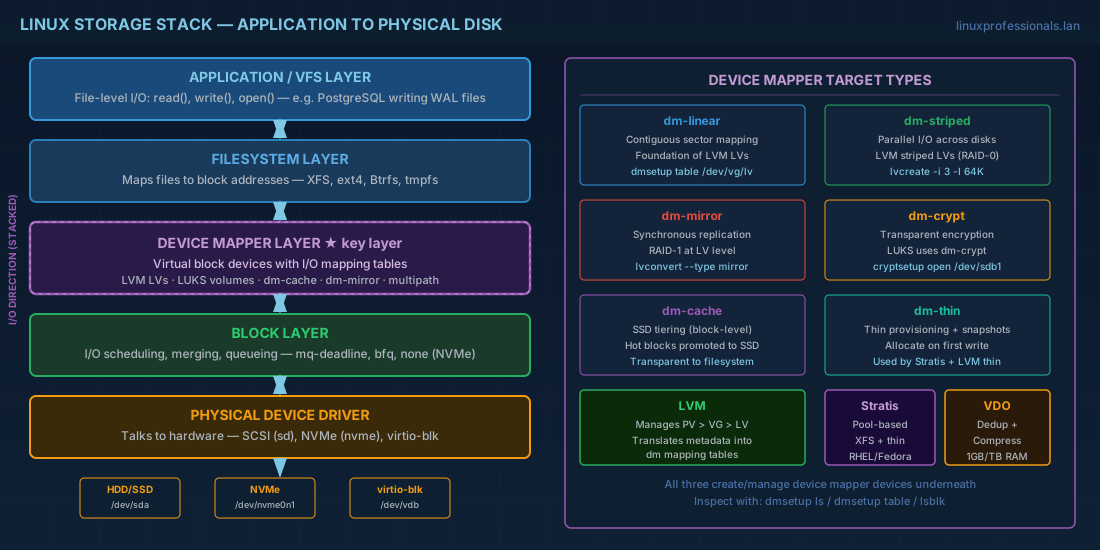
| Layer | What it does | Examples |
|---|---|---|
| Application / VFS | File-level I/O (read, write, open) | PostgreSQL writing WAL files |
| Filesystem | Maps files to block addresses | XFS, ext4, Btrfs |
| Device mapper | Virtual block devices with I/O mapping | LVM LVs, LUKS volumes, dm-cache, multipath |
| Block layer | I/O scheduling, merging, queueing | mq-deadline, bfq, none (for NVMe) |
| Physical device driver | Talks to hardware | SCSI (sd), NVMe (nvme), virtio-blk |
The key insight: device mapper does not know about files. It only deals with block ranges. A dm device maps a range of sectors on the virtual device to sectors on one or more physical devices. This is why device mapper is so flexible -- you can stack targets (encryption on top of striping on top of mirroring) without any target knowing about the others. For a filesystem-level perspective on these layers, see Linux filesystem internals.
Device Mapper Target Types Explained
A device mapper target is a kernel module that defines how I/O is mapped. Here are the targets you encounter most often in production Linux systems.
dm-linear: The Foundation of LVM Logical Volumes
The simplest target. dm-linear maps a contiguous range of sectors on the virtual device to a contiguous range on a physical device. LVM uses dm-linear for most logical volumes.
# View how LVM uses dm-linear under the hood
sudo dmsetup table /dev/vg_data/db_lv

# Typical output:
# 0 209715200 linear 8:17 2048
# Meaning: sectors 0-209715200 map linearly to device 8:17 (sdb1) starting at sector 2048
dm-striped: Parallel I/O Across Multiple Disks
Spreads I/O across multiple devices in round-robin fashion. LVM uses dm-striped when you create a striped LV. Improves throughput for sequential workloads.
# Create a striped LV across 3 PVs
sudo lvcreate -n striped_lv -L 90G -i 3 -I 64K vg_data

# View the dm-stripe mapping
sudo dmsetup table /dev/vg_data/striped_lv
# Output shows "striped" target with stripe count and chunk size
dm-mirror: Synchronous Data Replication
Keeps identical copies on two or more devices. Used by lvconvert --type mirror. Data written to the dm-mirror device goes to all legs simultaneously. This is the device mapper equivalent of RAID 1, but managed at the LV level rather than the whole-disk level.
# Create a mirrored LV with 2 copies
sudo lvcreate --type mirror -m 1 -n mirror_lv -L 50G vg_data

# View the dm-mirror mapping
sudo dmsetup table /dev/vg_data/mirror_lv
# Shows "mirror" target with log type and device legs

# Check mirror sync status
sudo lvs -o name,copy_percent,seg_type vg_data/mirror_lv
dm-crypt: Transparent Block-Level Encryption
Encrypts and decrypts I/O transparently. LUKS (via cryptsetup) creates dm-crypt devices. Every block read from disk is decrypted, every block written is encrypted.
# See dm-crypt in action with LUKS
sudo cryptsetup luksDump /dev/sdb1
sudo cryptsetup open /dev/sdb1 encrypted_vol

# The decrypted device is a dm device
ls -la /dev/mapper/encrypted_vol
sudo dmsetup table encrypted_vol
# Shows "crypt" target with cipher specification
dm-cache: SSD Tiering at the Block Layer
Provides block-level caching with a fast device (SSD) in front of a slow device (HDD). Covered in detail in the Advanced LVM article. The dm-cache target tracks hot blocks and promotes them to SSD transparently.
Working with dmsetup: Direct Device Mapper Control
Most administrators interact with device mapper through LVM or cryptsetup. But dmsetup gives you direct access to the device mapper layer. This is essential for troubleshooting and understanding what is happening beneath higher-level tools.
# List all device mapper devices
sudo dmsetup ls

# Show the mapping table for all devices
sudo dmsetup table

# Show status (includes I/O counters for some targets)
sudo dmsetup status

# Show detailed info for a specific device
sudo dmsetup info vg_data-db_lv

# See the dependency tree (which dm devices stack on which)
sudo dmsetup deps

# Create a simple dm-linear device manually (for understanding)
# Map 1GB (2097152 512-byte sectors) from /dev/sdb starting at sector 0
echo "0 2097152 linear /dev/sdb 0" | sudo dmsetup create test_linear
ls /dev/mapper/test_linear

# Remove the manual device
sudo dmsetup remove test_linear
Production use of dmsetup create is rare because LVM handles device creation. But dmsetup table, dmsetup status, and dmsetup info are everyday troubleshooting commands. When an LV behaves unexpectedly, checking its dm table reveals the actual block mapping.
How LVM Uses Device Mapper Under the Hood
Every LV you create with lvcreate results in one or more dm devices. LVM translates its metadata (PV, VG, LV definitions) into dm mapping tables and loads them into the kernel.
# Trace the relationship
sudo lvs -o lv_name,lv_dm_path,seg_type vg_data

# Example output:
# db_lv     /dev/dm-3   linear
# cache_lv  /dev/dm-5   cache

# The dm path tells you the kernel device name
# /dev/vg_data/db_lv is a symlink to /dev/dm-3
ls -la /dev/vg_data/db_lv

# lsblk shows the full tree
lsblk --fs /dev/sdb
Troubleshooting Stale Device Mapper Entries
After removing LVs, stopping LUKS volumes, or disconnecting multipath devices, stale dm entries can linger. These show up as entries in dmsetup ls that no longer correspond to active storage. Here is how to diagnose and clean them.
# List all dm devices and check for stale entries
sudo dmsetup ls
sudo dmsetup info --columns -o name,open,segments

# An "open" count of 0 with no corresponding mount may indicate a stale device
# Check if the device is mounted or in use
sudo dmsetup info vg_data-old_lv

# Remove a stale dm device that is not in use
sudo dmsetup remove vg_data-old_lv

# If the device is stuck due to open references:
# Identify which process holds the device
sudo dmsetup info -c -o name,blkdevname,open vg_data-old_lv
sudo lsof /dev/dm-X   # Replace X with the device number

# Force removal (use with extreme caution)
sudo dmsetup remove --force vg_data-old_lv
Stratis: Modern Pool-Based Storage Management on Linux
Stratis is a storage management tool built on device mapper, XFS, and thin provisioning. It aims to provide a ZFS/Btrfs-like experience (pools, filesystems, snapshots) without replacing the kernel filesystem. Red Hat introduced Stratis as an alternative to manual LVM management for simpler use cases.
Stratis is available on Fedora 43 and RHEL 10.1 (and RHEL 9.7). Debian and Ubuntu have packages in community repositories but Stratis is primarily a Red Hat ecosystem tool.
# Install Stratis (Fedora 43 / RHEL 10.1)
sudo dnf install -y stratisd stratis-cli
sudo systemctl enable --now stratisd

# Create a pool from one or more disks
sudo stratis pool create datapool /dev/sdc /dev/sdd

# Create a filesystem in the pool
sudo stratis filesystem create datapool appdata

# Mount the Stratis filesystem
sudo mkdir -p /srv/appdata
sudo mount /dev/stratis/datapool/appdata /srv/appdata

# Stratis filesystems are XFS thin-provisioned by default
# No need to specify size -- it grows from the pool automatically
df -h /srv/appdata

# List pools and filesystems
sudo stratis pool list
sudo stratis filesystem list

# Create a snapshot
sudo stratis filesystem snapshot datapool appdata snap_appdata_20260228

# Add a cache tier (SSD)
sudo stratis pool init-cache datapool /dev/nvme0n1p1
Under the hood, Stratis creates device mapper devices, thin pools, and XFS filesystems. You can verify this with dmsetup ls and lsblk. The advantage of Stratis is that it handles the plumbing automatically. The disadvantage is less flexibility than manual LVM for complex configurations.
For persistent mounts, Stratis provides systemd generator integration. Add to fstab:
# fstab entry for Stratis filesystem
/dev/stratis/datapool/appdata /srv/appdata xfs defaults,x-systemd.requires=stratisd.service 0 0
Stratis vs LVM: When to Use Each
Choosing between Stratis and LVM depends on your complexity requirements and ecosystem.
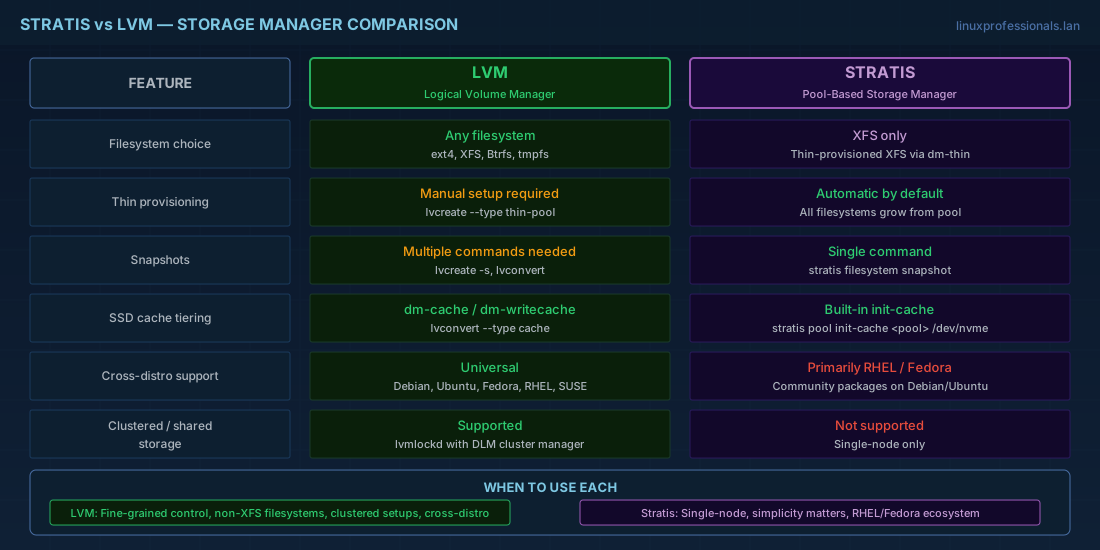
| Feature | LVM | Stratis |
|---|---|---|
| Filesystem choice | Any (ext4, XFS, Btrfs) | XFS only |
| Thin provisioning | Manual setup required | Automatic by default |
| Snapshot complexity | Multiple commands | Single command |
| Cache tiering | dm-cache / dm-writecache | Built-in init-cache |
| Cross-distro support | Universal | Primarily RHEL/Fedora |
| Clustered/shared storage | lvmlockd with dlm | Not supported |
Use Stratis for straightforward single-node storage where simplicity matters. Use LVM when you need fine-grained control, non-XFS filesystems, clustered setups, or cross-distribution portability.
VDO: Block-Level Deduplication and Compression
VDO (Virtual Data Optimizer) operates as a device mapper target that deduplicates and compresses data before writing it to disk. On RHEL 10.1 and Fedora 43, VDO is integrated into LVM as the vdo LV type. This means you do not manage VDO volumes separately; they are part of your LVM workflow.
# Check VDO kernel module
lsmod | grep kvdo

# View VDO statistics on an LVM VDO volume
sudo lvs -o name,vdo_saving_percent,vdo_compression,vdo_deduplication vg_data

# Standalone VDO (older approach, still works on RHEL 9.7)
sudo dnf install -y vdo kmod-kvdo
sudo vdo create --name=vdo0 --device=/dev/sde --vdoLogicalSize=2T
sudo mkfs.xfs -K /dev/mapper/vdo0
sudo mount /dev/mapper/vdo0 /srv/vdo-data
sudo vdostats --human-readable
VDO requires significant RAM for its deduplication index. The universal deduplication service (UDS) index needs approximately 1GB of RAM per 1TB of physical storage for dense indexing. Plan your memory budget before deploying VDO on large volumes.
Inspecting the Storage Stack with blkid, lsblk, and dmsetup
Two commands give you a complete picture of how storage is layered on any system. Combined with dmsetup, they form the essential troubleshooting toolkit for Linux storage.
# lsblk shows the device tree with filesystem info
lsblk --fs
# Shows: NAME, FSTYPE, FSVER, LABEL, UUID, FSAVAIL, FSUSE%, MOUNTPOINTS

# lsblk with topology info
lsblk -t
# Shows: alignment offset, min I/O, optimal I/O, physical sector size

# blkid identifies filesystem types and UUIDs on block devices
sudo blkid

# blkid for a specific device
sudo blkid /dev/mapper/vg_data-db_lv

# Combine for full picture
lsblk -o NAME,TYPE,FSTYPE,SIZE,MOUNTPOINT,UUID
sudo dmsetup ls --tree
dmsetup ls --tree is particularly useful because it shows the device mapper dependency tree, revealing how dm devices stack on each other and on physical devices. When troubleshooting a mount failure or I/O error, start here to trace the full path from filesystem to physical disk. For filesystem-specific repair tools, see the guide on fsck, tune2fs, xfs_repair, and SMART monitoring.
Device Mapper and Storage Virtualization Quick Reference
| Task | Command |
|---|---|
| List all dm devices | dmsetup ls |
| Show dm mapping tables | dmsetup table |
| Show dm device info | dmsetup info device_name |
| Show dm dependency tree | dmsetup ls --tree |
| Show dm device status | dmsetup status |
| Show block device tree | lsblk --fs |
| Show block topology | lsblk -t |
| Identify filesystem/UUID | blkid /dev/device |
| Create Stratis pool | stratis pool create poolname /dev/sdX |
| Create Stratis filesystem | stratis filesystem create poolname fsname |
| Stratis snapshot | stratis filesystem snapshot poolname fsname snapname |
| Add Stratis cache | stratis pool init-cache poolname /dev/nvmeX |
| Check VDO stats | vdostats --human-readable |
| Create manual dm device | echo "0 SIZE linear /dev/sdX 0" | dmsetup create name |
| Remove manual dm device | dmsetup remove name |
Summary
Device mapper is the foundation of Linux storage virtualization. Every LVM volume, LUKS encrypted device, multipath device, and cached volume is a device mapper device at its core. Understanding this layer through dmsetup gives you the ability to debug storage issues that higher-level tools obscure. When lvs or lsblk do not explain a problem, dmsetup table and dmsetup status show the actual kernel-level truth.
For new deployments, Stratis offers a simpler management experience for pools and filesystems on Fedora and RHEL systems. VDO adds deduplication and compression for suitable workloads. But these tools do not replace the need to understand device mapper itself. When something breaks at 3 AM and you need to trace why I/O is failing from application to disk, the storage stack diagram in this article is your map. Start at the top with the mount point, follow through dm devices with dmsetup, and end at the physical device with lsblk -t and smartctl. For related storage topics, explore partitions and filesystem mounts.


