Encrypting Linux filesystems with LUKS and dm-crypt protects data at rest when disks are stolen, decommissioned, or accessed by unauthorized parties. On Linux, the standard encryption stack is dm-crypt (the kernel-level block encryption layer) combined with LUKS (Linux Unified Key Setup -- the on-disk format that manages encryption metadata and key slots). LUKS2 is the current default format on all major distributions in 2026. This article covers the full lifecycle of encrypted filesystems: creating LUKS volumes, managing key slots, integrating encryption with LVM, backing up LUKS headers, and understanding the performance implications of disk encryption on Linux.
Commands below apply to Debian 13.3, Ubuntu 24.04.3 LTS / 25.10, Fedora 43, and RHEL 10.1 (with RHEL 9.7 notes). The cryptsetup package provides all LUKS tooling on every major distribution.
Understanding dm-crypt and the Linux Device Mapper
dm-crypt is a kernel subsystem that provides transparent block-level encryption. It operates through the device mapper framework, the same infrastructure used by LVM and multipath. When you open a LUKS volume, dm-crypt creates a virtual block device (e.g., /dev/mapper/mydata) that decrypts reads and encrypts writes on the fly. The underlying physical device stores only ciphertext.
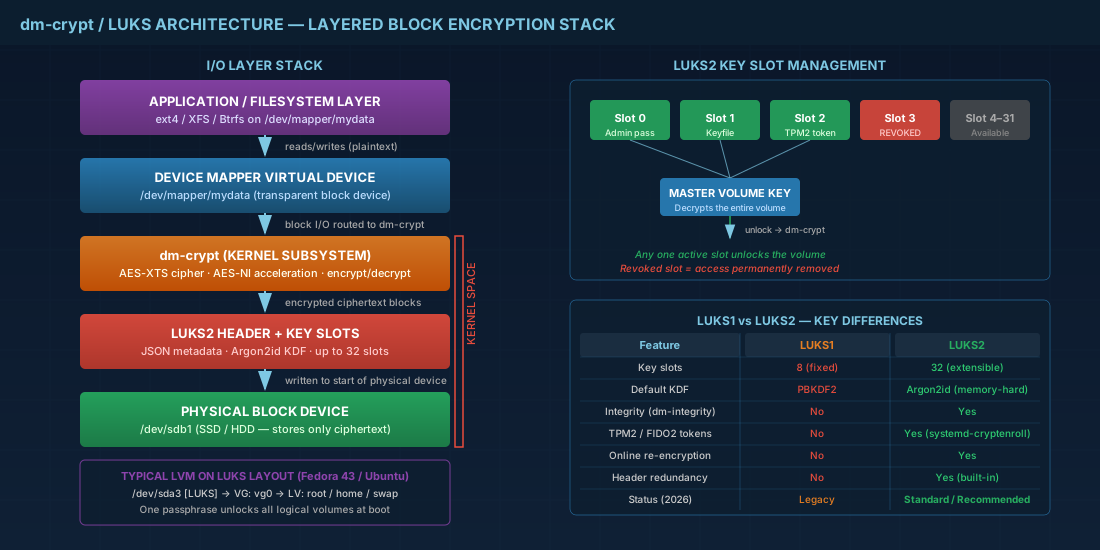
The device mapper stacking model means you can layer encryption under or over LVM logical volumes. The two common patterns are:
- LUKS on partition, then LVM on top: encrypt the entire PV, then create VGs and LVs inside. This is the standard full-disk-encryption layout used by Fedora 43 and Ubuntu installers.
- LVM first, then LUKS on each LV: gives flexibility to encrypt only certain volumes, but adds per-volume key management overhead.
For most production use, encrypt the whole physical volume first. It is simpler to manage and avoids accidentally leaving unencrypted LVs. Understanding how LVM and encryption interact is essential -- see our advanced LVM guide on thin provisioning and migration for more on layered storage architectures.
LUKS1 vs LUKS2: Key Differences in Linux Disk Encryption
LUKS2 replaced LUKS1 as the default format in cryptsetup 2.1 (released 2019). All current distributions (Debian 13.3, Ubuntu 24.04.3, Fedora 43, RHEL 10.1) create LUKS2 volumes by default. The key differences between LUKS1 and LUKS2:
| Feature | LUKS1 | LUKS2 |
|---|---|---|
| Header format | Binary, fixed layout | JSON metadata, extensible |
| Key slots | 8 (fixed) | 32 (extensible) |
| Default KDF | PBKDF2 | Argon2id (memory-hard) |
| Integrity support | No | Yes (dm-integrity) |
| Token plugins | No | Yes (systemd-cryptenroll, FIDO2, TPM2) |
| Redundant headers | No | Yes (built-in redundancy) |
| Online re-encryption | No | Yes |
LUKS2's use of Argon2id is significant. Argon2id is a memory-hard KDF, meaning brute-force attacks require large amounts of RAM per guess, not just CPU time. This makes offline passphrase attacks substantially more expensive compared to LUKS1's PBKDF2. For any new encrypted volume in 2026, LUKS2 with Argon2id is the standard.
Creating, Opening, and Closing LUKS Encrypted Volumes
The basic LUKS encryption workflow: format the partition with LUKS, open it to create the mapper device, create a filesystem inside, mount it.
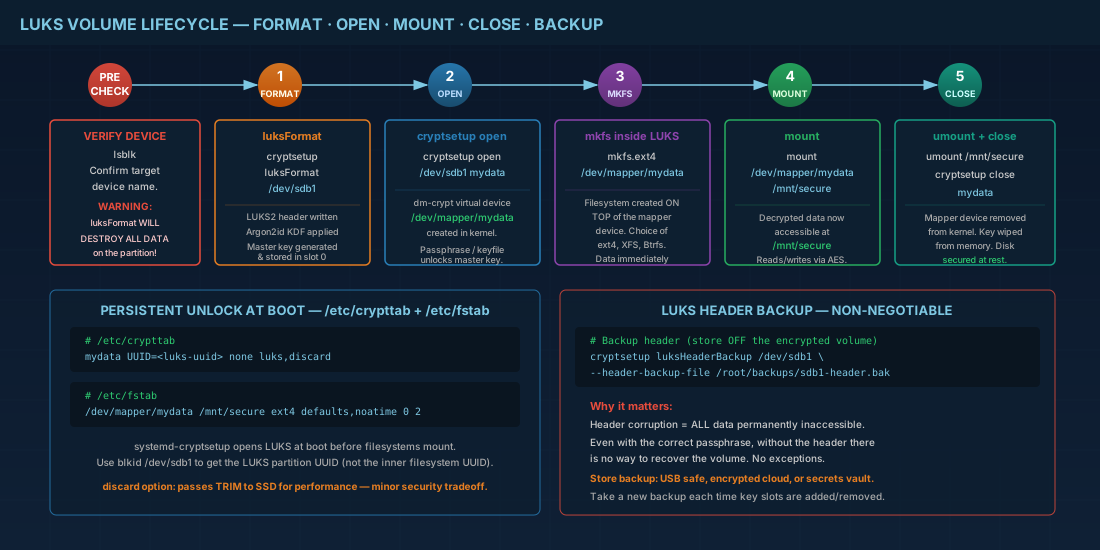
cryptsetup luksFormat destroys all data on the target device. Triple-check the device name with lsblk before proceeding.
# Step 1: Format partition with LUKS2 (default)
sudo cryptsetup luksFormat /dev/sdb1

# You'll be asked to type YES (uppercase) and enter a passphrase
# Default cipher: aes-xts-plain64, 512-bit key, Argon2id KDF

# Step 2: Open the LUKS volume (creates /dev/mapper/mydata)
sudo cryptsetup open /dev/sdb1 mydata

# Step 3: Create a filesystem on the decrypted device
sudo mkfs.ext4 -L encrypted_data /dev/mapper/mydata

# Step 4: Mount it
sudo mkdir -p /mnt/secure
sudo mount /dev/mapper/mydata /mnt/secure

# When done: unmount and close
sudo umount /mnt/secure
sudo cryptsetup close mydata
The filesystem you create inside the LUKS container can be any supported Linux filesystem. For guidance on choosing between ext4, XFS, or Btrfs for the inner filesystem, see our Linux filesystem internals comparison.
Checking LUKS Volume Status and Header Details
# View LUKS header information
sudo cryptsetup luksDump /dev/sdb1

# Check if a device is a LUKS device
sudo cryptsetup isLuks /dev/sdb1 && echo "LUKS" || echo "Not LUKS"

# Show status of an open mapping
sudo cryptsetup status mydata
Persistent LUKS Unlock at Boot with /etc/crypttab
For encrypted volumes that unlock automatically at boot, add an entry to /etc/crypttab. This file tells systemd (via systemd-cryptsetup) which devices to open and how.
# /etc/crypttab format:
# name    device                                  keyfile       options
mydata    UUID=a1b2c3d4-e5f6-7890-abcd-123456789  none          luks,discard

# With a keyfile instead of interactive passphrase:
mydata    UUID=a1b2c3d4-e5f6-7890-abcd-123456789  /root/.keys/mydata.key  luks,discard

# Then add the mount to /etc/fstab:
# /dev/mapper/mydata  /mnt/secure  ext4  defaults,noatime  0  2
The discard option passes TRIM commands through to the underlying SSD. This is important for SSD performance and longevity, but it has a minor security implication: TRIM reveals which blocks are unused, which leaks some information about data density. For most production environments, the SSD performance benefit outweighs this concern.
# Get the UUID of the LUKS partition (not the filesystem inside)
sudo blkid /dev/sdb1

# After editing crypttab and fstab, test without rebooting
sudo systemctl daemon-reload
sudo systemctl start systemd-cryptsetup@mydata.service
LUKS with LVM: Standard Full-Disk Encryption Layout on Linux
Most distribution installers use this pattern for full-disk encryption: one LUKS container on a partition, with LVM inside. All logical volumes (root, home, swap) are encrypted by a single passphrase. This is the layout Fedora 43 and Ubuntu create when you select "Encrypt" during installation.
# Typical layout created by Fedora 43 / Ubuntu installer:
# /dev/sda1  -> /boot/efi  (ESP, unencrypted, FAT32)
# /dev/sda2  -> /boot      (unencrypted, ext4)
# /dev/sda3  -> LUKS container
#   +-- VG: vg0
#       |-- LV: root  -> /
#       |-- LV: home  -> /home
#       +-- LV: swap  -> [swap]

# Manual setup equivalent:
sudo cryptsetup luksFormat /dev/sda3
sudo cryptsetup open /dev/sda3 crypt_pv

sudo pvcreate /dev/mapper/crypt_pv
sudo vgcreate vg0 /dev/mapper/crypt_pv
sudo lvcreate -L 50G -n root vg0
sudo lvcreate -L 100G -n home vg0
sudo lvcreate -L 8G -n swap vg0

sudo mkfs.ext4 /dev/vg0/root
sudo mkfs.ext4 /dev/vg0/home
sudo mkswap /dev/vg0/swap
This layout means you type one passphrase at boot and every LV inside is decrypted. The /boot partition remains unencrypted because GRUB needs to read the kernel and initramfs before LUKS is unlocked. On systems using GRUB with LUKS2 support (Fedora 43, recent Ubuntu), you can encrypt /boot too, but the passphrase must be entered twice: once for GRUB, once for the initramfs.
Managing LUKS Key Slots: Adding, Removing, and Rotating Passphrases
LUKS2 supports up to 32 key slots. Each slot can hold a different passphrase or keyfile, and any one of them can unlock the volume. This is useful for team environments: give each admin their own slot, and revoke access by removing their slot without changing everyone else's passphrase.
# Add a new passphrase in the next available slot
sudo cryptsetup luksAddKey /dev/sdb1

# Add a keyfile
sudo dd if=/dev/urandom of=/root/.keys/mydata.key bs=4096 count=1
sudo chmod 600 /root/.keys/mydata.key
sudo cryptsetup luksAddKey /dev/sdb1 /root/.keys/mydata.key

# Remove a key slot by slot number
sudo cryptsetup luksKillSlot /dev/sdb1 3

# Change the passphrase in a specific slot
sudo cryptsetup luksChangeKey /dev/sdb1 --key-slot 0
Never remove the last key slot. If you do, the volume is permanently inaccessible. Always verify how many active slots exist before removing one: sudo cryptsetup luksDump /dev/sdb1 | grep "Key Slot".
LUKS Header Backup and Disaster Recovery
The LUKS header contains everything needed to unlock the volume: key slot data, salt, cipher parameters. If the header is corrupted (bad sectors, accidental overwrite), the entire volume is lost even if the data is intact. Backing up the LUKS header is non-negotiable for production encrypted volumes.
# Backup the LUKS header
sudo cryptsetup luksHeaderBackup /dev/sdb1 \
  --header-backup-file /root/backups/sdb1-luks-header.bak

# Store this file securely OFF the encrypted volume
# Consider: USB drive in a safe, encrypted cloud storage, or a vault

# Restore a header (e.g., after corruption)
sudo cryptsetup luksHeaderRestore /dev/sdb1 \
  --header-backup-file /root/backups/sdb1-luks-header.bak
Security note: the header backup contains everything needed to decrypt the volume with any of the passphrases that were active when the backup was taken. Store it with the same care as the passphrase itself. If you add new key slots after the backup, take a new backup. Monitor the health of the disk storing your LUKS volumes using SMART monitoring with smartctl to catch hardware degradation before it corrupts the header.
LUKS2 Tokens: TPM2 and FIDO2 Hardware-Based Unlock
LUKS2 introduced a token mechanism that allows automated unlock using hardware security devices. The systemd-cryptenroll tool (available on Fedora 43, RHEL 10.1, and recent Debian/Ubuntu) manages these tokens for TPM2 chips and FIDO2 security keys.
# Enroll a TPM2 chip for automatic unlock at boot
sudo systemd-cryptenroll --tpm2-device=auto /dev/sdb1

# Enroll a FIDO2 security key (e.g., YubiKey)
sudo systemd-cryptenroll --fido2-device=auto /dev/sdb1

# List enrolled tokens
sudo cryptsetup luksDump /dev/sdb1 | grep -A5 "Tokens:"

# Remove a token
sudo systemd-cryptenroll --wipe-slot=tpm2 /dev/sdb1
TPM2 enrollment binds the LUKS key to the machine's TPM chip. The volume unlocks automatically at boot without a passphrase, but only on that specific hardware. If the TPM is cleared or the machine changes, you need the recovery passphrase. This is the standard approach for servers that must boot unattended in locked data centers.
On RHEL 10.1 and Fedora 43, the clevis framework provides an alternative TPM2 and network-based (Tang server) unlock mechanism. Both approaches achieve the same goal; systemd-cryptenroll is the newer, more integrated option.
LUKS Encryption Performance: AES-NI and Throughput Impact
Block-level disk encryption performance depends on the cipher and whether your CPU has hardware acceleration. Understanding the overhead helps you plan capacity for encrypted workloads.
- AES-NI: All modern x86_64 CPUs (Intel since Westmere, AMD since Bulldozer) have AES-NI instructions. With AES-NI, the performance overhead of AES-XTS encryption is typically 2-5% on sequential I/O. Without AES-NI (some ARM boards, older VMs without passthrough), overhead can reach 20-30%.
- Check for AES-NI:
grep -m1 aes /proc/cpuinfo. If "aes" appears in the flags, hardware acceleration is available. - Benchmark:
cryptsetup benchmarkruns cipher speed tests on your hardware.
# Run cipher benchmark
sudo cryptsetup benchmark

# Sample output on a modern Xeon:
# PBKDF2-sha256     2145023 iterations per second for 256-bit key
#     Algorithm |       Key |      Encryption |      Decryption
#         aes-xts        256b      4716.3 MiB/s      4745.1 MiB/s
#         aes-xts        512b      3894.2 MiB/s      3901.7 MiB/s

# Check which cipher and key size an open volume is using
sudo cryptsetup status mydata
For NVMe SSDs capable of 3+ GB/s, encryption overhead becomes more visible because the CPU must keep up with the SSD's speed. On SATA SSDs (550 MB/s), the CPU is never the bottleneck. If you see encryption-related throughput limits on NVMe, consider enabling the no_read_workqueue and no_write_workqueue flags in crypttab to bypass dm-crypt's internal work queues and improve parallelism.
LUKS and dm-crypt Quick Reference Commands
| Task | Command |
|---|---|
| Format with LUKS2 | sudo cryptsetup luksFormat /dev/sdX |
| Open LUKS volume | sudo cryptsetup open /dev/sdX name |
| Close LUKS volume | sudo cryptsetup close name |
| Dump LUKS header info | sudo cryptsetup luksDump /dev/sdX |
| Add passphrase | sudo cryptsetup luksAddKey /dev/sdX |
| Remove key slot | sudo cryptsetup luksKillSlot /dev/sdX N |
| Backup LUKS header | sudo cryptsetup luksHeaderBackup /dev/sdX --header-backup-file file.bak |
| Restore LUKS header | sudo cryptsetup luksHeaderRestore /dev/sdX --header-backup-file file.bak |
| Enroll TPM2 | sudo systemd-cryptenroll --tpm2-device=auto /dev/sdX |
| Enroll FIDO2 key | sudo systemd-cryptenroll --fido2-device=auto /dev/sdX |
| Benchmark ciphers | sudo cryptsetup benchmark |
| Check for AES-NI | grep -m1 aes /proc/cpuinfo |
| Auto-unlock at boot (crypttab) | name UUID=... none luks,discard |
Summary
LUKS2 with dm-crypt is the standard approach to disk encryption on Linux. The combination of Argon2id key derivation, extensible JSON metadata, and hardware token support makes LUKS2 a significant improvement over LUKS1. For most environments, the recommended layout is a LUKS container on the disk partition with LVM inside, giving you a single passphrase and flexible volume management.
Three operational practices are non-negotiable: back up the LUKS header and store it securely off-device, verify that AES-NI is active to keep performance impact below 5%, and test your unlock procedure (including key slot management) before you need it in a disaster recovery scenario. Use systemd-cryptenroll with TPM2 or FIDO2 for unattended server boot or hardware-bound workstation unlock. And never remove the last key slot.


