The Linux TCP/IP stack is a full network protocol implementation built into the kernel that handles everything from raw Ethernet frames to application sockets. Understanding TCP/IP protocols and Linux kernel networking internals is essential for any systems administrator who needs to debug packet loss, diagnose connection failures, or tune network performance in production. This article walks through the stack layer by layer, covering the data structures, netfilter hooks, and kernel tunables that matter on modern distributions (Debian 13.3, Ubuntu 24.04.3 LTS / 25.10, Fedora 43, RHEL 10.1). If you are new to Linux networking concepts, start with our Linux networking basics: IP, subnets, routing, and DNS guide before diving into kernel internals.
TCP/IP Model vs OSI Model in Linux Networking
The OSI seven-layer model is useful for classroom discussions, but Linux implements the TCP/IP four-layer model: link, network, transport, and application. The kernel handles the first three. User-space programs operate at the application layer through system calls like connect(), sendmsg(), and recvmsg().
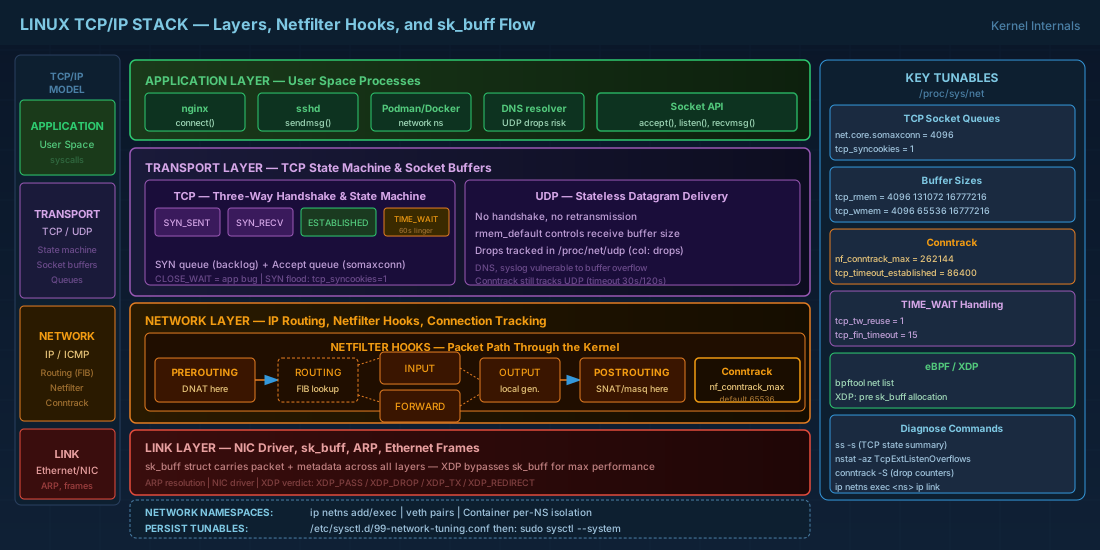
In the link layer, the kernel manages NIC drivers, ARP resolution, and frame delivery. The network layer handles IP routing decisions and fragmentation. The transport layer implements TCP state machines and UDP demultiplexing. What makes the Linux stack distinctive is how deeply these layers integrate with each other through shared data structures, particularly the socket buffer (sk_buff).
Each packet flowing through the kernel is wrapped in an sk_buff structure. This struct carries pointers to the packet data plus metadata: source/destination, protocol, timestamps, connection tracking state, and netfilter marks. When you see a packet traverse netfilter hooks, get routed, and arrive at a socket, it is the same sk_buff being passed along. Allocating and freeing these structures is a significant cost at high packet rates, which is why technologies like XDP (eXpress Data Path) exist to bypass this path entirely.
Netfilter, Conntrack, and the Linux Routing Subsystem
Netfilter provides five hook points in the packet path: PREROUTING, INPUT, FORWARD, OUTPUT, and POSTROUTING. Every packet entering or leaving the machine passes through a subset of these hooks depending on whether it is locally destined, forwarded, or locally generated. Nftables (the modern replacement for iptables) registers its rules at these hooks. For practical firewall configuration using these hooks, see our guide on firewall management with nftables and firewalld.
Connection tracking (conntrack) sits inside netfilter and maintains a state table of all active connections. Each entry records protocol, source/destination addresses and ports, state (NEW, ESTABLISHED, RELATED, INVALID), and timeout. On busy NAT gateways, the conntrack table size can become a bottleneck. The default limit is often 65536 entries, which a server handling thousands of concurrent connections can exhaust quickly.
# Check current conntrack table size and usage
cat /proc/sys/net/netfilter/nf_conntrack_max
cat /proc/sys/net/netfilter/nf_conntrack_count

# Increase conntrack table for busy NAT gateways
sudo sysctl -w net.netfilter.nf_conntrack_max=262144

# View active connections
sudo conntrack -L | head -20

# View conntrack stats (drops indicate table overflow)
sudo conntrack -S
The routing subsystem uses a lookup table (FIB, Forwarding Information Base) indexed by destination prefix. The kernel evaluates routing rules in order (visible via ip rule list), then performs longest-prefix-match in the selected table. For locally destined packets, the route lookup happens after PREROUTING. For forwarded packets, it happens between PREROUTING and FORWARD. For locally generated packets, it happens before OUTPUT.
Diagnosing conntrack table exhaustion
When the conntrack table fills up, new connections are silently dropped. This manifests as intermittent connection timeouts that are difficult to trace without knowing what to look for. Here is a practical approach to diagnosing and resolving conntrack exhaustion on a busy NAT gateway:
# Monitor conntrack usage in real-time (watch for count approaching max)
watch -n 1 'echo "Max: $(cat /proc/sys/net/netfilter/nf_conntrack_max) | Current: $(cat /proc/sys/net/netfilter/nf_conntrack_count)"'

# Check if drops have occurred (insert_failed and drop columns)
sudo conntrack -S
# Output includes: insert_failed=0 drop=0
# Non-zero drop values confirm table exhaustion

# Identify which protocols consume the most entries
sudo conntrack -L -o extended 2>/dev/null | awk '{print $1}' | sort | uniq -c | sort -rn

# Reduce timeout for established TCP connections (default is 432000 = 5 days)
sudo sysctl -w net.netfilter.nf_conntrack_tcp_timeout_established=86400

# Reduce timeout for TIME_WAIT entries
sudo sysctl -w net.netfilter.nf_conntrack_tcp_timeout_time_wait=30
TCP Handshake, State Machine, and Socket Internals
TCP uses a three-way handshake: SYN, SYN-ACK, ACK. But the kernel maintains two queues that administrators often overlook. The SYN queue (or SYN backlog) holds half-open connections that have received a SYN but not yet completed the handshake. The accept queue holds fully established connections waiting for the application to call accept(). If either queue overflows, connections get dropped silently.
The accept queue depth is controlled by net.core.somaxconn and the application's listen() backlog argument (whichever is smaller). On a web server handling bursts, a somaxconn of 128 (historically the default) causes drops during traffic spikes. Modern kernels default to 4096, but verify this on your systems.
The TCP state machine transitions through 11 states. In production, the ones that cause trouble are:
- TIME_WAIT — the socket lingers for 2 * MSL (60 seconds by default) after close. A busy proxy server can accumulate thousands of TIME_WAIT sockets. Enable
net.ipv4.tcp_tw_reuseto allow reuse of TIME_WAIT sockets for outgoing connections. - CLOSE_WAIT — the remote end closed, but the local application has not. This almost always signals an application bug (leaked file descriptors, missing close calls).
- SYN_RECV — a spike of SYN_RECV states may indicate a SYN flood attack. Enable SYN cookies (
net.ipv4.tcp_syncookies = 1) to handle this without allocating state for each SYN.
# View TCP socket states in aggregate
ss -s

# List all TIME_WAIT sockets
ss -tan state time-wait | wc -l

# List CLOSE_WAIT sockets with process info
ss -tanp state close-wait

# Check current somaxconn value
sysctl net.core.somaxconn
Detecting and resolving accept queue overflows
Accept queue overflows are a common cause of connection failures under load that administrators often misdiagnose as application slowness. The kernel tracks these overflows, but you need to know where to look:
# Check for listen overflow events (ListenOverflows increments on each drop)
nstat -az TcpExtListenOverflows TcpExtListenDrops

# View per-socket queue depth (Recv-Q for LISTEN sockets = current backlog)
ss -tlnp
# The Recv-Q column on LISTEN sockets shows pending connections
# The Send-Q column on LISTEN sockets shows the maximum backlog

# Example output:
# State  Recv-Q  Send-Q  Local Address:Port  Process
# LISTEN 0       4096    *:80                nginx: master

# If Recv-Q approaches Send-Q, the accept queue is nearly full
# Increase somaxconn and the application's backlog parameter
sudo sysctl -w net.core.somaxconn=8192
# Then restart the application so it picks up the new limit
UDP and ICMP Protocol Characteristics in Linux
UDP is stateless at the transport layer. The kernel delivers datagrams to the bound socket without connection setup, retransmission, or ordering guarantees. Connection tracking still works for UDP by timing out entries after net.netfilter.nf_conntrack_udp_timeout seconds (default 30 for non-established streams, 120 for established).
The receive buffer for UDP sockets defaults to net.core.rmem_default. If an application cannot drain packets fast enough, the kernel drops them silently. The counter in /proc/net/udp (column "drops") shows per-socket drop counts. DNS resolvers and syslog servers running on UDP are common victims of this.
ICMP types you should know beyond just echo (type 8) and echo reply (type 0): type 3 (destination unreachable) with its subcodes (port unreachable = code 3, fragmentation needed = code 4), type 11 (time exceeded, used by traceroute), and type 5 (redirect, which the kernel can accept or ignore via net.ipv4.conf.all.accept_redirects). On production servers, disable ICMP redirect acceptance to prevent route table manipulation. For practical use of ICMP with troubleshooting tools, see our network troubleshooting with ss, ip, ping, and tracepath tutorial.
Linux Kernel Network Tunables in /proc/sys/net
The /proc/sys/net tree exposes hundreds of kernel network parameters. Here are the ones that matter most in production:
# TCP keepalive: detect dead peers on long-lived connections
# Send probe after 600s idle, then every 60s, give up after 5 probes
sudo sysctl -w net.ipv4.tcp_keepalive_time=600
sudo sysctl -w net.ipv4.tcp_keepalive_intvl=60
sudo sysctl -w net.ipv4.tcp_keepalive_probes=5

# Socket buffer sizes (bytes) — affects throughput on high-latency links
# Format: min default max
sudo sysctl -w net.ipv4.tcp_rmem="4096 131072 16777216"
sudo sysctl -w net.ipv4.tcp_wmem="4096 65536 16777216"
sudo sysctl -w net.core.rmem_max=16777216
sudo sysctl -w net.core.wmem_max=16777216

# Accept queue depth for listening sockets
sudo sysctl -w net.core.somaxconn=4096

# Enable TCP window scaling (usually on by default)
sysctl net.ipv4.tcp_window_scaling

# Make tunables persistent across reboot
# Add lines to /etc/sysctl.d/99-network-tuning.conf
# Then run: sudo sysctl --system
The tcp_rmem and tcp_wmem tunables use three values: minimum, default, and maximum. The kernel auto-tunes between default and maximum based on available memory and connection demand. Setting the maximum too low caps throughput on high-bandwidth, high-latency paths. Setting it too high on a server with thousands of connections wastes memory. For a database server with 50 client connections on a 10 Gbps LAN, generous buffers are fine. For a reverse proxy handling 50,000 concurrent connections, keep the default conservative and let auto-tuning work.
Network Namespaces and Container Networking
Network namespaces give each namespace its own interfaces, routing table, firewall rules, and socket space. This is the foundation of container networking. Every container runtime (Podman, Docker, LXC) creates a network namespace per container and connects it to the host via veth pairs, bridges, or macvlan.
# Create a namespace
sudo ip netns add test-ns

# Run a command inside the namespace
sudo ip netns exec test-ns ip link list

# Create a veth pair connecting host and namespace
sudo ip link add veth-host type veth peer name veth-ns
sudo ip link set veth-ns netns test-ns

# Configure addresses
sudo ip addr add 10.200.1.1/24 dev veth-host
sudo ip link set veth-host up
sudo ip netns exec test-ns ip addr add 10.200.1.2/24 dev veth-ns
sudo ip netns exec test-ns ip link set veth-ns up
sudo ip netns exec test-ns ip link set lo up

# Test connectivity
sudo ip netns exec test-ns ping -c 2 10.200.1.1

# Clean up
sudo ip netns del test-ns
In production, you rarely create namespaces by hand. But understanding them helps when debugging container networking. If a container cannot reach the host, check whether the veth peer is in the right namespace and whether the bridge has the correct forwarding rules. Use ip netns identify <PID> to find which namespace a process lives in, or nsenter -t <PID> -n to enter it and run diagnostics.
eBPF and XDP for High-Performance Packet Processing
eBPF (extended Berkeley Packet Filter) lets you attach small programs to kernel hooks without writing kernel modules. For networking, the most relevant attachment point is XDP (eXpress Data Path), which runs at the NIC driver level before the kernel allocates an sk_buff. This makes XDP programs extremely fast for tasks like DDoS mitigation, load balancing, and traffic filtering.
An XDP program receives a raw packet buffer and returns a verdict: XDP_PASS (continue normal processing), XDP_DROP (discard immediately), XDP_TX (bounce back out the same interface), or XDP_REDIRECT (send to another interface or CPU). Facebook (Meta) uses XDP for their L4 load balancer (Katran), processing millions of packets per second on commodity hardware.
# List eBPF programs attached to network interfaces (requires bpftool)
sudo bpftool net list

# Attach a simple XDP program (example using xdp-loader from xdp-tools)
# This loads a pass-all program for testing
sudo xdp-loader load eth0 /usr/lib/bpf/xdp_pass.o

# Check XDP attachment on an interface
ip link show eth0 | grep xdp

# Detach XDP program
sudo xdp-loader unload eth0 --all

# View eBPF map contents (used for counters, state tables)
sudo bpftool map list
You do not need to write eBPF programs to benefit from them. Tools like bpftrace, Cilium (for Kubernetes networking), and Cloudflare's open-source XDP-based firewall all use eBPF under the hood. On RHEL 10.1 and Fedora 43, eBPF support is mature with libbpf and bpftool available in standard repositories.
Quick Reference - Cheats
| Task | Command / Path |
|---|---|
| View conntrack table size | cat /proc/sys/net/netfilter/nf_conntrack_max |
| TCP socket state summary | ss -s |
| Count TIME_WAIT sockets | ss -tan state time-wait | wc -l |
| TCP buffer tunables | sysctl net.ipv4.tcp_rmem / tcp_wmem |
| Accept queue depth | sysctl net.core.somaxconn |
| TCP keepalive settings | sysctl net.ipv4.tcp_keepalive_time |
| UDP per-socket drops | cat /proc/net/udp (drops column) |
| Network namespace list | ip netns list |
| Run command in namespace | ip netns exec <name> <cmd> |
| List eBPF programs on NICs | bpftool net list |
| Persist sysctl changes | Write to /etc/sysctl.d/99-*.conf, run sysctl --system |
| Disable ICMP redirects | sysctl -w net.ipv4.conf.all.accept_redirects=0 |
Summary
The Linux TCP/IP stack is not a black box. Every packet follows a deterministic path through netfilter hooks, routing decisions, and protocol state machines. When performance degrades or connections drop, the answers are usually in the tunables under /proc/sys/net, the conntrack table size, or the socket queue depths. Network namespaces provide the isolation that containers depend on, and eBPF/XDP offer a path to process packets at wire speed without kernel module development. Knowing these internals means you can trace a problem from the NIC driver to the application socket and fix it where it actually originates, not where symptoms happen to appear.


