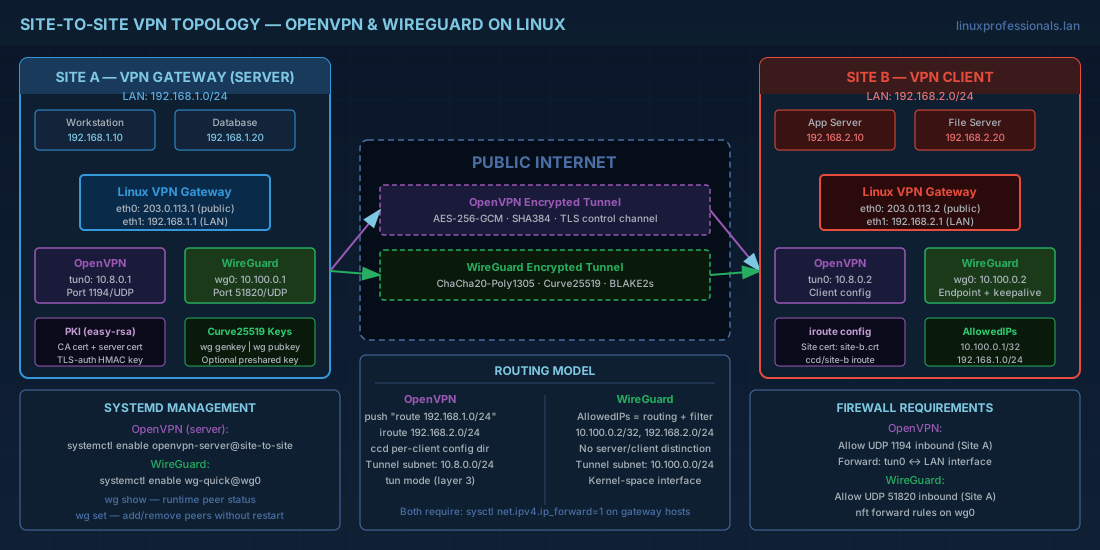
When two offices need encrypted connectivity over the public internet, you build a site-to-site VPN on Linux. Linux gives you two mature options: OpenVPN, which has been the standard for over two decades, and WireGuard, which has been in the mainline kernel since Linux 5.6 and is now the default choice for new deployments on performance-sensitive links. This article walks through both Linux VPN solutions, from certificate generation and configuration to routing, systemd management, and firewall rules.
All examples target Debian 13.3, Ubuntu 24.04.3 LTS, Fedora 43, and RHEL 10.1. RHEL 9.7 compatibility notes are included where relevant. For securing the SSH access that you will use to manage these VPN gateways, see OpenSSH for Admins: Keys, Hardening, and Tunneling.

OpenVPN Architecture, PKI Setup, and Certificate Management
OpenVPN runs in userspace and creates virtual network interfaces (tun for routed mode, tap for bridged mode). It uses TLS for the control channel and symmetric encryption for the data channel. The PKI (Public Key Infrastructure) is the foundation: every connection requires the server and client to present certificates signed by the same CA.
tun vs. tap: choosing the right VPN mode
For site-to-site VPN, use tun (routed mode) in almost all cases. It operates at layer 3, carries only IP packets, and has lower overhead. tap (bridged mode) operates at layer 2 and carries Ethernet frames -- necessary only when you need the remote sites to share a broadcast domain (for example, legacy applications that rely on NetBIOS or mDNS). Bridging adds complexity and latency. Unless you have a specific layer-2 requirement, stick with tun. For more on how Linux handles packet routing between interfaces, review Linux Routing, NAT, and Packet Forwarding.
Building a PKI with easy-rsa for OpenVPN
# Install easy-rsa
# Debian/Ubuntu
apt install easy-rsa openvpn

# RHEL/Fedora
dnf install easy-rsa openvpn

# Initialize the PKI directory
make-cadir /etc/openvpn/easy-rsa
cd /etc/openvpn/easy-rsa

# Edit vars for your organization (optional but recommended)
cat > vars <<'EOF'
set_var EASYRSA_REQ_COUNTRY    "IE"
set_var EASYRSA_REQ_PROVINCE   "Dublin"
set_var EASYRSA_REQ_CITY       "Dublin"
set_var EASYRSA_REQ_ORG        "ExampleCorp"
set_var EASYRSA_REQ_OU         "Infrastructure"
set_var EASYRSA_ALGO           ec
set_var EASYRSA_CURVE          secp384r1
set_var EASYRSA_CA_EXPIRE      3650
set_var EASYRSA_CERT_EXPIRE    825
EOF

# Initialize and build CA
./easyrsa init-pki
./easyrsa build-ca nopass
# Generates: pki/ca.crt, pki/private/ca.key

# Generate server certificate
./easyrsa gen-req vpn-server nopass
./easyrsa sign-req server vpn-server

# Generate client certificate (for the remote site)
./easyrsa gen-req site-b nopass
./easyrsa sign-req client site-b

# Generate TLS auth key for HMAC (prevents DoS on the UDP port)
openvpn --genkey tls-auth /etc/openvpn/ta.key
Using elliptic curve cryptography (EASYRSA_ALGO ec with secp384r1) instead of RSA gives you equivalent security with smaller keys and faster handshakes. This matters on high-throughput VPN gateways handling hundreds of tunnels.
OpenVPN server configuration for site-to-site tunnels
# /etc/openvpn/server/site-to-site.conf
port 1194
proto udp
dev tun

ca /etc/openvpn/easy-rsa/pki/ca.crt
cert /etc/openvpn/easy-rsa/pki/issued/vpn-server.crt
key /etc/openvpn/easy-rsa/pki/private/vpn-server.key
tls-auth /etc/openvpn/ta.key 0

# Tunnel subnet
server 10.8.0.0 255.255.255.0

# Push route so Site B knows how to reach Site A's LAN
# Site A LAN: 192.168.1.0/24
push "route 192.168.1.0 255.255.255.0"

# Route to Site B's LAN (add via client-config-dir or iroute)
route 192.168.2.0 255.255.255.0
client-config-dir /etc/openvpn/ccd

# Crypto settings
cipher AES-256-GCM
data-ciphers AES-256-GCM:CHACHA20-POLY1305
auth SHA384

# Security
user nobody
group nogroup
persist-key
persist-tun

# Keepalive: ping every 10s, timeout at 60s
keepalive 10 60

# Logging
verb 3
status /var/log/openvpn-status.log
log-append /var/log/openvpn.log
# Client-specific route: /etc/openvpn/ccd/site-b
# Tell the server that Site B owns 192.168.2.0/24
iroute 192.168.2.0 255.255.255.0OpenVPN client configuration (Site B)
# /etc/openvpn/client/site-to-site.conf
client
dev tun
proto udp
remote vpn.example.com 1194
resolv-retry infinite

ca /etc/openvpn/ca.crt
cert /etc/openvpn/site-b.crt
key /etc/openvpn/site-b.key
tls-auth /etc/openvpn/ta.key 1

cipher AES-256-GCM
data-ciphers AES-256-GCM:CHACHA20-POLY1305
auth SHA384

user nobody
group nogroup
persist-key
persist-tun

keepalive 10 60
verb 3
Managing OpenVPN tunnels with systemd
# Enable and start the server instance
systemctl enable --now openvpn-server@site-to-site

# On the client side
systemctl enable --now openvpn-client@site-to-site

# Check status
systemctl status openvpn-server@site-to-site
journalctl -u openvpn-server@site-to-site -f
The @ syntax tells systemd to use the instance name as the config file name (without the .conf extension). This lets you run multiple VPN tunnels on the same host.
Revoking OpenVPN client certificates
When a remote site is decommissioned or a certificate is compromised, you need to revoke it immediately. Here is the complete revocation workflow:
# Revoke the certificate for site-b
cd /etc/openvpn/easy-rsa
./easyrsa revoke site-b

# Generate an updated Certificate Revocation List (CRL)
./easyrsa gen-crl

# Copy the CRL to the OpenVPN server directory
cp pki/crl.pem /etc/openvpn/server/

# Add to server config (if not already present):
# crl-verify /etc/openvpn/server/crl.pem

# Restart OpenVPN to enforce the revocation
systemctl restart openvpn-server@site-to-site

# Verify the revoked client can no longer connect
# Check logs for "VERIFY ERROR" entries
journalctl -u openvpn-server@site-to-site --since "5 minutes ago" | grep VERIFY
WireGuard: High-Performance Kernel-Level VPN for Linux
WireGuard runs inside the Linux kernel as a network module. It uses modern cryptography (Curve25519 for key exchange, ChaCha20 for symmetric encryption, Poly1305 for authentication, BLAKE2s for hashing) with no configuration choices to get wrong -- there is one cipher suite, and it is secure. The codebase is roughly 4,000 lines of code compared to OpenVPN's 100,000+, which means a smaller attack surface and easier auditing.
Installing WireGuard on modern Linux distributions
# Debian 13.3 / Ubuntu 24.04.3 LTS (kernel module included)
apt install wireguard

# Fedora 43 (kernel module included)
dnf install wireguard-tools

# RHEL 10.1 (kernel module included since RHEL 9.1+)
dnf install wireguard-tools

# RHEL 9.7 (also supported, kernel module in-tree)
dnf install wireguard-tools
WireGuard key generation and preshared keys
WireGuard uses Curve25519 key pairs. Each peer (server and client) needs its own pair.
# Generate keys for Site A (the "server")
wg genkey | tee /etc/wireguard/site-a-private.key | wg pubkey > /etc/wireguard/site-a-public.key
chmod 600 /etc/wireguard/site-a-private.key

# Generate keys for Site B (the "client")
wg genkey | tee /etc/wireguard/site-b-private.key | wg pubkey > /etc/wireguard/site-b-public.key
chmod 600 /etc/wireguard/site-b-private.key

# Optional: generate a preshared key for post-quantum resistance
wg genpsk > /etc/wireguard/preshared.key
chmod 600 /etc/wireguard/preshared.key
WireGuard site-to-site VPN configuration
WireGuard configuration uses INI-style files with [Interface] and [Peer] sections.
# Site A: /etc/wireguard/wg0.conf
[Interface]
Address = 10.100.0.1/24
ListenPort = 51820
PrivateKey = <contents of site-a-private.key>

# Enable IP forwarding for routing between sites
PostUp = sysctl -w net.ipv4.ip_forward=1
PostUp = nft add rule inet filter forward iifname "wg0" accept
PostUp = nft add rule inet filter forward oifname "wg0" accept
PostDown = nft delete rule inet filter forward iifname "wg0" accept
PostDown = nft delete rule inet filter forward oifname "wg0" accept

[Peer]
# Site B
PublicKey = <contents of site-b-public.key>
PresharedKey = <contents of preshared.key>
AllowedIPs = 10.100.0.2/32, 192.168.2.0/24
# No Endpoint here if Site B connects to Site A (Site A listens)
# Site B: /etc/wireguard/wg0.conf
[Interface]
Address = 10.100.0.2/24
PrivateKey = <contents of site-b-private.key>
PostUp = sysctl -w net.ipv4.ip_forward=1
PostUp = nft add rule inet filter forward iifname "wg0" accept
PostUp = nft add rule inet filter forward oifname "wg0" accept
PostDown = nft delete rule inet filter forward iifname "wg0" accept
PostDown = nft delete rule inet filter forward oifname "wg0" accept
[Peer]
# Site A
PublicKey = <contents of site-a-public.key>
PresharedKey = <contents of preshared.key>
Endpoint = vpn.example.com:51820
AllowedIPs = 10.100.0.1/32, 192.168.1.0/24
PersistentKeepalive = 25Understanding AllowedIPs and routing in WireGuard
AllowedIPs serves two purposes simultaneously: it defines which source IPs are accepted from a peer (incoming filter), and it defines which destination IPs are routed to that peer (outgoing routing). For site-to-site VPN, include the tunnel address and the remote LAN subnet. If you set AllowedIPs = 0.0.0.0/0, all traffic goes through the tunnel -- useful for road-warrior VPN, but not for site-to-site where you only want cross-site traffic tunneled.
Managing WireGuard tunnels with wg-quick and wg commands
# Bring up the tunnel
wg-quick up wg0

# Bring it down
wg-quick down wg0

# Enable at boot via systemd
systemctl enable --now wg-quick@wg0

# Check tunnel status
wg show
# Output shows each peer, last handshake, transfer bytes, endpoint

# Add a peer at runtime (no restart needed)
wg set wg0 peer <pubkey> allowed-ips 10.100.0.3/32,192.168.3.0/24 endpoint 203.0.113.50:51820

# Remove a peer at runtime
wg set wg0 peer <pubkey> remove
The wg command modifies the running interface without restarting the tunnel. This means you can add or remove peers without disrupting existing connections -- a significant operational advantage over OpenVPN, which requires a restart for configuration changes.
WireGuard vs. OpenVPN Performance Comparison
Benchmarks vary by hardware, but the pattern is consistent. WireGuard operates in kernel space and uses modern cryptographic primitives optimized for current CPUs. OpenVPN runs in userspace and copies packets between kernel and userspace for each direction, adding latency.
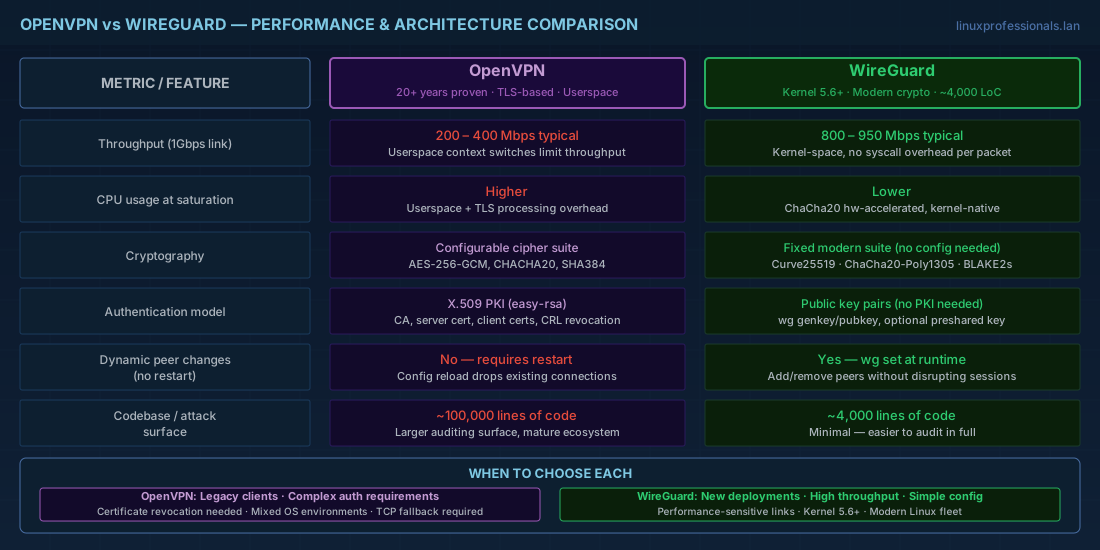
| Metric | WireGuard | OpenVPN |
|---|---|---|
| Throughput (1Gbps link) | 800-950 Mbps typical | 200-400 Mbps typical |
| CPU usage at saturation | Lower (kernel-space, no context switching) | Higher (userspace, TLS processing) |
| Latency overhead | ~0.5ms per hop | ~1-3ms per hop |
| Connection establishment | 1 RTT (Noise protocol) | Multiple RTTs (TLS handshake) |
| Configuration complexity | Minimal (one cipher suite, no choices) | Moderate (many cipher/auth options) |
| PKI requirement | None (simple key pairs) | Yes (CA, server cert, client certs) |
| Stealth/obfuscation | Limited (fixed UDP port) | Better (can run over TCP/443, obfsproxy) |
Choose WireGuard when performance and simplicity are priorities. Choose OpenVPN when you need TCP fallback for restrictive firewalls, fine-grained PKI certificate management, or compatibility with older systems that lack kernel WireGuard support.
Firewall Rules for VPN Gateways on Linux
Both VPN solutions need firewall rules on the gateway hosts to allow VPN traffic and forward packets between the tunnel and LAN interfaces. For comprehensive firewall configuration guidance, see Firewall Management with nftables and firewalld.
nftables rules for WireGuard VPN
# Allow WireGuard UDP port
nft add rule inet filter input udp dport 51820 accept

# Allow forwarding between wg0 and the LAN interface
nft add rule inet filter forward iifname "wg0" oifname "eth0" accept
nft add rule inet filter forward iifname "eth0" oifname "wg0" accept

# Enable IP forwarding (persist in /etc/sysctl.d/)
echo "net.ipv4.ip_forward = 1" > /etc/sysctl.d/99-vpn.conf
sysctl -p /etc/sysctl.d/99-vpn.conf
firewalld rules for OpenVPN
# Add OpenVPN service
firewall-cmd --permanent --add-service=openvpn
# Or if using a custom port:
firewall-cmd --permanent --add-port=1194/udp

# Enable masquerading for NAT (if the remote site needs internet through this gateway)
firewall-cmd --permanent --add-masquerade

# Allow forwarding between zones
firewall-cmd --permanent --zone=public --add-forward

firewall-cmd --reload
On RHEL 10.1 and Fedora 43, firewalld handles the forwarding policy. On Debian 13.3 where you manage nftables directly, write explicit forward chain rules as shown above.
Troubleshooting VPN connectivity and routing issues
When a site-to-site VPN tunnel is up but traffic does not flow, use these diagnostic steps to isolate the problem:
# 1. Verify the tunnel interface exists and has the correct address
ip addr show wg0      # WireGuard
ip addr show tun0     # OpenVPN

# 2. Check if IP forwarding is enabled
sysctl net.ipv4.ip_forward
# Must return: net.ipv4.ip_forward = 1

# 3. Verify routing table includes routes to remote subnet
ip route | grep 192.168.2.0
# Should show the route via the tunnel interface

# 4. Test connectivity to the remote tunnel endpoint
ping 10.100.0.2       # WireGuard tunnel peer
ping 10.8.0.1         # OpenVPN tunnel server

# 5. Check for firewall rules blocking forwarded traffic
nft list chain inet filter forward
# Or for firewalld:
firewall-cmd --list-all --zone=public

# 6. Capture traffic on the tunnel interface to verify packets arrive
tcpdump -i wg0 -n -c 20
tcpdump -i tun0 -n -c 20
OpenVPN and WireGuard Quick Reference Commands
| Task | Command |
|---|---|
| Initialize easy-rsa PKI | cd /etc/openvpn/easy-rsa && ./easyrsa init-pki && ./easyrsa build-ca nopass |
| Generate OpenVPN server cert | ./easyrsa gen-req vpn-server nopass && ./easyrsa sign-req server vpn-server |
| Generate TLS auth key | openvpn --genkey tls-auth /etc/openvpn/ta.key |
| Start OpenVPN server | systemctl enable --now openvpn-server@site-to-site |
| Revoke OpenVPN client cert | ./easyrsa revoke site-b && ./easyrsa gen-crl |
| Generate WireGuard keys | wg genkey | tee private.key | wg pubkey > public.key |
| Generate preshared key | wg genpsk > preshared.key |
| Bring up WireGuard tunnel | wg-quick up wg0 |
| Enable WireGuard at boot | systemctl enable --now wg-quick@wg0 |
| Show WireGuard status | wg show |
| Add WireGuard peer at runtime | wg set wg0 peer <pubkey> allowed-ips 10.100.0.3/32 endpoint host:51820 |
| Remove WireGuard peer | wg set wg0 peer <pubkey> remove |
| Enable IP forwarding | sysctl -w net.ipv4.ip_forward=1 |
| Allow VPN in firewalld | firewall-cmd --permanent --add-service=openvpn && firewall-cmd --reload |
Summary
OpenVPN and WireGuard both build encrypted tunnels between sites, but they take fundamentally different approaches. OpenVPN gives you a mature PKI model, TCP fallback for hostile networks, and decades of enterprise deployment experience. WireGuard gives you kernel-level VPN performance, a minimal attack surface, and configuration simplicity that reduces the chance of misconfiguration.
For new site-to-site VPN deployments in 2026, WireGuard is the default recommendation when both endpoints run modern kernels (Linux 5.6+ -- all current distributions qualify). OpenVPN remains the right choice when you need TCP transport, certificate-based identity management, or compatibility with endpoints that cannot run WireGuard.
Regardless of which you choose, the operational fundamentals are the same: protect private keys, enable IP forwarding only where needed, write explicit firewall rules for VPN traffic, manage tunnels through systemd for reliability, and monitor tunnel status so you know when a link goes down before your users tell you. On Debian 13.3, Ubuntu 24.04.3 LTS, Fedora 43, RHEL 10.1, and RHEL 9.7, both solutions install from standard repositories and integrate cleanly with nftables and firewalld.