A firewall stops packets at the perimeter. But what happens when someone gets past it -- through a compromised application, a stolen credential, or a zero-day in a web framework? Effective intrusion detection on Linux requires defense layers inside the host itself. AIDE (Advanced Intrusion Detection Environment) watches for unauthorized file changes. fail2ban reacts to brute-force patterns in real time. auditd records system calls and file access at the kernel level. Together, they form a defense-in-depth detection stack that gives you visibility and response capability on every Linux server.
This article covers practical deployment on Debian 13.3, Ubuntu 24.04.3 LTS, Fedora 43, and RHEL 10.1. RHEL 9.7 compatibility is noted where commands differ. For establishing a broader security foundation before deploying these tools, see Linux Security Baseline: Updates, Firewall, and Least Privilege.
AIDE Filesystem Integrity Monitoring: Detecting Unauthorized Changes

AIDE (Advanced Intrusion Detection Environment) takes a snapshot of file metadata -- hashes, permissions, ownership, timestamps -- and stores it in a database. Later, you run a check to compare the current filesystem state against that snapshot. Any mismatch means something changed, and you need to decide whether that change was authorized. Filesystem integrity monitoring is a critical control for detecting trojaned binaries, unauthorized configuration changes, and rootkit installations.
Installing AIDE and initializing the baseline database
# Debian/Ubuntu
apt install aide

# RHEL/Fedora
dnf install aide
After installation, initialize the database. This takes several minutes on a server with many packages because AIDE hashes every monitored file.
# Initialize the AIDE database
aide --init

# On Debian/Ubuntu, the output goes to /var/lib/aide/aide.db.new
# Move it to the expected location
mv /var/lib/aide/aide.db.new /var/lib/aide/aide.db

# On RHEL/Fedora, the path may differ:
mv /var/lib/aide/aide.db.new.gz /var/lib/aide/aide.db.gz
Initialize AIDE on a clean, freshly provisioned system. If you initialize after a compromise, the database captures the compromised state as the baseline, which defeats the purpose entirely.
Configuring aide.conf for production monitoring
The default configuration monitors common system directories, but you should tune it for your environment. The config file defines rules (groups of attributes to check) and paths to monitor or exclude.
# /etc/aide/aide.conf (Debian) or /etc/aide.conf (RHEL)

# Define attribute groups
# p=permissions, i=inode, n=link count, u=user, g=group
# s=size, m=mtime, S=check for growing size, sha256=hash
NORMAL = p+i+n+u+g+s+m+sha256
PERMS = p+u+g
LOG = p+u+g+S

# Critical system binaries -- full integrity check
/usr/sbin NORMAL
/usr/bin NORMAL
/sbin NORMAL
/bin NORMAL

# Config files -- track changes
/etc NORMAL

# Kernel modules
/lib/modules NORMAL

# Exclude paths that change legitimately
!/var/log
!/var/cache
!/var/tmp
!/tmp
!/run
!/proc
!/sys
!/var/lib/aide
The exclamation mark prefix excludes a path. Without proper exclusions, every log rotation and package cache update triggers false positives, and administrators quickly learn to ignore AIDE reports -- which is worse than not running AIDE at all.
Running AIDE checks, handling results, and automating reports
# Run a check against the baseline
aide --check

# Output shows added, removed, and changed files
# Example output:
#   Changed entries:
#   f ... . : /etc/passwd
#   f ... . : /usr/bin/curl

# After verifying changes are legitimate, update the baseline
aide --update
mv /var/lib/aide/aide.db.new /var/lib/aide/aide.db
Schedule AIDE checks via cron or a systemd timer. A daily check is standard. Send the report to a monitored email address or a log aggregation system -- a report sitting in /var/log that nobody reads is security theater.
# /etc/cron.d/aide-check
0 4 * * * root /usr/bin/aide --check | mail -s "AIDE report $(hostname)" security-team@example.com
Securing the AIDE database against tampering
If an attacker gains root access, they can modify the AIDE database to hide their changes. Protect the baseline with these measures:
- Store a copy offline -- copy the database to a read-only USB drive, a network share with restricted write access, or an immutable S3 bucket.
- Use cryptographic signing -- AIDE supports
gpgsignatures on the database file. Verify the signature before each check. - Set immutable attributes -- use
chattr +i /var/lib/aide/aide.dbto prevent modification. An attacker with root can remove the immutable flag, but it adds a step and may generate audit events if auditd is monitoring attribute changes.
fail2ban: Automated Brute-Force Detection and Response
fail2ban monitors log sources for patterns that indicate attacks (failed SSH logins, HTTP authentication failures, SMTP abuse) and creates temporary firewall bans. It is reactive, not preventive -- it bans after detecting bad behavior, not before. When combined with nftables firewall rules, fail2ban provides automated incident response at the network layer. For details on configuring the nftables backend, see Linux Server Security: nftables, firewalld, and Port Scanning.
Configuring fail2ban jails and filters
A jail ties a filter (regex pattern) to an action (ban command) and a log source. The default installation includes jails for sshd, postfix, dovecot, apache, nginx, and many others. You enable the ones relevant to your server.
# /etc/fail2ban/jail.local
[DEFAULT]
banaction = nftables-multiport
banaction_allports = nftables-allports
backend = systemd
bantime = 2h
findtime = 10m
maxretry = 5
ignoreip = 127.0.0.1/8 ::1 10.0.0.0/8

[sshd]
enabled = true
port = ssh
filter = sshd
maxretry = 3
bantime = 6h

[nginx-http-auth]
enabled = true
port = http,https
filter = nginx-http-auth
logpath = /var/log/nginx/error.log
maxretry = 5
bantime = 1h
The ignoreip directive is critical. Without it, you risk banning yourself or your monitoring systems during legitimate failed login attempts. Always whitelist your management networks.
fail2ban with systemd journal backend
On systems using journald (Fedora 43, RHEL 10.1, Ubuntu 24.04.3 with default config), set backend = systemd and fail2ban reads directly from the journal instead of tailing log files. This is more reliable because it works even when log files are rotated or when services write exclusively to the journal.
# Verify fail2ban can read from the journal
fail2ban-client get sshd logpath
# Should show: systemd journal for sshd

# Test the filter against current journal entries
fail2ban-regex systemd-journal "sshd"
Writing custom fail2ban filters for application-specific detection
When you run a custom application that logs authentication failures in its own format, you need a custom filter.
# /etc/fail2ban/filter.d/myapp.conf
[Definition]
failregex = ^.*authentication failure from <HOST> for user .*$
            ^.*login rejected: invalid credentials from <HOST>$
ignoreregex =
datepattern = %%Y-%%m-%%d %%H:%%M:%%S
# /etc/fail2ban/jail.local (add this jail)
[myapp]
enabled = true
port = 8443
filter = myapp
logpath = /var/log/myapp/auth.log
maxretry = 5
bantime = 2h# Test the filter before enabling
fail2ban-regex /var/log/myapp/auth.log /etc/fail2ban/filter.d/myapp.conf
# Reload fail2ban
fail2ban-client reload
fail2ban-client status myappAlways test custom filters with fail2ban-regex against real log samples. A regex that does not match means the jail watches silently and never bans, which creates a false sense of security.
auditd: Kernel-Level System Auditing for Linux Security
auditd records events at the kernel level -- file access, system calls, process execution, network connections. It is the most thorough Linux auditing tool available, and it is required by compliance frameworks like PCI DSS, HIPAA, and SOC 2. On RHEL 10.1, RHEL 9.7, and Fedora 43, auditd is installed by default. On Debian 13.3 and Ubuntu, install it explicitly. For systems running mandatory access control alongside auditd, see SELinux and AppArmor for Beginners.
# Debian/Ubuntu
apt install auditd audispd-plugins

# RHEL/Fedora (usually pre-installed)
dnf install audit
Writing auditd file watch rules
File watches track access to specific files or directories. The -w flag specifies the path, -p specifies the permission filter (r=read, w=write, x=execute, a=attribute change), and -k assigns a searchable key.
# /etc/audit/rules.d/security.rules

# Watch authentication files
-w /etc/passwd -p wa -k identity
-w /etc/shadow -p wa -k identity
-w /etc/group -p wa -k identity
-w /etc/gshadow -p wa -k identity
-w /etc/sudoers -p wa -k sudo_changes
-w /etc/sudoers.d/ -p wa -k sudo_changes

# Watch SSH configuration
-w /etc/ssh/sshd_config -p wa -k sshd_config
-w /etc/ssh/sshd_config.d/ -p wa -k sshd_config

# Watch cron directories
-w /etc/crontab -p wa -k cron_changes
-w /etc/cron.d/ -p wa -k cron_changes
-w /var/spool/cron/ -p wa -k cron_changes
Configuring syscall audit rules for threat detection
Syscall rules capture specific kernel calls. These are more powerful but generate more log volume. Use them selectively for high-value security events.
# /etc/audit/rules.d/syscalls.rules

# Log all execve calls (tracks every command executed)
-a always,exit -F arch=b64 -S execve -k cmd_exec

# Track file deletion
-a always,exit -F arch=b64 -S unlink -S unlinkat -S rename -S renameat -k file_delete

# Track permission changes
-a always,exit -F arch=b64 -S chmod -S fchmod -S fchmodat -k perm_change

# Track module loading (detect rootkit insertion)
-a always,exit -F arch=b64 -S init_module -S finit_module -k module_load

# Make audit configuration immutable (requires reboot to change)
# Place this as the LAST rule
-e 2
The -e 2 rule makes the audit configuration immutable at runtime. An attacker who gains root cannot disable auditing without rebooting the system, which itself is a detectable event. Use this on production servers.
Searching and reporting with ausearch and aureport
# Load new rules
augenrules --load

# Search for events by key
ausearch -k identity --start today

# Search for events by specific user
ausearch -ua 1000 --start recent

# Search for failed operations
ausearch --success no --start today

# Generate summary reports
aureport --summary
aureport --auth          # authentication report
aureport --login         # login report
aureport --file          # file access report
aureport --key           # events by key
aureport --failed        # all failed events
In enterprise environments, forward audit logs to a central SIEM (Splunk, Elastic, Wazuh) using the audispd syslog plugin or by shipping /var/log/audit/audit.log with a log forwarder. Local audit logs on a compromised host may be tampered with; remote copies are your insurance.
Combining AIDE, fail2ban, and auditd for Defense in Depth
Each tool covers a different intrusion detection gap:
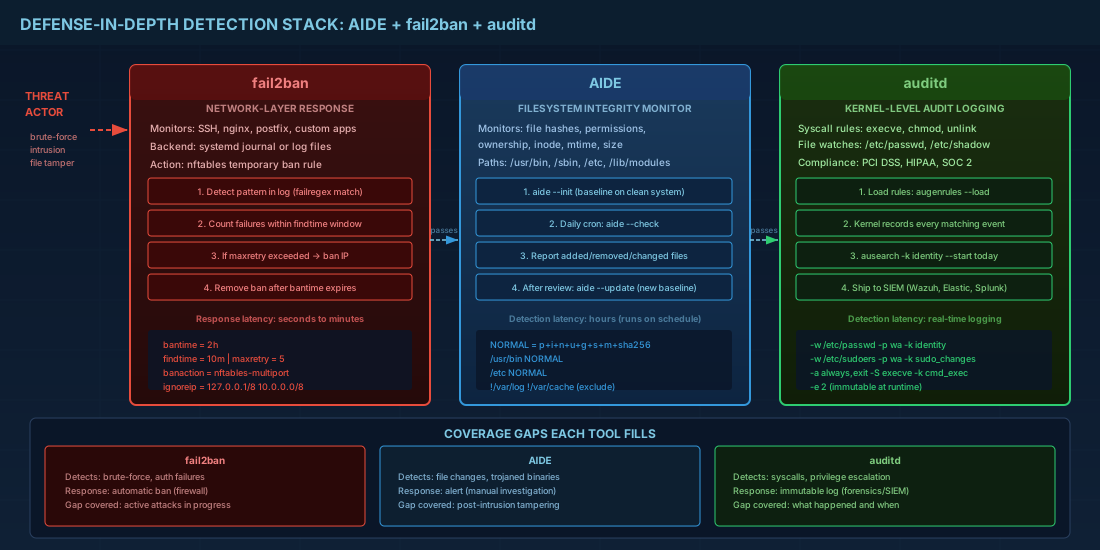
| Tool | Detects | Response | Latency |
|---|---|---|---|
| AIDE | File modifications, trojaned binaries, config tampering | Alert (manual response) | Hours (runs on schedule) |
| fail2ban | Brute-force attacks, repeated auth failures | Automatic ban (firewall rule) | Seconds to minutes |
| auditd | Syscall-level activity, file access, privilege escalation | Log (for forensics and SIEM alerts) | Real-time logging |
Incident response workflow using AIDE, fail2ban, and auditd
When any of these intrusion detection tools fire an alert, follow a structured response:
- Triage: Check auditd logs with
ausearch -k <key> --start todayto understand what happened and when. - Contain: If a host is compromised, isolate it from the network. Do not shut it down -- volatile memory contains evidence.
- Investigate: Run
aide --checkto identify all modified files. Cross-reference with auditd logs to find the responsible process and user. - Eradicate: Remove malicious files, revoke compromised credentials, patch the vulnerability.
- Recover: Restore from a known-good backup, re-initialize the AIDE database, verify auditd rules are intact.
- Document: Write a postmortem with timeline, root cause, and changes made to prevent recurrence.
# Quick triage commands after an alert
# 1. Check what changed on disk
aide --check 2>&1 | head -100

# 2. Review recent audit events for the relevant key
ausearch -k identity --start today -i

# 3. Check fail2ban for related ban activity
fail2ban-client status sshd

# 4. Review recent logins
aureport --login --start today
last -20

# 5. Check for unexpected processes
ps auxf | grep -v '\[' | head -50
ss -tulpn
Intrusion Detection Quick Reference Commands
| Task | Command |
|---|---|
| Initialize AIDE database | aide --init && mv /var/lib/aide/aide.db.new /var/lib/aide/aide.db |
| Check filesystem integrity | aide --check |
| Update AIDE baseline | aide --update && mv /var/lib/aide/aide.db.new /var/lib/aide/aide.db |
| fail2ban jail status | fail2ban-client status sshd |
| Test fail2ban filter | fail2ban-regex /var/log/auth.log /etc/fail2ban/filter.d/sshd.conf |
| Unban IP in fail2ban | fail2ban-client set sshd unbanip 1.2.3.4 |
| Load audit rules | augenrules --load |
| Search audit events by key | ausearch -k identity --start today -i |
| Audit authentication report | aureport --auth --start today |
| Audit failed events | aureport --failed --start today |
| Make audit config immutable | Add -e 2 as the last rule in /etc/audit/rules.d/ |
| Recent logins report | aureport --login --start today |
Summary
No single intrusion detection tool catches everything. AIDE finds file-level tampering after the fact. fail2ban blocks brute-force attackers in near real time. auditd records kernel-level events for forensics and compliance. Deploying all three gives you overlapping coverage -- AIDE catches what auditd might miss in volume, fail2ban reacts faster than either can alert, and auditd provides the forensic trail that AIDE and fail2ban cannot.
The common failure mode is deploying these tools and then ignoring their output. AIDE reports need to go somewhere monitored. fail2ban jails need tested filters. auditd logs need a SIEM or at least a weekly review. Detection without response is just expensive logging. On Debian 13.3, Ubuntu 24.04.3 LTS, Fedora 43, RHEL 10.1, and RHEL 9.7, all three tools install cleanly and work with modern systemd and nftables stacks. The setup time is measured in hours; the value shows up the first time you catch an unauthorized change before it becomes a breach.