Advanced LVM features like thin provisioning, snapshots, and live migration take basic volume management to enterprise grade. If you already know how to create physical volumes, volume groups, and logical volumes from the LVM beginners guide, you have the foundation. But production LVM goes much further. Thin provisioning lets you allocate more storage than you physically have. Snapshots give you point-in-time copies for backups or testing. And tools like pvmove let you migrate data between disks while the system is live.
This article covers the advanced LVM features you need for enterprise environments: thin pools, thick and thin snapshots, online migration with pvmove, SSD caching with dm-cache, VDO deduplication, and clustered operation. Examples target Debian 13.3, Ubuntu 24.04.3 LTS, Fedora 43, and RHEL 10.1.
LVM Thin Provisioning: Allocate More Storage Than You Have
Traditional LVM allocates physical extents the moment you create a logical volume. A 100GB LV immediately consumes 100GB of VG space, even if you only write 2GB to it. Thin provisioning changes this. You create a thin pool, then carve thin LVs from it. Blocks are allocated only when data is actually written.
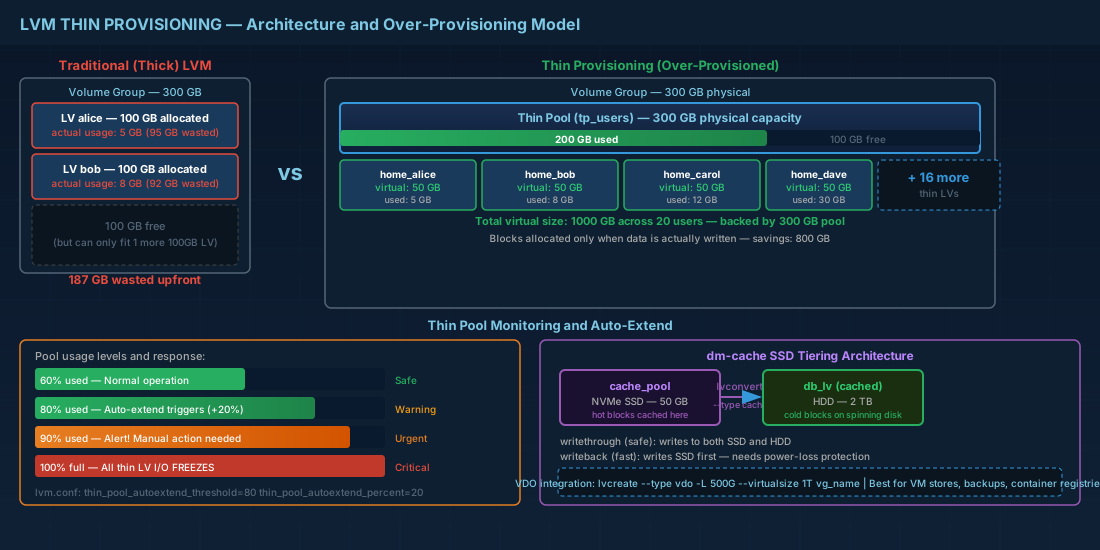
Why this matters: on a file server with 20 user home directories, you might want each user to see a 50GB volume. That is 1TB total. But actual usage might only be 200GB. With thin provisioning, you back all 20 thin LVs with a 300GB pool and expand the pool as usage grows. This is over-provisioning, and it is deliberate.
# Create a thin pool in an existing VG
# Pool size is the actual physical allocation
sudo lvcreate -L 300G --thinpool tp_users vg_data

# Create thin LVs from the pool
# Virtual size can exceed pool size (over-provisioning)
sudo lvcreate -V 50G --thin -n home_alice vg_data/tp_users
sudo lvcreate -V 50G --thin -n home_bob vg_data/tp_users
sudo lvcreate -V 50G --thin -n home_carol vg_data/tp_users

# Check pool utilization
sudo lvs -o lv_name,lv_size,data_percent,metadata_percent vg_data/tp_users

# Format and mount a thin LV (works like any normal LV)
sudo mkfs.ext4 /dev/vg_data/home_alice
sudo mkdir -p /home/alice
sudo mount /dev/vg_data/home_alice /home/alice
Over-provisioning is powerful but dangerous without monitoring. If the thin pool fills to 100%, all thin LVs on that pool freeze and I/O stalls. Set up alerts at 80% pool usage. LVM can auto-extend thin pools if configured in /etc/lvm/lvm.conf with thin_pool_autoextend_threshold and thin_pool_autoextend_percent.
# Enable auto-extend in /etc/lvm/lvm.conf
# These settings tell LVM to grow the pool by 20% when it hits 80% full
activation {
    thin_pool_autoextend_threshold = 80
    thin_pool_autoextend_percent = 20
}

# The dmeventd service must be running for auto-extend to work
sudo systemctl enable --now dm-event.service
Monitoring Thin Pool Usage with Scripts
Relying solely on auto-extend is risky. A monitoring script that alerts your operations team when pool usage exceeds a threshold provides an essential safety net.
# Simple thin pool monitoring script
#!/bin/bash
# Save as /usr/local/bin/check-thin-pools.sh
THRESHOLD=85

for pool in $(lvs --noheadings -o lv_name,lv_attr | awk '$2 ~ /^t/ {print $1}'); do
  USAGE=$(lvs --noheadings -o data_percent "vg_data/$pool" | tr -d ' ')
  USAGE_INT=${USAGE%.*}
  if [ "$USAGE_INT" -ge "$THRESHOLD" ]; then
    echo "WARNING: Thin pool $pool is at ${USAGE}% capacity" | \
      mail -s "Thin Pool Alert: $pool" admin@example.com
  fi
done

# Add to crontab: run every 5 minutes
# */5 * * * * /usr/local/bin/check-thin-pools.sh
LVM Snapshots: Point-in-Time Copies for Backup and Rollback
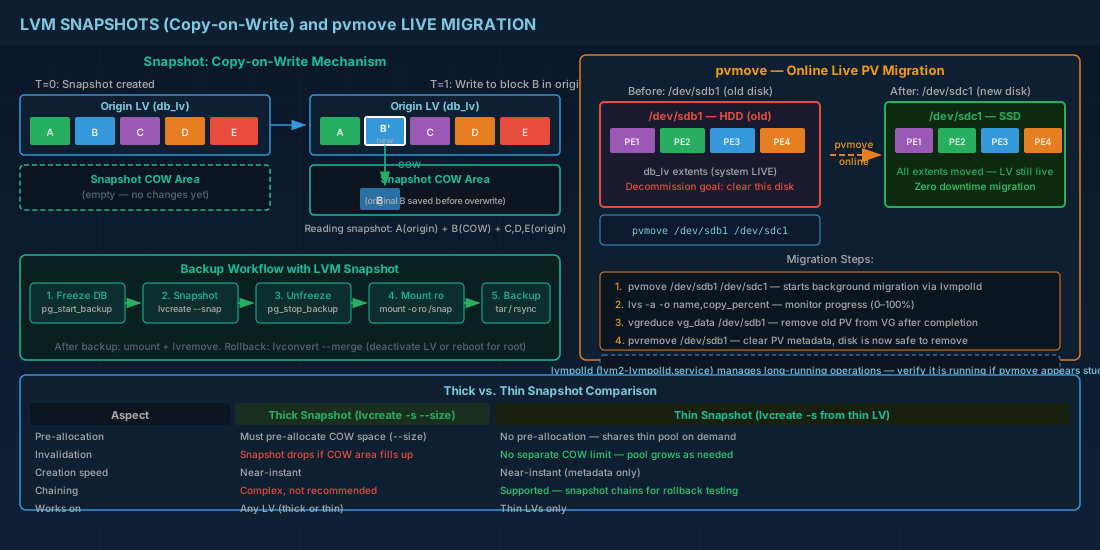
An LVM snapshot captures the state of a logical volume at a specific moment. It uses copy-on-write: when a block in the origin LV changes, the old block is copied to the snapshot before the write completes. The snapshot itself only consumes space proportional to the amount of change, not the full LV size.
Traditional (Thick) Snapshots
# Create a snapshot of an existing LV
# --size defines the COW space, not the LV size
sudo lvcreate --snapshot --name snap_db_backup --size 10G /dev/vg_data/db_lv

# Mount the snapshot read-only for backup
sudo mkdir -p /mnt/snap_backup
sudo mount -o ro /dev/vg_data/snap_db_backup /mnt/snap_backup

# Run your backup tool against the snapshot mount
sudo tar czf /backup/db_$(date +%Y%m%d).tar.gz -C /mnt/snap_backup .

# Unmount and remove when done
sudo umount /mnt/snap_backup
sudo lvremove -f vg_data/snap_db_backup
The --size parameter is the maximum amount of changed data the snapshot can track. If changes exceed this size, the snapshot becomes invalid and is automatically dropped. For a database backup that takes 10 minutes, estimate the write rate and add 50% margin. If the DB writes 1GB/min, a 15GB snapshot is reasonable.
Thin Snapshots: Space-Efficient and Instant
Thin LVs get a better snapshot implementation. Thin snapshots share the thin pool and do not require a pre-allocated COW area. They are more space-efficient and can be created nearly instantly.
# Snapshot a thin LV (no --size needed)
sudo lvcreate --snapshot --name snap_alice vg_data/home_alice

# Thin snapshots can themselves be snapshotted (snapshot chains)
# Useful for testing rollback scenarios
sudo lvcreate --snapshot --name snap_alice_v2 vg_data/snap_alice
Merging Snapshots for LVM Rollback
Merging a snapshot rolls the origin LV back to the snapshot state. This is useful after a failed upgrade or configuration change.
# Merge a snapshot back into the origin
sudo lvconvert --merge vg_data/snap_db_backup

# For the root filesystem or active LVs, the merge happens on next activation
# Reboot if the LV is the root filesystem
sudo reboot
Production consequence: snapshot merge on an active origin LV is deferred until the LV is deactivated and reactivated. For non-root LVs, unmount and run lvchange -an then lvchange -ay. For root, a reboot is required.
Snapshot Best Practices for Database Backups
Using LVM snapshots for database-consistent backups requires coordination with the database engine to ensure data integrity.
# PostgreSQL: use pg_start_backup/pg_stop_backup with snapshot
sudo -u postgres psql -c "SELECT pg_start_backup('lvm_snap', true);"
sudo lvcreate --snapshot --name snap_pg --size 20G /dev/vg_data/pg_data
sudo -u postgres psql -c "SELECT pg_stop_backup();"

# MySQL/MariaDB: flush and lock tables, then snapshot
mysql -u root -e "FLUSH TABLES WITH READ LOCK;"
sudo lvcreate --snapshot --name snap_mysql --size 15G /dev/vg_data/mysql_data
mysql -u root -e "UNLOCK TABLES;"

# Mount snapshot, backup, and clean up
sudo mount -o ro /dev/vg_data/snap_pg /mnt/snap_backup
sudo rsync -a /mnt/snap_backup/ /backup/pg_$(date +%Y%m%d)/
sudo umount /mnt/snap_backup
sudo lvremove -f vg_data/snap_pg
Online Data Migration with pvmove
pvmove relocates physical extents from one PV to another while the LV is online and in use. This is how you move data off an old disk before decommissioning it, or shift workloads to faster storage.
# Move all extents from /dev/sdb1 to /dev/sdc1
sudo pvmove /dev/sdb1 /dev/sdc1

# Move only a specific LV's extents
sudo pvmove -n vg_data/db_lv /dev/sdb1 /dev/sdc1

# Monitor progress (pvmove runs in the background via lvmpolld)
sudo lvs -a -o name,copy_percent

# After migration completes, remove the old PV
sudo vgreduce vg_data /dev/sdb1
sudo pvremove /dev/sdb1
lvmpolld is the daemon that manages long-running LVM operations like pvmove and lvconvert mirroring. It was introduced to avoid the old polling-in-shell approach. On all current distributions, it runs as a systemd service (lvm2-lvmpolld.service). If pvmove appears to hang, check that lvmpolld is running.
SSD Cache Tiering with dm-cache
dm-cache places a fast SSD in front of a slow HDD logical volume. Frequently accessed blocks are promoted to SSD automatically. This gives you near-SSD read performance for hot data while keeping cold data on cheap spinning disks.
# Prepare an SSD PV and add it to the VG
sudo pvcreate /dev/nvme0n1p1
sudo vgextend vg_data /dev/nvme0n1p1

# Create a cache pool on the SSD
sudo lvcreate --type cache-pool -L 50G -n cache_pool vg_data /dev/nvme0n1p1

# Attach the cache pool to an existing slow LV
sudo lvconvert --type cache --cachepool vg_data/cache_pool vg_data/db_lv

# Verify cache is active
sudo lvs -a -o name,seg_type,cache_mode,cache_read_hits,cache_read_misses vg_data

# To remove cache (flush first, then uncache)
sudo lvconvert --uncache vg_data/db_lv
Cache modes: writethrough (default, safe, writes go to both) and writeback (faster, writes go to SSD first). Use writeback only if the SSD has power-loss protection, or you accept the risk of data loss on sudden power failure.
An alternative is dm-writecache, which is simpler and only caches writes. It works well for write-heavy workloads like logging servers. Create with lvconvert --type writecache --cachevol fast_lv vg_data/slow_lv. For a deeper look at how these caching mechanisms work at the device mapper layer, see our dedicated guide.
VDO Integration for Deduplication and Compression
VDO (Virtual Data Optimizer) provides inline deduplication and compression at the block layer. On RHEL 10.1 and Fedora 43, VDO is integrated into LVM as a volume type. On Debian 13.3 and Ubuntu, VDO support requires the kvdo kernel module and vdo userspace tools.
# RHEL 10.1 / Fedora 43: create a VDO LV through LVM
sudo lvcreate --type vdo -n vdo_lv -L 500G --virtualsize 1T vg_data

# The --virtualsize can be larger than -L because VDO deduplicates and compresses
# Monitor savings
sudo lvs -o name,vdo_saving_percent vg_data/vdo_lv

# Format and mount
sudo mkfs.xfs -K /dev/vg_data/vdo_lv
sudo mount /dev/vg_data/vdo_lv /srv/vdo-data
VDO is most effective for workloads with high data redundancy: VM image stores, container registries, backup repositories, and log archives. For unique random data (encrypted volumes, compressed archives), VDO adds overhead with no benefit. Measure your actual savings ratio before committing to VDO in production. To understand how VDO sits within the broader storage stack, see Linux filesystem internals.
Clustered LVM with lvmlockd for Shared Storage
When multiple nodes share access to the same physical storage (SAN, iSCSI multipath), you need locking to prevent concurrent metadata corruption. Historically, clvmd handled this. Modern systems use lvmlockd with either dlm (Distributed Lock Manager) or sanlock.
# RHEL 10.1 clustered LVM with lvmlockd and dlm
sudo dnf install -y lvm2-lockd dlm

# Configure the VG for shared access
sudo vgchange --lock-type dlm vg_shared

# Start required services on all cluster nodes
sudo systemctl enable --now dlm lvmlockd

# Activate shared VG
sudo vgchange -ay --lock-type dlm vg_shared
Clustered LVM requires a functioning cluster stack (Pacemaker/Corosync). This is not a casual setup. Misconfigured locking will corrupt your VG metadata. Test in a lab environment with at least two nodes and shared storage before deploying.
Advanced LVM Command Quick Reference
| Task | Command |
|---|---|
| Create thin pool | lvcreate -L 300G --thinpool tp_name vg_name |
| Create thin LV | lvcreate -V 50G --thin -n lv_name vg/tp_name |
| Check pool usage | lvs -o lv_name,data_percent,metadata_percent vg/tp |
| Create thick snapshot | lvcreate --snapshot --name snap -s 10G /dev/vg/lv |
| Create thin snapshot | lvcreate --snapshot --name snap vg/thin_lv |
| Merge snapshot (rollback) | lvconvert --merge vg/snap_name |
| Online migrate PV | pvmove /dev/old_pv /dev/new_pv |
| Attach SSD cache | lvconvert --type cache --cachepool vg/cache vg/slow_lv |
| Remove cache | lvconvert --uncache vg/cached_lv |
| Create VDO LV (RHEL/Fedora) | lvcreate --type vdo -n vdo_lv -L 500G --virtualsize 1T vg |
| Check VDO savings | lvs -o name,vdo_saving_percent vg/vdo_lv |
| Check lvmpolld status | systemctl status lvm2-lvmpolld |
Summary
Advanced LVM turns basic volume management into a flexible storage platform. Thin provisioning lets you over-commit storage responsibly, provided you monitor pool usage and configure auto-extend. LVM snapshots give you safe rollback points for upgrades and consistent backup windows. pvmove makes disk migrations a background task instead of a maintenance window.
For performance, dm-cache and dm-writecache let you tier storage between SSD and HDD without application changes. VDO adds deduplication and compression for workloads with high redundancy. And for shared storage clusters, lvmlockd with dlm provides the coordination needed to prevent metadata corruption. Each of these features builds on the basic PV/VG/LV model, so the conceptual overhead is manageable if you take them one at a time. For related topics, see partitions, filesystems, and mounts and filesystem maintenance with fsck and xfs_repair.


