Understanding Linux filesystem internals is what separates an operator who picks the right storage tool from one who just runs mkfs and hopes for the best. Every filesystem you format onto a disk -- whether ext4, XFS, Btrfs, or tmpfs -- makes hundreds of design decisions on your behalf: how data blocks are laid out, how crashes are survived through journaling, and how free space is tracked across the volume. This article walks through the internal architecture of ext4, XFS, Btrfs, and tmpfs, explains what each filesystem design trades away, and gives you a practical framework for choosing the right Linux filesystem for a given workload.
All commands and version references apply to Debian 13.3, Ubuntu 24.04.3 LTS / 25.10, Fedora 43, and RHEL 10.1 (with RHEL 9.7 compatibility notes where relevant). If you are new to disk management on Linux, start with our guide on partitions, filesystems, and mounts before diving into internals.
ext4 Filesystem Internals: Journal, Extents, and Delayed Allocation
ext4 has been the workhorse filesystem on Linux for over fifteen years. It is an evolution of ext3, which itself descended from ext2. The design is conservative and well understood, which is exactly why Debian and Ubuntu still ship it as the default root filesystem. For system administrators who need proven reliability and straightforward recovery tools, ext4 remains the go-to choice.
How ext4 Journaling Protects Your Data
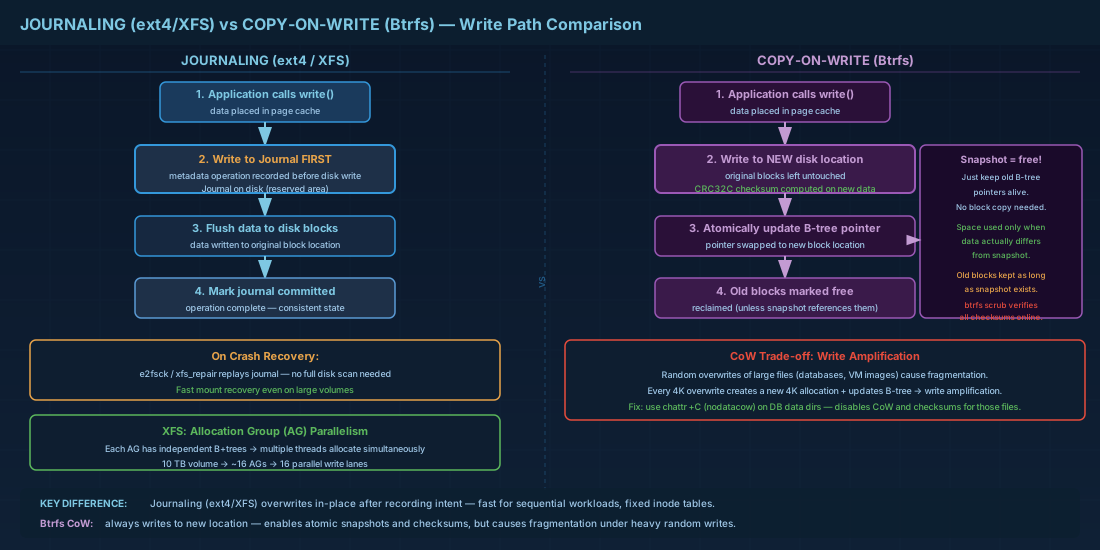
ext4 uses a write-ahead journal to protect metadata consistency. Before any structural change (inode update, block allocation, directory entry modification), the operation is first written to the journal. If the system crashes mid-write, e2fsck replays the journal at next mount instead of scanning the entire filesystem. The default journal mode is ordered, which journals metadata but forces data blocks to disk before their metadata commit. This prevents stale data exposure after a crash without the performance cost of full data journaling.
# Check current journal mode and size
sudo dumpe2fs -h /dev/sda2 2>/dev/null | grep -i journal

# The three journal modes:
# journal  - journals both data and metadata (safest, slowest)
# ordered  - journals metadata, flushes data first (default)
# writeback - journals metadata only (fastest, risk of stale data after crash)
ext4 Extents: Efficient Block Mapping for Large Files
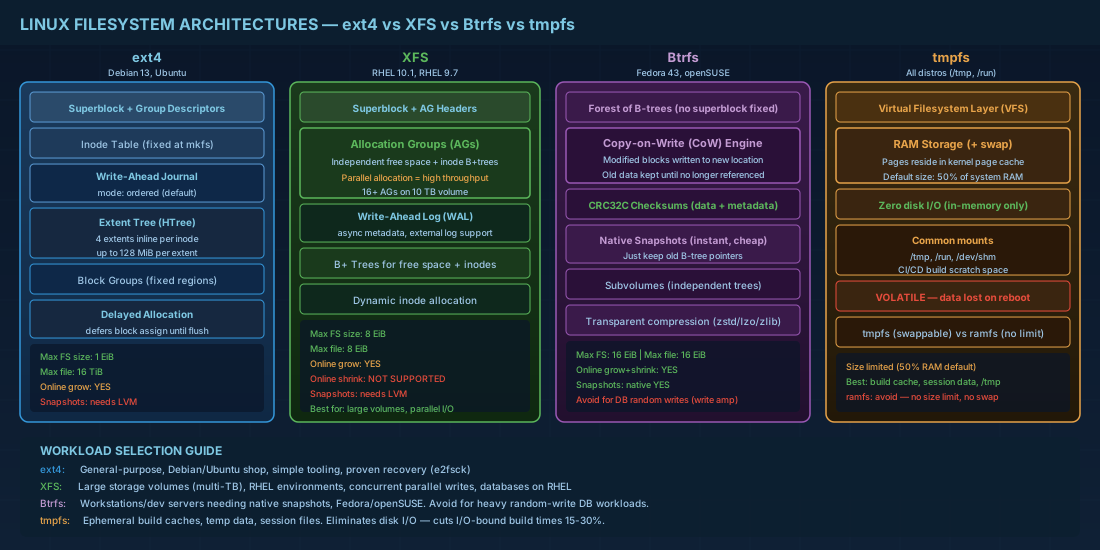
ext4 replaced the old indirect block mapping from ext3 with extents. An extent is a single descriptor that says "this file's bytes 0 through 524287 live in disk blocks 100000 through 100127." One extent can describe up to 128 MiB of contiguous data. This drastically reduces metadata overhead for large files. A single inode can hold four extents directly; beyond that, ext4 uses an extent tree (HTree) structure.
Practical consequence: large sequential files (database tablespaces, VM disk images) perform well on ext4 because extent-based allocation reduces the number of metadata lookups during reads. This makes ext4 a strong candidate for workloads involving large, contiguous files.
Delayed Allocation and Write Optimization on ext4
When an application calls write(), ext4 does not immediately assign physical blocks. Instead, it holds the data in page cache and defers block allocation until the data must actually be flushed to disk. This delayed allocation strategy gives the allocator a chance to see the full write pattern and place blocks contiguously, reducing fragmentation. The downside: if the system crashes before flush, data written after the last fsync() can be lost. Applications that care about durability (databases, mail servers) must call fsync() explicitly.
You can observe delayed allocation in action by writing a large file and checking block allocation before and after a sync:
# Write a file and check block allocation before sync
dd if=/dev/zero of=/mnt/test/bigfile bs=1M count=100 oflag=direct
# Check how blocks are allocated
sudo filefrag -v /mnt/test/bigfile
# Fewer extents = better contiguous allocation from delayed alloc
XFS Architecture: Allocation Groups, Log, and Parallel I/O Scalability
XFS was designed at SGI for large filesystems with heavy parallel I/O. It is the default filesystem on RHEL 10.1 and RHEL 9.7 for a reason: it handles multi-terabyte volumes and hundreds of concurrent writers better than ext4 in most benchmarks. For enterprise environments managing large storage volumes, XFS architecture is optimized for scalability.
XFS Allocation Groups for Parallel Write Performance
XFS divides a filesystem into allocation groups (AGs), each of which manages its own free space, inodes, and B+ trees independently. This design allows multiple threads to allocate space simultaneously without contending on a single lock. On a 10 TB volume with the default AG size, you might have 16 allocation groups, meaning 16 threads can allocate blocks in parallel without blocking each other.
# View XFS filesystem geometry including AG count and size
xfs_info /dev/sda3

# Sample output (abbreviated):
# data   = bsize=4096  blocks=2621440, imaxpct=25
#        = sunit=0     swidth=0 blks
# naming = version 2   bsize=4096  ascii-ci=0
# log    = internal    bsize=4096  blocks=2560, version=2
# realtime = none      extsz=4096  blocks=0, rtextents=0
XFS Write-Ahead Log Design
XFS uses a write-ahead log, similar in concept to ext4's journal but with a different implementation. The log can be placed on an external device for performance (useful for database workloads). XFS logs metadata changes asynchronously by default, which gives it higher throughput on metadata-intensive workloads. After a crash, xfs_repair or the normal mount process replays the log. For more on XFS repair procedures, see our guide on filesystem maintenance with fsck, tune2fs, and xfs_repair.
XFS Online Operations and Resize Limits
XFS can grow online but cannot shrink. This is a hard architectural constraint, not a missing feature. The allocation group structure makes shrinking extremely difficult to implement safely. Plan capacity accordingly: if you expect a volume to need resizing in both directions, ext4 or Btrfs is a better fit. XFS supports files up to 8 EiB and filesystems up to 8 EiB (with 64-bit mode, which has been the default for years). When using LVM for volume management, always keep this one-way resize limitation in mind.
Btrfs Copy-on-Write Filesystem Design and Data Integrity
Btrfs takes a fundamentally different approach from ext4 and XFS. It is a copy-on-write (CoW) filesystem. When you modify a block of data, Btrfs writes the new version to a different location, then atomically updates the pointer. The old block remains untouched until it is no longer referenced. This CoW design enables instant snapshots (just keep the old pointers) and self-healing (checksums on every data and metadata block).
Fedora 43 uses Btrfs as the default desktop filesystem. openSUSE has shipped Btrfs by default since 2014. RHEL does not support Btrfs; Red Hat removed it from RHEL 8 onward. To learn more about leveraging Btrfs capabilities, read our deep-dive on Btrfs subvolumes, snapshots, and advanced features.
# View Btrfs filesystem details
sudo btrfs filesystem show /dev/sda4

# Check space usage (more accurate than df for Btrfs)
sudo btrfs filesystem usage /mnt/data

# Verify data integrity with scrub
sudo btrfs scrub start -Bd /mnt/data
The CoW design has a trade-off: random overwrites of large files (database workloads, VM images) cause fragmentation and write amplification. For these cases, you can disable CoW per-file with chattr +C or use nodatacow as a mount option, but then you lose checksumming on those files.
tmpfs and ramfs: Volatile In-Memory Filesystems on Linux
tmpfs and ramfs store data entirely in RAM (and swap, in the case of tmpfs). They exist for scratch data that does not need to survive a reboot, making them ideal for temporary build artifacts, session data, and runtime caches.
tmpfs is the standard choice. It respects a size limit (defaults to 50% of RAM), and pages can be swapped out under memory pressure. /tmp, /run, and /dev/shm are typically tmpfs on modern systemd-based distributions.
ramfs has no size limit and never swaps. It will consume all available RAM if you let it. There is almost no good reason to use ramfs in production; tmpfs is the correct choice in virtually all cases.
# Check which tmpfs mounts exist
findmnt -t tmpfs

# Create a custom tmpfs mount (e.g., for build artifacts)
sudo mount -t tmpfs -o size=2G,mode=1777 tmpfs /mnt/build-scratch

# Make it persistent via /etc/fstab
# tmpfs /mnt/build-scratch tmpfs size=2G,mode=1777 0 0
Enterprise use case: CI/CD build servers often mount a tmpfs for compilation scratch space. A 2 GiB tmpfs eliminates disk I/O for intermediate build objects and can cut build times by 15-30% on I/O-bound projects. Monitoring available memory with free -h or disk and capacity monitoring tools is essential when using tmpfs to avoid out-of-memory conditions.
Linux Filesystem Comparison: ext4 vs XFS vs Btrfs vs tmpfs
| Feature | ext4 | XFS | Btrfs | tmpfs |
|---|---|---|---|---|
| Max filesystem size | 1 EiB | 8 EiB | 16 EiB | RAM + swap |
| Max file size | 16 TiB | 8 EiB | 16 EiB | RAM + swap |
| Journal/log | Yes (metadata) | Yes (metadata) | No (CoW replaces it) | N/A |
| Data checksums | No | No | Yes (CRC32C) | No |
| Snapshots | No (needs LVM) | No (needs LVM) | Yes (native) | No |
| Online shrink | No (offline only) | No (not supported) | Yes | Yes (remount) |
| Online grow | Yes | Yes | Yes | Yes (remount) |
| Compression | No | No | Yes (zstd, zlib, lzo) | No |
| Default on (2026) | Debian 13.3, Ubuntu | RHEL 10.1 / 9.7 | Fedora 43, openSUSE | All (for /tmp, /run) |
Choosing the Right Linux Filesystem for Your Workload
There is no universal answer. Here are concrete decision rules based on real production patterns:
- General-purpose server, Debian/Ubuntu shop: ext4. Tooling is simple, recovery with
e2fsckis well documented, and your team already knows it. No reason to change unless you need features ext4 does not have. - Large storage volumes (multi-TB), RHEL environment: XFS. The allocation group parallelism handles concurrent writes well, and RHEL vendor support covers it fully. XFS is the only filesystem Red Hat supports for volumes over 500 GiB on RHEL 10.1.
- Workstation or development server needing snapshots: Btrfs. Snapshot-based rollback before system updates is a real time-saver. Fedora 43 and openSUSE use this pattern with snapper out of the box.
- Database servers (PostgreSQL, MySQL): ext4 or XFS. Avoid Btrfs for heavy random write workloads unless you disable CoW for the data directory. The write amplification from CoW on database files is measurable.
- Build caches, temporary processing: tmpfs. If the data is ephemeral and fits in RAM, eliminate disk I/O entirely.
When combining filesystems with volume management, advanced LVM features like thin provisioning and snapshots can complement your filesystem choice, especially when Btrfs native snapshots are not available.
Filesystem Internals Quick Reference Commands
| Task | Command |
|---|---|
| Show ext4 superblock info | sudo dumpe2fs -h /dev/sdX |
| Show ext4 journal details | sudo dumpe2fs -h /dev/sdX | grep -i journal |
| Show XFS geometry | xfs_info /mount/point |
| Show Btrfs space usage | sudo btrfs filesystem usage /mount/point |
| Run Btrfs scrub | sudo btrfs scrub start -Bd /mount/point |
| List tmpfs mounts | findmnt -t tmpfs |
| Create tmpfs mount | sudo mount -t tmpfs -o size=2G tmpfs /mnt/scratch |
| Check filesystem type of device | sudo blkid /dev/sdX |
| Disable CoW for a directory (Btrfs) | chattr +C /path/to/dir |
| Grow ext4 online | sudo resize2fs /dev/sdX |
| Grow XFS online | sudo xfs_growfs /mount/point |
Summary
Linux filesystem internals dictate how your data survives crashes, how your storage scales, and where performance bottlenecks appear. ext4 uses extents and a write-ahead journal to deliver proven reliability with simple tooling. XFS splits the filesystem into parallel allocation groups for high-throughput, large-volume workloads. Btrfs uses copy-on-write to enable snapshots and checksums at the cost of write amplification on random-write workloads. tmpfs eliminates disk I/O entirely for ephemeral data.
Match the filesystem to the workload. Use ext4 when simplicity matters. Use XFS when capacity and throughput matter. Use Btrfs when you need native snapshots and can manage the operational overhead. Use tmpfs for scratch data that lives only in memory. Know what your filesystem is doing under the surface, and you will make better decisions when things go wrong at 3 AM.


