Ansible playbook failures at 2 AM do not care about your sleep schedule. The error messages are often cryptic, the stack traces reference Jinja2 template internals, and the actual root cause might be three levels of variable precedence away from where the failure appears. Traditional troubleshooting means reading documentation, searching forums, and correlating log outputs manually. A local LLM running on the same network as your Ansible control node offers a different approach: paste the error, describe what you expected, and get contextual troubleshooting guidance without leaving your terminal.
This guide covers practical patterns for using Ollama-powered LLMs to troubleshoot Ansible failures. We build command-line tools that pipe Ansible output directly into an LLM for analysis, create a custom model tuned with Ansible system prompts, handle common failure categories, and establish workflows that integrate AI assistance into existing troubleshooting practices. The emphasis is on what actually works versus what sounds good in theory.
Setting Up the Troubleshooting Environment
You need Ollama running with a model that understands both infrastructure concepts and YAML/Jinja2 syntax. Code-focused models handle Ansible better than general-purpose chat models because Ansible playbooks are essentially code.
# Install Ollama if not present
curl -fsSL https://ollama.com/install.sh | sh

# Pull a model with strong infrastructure knowledge
ollama pull llama3.1:8b

# For better YAML/code understanding, also have a code model available
ollama pull codellama:13b
Create a Custom Ansible Troubleshooting Model
# Create a Modelfile with Ansible-specific system prompt
cat > ~/ansible-debug-modelfile << 'EOF'
FROM llama3.1:8b

SYSTEM """You are an Ansible troubleshooting expert running on a Linux system. When presented with Ansible errors, playbook snippets, or task failures:

1. Identify the exact error type (syntax, connection, module, variable, permission, etc.)
2. Explain the root cause in plain language
3. Provide the specific fix with corrected YAML/code
4. Mention common related issues that often accompany this error

You understand Ansible module parameters, Jinja2 templating, variable precedence (all 22 levels), inventory structure, role dependencies, collections, vault encryption, callback plugins, and connection plugins. You know the differences between ansible-core versions and can identify version-specific issues.

When showing YAML fixes, always use proper indentation (2 spaces). Never suggest 'ansible-playbook --syntax-check' as the sole solution — analyze the actual error and provide the fix.

Be direct. Skip pleasantries. The person asking is in the middle of debugging and wants answers, not conversation."""

PARAMETER temperature 0.2
PARAMETER num_ctx 8192
PARAMETER top_p 0.9
EOF

# Create the custom model
ollama create ansible-debug -f ~/ansible-debug-modelfile

# Test it
ollama run ansible-debug "I get 'ERROR! the role my_role was not found' but the role exists in ./roles/my_role/"
The Ansible Error Analyzer Script
A practical troubleshooting tool pipes Ansible output directly to the LLM for analysis. This script captures errors from playbook runs and sends them for diagnosis.
#!/bin/bash
# ansible-diagnose.sh — Pipe Ansible errors to local LLM for analysis
OLLAMA_URL="http://localhost:11434/api/generate"
MODEL="ansible-debug"
# Colors for terminal output
RED='[0;31m'
GREEN='[0;32m'
CYAN='[0;36m'
NC='[0m'
diagnose() {
local error_text="$1"
local playbook_context="$2"
local prompt="Ansible error to diagnose:
\`\`\`
${error_text}
\`\`\`"
if [ -n "$playbook_context" ]; then
prompt="${prompt}
Relevant playbook section:
\`\`\`yaml
${playbook_context}
\`\`\`"
fi
prompt="${prompt}
Provide: 1) Root cause 2) Exact fix 3) Prevention tip"
echo -e "${CYAN}Analyzing error with ${MODEL}...${NC}
"
local payload=$(jq -n --arg model "$MODEL" --arg prompt "$prompt" '{model: $model, prompt: $prompt, stream: false, options: {temperature: 0.2}}')
local response=$(curl -s "$OLLAMA_URL" -d "$payload" | jq -r '.response')
echo -e "${GREEN}=== Diagnosis ===${NC}"
echo "$response"
}
# Mode 1: Pipe ansible-playbook output directly
if [ "$1" = "--pipe" ]; then
shift
echo -e "${CYAN}Running: ansible-playbook $@${NC}"
# Capture both stdout and stderr
output=$(ansible-playbook "$@" 2>&1)
exit_code=$?
if [ $exit_code -ne 0 ]; then
echo -e "${RED}Playbook failed (exit code: $exit_code)${NC}
"
echo "$output" | tail -50
echo ""
diagnose "$output"
else
echo -e "${GREEN}Playbook succeeded${NC}"
echo "$output"
fi
# Mode 2: Analyze a specific error message
elif [ "$1" = "--error" ]; then
shift
diagnose "$*"
# Mode 3: Analyze from a log file
elif [ "$1" = "--log" ]; then
if [ -f "$2" ]; then
error_text=$(cat "$2")
diagnose "$error_text"
else
echo "File not found: $2"
exit 1
fi
# Mode 4: Interactive troubleshooting session
elif [ "$1" = "--interactive" ]; then
echo -e "${CYAN}Ansible Troubleshooting Session (type 'exit' to quit)${NC}"
while true; do
echo -e "
${GREEN}Describe the issue or paste the error:${NC}"
read -r input
[ "$input" = "exit" ] && break
diagnose "$input"
done
else
echo "Usage:"
echo " $0 --pipe [ansible-playbook args] # Run and auto-diagnose failures"
echo " $0 --error 'error message' # Diagnose a specific error"
echo " $0 --log /path/to/ansible.log # Analyze a log file"
echo " $0 --interactive # Interactive session"
fi# Make it executable and test
chmod +x ansible-diagnose.sh
# Run a playbook with auto-diagnosis on failure
./ansible-diagnose.sh --pipe -i inventory.yml site.yml
# Diagnose a specific error
./ansible-diagnose.sh --error "fatal: [webserver1]: FAILED! => {"changed": false, "msg": "No package matching 'nginx' found available, installed or updated"}"
# Analyze a log file from a previous run
./ansible-diagnose.sh --log /var/log/ansible/last-run.logCommon Ansible Error Patterns and LLM Analysis
Let us walk through the most common categories of Ansible failures and how the LLM handles them.
Variable Precedence Issues
Ansible has 22 levels of variable precedence, and confusion about which variable wins is the most common source of "but I set that variable" frustration.
# Typical error scenario:
# You set a variable in group_vars/all.yml but it is being overridden

# Feed this to the LLM:
./ansible-diagnose.sh --error "
TASK [deploy : Configure nginx] *********************************************
fatal: [web01]: FAILED! => {"changed": false, "msg": "Destination /etc/nginx/sites-enabled/myapp.conf does not exist"}

# My variables:
# group_vars/all.yml: nginx_sites_dir: /etc/nginx/sites-enabled
# host_vars/web01.yml: nginx_sites_dir: /etc/nginx/conf.d
# The task uses {{ nginx_sites_dir }} but seems to be using the wrong value
"
The LLM correctly identifies that host_vars has higher precedence than group_vars/all and explains that the task is using /etc/nginx/conf.d from the host variable, not the group variable. It suggests either updating the host variable, removing the override, or using ansible-inventory --host web01 --yaml to inspect the resolved variables.
Connection and Authentication Failures
# SSH connection issues are the second most common Ansible problem
./ansible-diagnose.sh --error "
fatal: [db-server]: UNREACHABLE! => {
    "changed": false,
    "msg": "Failed to connect to the host via ssh: ssh: connect to host db-server port 22: Connection timed out",
    "unreachable": true
}"
Jinja2 Template Errors
# Template rendering failures with cryptic error messages
./ansible-diagnose.sh --error "
TASK [common : Deploy configuration] ****************************************
An exception occurred during task execution. The error was:
AnsibleUndefinedVariable: 'dict object' has no attribute 'primary_ip'.
The error appears to be in '/home/deploy/roles/common/templates/config.j2': line 15

# Template line 15:
# server_address = {{ network_config.primary_ip }}
"
Integrating with Ansible Callback Plugins
For automated troubleshooting, create a callback plugin that sends failures to the LLM automatically.
# Save as callback_plugins/ai_diagnose.py in your Ansible project
import json
import os
import requests
from ansible.plugins.callback import CallbackBase

class CallbackModule(CallbackBase):
    CALLBACK_VERSION = 2.0
    CALLBACK_TYPE = 'notification'
    CALLBACK_NAME = 'ai_diagnose'

    def __init__(self):
        super().__init__()
        self.ollama_url = os.getenv(
            'OLLAMA_URL', 'http://localhost:11434/api/generate'
        )
        self.model = os.getenv('ANSIBLE_AI_MODEL', 'ansible-debug')

    def v2_runner_on_failed(self, result, ignore_errors=False):
        if ignore_errors:
            return

        host = result._host.get_name()
        task = result._task.get_name()
        msg = result._result.get('msg', str(result._result))

        error_context = (
            f"Host: {host}\n"
            f"Task: {task}\n"
            f"Error: {msg}"
        )

        try:
            response = requests.post(
                self.ollama_url,
                json={
                    'model': self.model,
                    'prompt': f'Ansible task failure diagnosis:\n{error_context}',
                    'stream': False,
                    'options': {'temperature': 0.2}
                },
                timeout=30
            )
            diagnosis = response.json().get('response', 'No diagnosis available')
            self._display.display(
                f"\n[AI Diagnosis for {host}:{task}]\n{diagnosis}\n",
                color='cyan'
            )
        except Exception as e:
            self._display.warning(f"AI diagnosis unavailable: {e}")
# Enable the callback in ansible.cfg
[defaults]
callback_plugins = ./callback_plugins
callbacks_enabled = ai_diagnose
# Or via environment variable
export ANSIBLE_CALLBACK_PLUGINS=./callback_plugins
export ANSIBLE_CALLBACKS_ENABLED=ai_diagnose
# Now run playbooks normally — failures get automatic AI diagnosis
ansible-playbook -i inventory.yml site.ymlPlaybook Validation Before Execution
Beyond troubleshooting failures, the LLM can review playbooks before you run them.
#!/bin/bash
# ansible-review.sh — Pre-flight playbook review with LLM

OLLAMA_URL="http://localhost:11434/api/generate"
MODEL="ansible-debug"

review_playbook() {
    local playbook="$1"

    if [ ! -f "$playbook" ]; then
        echo "File not found: $playbook"
        exit 1
    fi

    local content=$(cat "$playbook")

    local prompt="Review this Ansible playbook for potential issues:

\`\`\`yaml
${content}
\`\`\`

Check for:
1. Syntax issues or deprecated module usage
2. Missing error handling (block/rescue, failed_when, ignore_errors misuse)
3. Security concerns (hardcoded passwords, world-readable permissions)
4. Idempotency violations (commands that are not safe to run twice)
5. Missing handlers or notify targets
6. Variable usage issues

List only actual problems found. Do not list things that are correct."

    local payload=$(jq -n         --arg model "$MODEL"         --arg prompt "$prompt"         '{model: $model, prompt: $prompt, stream: false, options: {temperature: 0.2, num_ctx: 8192}}')

    echo "Reviewing $playbook..."
    curl -s "$OLLAMA_URL" -d "$payload" | jq -r '.response'
}

review_playbook "$1"
# Review a playbook before running it
chmod +x ansible-review.sh
./ansible-review.sh roles/webserver/tasks/main.ymlLimitations and Honest Assessment
Local LLMs are useful troubleshooting assistants, but they have real limitations that you need to understand to use them effectively.
Hallucinated module parameters: The LLM sometimes invents module parameters that do not exist, especially for less common modules. Always verify suggested fixes against the official Ansible documentation before applying them. A 7B or 13B model trained on internet data may confuse parameters from different module versions or even different automation tools.
Version-specific knowledge gaps: If the model's training data predates a recent ansible-core release, it may not know about new modules, changed parameter names, or deprecated features. Ansible 2.16+ changes may not be well represented in models trained before late 2024.
Complex multi-role interactions: The LLM analyzes what you provide in the prompt. It cannot trace variable definitions across your entire role dependency tree, inventory hierarchy, and group/host variable files unless you include all of that context. For complex precedence issues, you may need to provide substantial context.
The model does not replace understanding. Use the LLM to accelerate troubleshooting, not to avoid learning how Ansible works. If you apply fixes without understanding them, you accumulate technical debt and brittle configurations.
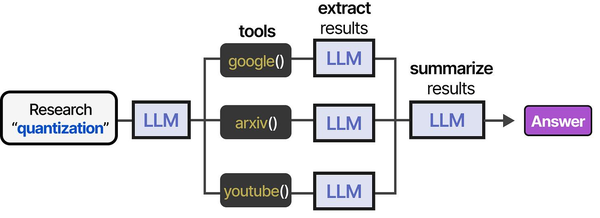
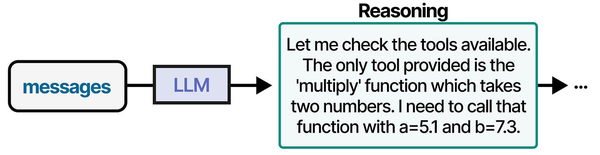
Using local LLMs for Ansible troubleshooting represents a practical application of the agentic tool-use patterns described in An Illustrated Guide to AI Agents. Grootendorst and Alammar show how AI agents follow a structured tool-usage pipeline: they receive a problem description, select the appropriate tool (in this case, Ansible modules and Linux diagnostic commands), execute the action, and evaluate the results. Running this loop with a local LLM through Ollama means that sensitive infrastructure details — inventory files, vault secrets, and network topologies — never leave the organization's network, addressing the security concerns that Ranjan, Chembachere, and Lobo highlight in Agentic AI in Enterprise.
Related Articles
- Generate Ansible Playbooks with Local LLMs: AI-Assisted Infrastructure as Code
- Terraform and Local LLMs: AI-Assisted Infrastructure as Code on Linux
- AI-Powered Log Analysis on Linux: Use Ollama to Parse Syslog, Journald, and Application Logs
- AI-Powered Monitoring and Alerting on Linux with Open Source Tools
Further Reading
- An Illustrated Guide to AI Agents by Maarten Grootendorst and Jay Alammar — Visual guide to agent memory, tools, and reasoning.
- LLMs in Production by Christopher Brousseau and Matthew Sharp — Practical deployment of language models from training to production.
- Agentic AI in Enterprise by Sumit Ranjan, Divya Chembachere, and Lanwin Lobo — Enterprise architecture patterns for agentic AI systems.
Frequently Asked Questions
Which model works best for Ansible troubleshooting?
Llama 3.1 8B with the custom system prompt described in this guide handles most Ansible errors well. It understands YAML syntax, knows common Ansible modules, and generates readable explanations. For complex Jinja2 template issues or playbook refactoring suggestions, CodeLlama 13B performs better because it has stronger code comprehension. DeepSeek Coder V2 is another strong option. Avoid using models smaller than 7B for this use case — they lack the reasoning depth to trace variable precedence chains or identify subtle syntax issues.
Can the LLM access my inventory and variable files for better diagnosis?
Not automatically. The LLM processes only the text you include in the prompt. For the best results, include relevant context: the failing task, the relevant variable definitions, inventory group membership, and any role defaults that might be involved. The callback plugin approach captures the error automatically, but for deep analysis, manually providing the surrounding context produces much better diagnoses. You could extend the diagnosis script to automatically include related files, but be mindful of context window limits.
Is it safe to send production Ansible data to a local LLM?
With Ollama running locally, your data never leaves your machine or network. This is a key advantage over cloud-based AI tools. However, be aware that error messages and playbook contents may include sensitive information: hostnames, IP addresses, usernames, file paths, and sometimes even passwords if they appear in error output. If your Ollama instance runs on a different machine, ensure the network connection is secured (SSH tunnel or TLS reverse proxy). Never use a cloud LLM API for this purpose if your Ansible data contains sensitive infrastructure details.


