AI agents are programs that use a language model as their reasoning engine — they decide what actions to take, call external tools, interpret results, and repeat until the task is finished. LangChain is the most widely adopted Python framework for building these agents, and Ollama lets you run the underlying LLM entirely on your own Linux hardware. Put them together and you have a fully self-hosted agent pipeline where no prompt, document, or API key ever leaves your network.
This guide walks through the entire stack: installing Ollama and LangChain on Linux, connecting them, building a basic ReAct agent with tool-calling, adding persistent memory, and deploying the result as a service. Every example runs against local models — no OpenAI or Anthropic API keys required.
Why LangChain with Local Models
LangChain abstracts the interface between your application logic and the LLM. It provides standard classes for chat models, tool definitions, output parsers, memory stores, and agent loops. When you pair it with Ollama, you get the same agent architecture that people build with GPT-4 or Claude, but running on hardware you control. For GPU driver setup, see our NVIDIA driver and CUDA installation guide.
The practical benefits for Linux environments are significant. Data privacy is absolute — every token stays on your machine. Latency is predictable since there are no network round-trips to a cloud endpoint. Cost scales with electricity rather than per-token pricing. And you can run agents in air-gapped environments, which matters for government, healthcare, and financial deployments where regulatory constraints prohibit external API calls.
The trade-off is model capability. Local models in the 7B–70B parameter range are powerful but not as capable as frontier cloud models on complex reasoning tasks. For many agent workflows — file processing, database queries, system monitoring, document summarization — they are more than sufficient.
Prerequisites and Installation
You need a Linux machine with Python 3.10 or later, Ollama installed and running, and enough hardware to run at least a 7B parameter model (8 GB RAM minimum, 16 GB recommended, GPU optional but helpful).
Install Ollama
If you do not already have Ollama running, install it with the official script:
curl -fsSL https://ollama.com/install.sh | sh
systemctl status ollama
Pull a model that supports tool-calling well. Llama 3.1 8B and Mistral are good starting points:
ollama pull llama3.1:8b
ollama pull mistral
Set Up a Python Environment
Create a dedicated virtual environment to keep LangChain dependencies isolated from your system Python:
mkdir -p ~/langchain-agents && cd ~/langchain-agents
python3 -m venv venv
source venv/bin/activate
pip install --upgrade pip
Install LangChain Packages
LangChain is modular — you install only the packages you need. For Ollama integration, you need the core library, the Ollama provider, and the community package for additional tools:
pip install langchain langchain-ollama langchain-community langgraphThe langgraph package is LangChain's newer agent framework that gives you fine-grained control over agent state machines. We will use it for the advanced agent examples later in this article.
Connecting LangChain to Ollama
The connection is straightforward. LangChain's ChatOllama class wraps Ollama's HTTP API and exposes it as a standard LangChain chat model:
from langchain_ollama import ChatOllama

llm = ChatOllama(
    model="llama3.1:8b",
    base_url="http://localhost:11434",
    temperature=0.1,
)

response = llm.invoke("What is the capital of Ireland?")
print(response.content)
Save this as test_connection.py and run it. If you get a text response, the connection works. The temperature=0.1 keeps outputs deterministic, which is important for agent workflows where you want consistent tool-calling behavior.
Streaming Responses
For interactive applications, you can stream tokens as they are generated:
for chunk in llm.stream("Explain TCP three-way handshake briefly"):
    print(chunk.content, end="", flush=True)
print()
Building a Basic ReAct Agent
The ReAct (Reasoning + Acting) pattern is the most common agent architecture. The model receives a prompt with available tools, thinks about what to do, calls a tool, observes the result, and then decides whether to call another tool or return a final answer.
Defining Tools
In LangChain, tools are Python functions decorated with @tool. The docstring becomes the tool description that the model reads to decide when to use it:
from langchain_core.tools import tool
import subprocess
import psutil

@tool
def get_disk_usage(path: str = "/") -> str:
    """Get disk usage statistics for a filesystem path. Returns used, free, and total space."""
    usage = psutil.disk_usage(path)
    return f"Total: {usage.total // (1024**3)} GB, Used: {usage.used // (1024**3)} GB, Free: {usage.free // (1024**3)} GB, Usage: {usage.percent}%"

@tool
def get_system_load() -> str:
    """Get current system load averages (1, 5, 15 minutes) and CPU count."""
    load = psutil.getloadavg()
    cpus = psutil.cpu_count()
    return f"Load: {load[0]:.2f}, {load[1]:.2f}, {load[2]:.2f} | CPUs: {cpus}"

@tool
def run_shell_command(command: str) -> str:
    """Run a shell command and return its output. Use for system information gathering only."""
    try:
        result = subprocess.run(
            command, shell=True, capture_output=True, text=True, timeout=10
        )
        return result.stdout[:2000] if result.stdout else result.stderr[:2000]
    except subprocess.TimeoutExpired:
        return "Command timed out after 10 seconds"
Creating the Agent
With tools defined, create the agent using LangGraph's prebuilt ReAct agent:
from langgraph.prebuilt import create_react_agent

tools = [get_disk_usage, get_system_load, run_shell_command]

agent = create_react_agent(
    model=llm,
    tools=tools,
)

# Run the agent
result = agent.invoke({
    "messages": [("user", "Check the disk usage on / and tell me if I should be concerned")]
})

for msg in result["messages"]:
    print(f"{msg.type}: {msg.content}")
    print("---")
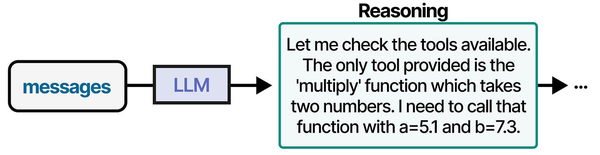
When you run this, the model will reason that it needs disk information, call the get_disk_usage tool, read the result, and then produce a human-readable assessment. The entire loop — reasoning, tool calling, observation, final answer — happens automatically.
Adding Memory to Agents
Stateless agents forget everything between invocations. For ongoing tasks like monitoring or multi-turn conversations, you need memory. LangGraph supports checkpointing, which persists agent state between runs:
from langgraph.checkpoint.memory import MemorySaver

memory = MemorySaver()

agent_with_memory = create_react_agent(
    model=llm,
    tools=tools,
    checkpointer=memory,
)

config = {"configurable": {"thread_id": "sysadmin-session-1"}}

# First interaction
result1 = agent_with_memory.invoke(
    {"messages": [("user", "What is the current system load?")]},
    config=config,
)

# Second interaction - the agent remembers the previous exchange
result2 = agent_with_memory.invoke(
    {"messages": [("user", "Is that higher or lower than what you'd expect for a web server?")]},
    config=config,
)
The thread_id acts as a session identifier. All messages within the same thread are preserved. For production, replace MemorySaver (which is in-memory only) with a persistent backend like SQLite or PostgreSQL.
Multi-Tool Agent: System Health Monitor
Here is a more complete example — a system health monitoring agent that combines multiple tools and produces a structured report:
from langchain_core.tools import tool
from langchain_ollama import ChatOllama
from langgraph.prebuilt import create_react_agent
import psutil
import subprocess

@tool
def check_memory() -> str:
    """Check system memory usage. Returns total, available, used, and percentage."""
    mem = psutil.virtual_memory()
    return f"Total: {mem.total // (1024**3)} GB, Available: {mem.available // (1024**3)} GB, Used: {mem.percent}%"

@tool
def check_services(service_name: str) -> str:
    """Check if a systemd service is active. Pass the service name without .service suffix."""
    result = subprocess.run(
        ["systemctl", "is-active", service_name],
        capture_output=True, text=True
    )
    status = result.stdout.strip()
    return f"Service {service_name}: {status}"

@tool
def check_recent_errors() -> str:
    """Check journald for recent error-level messages in the last hour."""
    result = subprocess.run(
        ["journalctl", "--priority=err", "--since", "1 hour ago", "--no-pager", "-q"],
        capture_output=True, text=True
    )
    errors = result.stdout.strip()
    return errors if errors else "No errors in the last hour"

llm = ChatOllama(model="llama3.1:8b", temperature=0.1)

health_agent = create_react_agent(
    model=llm,
    tools=[get_disk_usage, get_system_load, check_memory, check_services, check_recent_errors],
)

report = health_agent.invoke({
    "messages": [("user",
        "Run a full system health check. Check disk on /, memory, load, "
        "whether nginx and ollama services are running, and recent errors. "
        "Give me a summary with any concerns highlighted."
    )]
})

print(report["messages"][-1].content)
The agent will methodically call each tool, gather data, and synthesize a coherent health report. This is the kind of workflow where local models genuinely shine — the tasks are structured, the tools provide factual data, and the model's job is mainly to orchestrate and summarize.
Custom Agent Graphs with LangGraph
For workflows that need more control than a simple ReAct loop, LangGraph lets you define explicit state machines. Each node in the graph is a function that processes state, and edges define the flow:
from langgraph.graph import StateGraph, MessagesState, START, END
from langchain_core.messages import SystemMessage

def classify_request(state: MessagesState):
    """First node: classify what the user is asking about."""
    classifier = ChatOllama(model="llama3.1:8b", temperature=0)
    sys_msg = SystemMessage(content="Classify the user request as one of: disk, network, service, general. Reply with just the category.")
    result = classifier.invoke([sys_msg] + state["messages"])
    return {"messages": [result]}

def handle_disk(state: MessagesState):
    """Handle disk-related queries."""
    # Call disk tools and respond
    pass

def handle_network(state: MessagesState):
    """Handle network-related queries."""
    # Call network tools and respond
    pass

def router(state: MessagesState):
    """Route to the correct handler based on classification."""
    last_msg = state["messages"][-1].content.lower()
    if "disk" in last_msg:
        return "disk_handler"
    elif "network" in last_msg:
        return "network_handler"
    return "general_handler"

graph = StateGraph(MessagesState)
graph.add_node("classifier", classify_request)
graph.add_node("disk_handler", handle_disk)
graph.add_node("network_handler", handle_network)

graph.add_edge(START, "classifier")
graph.add_conditional_edges("classifier", router)
graph.add_edge("disk_handler", END)
graph.add_edge("network_handler", END)

app = graph.compile()
This pattern is useful when different types of requests need completely different tool sets or processing logic. Rather than loading every tool into a single agent (which can confuse smaller models), you route to specialized sub-agents.
Deploying as a Service
For production use, wrap your agent in a FastAPI server and run it under systemd:
pip install fastapi uvicornCreate agent_server.py:
from fastapi import FastAPI
from pydantic import BaseModel
from langchain_ollama import ChatOllama
from langgraph.prebuilt import create_react_agent

app = FastAPI()

llm = ChatOllama(model="llama3.1:8b", temperature=0.1)
agent = create_react_agent(model=llm, tools=[get_disk_usage, get_system_load])

class Query(BaseModel):
    message: str

@app.post("/agent")
async def run_agent(query: Query):
    result = agent.invoke({"messages": [("user", query.message)]})
    return {"response": result["messages"][-1].content}
Create a systemd service unit:
sudo tee /etc/systemd/system/langchain-agent.service > /dev/null << EOF
[Unit]
Description=LangChain Agent API
After=network.target ollama.service

[Service]
Type=simple
User=www-data
WorkingDirectory=/opt/langchain-agents
ExecStart=/opt/langchain-agents/venv/bin/uvicorn agent_server:app --host 127.0.0.1 --port 8100
Restart=always
RestartSec=5

[Install]
WantedBy=multi-user.target
EOF

sudo systemctl daemon-reload
sudo systemctl enable --now langchain-agent
Performance Tips for Local Agent Workflows
Agent workloads are demanding because each "thought" step requires a full LLM inference. A single user query might trigger 3-5 model calls as the agent reasons, acts, and observes. Keep these guidelines in mind:
- Choose smaller models for agent loops. An 8B model with tool-calling support is usually better than a 70B model for agents because the latency per step is dramatically lower. The total wall-clock time for a 5-step agent run matters more than the quality of any single step.
- Keep tool descriptions concise. Every tool's name and docstring is included in the prompt. Verbose descriptions waste context window tokens and can confuse the model about when to use each tool.
- Limit the number of tools. Smaller models handle 3-5 tools well. Beyond 8-10 tools, they start making poor tool selection decisions. Use the router pattern described above to split tools across specialized sub-agents.
- Set
num_ctxappropriately. Agent prompts with tool definitions and conversation history can get large. If you see truncation, increase the context window:ChatOllama(model="llama3.1:8b", num_ctx=8192) - Pin the Ollama model in memory. Set
OLLAMA_KEEP_ALIVE=-1in the Ollama environment to prevent the model from unloading between requests. This eliminates cold-start latency for agent loops.
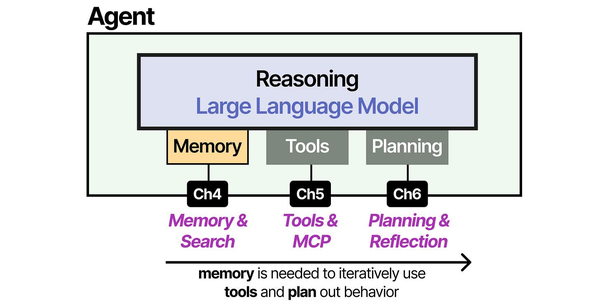
Building AI agents with Ollama and LangChain on Linux directly implements the agent architecture described in An Illustrated Guide to AI Agents by Grootendorst and Alammar. The book's three-pillar framework — memory, tools, and planning — maps directly to LangChain's memory modules, tool integrations, and agent reasoning chains running on local Ollama models.
Related Articles
- Ollama Python API: Build Linux Administration Tools with Local LLMs
- Model Context Protocol (MCP) on Linux with Ollama: Connect AI to Your Tools
- Build a Self-Hosted RAG Pipeline on Linux: Chat with Your Documentation
- n8n and Ollama: Build Self-Hosted AI Automation Workflows on Linux
Further Reading
- An Illustrated Guide to AI Agents by Maarten Grootendorst and Jay Alammar — Visual guide to agent memory, tools, and reasoning.
- LLMs in Production by Christopher Brousseau and Matthew Sharp — Practical deployment of language models from training to production.
- Agentic AI in Enterprise by Sumit Ranjan, Divya Chembachere, and Lanwin Lobo — Enterprise architecture patterns for agentic AI systems.
Frequently Asked Questions
Which Ollama models work best with LangChain tool-calling?
Llama 3.1 8B and Mistral 7B Instruct are the most reliable for tool-calling with LangChain on local hardware. They consistently produce correctly formatted tool-call outputs. Larger models like Llama 3.1 70B or Mixtral 8x22B improve reasoning quality but require significantly more VRAM. The key requirement is a model trained with tool-calling in its instruction template — not all fine-tunes support this.
Can I run LangChain agents on a machine without a GPU?
Yes, Ollama supports CPU-only inference. Agent workflows will be slower — expect 5-15 seconds per agent step with an 8B model on a modern CPU versus 1-3 seconds on a mid-range GPU. For development and low-traffic production use, CPU-only is workable. For interactive applications where users are waiting, a GPU makes a meaningful difference in perceived responsiveness.
How do I debug agent behavior when the model makes wrong tool calls?
Enable LangChain's verbose mode by setting the environment variable LANGCHAIN_VERBOSE=true before running your script. This prints every prompt sent to the model and every response received, including the raw tool-call JSON. You will see exactly where the model's reasoning diverges from your expectations. Common fixes include rewriting tool docstrings for clarity, reducing the number of available tools, or switching to a model with better instruction-following capabilities.


