Terraform is the de facto standard for Infrastructure as Code across cloud and on-premises environments. Writing HCL (HashiCorp Configuration Language) is straightforward for simple resources, but real-world Terraform configurations grow complex fast. Multi-environment setups, module composition, state management, provider-specific quirks, and the constant evolution of provider APIs create a knowledge burden that even experienced engineers feel. GitHub Copilot and ChatGPT can help, but they require sending your infrastructure descriptions — including network topologies, security configurations, and resource naming conventions — to external services.
Running a local LLM for Terraform assistance keeps that information on your network. Ollama provides a straightforward runtime, and modern code-focused models understand HCL well enough to generate valid configurations, explain complex Terraform plans, suggest security improvements, and convert between provider versions. The results are not perfect — no AI tool produces flawless IaC on the first attempt — but they accelerate the development cycle significantly, especially for the repetitive boilerplate that dominates Terraform work.
This guide covers the full integration: setting up an LLM optimized for HCL generation, building CLI tools that connect Terraform workflows to local AI, automated plan review, module generation from natural language descriptions, and practical techniques for getting the best output quality from models that were not specifically trained on Terraform. For the foundational setup, see our complete Ollama installation guide. For GPU driver setup, see our NVIDIA driver and CUDA installation guide.
Setting Up the LLM for Terraform Work
Not all models handle HCL equally well. Terraform configurations combine structured syntax (similar to JSON), embedded expressions, provider-specific resource types, and declarative logic. Code-focused models outperform general-purpose chat models by a significant margin on these tasks.
Model Selection and Installation
# Install Ollama if not already present
curl -fsSL https://ollama.com/install.sh | sh
sudo systemctl enable --now ollama

# Best models for Terraform/HCL generation (tested and ranked):

# 1. Qwen 2.5 Coder 32B — Best HCL quality, understands provider APIs well
ollama pull qwen2.5-coder:32b-instruct-q4_K_M

# 2. DeepSeek Coder V2 16B — Good balance of speed and quality
ollama pull deepseek-coder-v2:16b-lite-instruct-q4_K_M

# 3. Codestral 22B — Mistral's code model, solid Terraform knowledge
ollama pull codestral:22b-v0.1-q4_K_M

# 4. Llama 3.1 8B — For systems with limited VRAM (acceptable quality)
ollama pull llama3.1:8b-instruct-q8_0

# Quick validation: generate a simple Terraform resource
ollama run qwen2.5-coder:32b-instruct-q4_K_M \
  "Write a Terraform resource block that creates an AWS EC2 instance with a t3.micro instance type, Amazon Linux 2023 AMI, and a Name tag."
Creating a Terraform-Specific Modelfile
A custom Modelfile lets you bake Terraform-specific system instructions into the model, improving output quality without repeating the context in every prompt.
# Create the Modelfile
cat > /opt/ollama/Modelfile.terraform <<'MEOF'
FROM qwen2.5-coder:32b-instruct-q4_K_M

SYSTEM """You are a senior infrastructure engineer specializing in Terraform.
Follow these rules:
1. Generate valid HCL syntax only.
2. Use latest stable provider syntax and resource arguments.
3. Include required provider blocks and version constraints.
4. Use variables for environment-specific values.
5. Add descriptions to all variables and outputs.
6. Follow lowercase_with_underscores naming.
7. Include lifecycle blocks where appropriate.
8. Specify explicit provider versions with ~> constraints.
9. Add comments explaining non-obvious choices.
10. For modules, include variables.tf, outputs.tf, and README."""

PARAMETER temperature 0.2
PARAMETER num_predict 8192
MEOF

# Create the custom model
ollama create terraform-assistant -f /opt/ollama/Modelfile.terraform

# Test the custom model
ollama run terraform-assistant "Create a VPC module with public and private subnets across 3 AZs"
Building the CLI Integration
The most practical integration is a command-line tool that sits alongside terraform in your workflow. It generates configurations, reviews plans, and explains state changes — all piped through the local LLM.
The tf-ai CLI Tool
#!/usr/bin/env python3
"""tf-ai: AI-assisted Terraform development using local LLMs."""

import argparse
import json
import subprocess
import sys
from pathlib import Path
import requests

OLLAMA_API = "http://localhost:11434/api/generate"
DEFAULT_MODEL = "terraform-assistant"

def query_llm(prompt, model=DEFAULT_MODEL):
    """Send a prompt to Ollama and return the response."""
    resp = requests.post(OLLAMA_API, json={
        "model": model,
        "prompt": prompt,
        "stream": False,
        "options": {"temperature": 0.2, "num_predict": 8192}
    }, timeout=180)
    if resp.status_code == 200:
        return resp.json().get("response", "")
    print(f"LLM error: {resp.status_code}", file=sys.stderr)
    return ""

def cmd_generate(args):
    """Generate Terraform configuration from a description."""
    description = " ".join(args.description)
    context = ""

    # Include existing config files as context
    tf_dir = Path(args.dir)
    if tf_dir.exists():
        for tf_file in tf_dir.glob("*.tf"):
            file_content = tf_file.read_text()
            if len(context) + len(file_content) < 8000:
                context += f"\n# Existing file: {tf_file.name}\n{file_content}\n"

    prompt = f"Generate Terraform HCL configuration for: {description}\n"
    if context:
        prompt += f"\nExisting configuration context:{context}\n"
    prompt += "\nOutput only the HCL code."

    result = query_llm(prompt, args.model)
    if args.output:
        Path(args.output).write_text(result)
        print(f"Written to {args.output}")
    else:
        print(result)

def cmd_review(args):
    """Review a Terraform plan for issues and improvements."""
    plan_result = subprocess.run(
        ["terraform", "plan", "-no-color"],
        capture_output=True, text=True, cwd=args.dir
    )
    plan_output = plan_result.stdout + plan_result.stderr

    prompt = (
        "Review this Terraform plan output for potential issues.\n"
        "Check for: security concerns, cost optimization, "
        "missing best practices, state conflicts.\n\n"
        f"Terraform plan output:\n{plan_output}\n\n"
        "Provide a structured review with severity levels."
    )

    review = query_llm(prompt, args.model)
    print(review)

def cmd_explain(args):
    """Explain what a Terraform configuration does in plain language."""
    target = Path(args.target)
    if target.is_file():
        content = target.read_text()
    elif target.is_dir():
        content = ""
        for tf_file in sorted(target.glob("*.tf")):
            content += f"\n# File: {tf_file.name}\n{tf_file.read_text()}\n"
    else:
        print(f"Error: {args.target} not found", file=sys.stderr)
        sys.exit(1)

    prompt = (
        "Explain this Terraform configuration in plain language.\n"
        "Describe the infrastructure, component relationships, "
        "and important configuration details.\n\n"
        f"{content}"
    )
    print(query_llm(prompt, args.model))

if __name__ == "__main__":
    parser = argparse.ArgumentParser(description="AI-assisted Terraform CLI")
    parser.add_argument("-m", "--model", default=DEFAULT_MODEL)
    sub = parser.add_subparsers(dest="command", required=True)

    gen_p = sub.add_parser("generate", help="Generate Terraform config")
    gen_p.add_argument("description", nargs="+")
    gen_p.add_argument("-d", "--dir", default=".")
    gen_p.add_argument("-o", "--output")

    rev_p = sub.add_parser("review", help="Review a Terraform plan")
    rev_p.add_argument("-d", "--dir", default=".")

    exp_p = sub.add_parser("explain", help="Explain Terraform config")
    exp_p.add_argument("target")

    args = parser.parse_args()
    {"generate": cmd_generate, "review": cmd_review,
     "explain": cmd_explain}[args.command](args)
Installation and Usage
# Install dependencies
pip install requests

# Make the script executable
chmod +x tf-ai.py
sudo cp tf-ai.py /usr/local/bin/tf-ai

# Generate a new Terraform configuration
tf-ai generate "AWS VPC with 3 public and 3 private subnets, NAT gateway, and flow logs"

# Generate and write to a file
tf-ai generate "S3 bucket with versioning, encryption, and lifecycle rules" -o s3.tf

# Review an existing Terraform plan
cd /path/to/terraform/project
tf-ai review

# Explain what a configuration does
tf-ai explain /path/to/terraform/project/
Automated Plan Review in CI/CD
The most impactful integration point is automated plan review in your CI/CD pipeline. Every Terraform pull request gets an AI review that catches security issues, cost concerns, and missing best practices before human review.
GitLab CI Integration
# .gitlab-ci.yml
stages:
  - validate
  - plan
  - ai-review

terraform-validate:
  stage: validate
  script:
    - terraform init -backend=false
    - terraform validate
    - terraform fmt -check

terraform-plan:
  stage: plan
  script:
    - terraform init
    - terraform plan -no-color -out=tfplan
    - terraform show -no-color tfplan > plan_output.txt
  artifacts:
    paths:
      - plan_output.txt
      - tfplan

ai-plan-review:
  stage: ai-review
  needs: [terraform-plan]
  script:
    - |
      REVIEW=$(curl -s http://ollama-server:11434/api/generate \
        -d "{\"model\": \"terraform-assistant\",
             \"prompt\": \"Review this Terraform plan:\\n$(cat plan_output.txt)\",
             \"stream\": false}" | python3 -c "import sys,json; print(json.load(sys.stdin)['response'])")
      echo "$REVIEW" > ai_review.txt
  artifacts:
    paths:
      - ai_review.txt
Module Generation from Natural Language
Generating complete, reusable Terraform modules from a description is one of the highest-value use cases. A well-structured prompt produces modules that follow HashiCorp's module structure conventions.
# Generate a complete module
tf-ai generate "Reusable module for an EKS cluster with managed node groups, \
  IRSA support, cluster autoscaler IAM role, and VPC CNI addon. \
  Support for multiple node groups with different instance types. \
  Include outputs for cluster endpoint, certificate authority, and OIDC provider." \
  -o modules/eks/main.tf

# The model generates a complete module structure:
# modules/eks/
#   main.tf        - Core resources (EKS cluster, node groups)
#   variables.tf   - Input variables with descriptions and defaults
#   outputs.tf     - Output values
#   iam.tf         - IAM roles and policies
#   versions.tf    - Required provider versions
State File Analysis
Terraform state files contain the complete picture of your deployed infrastructure. A local LLM can analyze state files to answer questions about your environment without you needing to parse JSON manually.
# Export state to JSON
terraform show -json > state.json

# Ask questions about your infrastructure using a helper script
python3 analyze_state.py state.json "What resources lack proper tagging?"
#!/usr/bin/env python3
"""analyze_state.py — Query Terraform state with natural language."""
import json
import sys
import requests
def analyze(state_file, question):
with open(state_file) as f:
state = json.load(f)
resources = []
for r in state.get("values", {}).get("root_module", {}).get("resources", []):
resources.append({
"type": r["type"],
"name": r["name"],
"provider": r["provider_name"],
})
prompt = (
f"Analyze this Terraform state and answer: {question}\n\n"
f"Resources: {json.dumps(resources, indent=2)}"
)
resp = requests.post("http://localhost:11434/api/generate", json={
"model": "terraform-assistant",
"prompt": prompt,
"stream": False,
})
print(resp.json()["response"])
if __name__ == "__main__":
analyze(sys.argv[1], sys.argv[2])Handling Common Pitfalls
LLM-generated Terraform code has predictable failure modes. Knowing them helps you validate output effectively.
Deprecated resource arguments. Models trained on older data may use deprecated arguments. Always run terraform validate after generating code. The validation error messages are specific enough to fix manually or feed back to the LLM for correction.
Incorrect provider version constraints. The model might reference provider features that only exist in newer versions than what it specifies. Pin your provider versions and verify generated code against the actual provider documentation.
Missing data sources. LLMs often hardcode values (like AMI IDs or availability zone names) that should be looked up dynamically using data sources. Review generated code for any hardcoded IDs that should be data source lookups.
Security defaults. Models sometimes generate overly permissive security groups (0.0.0.0/0 ingress) or public S3 buckets because that is what appears frequently in tutorials. Always review security-related resources manually.
# Validate generated Terraform code
terraform init
terraform validate
terraform fmt -check

# Run tfsec for security scanning
tfsec .

# Run checkov for compliance checks
checkov -d .

# If validation fails, feed errors back to the LLM
ERRORS=$(terraform validate -json 2>&1)
tf-ai generate "Fix these Terraform validation errors: $ERRORS"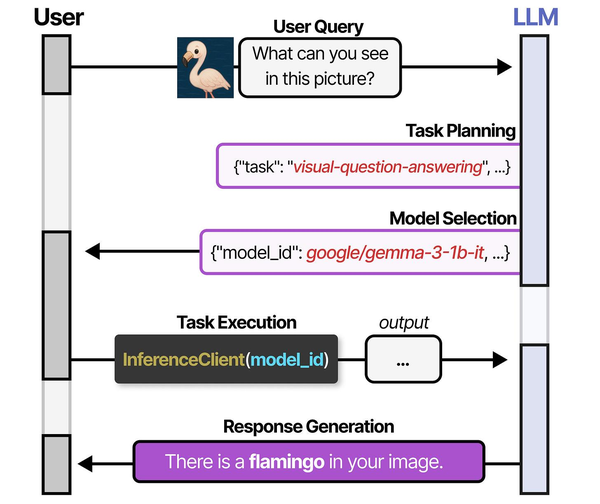
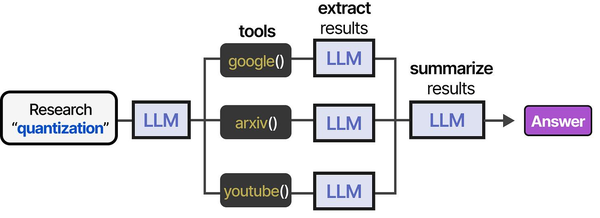
Using Terraform to manage local LLM infrastructure bridges the gap between DevOps automation and AI agent deployment. As described in An Illustrated Guide to AI Agents by Grootendorst and Alammar, agents require orchestrated environments with multiple specialized models — and infrastructure-as-code tools like Terraform ensure these environments are reproducible, version-controlled, and scalable.
Related Articles
- Generate Ansible Playbooks with Local LLMs: AI-Assisted Infrastructure as Code
- AI-Assisted Ansible Troubleshooting with Local LLMs on Linux
- Continue.dev and Ollama: Self-Hosted AI Coding Assistant for VS Code on Linux
- n8n and Ollama: Build Self-Hosted AI Automation Workflows on Linux
Further Reading
- An Illustrated Guide to AI Agents by Maarten Grootendorst and Jay Alammar — Visual guide to agent memory, tools, and reasoning.
- LLMs in Production by Christopher Brousseau and Matthew Sharp — Practical deployment of language models from training to production.
- Agentic AI in Enterprise by Sumit Ranjan, Divya Chembachere, and Lanwin Lobo — Enterprise architecture patterns for agentic AI systems.
Frequently Asked Questions
How accurate is LLM-generated Terraform compared to GitHub Copilot?
For common resource types (VPCs, EC2 instances, S3 buckets, IAM roles), local models like Qwen 2.5 Coder 32B produce output that is comparable to Copilot in structure and correctness. Where Copilot has an advantage is in auto-completion context — it sees your current file and cursor position. The CLI approach compensates by including existing configuration files as context in the prompt. For complex provider-specific resources (RDS Aurora global clusters, EKS IRSA configurations), Copilot tends to be slightly more accurate because it has access to more recent training data.
Can I use this with OpenTofu instead of Terraform?
Yes. OpenTofu uses the same HCL syntax and is API-compatible with Terraform for most operations. The tf-ai tool works identically — just replace terraform commands with tofu in the review function. The LLM does not distinguish between them since the configuration language is the same. Some OpenTofu-specific features (like client-side state encryption) are not well-represented in training data, so you may need to guide the model for those.
How do I prevent the LLM from generating insecure configurations?
The custom Modelfile includes security-focused system instructions, but you should never trust LLM output without validation. Run tfsec, checkov, or trivy config against all generated code before applying. In CI/CD, make security scanning a required gate that blocks apply if critical findings exist. The AI review feature catches many issues, but static analysis tools are more reliable for security enforcement.
What is the performance impact of running the LLM alongside Terraform operations?
Terraform operations (init, plan, apply) are network-bound, not compute-bound. The LLM is compute-bound. On a development workstation with 32 GB RAM and a GPU, running both simultaneously is seamless. On servers with limited resources, the LLM inference during plan review adds 10-30 seconds depending on the plan size and model. For CI/CD pipelines, run the AI review as a separate stage that does not block the critical path.


