Writing Ansible playbooks is one of those tasks that sits in an awkward productivity valley. Simple playbooks are faster to write by hand than to describe to someone else. Complex playbooks require deep knowledge of modules, handlers, Jinja2 templating, and role structure. The middle ground — the majority of playbook work — is where you know what you want (install nginx, configure TLS, set up log rotation) but spend 20 minutes looking up the exact module parameters and YAML formatting. That middle ground is where local LLM-based ansible ai playbook generation delivers real value.
Red Hat offers Ansible Lightspeed, their commercial AI assistant for Ansible. It works, but it requires sending your infrastructure descriptions to IBM's cloud. For organizations that take infrastructure privacy seriously — and if you are managing production servers, you should — sending playbook prompts to a third-party API means disclosing your server topology, application stack, security configurations, and operational procedures. A local LLM running on your own hardware eliminates that concern entirely. The infrastructure descriptions never leave your network.
This guide covers the complete workflow: setting up Ollama with a code-focused model that understands Ansible well, building a practical CLI tool that turns natural language into working playbooks, validating the generated YAML before it touches a server, and integrating the whole thing into existing Ansible development workflows. We will generate real playbooks — a full LAMP stack, a security hardening configuration, and a monitoring setup — and evaluate the quality of the output honestly, including where the LLM gets things wrong. For GPU driver setup, see our NVIDIA driver and CUDA installation guide.
Why Local Instead of Ansible Lightspeed
Ansible Lightspeed (powered by IBM watsonx Code Assistant) is a polished product. It integrates directly into VS Code, understands Ansible context well, and generates high-quality suggestions. But it has three limitations that matter for certain organizations.
First, data privacy. Every prompt you send to Lightspeed includes context about your infrastructure. When you type "configure nginx reverse proxy for internal application servers at 10.0.1.x," you are telling IBM about your network topology. When you ask for "hardening tasks for RHEL 9 servers running PostgreSQL 16 with PCI DSS requirements," you are disclosing your compliance obligations and technology stack. For many organizations, this information is classified as confidential.
Second, vendor lock-in. Lightspeed requires an Ansible Automation Platform subscription. If Red Hat changes the pricing, limits the features, or discontinues the service, your AI-assisted workflow disappears. A local LLM is infrastructure you own and control.
Third, availability. A local LLM works when your internet connection does not. It works in air-gapped environments. It works during the outage that you are trying to write a remediation playbook for. There is something deeply satisfying about your infrastructure automation tools not depending on external infrastructure.
Setting Up Ollama with a Code-Focused Model
Not all LLMs generate good Ansible. General-purpose chat models can write YAML, but they frequently hallucinate module names, use deprecated parameters, and produce syntactically valid YAML that fails Ansible's validation. Code-focused models trained on infrastructure code perform significantly better.
Install Ollama
# Install Ollama on Linux
curl -fsSL https://ollama.com/install.sh | sh

# Verify installation
ollama --version

# Start the Ollama service (usually auto-started after install)
sudo systemctl enable --now ollama

# Check the API is responding
curl -s http://localhost:11434/api/tags | python3 -m json.tool
Select and Pull a Model
# Best models for Ansible generation (ranked by quality for this specific task):

# 1. Qwen 2.5 Coder 32B — Best overall for structured code generation
#    Requires: 20+ GB VRAM (Q4 quantization)
ollama pull qwen2.5-coder:32b-instruct-q4_K_M

# 2. DeepSeek Coder V2 — Strong at YAML and configuration files
#    Requires: 16+ GB VRAM
ollama pull deepseek-coder-v2:16b-lite-instruct-q4_K_M

# 3. Codestral — Mistral's code model, good infrastructure knowledge
#    Requires: 14+ GB VRAM
ollama pull codestral:22b-v0.1-q4_K_M

# 4. Llama 3.1 8B — If your VRAM is limited (8 GB minimum)
#    Acceptable quality, faster generation
ollama pull llama3.1:8b-instruct-q8_0

# For this guide, we will use Qwen 2.5 Coder 32B as the primary model
# Test it with a simple Ansible prompt
ollama run qwen2.5-coder:32b-instruct-q4_K_M "Write an Ansible task that installs nginx on Ubuntu and ensures the service is running and enabled."
The model selection matters more than you might expect. In testing, Qwen 2.5 Coder 32B consistently produces playbooks with correct module names and valid parameters. Llama 3.1 8B, while faster, occasionally invents module parameters that do not exist or uses the shell module when a proper Ansible module is available. The 32B model is worth the VRAM investment if you have the hardware.
Building the Playbook Generator CLI
We will build a command-line tool that takes a natural language description and outputs a validated Ansible playbook. The tool handles prompt engineering, API communication, YAML extraction, and validation — the parts you do not want to do manually every time.
The Core Script
#!/usr/bin/env python3
"""ansible-gen: Generate Ansible playbooks from natural language using a local LLM."""

import argparse
import json
import re
import subprocess
import sys
import urllib.request
import yaml

OLLAMA_URL = "http://localhost:11434/api/generate"
DEFAULT_MODEL = "qwen2.5-coder:32b-instruct-q4_K_M"

SYSTEM_PROMPT = """You are an expert Ansible automation engineer. Generate production-quality
Ansible playbooks based on the user's description. Follow these rules strictly:

1. Output ONLY valid YAML. No explanations before or after the YAML.
2. Always start with --- and include a play name.
3. Use fully qualified collection names (e.g., ansible.builtin.apt, not apt).
4. Use handlers for service restarts, never restart services directly in tasks.
5. Include become: true when tasks require root privileges.
6. Use variables for anything that might change between environments.
7. Add comments explaining non-obvious decisions.
8. Use block/rescue for error handling in critical sections.
9. Never use the shell or command module when a proper Ansible module exists.
10. Always set file permissions explicitly when creating files.
11. Use ansible.builtin.template for configuration files, not ansible.builtin.copy with content."""

def generate_playbook(description, model=DEFAULT_MODEL):
    """Send the description to Ollama and return the generated playbook."""
    payload = {
        "model": model,
        "prompt": f"Generate an Ansible playbook for the following requirement:\n\n{description}",
        "system": SYSTEM_PROMPT,
        "stream": False,
        "options": {
            "temperature": 0.2,  # Low temperature for deterministic code output
            "num_predict": 4096,
            "top_p": 0.9,
        }
    }

    req = urllib.request.Request(
        OLLAMA_URL,
        data=json.dumps(payload).encode("utf-8"),
        headers={"Content-Type": "application/json"},
    )

    try:
        with urllib.request.urlopen(req, timeout=120) as resp:
            result = json.loads(resp.read().decode("utf-8"))
            return result.get("response", "")
    except Exception as e:
        print(f"Error communicating with Ollama: {e}", file=sys.stderr)
        sys.exit(1)

def extract_yaml(text):
    """Extract YAML content from the LLM response."""
    # Try to find YAML between code fences first
    yaml_match = re.search(r"```(?:ya?ml|ansible)?\s*\n(.*?)```", text, re.DOTALL)
    if yaml_match:
        return yaml_match.group(1).strip()

    # If no code fences, try to find content starting with ---
    yaml_match = re.search(r"(---\s*\n.*)", text, re.DOTALL)
    if yaml_match:
        return yaml_match.group(1).strip()

    # Last resort: return the whole thing and hope it is YAML
    return text.strip()

def validate_yaml(yaml_content):
    """Validate that the content is parseable YAML."""
    try:
        parsed = yaml.safe_load(yaml_content)
        if not isinstance(parsed, list):
            return False, "Playbook must be a YAML list of plays"
        return True, "YAML is valid"
    except yaml.YAMLError as e:
        return False, f"YAML parse error: {e}"

def lint_playbook(yaml_content, playbook_path):
    """Run ansible-lint on the generated playbook if available."""
    try:
        result = subprocess.run(
            ["ansible-lint", playbook_path],
            capture_output=True, text=True, timeout=30
        )
        if result.returncode == 0:
            return True, "ansible-lint passed"
        return False, result.stdout + result.stderr
    except FileNotFoundError:
        return True, "ansible-lint not installed, skipping"
    except subprocess.TimeoutExpired:
        return True, "ansible-lint timed out, skipping"

def main():
    parser = argparse.ArgumentParser(description="Generate Ansible playbooks with local LLMs")
    parser.add_argument("description", nargs="?", help="Natural language description")
    parser.add_argument("-m", "--model", default=DEFAULT_MODEL, help="Ollama model to use")
    parser.add_argument("-o", "--output", help="Output file path")
    parser.add_argument("--no-validate", action="store_true", help="Skip validation")
    parser.add_argument("--lint", action="store_true", help="Run ansible-lint on output")
    args = parser.parse_args()

    # Read from stdin if no description provided
    if args.description:
        description = args.description
    elif not sys.stdin.isatty():
        description = sys.stdin.read().strip()
    else:
        print("Usage: ansible-gen 'description' or echo 'description' | ansible-gen")
        sys.exit(1)

    print(f"Generating playbook with {args.model}...", file=sys.stderr)
    raw_output = generate_playbook(description, args.model)
    playbook_yaml = extract_yaml(raw_output)

    # Validate
    if not args.no_validate:
        is_valid, message = validate_yaml(playbook_yaml)
        if not is_valid:
            print(f"Validation failed: {message}", file=sys.stderr)
            print("Raw output saved for debugging:", file=sys.stderr)
            print(raw_output, file=sys.stderr)
            sys.exit(1)
        print(f"Validation: {message}", file=sys.stderr)

    # Output
    if args.output:
        with open(args.output, "w") as f:
            f.write(playbook_yaml + "\n")
        print(f"Playbook written to {args.output}", file=sys.stderr)

        # Lint if requested
        if args.lint:
            lint_ok, lint_msg = lint_playbook(playbook_yaml, args.output)
            print(f"Lint: {lint_msg}", file=sys.stderr)
    else:
        print(playbook_yaml)

if __name__ == "__main__":
    main()
Installation and Usage
# Save the script
sudo install -m 755 ansible-gen.py /usr/local/bin/ansible-gen

# Install Python YAML library (if not already present)
pip install pyyaml

# Basic usage
ansible-gen "Install and configure PostgreSQL 16 on Ubuntu 24.04 with a database called appdb and a user called appuser"

# Save directly to a file
ansible-gen -o playbooks/postgres-setup.yml "Install PostgreSQL 16 on Ubuntu with SSL enabled"

# Use a different model
ansible-gen -m llama3.1:8b-instruct-q8_0 "Configure UFW firewall to allow SSH, HTTP, and HTTPS"

# Pipe from a file with detailed requirements
ansible-gen -o playbooks/webserver.yml --lint < requirements/webserver.txt

# Use with ansible-lint validation
ansible-gen --lint -o playbooks/hardening.yml "CIS benchmark Level 1 hardening for RHEL 9"
Practical Example: Generate a LAMP Stack Playbook
Let us generate a real playbook and evaluate the output. We will ask for a full LAMP stack deployment, which is complex enough to test the model's understanding of multi-service configuration, file permissions, handlers, and variable usage.
# Generate the playbook
ansible-gen -o lamp-stack.yml "Deploy a complete LAMP stack on Ubuntu 24.04:
- Apache with mod_rewrite and mod_ssl enabled
- PHP 8.3 with FPM, including extensions for MySQL, curl, mbstring, xml, and zip
- MariaDB 10.11 with a database called webapp_db and user webapp_user
- Apache virtual host for the domain example.com with document root at /var/www/example.com
- Self-signed SSL certificate for development
- Firewall rules allowing HTTP and HTTPS
- PHP-FPM configured to communicate with Apache via Unix socket"
Here is what a well-generated output looks like (edited for length, but representative of actual output from Qwen 2.5 Coder 32B):
---
- name: Deploy LAMP stack on Ubuntu 24.04
  hosts: webservers
  become: true
  vars:
    domain_name: example.com
    document_root: /var/www/{{ domain_name }}
    db_name: webapp_db
    db_user: webapp_user
    db_password: "{{ vault_db_password }}"
    php_version: "8.3"
    mariadb_version: "10.11"

  handlers:
    - name: Restart Apache
      ansible.builtin.systemd:
        name: apache2
        state: restarted

    - name: Restart PHP-FPM
      ansible.builtin.systemd:
        name: "php{{ php_version }}-fpm"
        state: restarted

    - name: Restart MariaDB
      ansible.builtin.systemd:
        name: mariadb
        state: restarted

  tasks:
    - name: Update apt cache
      ansible.builtin.apt:
        update_cache: true
        cache_valid_time: 3600

    - name: Install Apache and modules
      ansible.builtin.apt:
        name:
          - apache2
          - libapache2-mod-fcgid
        state: present

    - name: Enable Apache modules
      community.general.apache2_module:
        name: "{{ item }}"
        state: present
      loop:
        - rewrite
        - ssl
        - proxy_fcgi
        - setenvif
        - headers
      notify: Restart Apache

    # ... (additional tasks for PHP, MariaDB, vhost, SSL, firewall)
Notice several things the model got right: it used ansible.builtin. fully qualified names, defined variables at the top, used vault_db_password instead of hardcoding a password, created proper handlers, and used the correct community.general.apache2_module module. These details are what differentiate LLM output that you can actually use from output that looks right but fails when executed.
Practical Example: Generate Security Hardening Tasks
# Generate hardening playbook
ansible-gen -o hardening.yml "Security hardening for RHEL 9 servers following CIS benchmarks:
- Disable unused filesystems (cramfs, squashfs, udf, usb-storage)
- Configure audit system with auditd rules for file access and privilege escalation
- SSH hardening: disable root login, disable password auth, set idle timeout, restrict ciphers
- Set password policy: minimum 14 characters, complexity requirements, 90-day expiry
- Configure automatic security updates via dnf-automatic
- Disable core dumps
- Set correct permissions on cron directories
- Enable and configure firewalld with default deny
- Set umask to 027 in /etc/profile
- Remove unnecessary packages (telnet, rsh, talk)"
Security hardening is where the LLM quality differences become stark. A good code model will use ansible.builtin.lineinfile with proper regular expressions for sshd_config changes, use ansible.posix.sysctl for kernel parameters, and know that RHEL 9 uses authselect instead of the older authconfig. A weaker model will use the shell module for everything and write non-idempotent tasks.
Reviewing Generated Hardening Playbooks
Never trust hardening playbooks without review. Here is a checklist for evaluating LLM-generated security tasks:
# Review checklist for generated hardening playbooks:
#
# 1. Idempotency: Run the playbook twice. The second run should report zero changes.
ansible-playbook -i inventory hardening.yml --check --diff
ansible-playbook -i inventory hardening.yml --check --diff  # Should show no changes

# 2. No shell/command for things that have modules:
grep -n "ansible.builtin.shell\|ansible.builtin.command" hardening.yml
# Every match should be justified (no Ansible module exists for that action)

# 3. Backup directives on file modifications:
grep -n "lineinfile\|replace\|template" hardening.yml | while read line; do
    # Each should have backup: true
    echo "$line"
done

# 4. Validate against ansible-lint
ansible-lint hardening.yml

# 5. Test in a disposable environment first
# Use Molecule or a test VM — never run untested hardening against production
molecule test
Practical Example: Generate Monitoring Setup
# Generate monitoring stack playbook
ansible-gen -o monitoring.yml "Deploy a monitoring stack on Ubuntu 24.04:
- Prometheus server with 30-day retention and 2GB memory limit
- Node Exporter on all target hosts
- Grafana with anonymous read access disabled
- Prometheus configured to scrape Node Exporter from all hosts in the inventory
- Grafana provisioned with Prometheus as a data source
- Grafana provisioned with the Node Exporter Full dashboard (ID 1860)
- Alertmanager configured to send alerts to a Slack webhook
- Alert rules for: disk usage above 85%, memory usage above 90%, host down for 5 minutes
- All services running as systemd units
- Firewall rules to allow Grafana on port 3000 from the management network only"
Monitoring playbooks are a good stress test for LLM generation because they involve multiple services that need to reference each other (Prometheus needs to know Alertmanager's address, Grafana needs Prometheus's address, Prometheus needs the list of scrape targets). A well-generated playbook will use Ansible variables and templates to wire these connections correctly rather than hardcoding IP addresses.
Integrating with Existing Ansible Workflows
The standalone CLI is useful for quick generation, but the real productivity gain comes from integrating LLM-assisted generation into your existing Ansible development workflow.
Git Pre-Commit Hook for Validation
#!/bin/bash
# .git/hooks/pre-commit
# Validate all Ansible YAML files before committing

ERRORS=0

for file in $(git diff --cached --name-only --diff-filter=ACM | grep -E "\.ya?ml$"); do
    # Check if it looks like an Ansible playbook
    if head -5 "$file" | grep -q "hosts:"; then
        echo "Validating Ansible playbook: $file"

        # YAML syntax check
        python3 -c "import yaml; yaml.safe_load(open('$file'))" 2>/dev/null
        if [ $? -ne 0 ]; then
            echo "  FAIL: Invalid YAML syntax"
            ERRORS=$((ERRORS + 1))
            continue
        fi

        # ansible-lint check
        ansible-lint "$file" 2>/dev/null
        if [ $? -ne 0 ]; then
            echo "  WARN: ansible-lint issues detected"
            # Warning only, not blocking
        fi

        # ansible-playbook syntax check
        ansible-playbook --syntax-check "$file" 2>/dev/null
        if [ $? -ne 0 ]; then
            echo "  FAIL: Ansible syntax check failed"
            ERRORS=$((ERRORS + 1))
        fi
    fi
done

if [ $ERRORS -gt 0 ]; then
    echo "$ERRORS file(s) failed validation. Commit aborted."
    exit 1
fi
VS Code Integration
# Create a VS Code task that generates playbooks from a requirements file
# .vscode/tasks.json
{
    "version": "2.0.0",
    "tasks": [
        {
            "label": "Generate Ansible Playbook",
            "type": "shell",
            "command": "ansible-gen -o ${file} --lint < ${file}.requirements.txt",
            "problemMatcher": [],
            "presentation": {
                "reveal": "always",
                "panel": "new"
            }
        }
    ]
}

# Workflow:
# 1. Create a file like playbooks/webserver.yml.requirements.txt
# 2. Write your requirements in natural language
# 3. Run the VS Code task
# 4. Review the generated playbook
# 5. Edit as needed and commit
Makefile Integration
# Makefile for Ansible project with LLM generation support

MODEL ?= qwen2.5-coder:32b-instruct-q4_K_M
PLAYBOOK_DIR ?= playbooks
REQUIREMENTS_DIR ?= requirements

# Generate a playbook from a requirements file
# Usage: make generate NAME=webserver
generate:
	@if [ -z "$(NAME)" ]; then echo "Usage: make generate NAME="; exit 1; fi
	@echo "Generating $(PLAYBOOK_DIR)/$(NAME).yml from $(REQUIREMENTS_DIR)/$(NAME).txt..."
	ansible-gen -m $(MODEL) -o $(PLAYBOOK_DIR)/$(NAME).yml --lint < $(REQUIREMENTS_DIR)/$(NAME).txt
	@echo "Done. Review the playbook before using it."

# Validate all playbooks
validate:
	@for f in $(PLAYBOOK_DIR)/*.yml; do \
		echo "Validating $$f..."; \
		ansible-playbook --syntax-check "$$f"; \
		ansible-lint "$$f" || true; \
	done

# Run a playbook in check mode (dry run)
# Usage: make check NAME=webserver
check:
	ansible-playbook -i inventory/$(ENV) $(PLAYBOOK_DIR)/$(NAME).yml --check --diff

# Apply a playbook
# Usage: make apply NAME=webserver ENV=staging
apply:
	ansible-playbook -i inventory/$(ENV) $(PLAYBOOK_DIR)/$(NAME).yml --diff
Improving Generation Quality
The default prompt works well for straightforward playbooks, but there are techniques that significantly improve output quality for specific use cases.
Provide Examples (Few-Shot Prompting)
# Include examples of your preferred style in the prompt
# Create a style guide file: ~/.ansible-gen/style-examples.yml

# Then modify the SYSTEM_PROMPT to include it:
SYSTEM_PROMPT = """You are an expert Ansible automation engineer.
Follow the style shown in these examples when generating playbooks:

Example task style:
    - name: Install required packages
      ansible.builtin.apt:
        name: "{{ item }}"
        state: present
        update_cache: true
        cache_valid_time: 3600
      loop: "{{ required_packages }}"
      tags:
        - packages
        - setup

Example variable style:
  vars:
    app_name: myapp
    app_user: "{{ app_name }}"
    app_dir: "/opt/{{ app_name }}"
    app_config_dir: "{{ app_dir }}/config"

Always use this style. Include tags on every task.
Always define variables at the top of the play."""
Role Generation
# For generating Ansible roles instead of flat playbooks,
# modify the prompt to specify the role structure

ansible-gen "Generate an Ansible ROLE (not a playbook) for installing and configuring Redis 7 on Ubuntu.

The role should have:
- defaults/main.yml with configurable variables for port, bind address, maxmemory, and maxmemory-policy
- tasks/main.yml with installation, configuration, and service management
- handlers/main.yml for restarting Redis
- templates/redis.conf.j2 for the Redis configuration file
- meta/main.yml with role metadata

Output each file with a comment header showing the file path."
Limitations and Safety Guardrails
Local LLMs are powerful assistants but they are not infallible. Understanding the failure modes helps you build appropriate guardrails.
Common Failure Modes
Hallucinated module parameters. The LLM may generate parameters that do not exist for a given Ansible module. For example, it might add a timeout parameter to ansible.builtin.apt (which does not have one) or use enabled: yes instead of the correct enabled: true. Always run ansible-playbook --syntax-check on generated output.
Deprecated modules and syntax. The training data includes older Ansible content, so the LLM sometimes generates playbooks using modules or syntax that have been deprecated. Common examples: using apt instead of ansible.builtin.apt, using with_items instead of loop, or using the bare yes/no for booleans instead of true/false. ansible-lint catches most of these.
Security oversights. The LLM will generate functional playbooks but may not include security best practices unless explicitly asked. It might create files with world-readable permissions, use HTTP instead of HTTPS for package repositories, or skip firewall configuration. Always review generated playbooks against your security baseline.
Platform assumptions. If you ask for "install Docker" without specifying the OS, the model might generate Ubuntu-specific tasks on a project that targets RHEL. Always include the target OS in your prompt.
Mandatory Validation Pipeline
#!/bin/bash
# validate-playbook.sh — Run this on every generated playbook before use

PLAYBOOK=$1

if [ -z "$PLAYBOOK" ]; then
    echo "Usage: validate-playbook.sh <playbook.yml>"
    exit 1
fi

echo "=== Step 1: YAML Syntax ==="
python3 -c "import yaml; yaml.safe_load(open('$PLAYBOOK')); print('PASS')" || exit 1

echo "=== Step 2: Ansible Syntax Check ==="
ansible-playbook --syntax-check "$PLAYBOOK" || exit 1

echo "=== Step 3: ansible-lint ==="
ansible-lint "$PLAYBOOK"
LINT_EXIT=$?

echo "=== Step 4: Check for shell/command usage ==="
SHELL_COUNT=$(grep -c "ansible.builtin.shell\|ansible.builtin.command" "$PLAYBOOK" 2>/dev/null)
if [ "$SHELL_COUNT" -gt 0 ]; then
    echo "WARNING: $SHELL_COUNT shell/command tasks found. Review each for proper module alternatives."
fi

echo "=== Step 5: Check for hardcoded passwords ==="
if grep -qiE "password:\s*[^\{]" "$PLAYBOOK" 2>/dev/null; then
    echo "FAIL: Hardcoded passwords detected. Use ansible-vault or variable references."
    exit 1
fi

echo "=== Step 6: Dry run against test inventory ==="
echo "Run: ansible-playbook -i inventory/test $PLAYBOOK --check --diff"

if [ $LINT_EXIT -eq 0 ]; then
    echo "=== ALL CHECKS PASSED ==="
else
    echo "=== LINT WARNINGS — Review before deploying ==="
fi
Building a Playbook Review Workflow
The most productive workflow treats LLM-generated playbooks as first drafts, not finished products. The LLM gets you 80-90% of the way there in seconds instead of minutes, and human review handles the remaining 10-20%.
# Recommended workflow:
#
# 1. Write a clear, detailed requirements description
#    (more detail = better output)
#
# 2. Generate the playbook
#    ansible-gen -o playbooks/new-feature.yml "detailed description..."
#
# 3. Review the generated playbook
#    - Check module names are correct
#    - Verify parameters exist in the module documentation
#    - Ensure variables are defined and referenced correctly
#    - Confirm file permissions are appropriate
#    - Validate security considerations are addressed
#
# 4. Run the validation pipeline
#    ./validate-playbook.sh playbooks/new-feature.yml
#
# 5. Test in a disposable environment
#    molecule test
#    # or
#    vagrant up && ansible-playbook -i vagrant_inventory playbooks/new-feature.yml
#
# 6. Iterate: if something is wrong, adjust the prompt and regenerate
#    or manually edit the specific sections that need fixing
#
# 7. Commit only after successful test execution
Performance and Resource Considerations
Generating a typical playbook (50-200 lines of YAML) takes 10-30 seconds with a 32B model on an RTX 4090. The 8B model generates in 3-8 seconds on the same hardware. For batch generation of many playbooks, consider running Ollama with multiple model instances or using a larger GPU to increase throughput.
# Check generation performance
time ansible-gen "Install and configure Nginx with a basic virtual host on Ubuntu" > /dev/null

# For batch generation, parallelize with xargs
ls requirements/*.txt | xargs -P 4 -I {} bash -c '
    name=$(basename {} .txt)
    ansible-gen -m llama3.1:8b-instruct-q8_0 -o "playbooks/${name}.yml" < {}
    echo "Generated: ${name}.yml"
'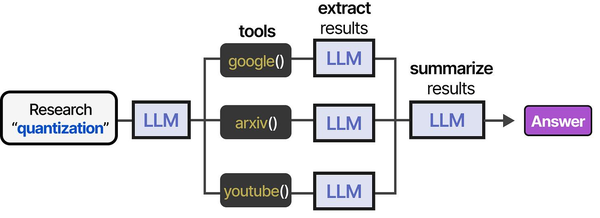
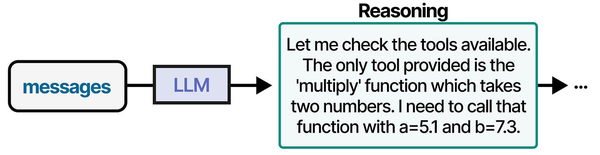
AI-assisted Ansible playbook generation is a compelling example of tool-augmented agents in practice. As detailed in An Illustrated Guide to AI Agents by Grootendorst and Alammar, agents follow a structured pipeline — researching context, selecting tools, extracting relevant information, and synthesizing output — which closely parallels how a local LLM generates infrastructure-as-code playbooks.
Related Articles
- AI-Assisted Ansible Troubleshooting with Local LLMs on Linux
- Terraform and Local LLMs: AI-Assisted Infrastructure as Code on Linux
- Continue.dev and Ollama: Self-Hosted AI Coding Assistant for VS Code on Linux
- Ollama and LangChain on Linux: Build AI Agents with Local Models
Further Reading
- An Illustrated Guide to AI Agents by Maarten Grootendorst and Jay Alammar — Visual guide to agent memory, tools, and reasoning.
- LLMs in Production by Christopher Brousseau and Matthew Sharp — Practical deployment of language models from training to production.
- Agentic AI in Enterprise by Sumit Ranjan, Divya Chembachere, and Lanwin Lobo — Enterprise architecture patterns for agentic AI systems.
Frequently Asked Questions
How does the quality compare to Ansible Lightspeed?
For straightforward infrastructure tasks (package installation, service configuration, file management), a good local model like Qwen 2.5 Coder 32B produces output that is comparable to Ansible Lightspeed. Where Lightspeed has an advantage is in Ansible-specific context awareness — it understands your existing roles and playbooks and makes suggestions that fit your project's patterns. The local LLM generates playbooks in isolation unless you explicitly include context in the prompt. For complex multi-role architectures, Lightspeed's integration with the Ansible ecosystem gives it an edge. For generating standalone playbooks from a description, the local approach works well and keeps your data private.
Which Ollama model should I use if I only have 8 GB of VRAM?
Llama 3.1 8B at Q8 quantization (about 8.5 GB VRAM) is the best option for limited hardware. At Q4 quantization it fits comfortably in 6 GB. The quality is noticeably lower than the 32B models — expect to make more manual corrections, especially for complex playbooks with multiple interdependent services. If you can afford 16 GB VRAM (an RTX 4060 Ti 16GB is around $400), DeepSeek Coder V2 16B at Q4 is a significant quality improvement. The general rule: use the largest code-focused model your VRAM can handle.
Can the LLM generate Ansible roles with proper directory structure?
Yes, but it requires explicit prompting. If you just ask for a "role," the LLM will often generate a flat playbook instead. Specify the directory structure you want in the prompt: "Generate an Ansible role with defaults/main.yml, tasks/main.yml, handlers/main.yml, templates/, and meta/main.yml." The output will include all files with path comments. You will need a wrapper script to split the single output into the correct directory structure, or generate each file separately with targeted prompts. The upcoming section of our CLI tool adds a --role flag that handles this automatically.
How do I prevent the LLM from generating insecure playbooks?
Three layers. First, include security requirements in the system prompt (our default prompt already includes rules about not using shell modules unnecessarily). Second, include specific security requirements in your per-playbook prompt ("use ansible-vault for all passwords," "set file permissions to 0640," "enable TLS for all services"). Third, run the validation pipeline that checks for hardcoded passwords, excessive permissions, and shell module usage. No automated system catches everything — human review remains essential for security-sensitive playbooks. Treat the LLM output as code from a junior engineer: probably functional, but needs a security review.
Can I fine-tune a model on my organization's existing playbooks?
Yes, and it significantly improves output quality for your specific environment. Collect your existing playbooks, format them as prompt-completion pairs (description of what the playbook does + the playbook content), and fine-tune using Ollama's model creation from a Modelfile or use tools like Axolotl for full fine-tuning. A fine-tuned model learns your naming conventions, preferred module usage patterns, variable naming style, and role structure. The practical barrier is that you need at least 50-100 high-quality playbook examples for meaningful fine-tuning, and the fine-tuning process itself requires significant compute resources (a full fine-tune of a 32B model needs multiple high-VRAM GPUs). LoRA fine-tuning on a single GPU is a more accessible alternative that still produces meaningful improvements.


