An attacker who controls the bootloader controls everything above it: the kernel, all services, all data. Secure Boot and bootloader hardening are not optional extras on production Linux systems. They form the foundation of a trust chain that starts at firmware and extends through every piece of code that runs before your applications. This article covers how the UEFI Secure Boot chain works, how to manage Machine Owner Keys (MOK) for custom kernels and modules, how to password-protect GRUB2, and how kernel lockdown, dm-verity, and TPM measured boot extend the chain of trust beyond the bootloader. For foundational concepts on how Linux starts up through BIOS, UEFI, GRUB, and systemd, see our Linux boot process overview.
How the UEFI Secure Boot Chain Works
Secure Boot is a UEFI feature that verifies digital signatures before executing any boot-stage binary. Without Secure Boot enabled, any binary placed on the EFI System Partition can execute with full system privileges during the boot process. The verification chain works through a hierarchy of cryptographic keys:
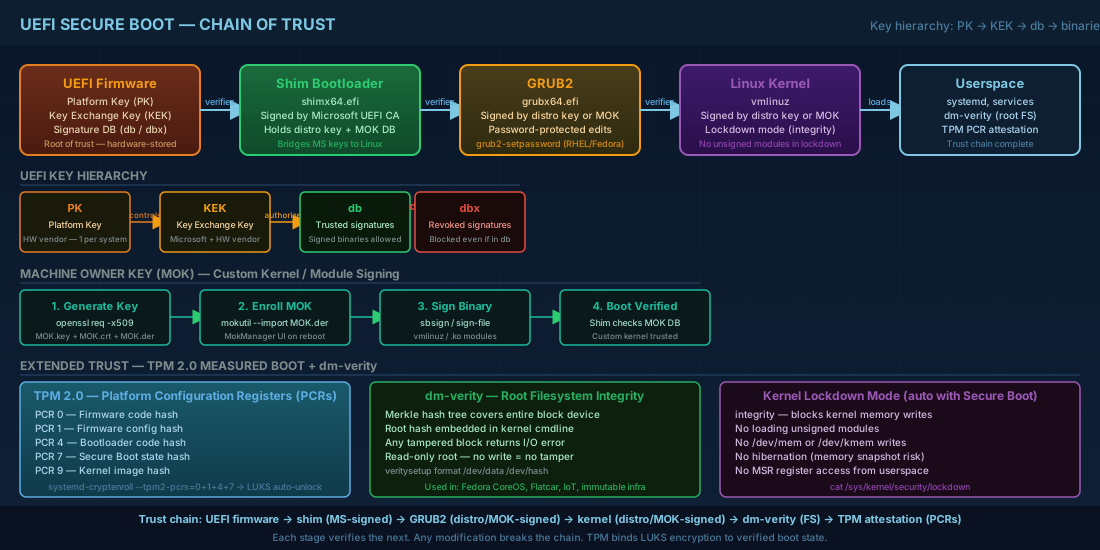
- Platform Key (PK) - the root of trust, owned by the hardware vendor. Controls who can modify the Secure Boot database. Each system has exactly one PK.
- Key Exchange Key (KEK) - authorizes changes to the signature database. Microsoft and the hardware vendor typically hold KEKs. Multiple KEKs can coexist.
- db (Signature Database) - contains the actual certificates and hashes of trusted binaries. If a bootloader's signature matches an entry in db, it runs.
- dbx (Forbidden Signature Database) - contains revoked signatures. A binary matching dbx is blocked even if it also matches db. This is how compromised bootloaders are blacklisted across the industry.
In practice, almost all x86 hardware ships with Microsoft's keys in KEK and db. Linux distributions deal with this through the shim bootloader.
Shim: bridging Microsoft's keys and Linux distributions
The shim is a small first-stage bootloader signed by Microsoft's UEFI CA certificate. Its job is simple: verify and chain-load GRUB2 (or another bootloader) using either the built-in distribution key or keys stored in a Machine Owner Key (MOK) database.
The boot sequence with Secure Boot enabled:
UEFI firmware
  -> verifies shim (signed by Microsoft UEFI CA) via db
    -> shim verifies grubx64.efi (signed by distro key or MOK)
      -> GRUB verifies vmlinuz (signed by distro key or MOK)
        -> kernel loads, may verify modules if lockdown is enabled
On Fedora 43 and RHEL 10.1, the shim binary lives at /boot/efi/EFI/fedora/shimx64.efi. On Ubuntu 24.04.3 LTS and Debian 13.3, it is at /boot/efi/EFI/ubuntu/shimx64.efi or /boot/efi/EFI/debian/shimx64.efi. For details on EFI System Partition layout and how these files are organized, see our UEFI and GRUB2 configuration guide.
Machine Owner Key (MOK) Management for Custom Kernels
When you compile a custom kernel, build out-of-tree modules (like NVIDIA drivers via DKMS), or use a third-party bootloader, the standard distribution keys will not cover those binaries. This is where MOK (Machine Owner Key) comes in. You generate your own key pair, enroll the public key into the MOK database, and sign your binaries with the private key. This lets you maintain a fully verified Secure Boot chain with custom software.
Generating a MOK key pair
# Create a directory for your signing keys
sudo mkdir -p /root/mok-keys
cd /root/mok-keys

# Generate a self-signed certificate (valid for 10 years)
openssl req -new -x509 -newkey rsa:2048 -keyout MOK.key -out MOK.crt \
  -nodes -days 3650 -subj "/CN=My Organization Secure Boot Key/"

# Convert to DER format (required for MOK enrollment)
openssl x509 -in MOK.crt -out MOK.der -outform DER

# Secure the private key
chmod 400 MOK.key
Store the private key securely. If an attacker obtains your MOK private key, they can sign malicious bootloaders and kernel modules that your system will trust. On multi-admin teams, consider storing the key on a hardware security module (HSM) or at minimum on encrypted, access-controlled storage separate from the servers it signs for.
Enrolling the MOK on a running system
# Import the key into the MOK pending list
sudo mokutil --import MOK.der
# You will be prompted to set a one-time enrollment password

# Reboot the system
sudo reboot

# During reboot, the MokManager (blue screen) will appear
# Select "Enroll MOK" -> "Continue" -> enter the password you set
# The key is now trusted by shim

# Verify enrollment after boot
mokutil --list-enrolled | grep "My Organization"
This process requires physical or out-of-band console access. On headless servers, use IPMI/iLO/iDRAC to interact with the MokManager screen during reboot. Plan MOK enrollment during maintenance windows and test the entire workflow on non-production systems first.
Signing Custom Kernels and Kernel Modules
With your MOK enrolled, you can sign binaries that shim and the kernel will trust. This is essential for any environment that runs custom-compiled kernels or out-of-tree drivers while maintaining Secure Boot. For background on how kernel modules are loaded and managed, see our kernel modules and hardware detection guide.
Signing a custom kernel binary
# Sign the kernel with sbsign (from sbsigntool package)
sudo sbsign --key /root/mok-keys/MOK.key --cert /root/mok-keys/MOK.crt \
  --output /boot/vmlinuz-6.12.8-custom-signed /boot/vmlinuz-6.12.8-custom

# Verify the signature
sbverify --cert /root/mok-keys/MOK.crt /boot/vmlinuz-6.12.8-custom-signed
# Signature verification OK
Signing kernel modules with DKMS
Out-of-tree modules built by DKMS need signing too. Without valid signatures, the kernel will refuse to load unsigned modules when Secure Boot and kernel lockdown are active. On Fedora 43 and RHEL 10.1, DKMS can be configured to sign modules automatically:
# Install required tools
sudo dnf install dkms pesign sbsigntools

# Configure DKMS to use your MOK for signing
# Add to /etc/dkms/framework.conf:
sign_tool="/usr/lib/modules/${kernelver}/build/scripts/sign-file"
mok_signing_key="/root/mok-keys/MOK.key"
mok_certificate="/root/mok-keys/MOK.crt"

# Manually sign a module (e.g., after building)
sudo /usr/src/kernels/$(uname -r)/scripts/sign-file sha256 \
  /root/mok-keys/MOK.key /root/mok-keys/MOK.crt \
  /lib/modules/$(uname -r)/extra/mymodule.ko
On Ubuntu 24.04.3 LTS, DKMS signing is integrated into the update-secureboot-policy workflow. During DKMS package installation, the system prompts for a MOK password and handles enrollment automatically. This is more user-friendly but provides less control over which key is used for signing.
GRUB2 Password Protection Against Unauthorized Boot Editing
Secure Boot prevents unsigned code from running, but it does not stop someone with console access from editing GRUB menu entries at boot time. An attacker can add init=/bin/bash to the kernel command line and get a root shell without any authentication. GRUB2 password protection prevents this by requiring authentication before menu entries can be edited.
Setting up GRUB2 authentication
# Generate a PBKDF2 password hash
grub2-mkpasswd-pbkdf2
# Enter password:
# Reenter password:
# PBKDF2 hash of your password is grub.pbkdf2.sha512.10000.ABC123...XYZ

# Add to /etc/grub.d/40_custom (or create a new file like 01_password):
cat <<'GRUBPW' | sudo tee /etc/grub.d/01_password
#!/bin/sh
exec tail -n +3 $0
set superusers="admin"
password_pbkdf2 admin grub.pbkdf2.sha512.10000.ABC123...XYZ
GRUBPW

# Make it executable
sudo chmod +x /etc/grub.d/01_password

# Regenerate GRUB config
# Fedora / RHEL:
sudo grub2-mkconfig -o /boot/efi/EFI/fedora/grub.cfg
# Debian / Ubuntu:
sudo update-grub
With the above configuration, ALL GRUB menu entries require authentication, including normal boot. To allow normal boot without a password while requiring authentication only for editing entries, add --unrestricted to each menuentry line in the appropriate /etc/grub.d/10_linux template. On RHEL 10.1 and Fedora 43, the GRUB2_PASSWORD mechanism in /boot/efi/EFI/fedora/user.cfg provides a simpler approach -- use grub2-setpassword instead.
The simpler GRUB2 password approach on RHEL and Fedora
# RHEL 10.1 / Fedora 43 provide grub2-setpassword
sudo grub2-setpassword
# Enter password:
# Confirm password:

# This creates /boot/efi/EFI/fedora/user.cfg (or /boot/grub2/user.cfg)
# Normal boot works without password; editing entries requires it
This method is preferred on RHEL and Fedora because it separates the password from the main GRUB configuration. The user.cfg file persists across grub2-mkconfig regenerations, so you do not lose the password when a kernel update triggers a config rebuild.
Kernel Lockdown, dm-verity, and Measured Boot
Kernel lockdown mode: preventing runtime kernel modifications
When Secure Boot is active, the kernel automatically enables lockdown mode on distributions that support it. Lockdown prevents operations that could modify the running kernel, closing a class of attacks where an adversary with root access tampers with kernel memory or loads malicious modules:
- No loading unsigned kernel modules
- No writing to
/dev/memor/dev/kmem - No direct PCI BAR access
- No hibernation (which could expose memory contents to offline analysis)
- No access to MSR registers from userspace
# Check lockdown state
cat /sys/kernel/security/lockdown
# [none] integrity confidentiality
# "integrity" means lockdown is active in integrity mode

# On Fedora 43 / RHEL 10.1 with Secure Boot enabled:
# [none] [integrity] confidentiality
There are two lockdown levels: integrity blocks modifications to the running kernel, while confidentiality additionally blocks operations that could leak kernel memory contents (such as reading /proc/kcore).
dm-verity: cryptographic verification of root filesystems
dm-verity provides transparent integrity verification of block devices using a Merkle tree of hashes. It is used in read-only root filesystem setups (common in container hosts, IoT, and immutable infrastructure like Fedora CoreOS and Flatcar Container Linux).
# Create a verity volume (offline, during image build)
veritysetup format /dev/sda2 /dev/sda3
# Root hash: 4a2e...b8f3  (this hash must be passed to the kernel)

# Activate the verity device
veritysetup open /dev/sda2 verified-root /dev/sda3 4a2e...b8f3

# The root hash can be embedded in the kernel command line:
# root=/dev/dm-0 dm-mod.create="verified-root,,4,ro,..."
dm-verity does not encrypt data. It only detects tampering. If a block does not match its expected hash, the I/O returns an error. Combined with a read-only root and Secure Boot, this creates a system where the boot chain is verified from firmware to filesystem content. Any modification to any file on the root filesystem will be detected at read time.
TPM 2.0 integration and measured boot
A Trusted Platform Module (TPM 2.0) stores measurements (SHA-256 hashes) of each boot stage in its Platform Configuration Registers (PCRs). Measured boot does not prevent booting -- it records what booted so you can attest the state later. This creates a cryptographic audit trail of the entire boot process.
# Check TPM availability
ls /dev/tpm*
# /dev/tpm0  /dev/tpmrm0

# Read PCR values (requires tpm2-tools)
sudo tpm2_pcrread sha256
# sha256:
#   0 : 0xA3B2...  (firmware code)
#   1 : 0xC4D5...  (firmware config)
#   4 : 0xE6F7...  (bootloader code)
#   5 : 0x8A9B...  (bootloader config)
#   7 : 0xBCDE...  (Secure Boot state)
#   8 : 0xF012...  (kernel command line)
#   9 : 0x3456...  (kernel image)

# Bind a LUKS volume to specific PCR values (auto-unlock only if boot chain matches)
sudo systemd-cryptenroll --tpm2-device=auto --tpm2-pcrs=0+1+4+7 /dev/sda2
This is the basis for full disk encryption that unlocks automatically on trusted boots but requires a passphrase if the boot chain changes (e.g., after a firmware update or if an attacker modifies the bootloader). On RHEL 10.1 and Fedora 43, systemd-cryptenroll with TPM2 bindings is the recommended approach. For detailed LUKS setup procedures, see our guide on encrypted filesystems with LUKS and dm-crypt.
Secure Boot and Bootloader Hardening Quick Reference
| Task | Command |
|---|---|
| Check Secure Boot status | mokutil --sb-state |
| List enrolled MOK keys | mokutil --list-enrolled |
| Import a new MOK | sudo mokutil --import MOK.der |
| Generate MOK key pair | openssl req -new -x509 -newkey rsa:2048 -keyout MOK.key -out MOK.crt -nodes -days 3650 |
| Sign a kernel binary | sudo sbsign --key MOK.key --cert MOK.crt --output vmlinuz-signed vmlinuz |
| Verify a signed binary | sbverify --cert MOK.crt /boot/vmlinuz-signed |
| Sign a kernel module | scripts/sign-file sha256 MOK.key MOK.crt module.ko |
| Set GRUB password (RHEL/Fedora) | sudo grub2-setpassword |
| Check kernel lockdown | cat /sys/kernel/security/lockdown |
| Read TPM PCR values | sudo tpm2_pcrread sha256 |
| Bind LUKS to TPM2 PCRs | sudo systemd-cryptenroll --tpm2-device=auto --tpm2-pcrs=0+1+4+7 /dev/sdX |
| Create dm-verity hash tree | veritysetup format /dev/data /dev/hash |
Summary
Secure Boot establishes a verified chain from UEFI firmware through the shim bootloader, GRUB2, and the kernel. MOK enrollment lets you extend that chain to your own custom kernels and out-of-tree modules without disabling Secure Boot entirely. GRUB2 password protection prevents unauthorized kernel parameter editing at the boot menu. Beyond the boot chain, kernel lockdown mode restricts runtime modifications, dm-verity verifies filesystem integrity at the block level, and TPM-based measured boot creates a cryptographic record of what actually ran. Together, these mechanisms form a layered defense that makes boot-level attacks significantly harder to execute undetected. The key operational takeaway: plan your key management, test MOK enrollment on non-production hardware first, and always maintain out-of-band console access for recovery. For broader Linux security hardening beyond the boot process, see our Linux security baseline guide covering updates, firewalls, and least-privilege configuration.


