Kernel modules are one of the first Linux topics that affects real support work. A server can boot, but a network card may stay offline because the right driver was not loaded. A laptop can detect USB storage, but not Wi-Fi, for the same reason. If you understand how modules and hardware detection fit together, you can move from guesswork to a repeatable workflow.
At a high level, Linux detects hardware buses (PCI, USB, NVMe, and others), matches each device to a driver, and loads that driver as a kernel module when possible. Most of this is automatic, but production incidents happen when versions, signatures, or initramfs content do not match what the system needs.
What kernel modules are and why they matter
A kernel module is a piece of kernel code that can be loaded after boot. It adds support for hardware drivers, filesystems, crypto, and other low-level features. The alternative is a built-in driver compiled directly into the kernel image.
For entry-level technicians, the practical difference is simple:
- Built-in code is always present once that kernel boots.
- A module can be loaded or unloaded without rebooting, if the driver supports it.
Modules are stored under /lib/modules/<kernel-version>/. If you boot kernel 6.8.x but only have modules for 6.5.x, device support can fail in surprising ways.
# Current running kernel version
uname -r

# Module tree for this kernel
ls /lib/modules/$(uname -r)

# Loaded modules right now
lsmod | head -n 20

# Metadata for one module (replace with a module on your host)
modinfo xhci_pci
Production consequence: after patch windows, version mismatch between kernel and module tree is a common cause of "booted but half-broken" nodes. Always verify uname -r and module path alignment first.
How Linux detects hardware during boot and hot-plug
Hardware detection starts early in boot. The kernel scans buses such as PCI and USB, reads each device ID, and asks: "Which driver supports this ID?" The mapping comes from module aliases, and udev coordinates user-space events after the kernel reports devices.
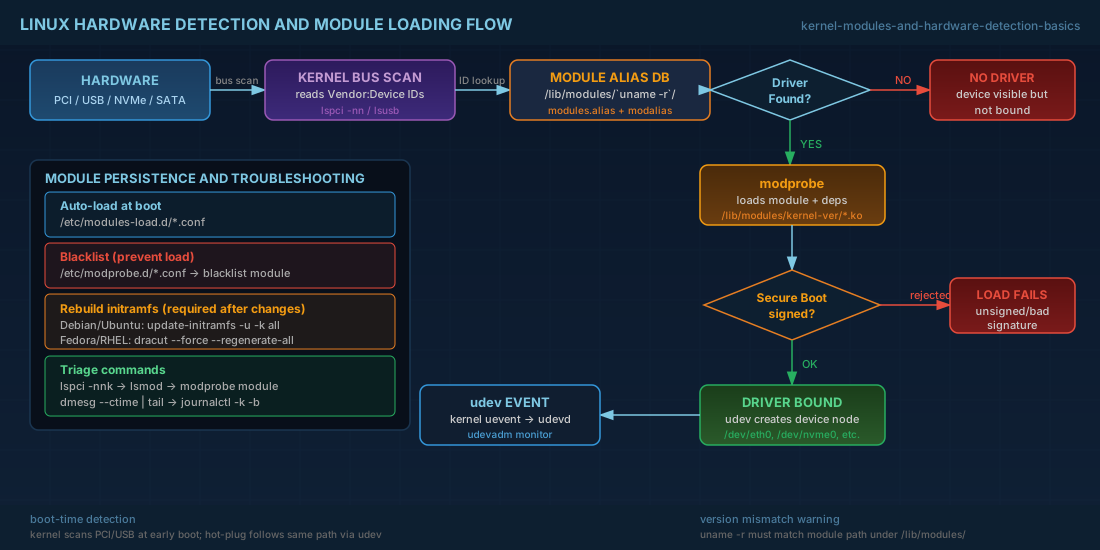
When you plug in new hardware later (hot-plug), the same model applies: kernel event, ID match, module load, device node creation.
# PCI devices with driver information
lspci -nnk

# USB topology and driver usage
lsusb -t

# Watch real-time udev events while plugging a device
sudo udevadm monitor --kernel --udev
Read output in order. First confirm the device appears at all. Then confirm a kernel driver is bound. If the device appears with "Kernel driver in use:" empty, Linux sees the hardware but has no active driver for it.
Production consequence: this distinction changes escalation path. "Hardware not detected" often points to firmware, cable, slot, or hypervisor pass-through issues. "Hardware detected but no driver bound" is usually a module, package, signature, or policy problem.
Loading, unloading, and inspecting modules safely
The main command is modprobe. It loads a target module and required dependencies. Use it instead of insmod for normal operations, because modprobe resolves dependency order from module metadata.
# Load a module and dependencies
sudo modprobe nvme_tcp

# Remove a module if nothing depends on it
sudo modprobe -r nvme_tcp

# Show dependency graph for one module
modinfo -F depends nvme_tcp

# Kernel log messages after load attempt
sudo dmesg --ctime | tail -n 50
Do not unload random modules on production systems. Removing a storage, filesystem, or network module can drop active workloads. On shared platforms, this can trigger cascading health check failures.
Also check Secure Boot state when custom or third-party modules are involved. With Secure Boot enabled, unsigned modules may be rejected even if the file exists.
# Secure Boot status (if mokutil is installed)
mokutil --sb-state

# Kernel messages about signature validation
sudo journalctl -k -b --no-pager | grep -Ei "module|signature|secure boot"
Persistent configuration: auto-load, blacklist, and initramfs
Automatic loading works for most hardware, but sometimes you need policy control. Linux provides two common configuration paths:
/etc/modules-load.d/*.confto force modules to load at boot./etc/modprobe.d/*.confto set options or blacklist modules.
# Force module load at boot
printf "br_netfilter\n" | sudo tee /etc/modules-load.d/k8s-network.conf

# Blacklist a module (example)
printf "blacklist nouveau\n" | sudo tee /etc/modprobe.d/blacklist-nouveau.conf

# Apply now without reboot where possible
sudo modprobe br_netfilter
If early boot depends on a module (for example storage, RAID, or encrypted root), update initramfs after module policy changes. Otherwise the system may work now but fail on next reboot.
# Debian 13.3, Ubuntu 24.04.3 LTS, Ubuntu 25.10
sudo update-initramfs -u -k all

# Fedora 43, RHEL 10.1, RHEL 9.7
sudo dracut --force --regenerate-all
Blacklisting the wrong storage or filesystem module can make a host unbootable. Keep remote console access and rollback steps ready before rebooting production machines.
Distribution notes for Debian, Ubuntu, Fedora, and RHEL
The core kernel-module model is consistent across major distributions, but tooling and package naming differ:
- Debian 13.3 and Ubuntu 24.04.3 LTS / 25.10: module handling is standard with
kmod; initramfs is typically managed byinitramfs-tools. - Fedora 43: also uses
kmod, but initramfs generation is throughdracutby default. - RHEL 10.1 and RHEL 9.7: same operational pattern as Fedora for
dracut, with enterprise policy layers for signed modules and support lifecycle constraints.
RHEL 9.7 compatibility note: procedures in this article transfer directly to RHEL 9.7 in most environments. Differences usually come from hardware enablement streams, vendor drivers, or security policy, not from basic module mechanics.
Practical troubleshooting flow for missing hardware
Use a short sequence and avoid skipping steps:
- Confirm the device is visible on its bus (
lspci,lsusb,lsblk). - Check whether a driver is bound (
lspci -nnk). - Load the expected module with
modprobeand read logs immediately. - Check module signature and Secure Boot messages if load fails.
- If boot-time behavior differs from runtime behavior, rebuild initramfs.
# Example: investigate an Ethernet controller
lspci -nn | grep -i -E "ethernet|network"
lspci -nnk | grep -A3 -i -E "ethernet|network"

# Try loading expected driver (example module name)
sudo modprobe e1000e

# Verify interface appeared
ip -br link

# Read kernel messages for driver probe results
sudo journalctl -k -b --no-pager | grep -Ei "e1000e|eth|firmware|failed|timeout"
This flow helps both beginners and operators. Beginners get a clear checklist. Operators get fast triage data to decide if they should rollback a kernel, push a firmware package, adjust module policy, or open a hardware ticket.
Summary
Kernel modules are the bridge between Linux and most hardware drivers. When detection fails, focus on sequence: device visibility, driver binding, module load result, and boot-time image content. Debian 13.3, Ubuntu 24.04.3 LTS, Ubuntu 25.10, Fedora 43, RHEL 10.1, and RHEL 9.7 all follow the same fundamentals, so one disciplined workflow works across mixed fleets.


