Ollama exposes an API that any programming language can use, but the official Python library turns that API into something you can weave directly into the scripts you already write to manage Linux servers. Instead of copying log output into a chat window, you can pipe it straight to a local LLM and get structured analysis back in your terminal. Instead of manually writing nginx configs, you can describe what you need and let the model generate a working configuration that your provisioning script applies automatically.
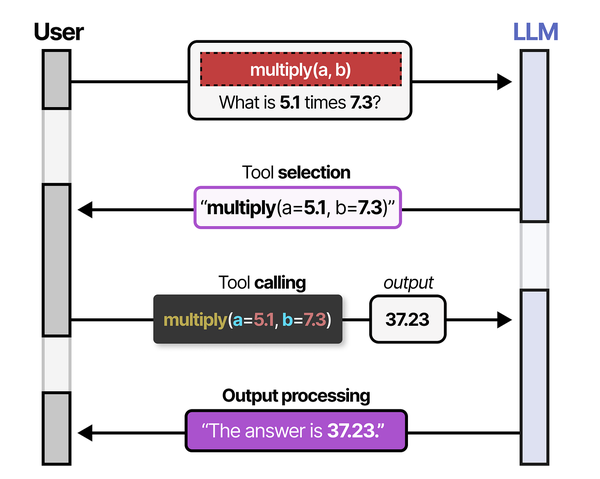
Building administration tools with Ollama's Python API is an exercise in practical tool-calling implementation. Grootendorst and Alammar outline in An Illustrated Guide to AI Agents that tool calling has five steps: creation, definition, selection, calling, and output processing. When building a Python script that uses Ollama to analyze system logs, each step maps directly: you create functions for log parsing and metric collection, define them in JSON schema format for the LLM, let the model select which functions to call based on the admin's query, execute the selected functions, and feed the output back to the LLM for summarization and recommendations.
This is not about replacing shell scripts with AI. The tools built here use LLMs for the parts of system administration where pattern recognition and natural language understanding genuinely help — reading messy log files, explaining obscure error messages, generating boilerplate configurations, and turning incidents into documentation. The mundane parts (restarting services, checking disk space, running updates) stay in plain bash where they belong. For GPU driver setup, see our NVIDIA driver and CUDA installation guide.
Brousseau and Sharp caution in LLMs in Production that production admin tools built on LLMs must handle errors gracefully and never execute destructive operations without explicit confirmation. They recommend a "suggest, then confirm" pattern where the LLM proposes an action (like restarting a service or clearing disk space), the script presents the proposal to the administrator, and execution only proceeds after human approval. This is especially critical for system administration tools where a misinterpreted prompt could lead to data loss or service outages.
Everything in this guide runs locally. Ollama serves the model on the same machine or network as the Python scripts. No API keys, no cloud dependencies, no data leaving your infrastructure.
Installing the Ollama Python Library
The official ollama Python package wraps the REST API into a clean Python interface. Install it in whatever environment you use for your administration scripts:
# Install with pip
pip install ollama

# Or in a virtual environment (recommended for production scripts)
python3 -m venv /opt/admin-tools/venv
source /opt/admin-tools/venv/bin/activate
pip install ollama
The library requires Python 3.8+ and has minimal dependencies. It talks to Ollama over HTTP, so the Python environment does not need CUDA, PyTorch, or any ML libraries — all inference happens in the Ollama server process.
Verify the connection:
python3 -c "
import ollama
response = ollama.list()
for model in response['models']:
    print(f\"{model['name']:30s} {model['size'] / 1e9:.1f} GB\")
"
If Ollama runs on a different machine, set the host when creating a client:
import ollama

# Connect to remote Ollama instance
client = ollama.Client(host='http://192.168.1.100:11434')
response = client.list()
print(response)
Basic Generation and Chat APIs
Simple Text Generation
The generate function sends a prompt and returns a completion. This is the raw interface — no conversation history, no role-based messaging:
import ollama

response = ollama.generate(
    model='llama3.1:8b',
    prompt='Explain what the Linux OOM killer does in two sentences.'
)
print(response['response'])
Chat Interface
The chat function uses the message-based format with roles (system, user, assistant), which gives you better control over the model's behavior:
import ollama

messages = [
    {
        'role': 'system',
        'content': 'You are a senior Linux systems administrator. Give concise, accurate answers. Include commands when relevant.'
    },
    {
        'role': 'user',
        'content': 'A process is using 95% of RAM. How do I identify it and handle the situation?'
    }
]

response = ollama.chat(
    model='llama3.1:8b',
    messages=messages
)
print(response['message']['content'])
The system message is where you shape the model's responses for your use case. A well-crafted system prompt is the difference between generic advice and targeted, actionable output. For sysadmin tools, specify the OS, the role, and the expected output format.
Streaming Responses
For long outputs, streaming shows tokens as they generate rather than waiting for the complete response:
import ollama
import sys

stream = ollama.chat(
    model='llama3.1:8b',
    messages=[{'role': 'user', 'content': 'Write a systemd service file for a Python web application'}],
    stream=True
)

for chunk in stream:
    content = chunk['message']['content']
    sys.stdout.write(content)
    sys.stdout.flush()

print()  # Final newline
Streaming is particularly useful for CLI tools where the user is watching output in real time. It also allows you to detect early problems — if the model starts generating nonsense, you can abort the stream without waiting for the full response.
Building a Log Analyzer
System logs contain critical information buried under noise. A log analyzer that uses an LLM can identify patterns, summarize issues, and suggest fixes without you reading through thousands of lines manually.
#!/usr/bin/env python3
"""Log analyzer using Ollama - reads journal or log files and provides analysis."""

import ollama
import subprocess
import argparse
from datetime import datetime

def get_journal_logs(unit=None, since="1h", priority=None):
    """Fetch logs from journalctl."""
    cmd = ["journalctl", "--no-pager", f"--since={since} ago"]
    if unit:
        cmd.extend(["-u", unit])
    if priority:
        cmd.extend(["-p", priority])
    cmd.append("-n")
    cmd.append("200")

    result = subprocess.run(cmd, capture_output=True, text=True)
    return result.stdout

def analyze_logs(logs, context=""):
    """Send logs to Ollama for analysis."""
    system_prompt = """You are a Linux systems administrator analyzing logs.
Your job:
1. Identify errors, warnings, and unusual patterns
2. Group related issues together
3. For each issue, explain what happened and suggest a fix
4. If nothing unusual is found, say so clearly

Output format:
- Start with a one-line summary (OK/ISSUES FOUND)
- List each finding with severity (CRITICAL/WARNING/INFO)
- Include the relevant log line(s) as evidence
- Suggest specific commands to investigate or fix

Do not speculate. If you are unsure about a log entry, say so."""

    user_prompt = f"Analyze these system logs:\n\n{logs}"
    if context:
        user_prompt += f"\n\nAdditional context: {context}"

    response = ollama.chat(
        model='llama3.1:8b',
        messages=[
            {'role': 'system', 'content': system_prompt},
            {'role': 'user', 'content': user_prompt}
        ]
    )
    return response['message']['content']

def main():
    parser = argparse.ArgumentParser(description='Analyze system logs with LLM')
    parser.add_argument('--unit', '-u', help='Systemd unit to analyze')
    parser.add_argument('--since', '-s', default='1h', help='Time range (default: 1h)')
    parser.add_argument('--priority', '-p', help='Minimum priority (emerg..debug)')
    parser.add_argument('--context', '-c', default='', help='Additional context for analysis')
    parser.add_argument('--file', '-f', help='Analyze a log file instead of journal')
    args = parser.parse_args()

    if args.file:
        with open(args.file, 'r') as f:
            logs = f.read()[-50000:]  # Last 50K chars to fit context
    else:
        logs = get_journal_logs(args.unit, args.since, args.priority)

    if not logs.strip():
        print("No logs found for the specified criteria.")
        return

    print(f"Analyzing {len(logs)} characters of logs...")
    print(f"Timestamp: {datetime.now().isoformat()}")
    print("-" * 60)

    analysis = analyze_logs(logs, args.context)
    print(analysis)

if __name__ == "__main__":
    main()
Usage examples:
# Analyze nginx logs from the last 2 hours
python3 log_analyzer.py -u nginx -s 2h

# Analyze SSH authentication issues
python3 log_analyzer.py -u sshd -s 24h -p warning

# Analyze a specific log file
python3 log_analyzer.py -f /var/log/app/error.log

# Add context about a known issue
python3 log_analyzer.py -u postgresql -s 6h -c "We migrated the database at 14:00"
The 200-line limit in the journal query keeps the input within the model's context window. For larger log volumes, add a filtering step before sending to the LLM — extract only lines containing errors, warnings, or specific patterns, then let the model analyze the filtered set.
Building a Config Generator
Configuration files for nginx, systemd, Docker, and other tools follow predictable patterns but require careful attention to syntax. An LLM can generate these from a natural language description, which is faster than modifying templates by hand.
#!/usr/bin/env python3
"""Configuration file generator using Ollama."""

import ollama
import argparse
import sys

CONFIG_TEMPLATES = {
    "nginx-proxy": "Generate an nginx reverse proxy configuration",
    "nginx-static": "Generate an nginx static file serving configuration",
    "systemd-service": "Generate a systemd service unit file",
    "systemd-timer": "Generate a systemd timer unit file",
    "docker-compose": "Generate a Docker Compose file",
    "logrotate": "Generate a logrotate configuration",
    "fail2ban-jail": "Generate a fail2ban jail configuration",
}

def generate_config(config_type, description, constraints=None):
    """Generate a configuration file using the LLM."""
    system_prompt = f"""You are a Linux configuration expert. Generate a {config_type} configuration file.

Rules:
- Output ONLY the configuration file content, no explanations before or after
- Include comments explaining non-obvious settings
- Use secure defaults (TLS 1.2+, restricted permissions, minimal access)
- Follow the principle of least privilege
- Use realistic but placeholder values for domains, IPs, and paths
- Mark values that must be changed with CHANGE_ME

If the request is ambiguous, choose the most secure and commonly used option."""

    user_prompt = f"Generate this configuration: {description}"
    if constraints:
        user_prompt += f"\n\nConstraints: {constraints}"

    response = ollama.chat(
        model='llama3.1:8b',
        messages=[
            {'role': 'system', 'content': system_prompt},
            {'role': 'user', 'content': user_prompt}
        ]
    )
    return response['message']['content']

def main():
    parser = argparse.ArgumentParser(description='Generate config files with LLM')
    parser.add_argument('type', choices=list(CONFIG_TEMPLATES.keys()),
                       help='Configuration type')
    parser.add_argument('description', help='What the config should do')
    parser.add_argument('--constraints', '-c', help='Additional constraints')
    parser.add_argument('--output', '-o', help='Write to file instead of stdout')
    args = parser.parse_args()

    config = generate_config(args.type, args.description, args.constraints)

    if args.output:
        with open(args.output, 'w') as f:
            f.write(config)
        print(f"Configuration written to {args.output}")
    else:
        print(config)

if __name__ == "__main__":
    main()
Usage:
# Generate an nginx reverse proxy for a Node.js app
python3 config_gen.py nginx-proxy "Reverse proxy for Node.js app on port 3000, domain app.example.com, with TLS and rate limiting"

# Generate a systemd service for a Python script
python3 config_gen.py systemd-service "Run /opt/monitor/check.py every startup, restart on failure, log to journal" -c "User: monitor, Group: monitor"

# Generate a Docker Compose file
python3 config_gen.py docker-compose "WordPress with MariaDB and Redis caching" -o docker-compose.yml

# Generate a fail2ban jail
python3 config_gen.py fail2ban-jail "Block IPs after 5 failed SSH attempts in 10 minutes, ban for 1 hour"
Always review generated configurations before deploying them. The LLM produces syntactically correct output most of the time, but it can hallucinate directives that do not exist or use deprecated options. A quick nginx -t or systemd-analyze verify catches these before they cause problems.
Building an Incident Responder
When something goes wrong on a server, the incident responder gathers system state and presents an analysis with suggested remediation steps:
#!/usr/bin/env python3
"""Incident analysis tool - gathers system state and provides LLM analysis."""

import ollama
import subprocess
import json
from datetime import datetime

def run_command(cmd):
    """Run a shell command and return stdout."""
    try:
        result = subprocess.run(cmd, shell=True, capture_output=True, text=True, timeout=10)
        return result.stdout.strip()
    except subprocess.TimeoutExpired:
        return "[command timed out]"
    except Exception as e:
        return f"[error: {e}]"

def gather_system_state():
    """Collect current system state information."""
    checks = {
        "uptime": "uptime",
        "load_average": "cat /proc/loadavg",
        "memory": "free -h",
        "disk_usage": "df -h --output=target,pcent,avail -x tmpfs -x devtmpfs",
        "top_cpu_processes": "ps aux --sort=-%cpu | head -10",
        "top_memory_processes": "ps aux --sort=-%mem | head -10",
        "failed_services": "systemctl --failed --no-pager",
        "recent_errors": "journalctl -p err --since='30 min ago' --no-pager -n 30",
        "network_connections": "ss -tunapl | head -20",
        "disk_io": "iostat -x 1 1 2>/dev/null || echo 'iostat not available'",
        "oom_events": "journalctl -k --grep='Out of memory' --since='24h ago' --no-pager -n 5",
    }

    state = {}
    for name, cmd in checks.items():
        state[name] = run_command(cmd)
    return state

def analyze_incident(state, symptom=""):
    """Send system state to LLM for analysis."""
    system_prompt = """You are an on-call Linux systems engineer responding to an incident.

Analyze the system state data and provide:

1. ASSESSMENT: One paragraph summary of the system's current health
2. ISSUES FOUND: List each problem with severity (P1-Critical, P2-High, P3-Medium, P4-Low)
3. ROOT CAUSE: Your best assessment of what is causing the problem
4. REMEDIATION: Specific commands to fix or mitigate each issue, in order of priority
5. FOLLOW-UP: What to monitor after remediation

Be specific. Reference actual process names, PIDs, percentages, and values from the data.
Do not suggest rebooting unless it is genuinely the last resort."""

    state_text = ""
    for check, output in state.items():
        state_text += f"\n=== {check.upper()} ===\n{output}\n"

    user_prompt = f"System state collected at {datetime.now().isoformat()}:\n{state_text}"
    if symptom:
        user_prompt = f"Reported symptom: {symptom}\n\n{user_prompt}"

    response = ollama.chat(
        model='llama3.1:8b',
        messages=[
            {'role': 'system', 'content': system_prompt},
            {'role': 'user', 'content': user_prompt}
        ]
    )
    return response['message']['content']

def main():
    import argparse
    parser = argparse.ArgumentParser(description='Incident analysis with LLM')
    parser.add_argument('--symptom', '-s', default='',
                       help='Describe the observed problem')
    parser.add_argument('--json', action='store_true',
                       help='Output raw system state as JSON')
    args = parser.parse_args()

    print("Gathering system state...")
    state = gather_system_state()

    if args.json:
        print(json.dumps(state, indent=2))
        return

    print("Analyzing with LLM...")
    print("=" * 60)
    analysis = analyze_incident(state, args.symptom)
    print(analysis)

if __name__ == "__main__":
    main()
Usage:
# General health check
python3 incident_responder.py

# With a specific symptom
python3 incident_responder.py -s "Website is returning 502 errors since 14:30"

# Export raw state data
python3 incident_responder.py --json > /tmp/incident_state.json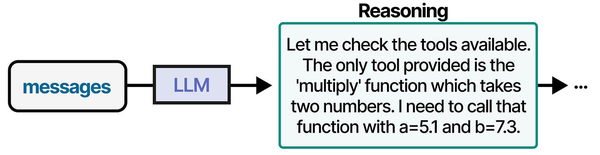
Building a Documentation Writer
After resolving an incident or completing a change, documentation needs to be written. The documentation writer takes raw notes, command history, and before/after states, then produces a structured post-mortem or change record:
#!/usr/bin/env python3
"""Documentation generator for incidents and changes."""

import ollama
import argparse
import sys
from datetime import datetime

def generate_postmortem(notes, timeline=None):
    """Generate an incident post-mortem from raw notes."""
    system_prompt = """Write an incident post-mortem document from the provided notes.

Use this structure:
- Title (short description of the incident)
- Date/Time
- Duration
- Impact (who/what was affected)
- Timeline (chronological list of events)
- Root Cause
- Resolution
- Lessons Learned
- Action Items (specific, assigned, with deadlines)

Write in past tense. Be factual and specific. Keep the language direct and professional."""

    user_prompt = f"Raw incident notes:\n{notes}"
    if timeline:
        user_prompt += f"\n\nTimeline events:\n{timeline}"

    response = ollama.chat(
        model='llama3.1:8b',
        messages=[
            {'role': 'system', 'content': system_prompt},
            {'role': 'user', 'content': user_prompt}
        ]
    )
    return response['message']['content']

def generate_runbook(task_description, commands_used):
    """Generate a runbook from a task description and commands."""
    system_prompt = """Write a runbook (operational procedure document) from the provided task and commands.

Use this structure:
- Title
- Purpose (one sentence)
- Prerequisites
- Procedure (numbered steps with exact commands)
- Verification (how to confirm success)
- Rollback (how to undo if something goes wrong)
- Troubleshooting (common issues and fixes)

Each step should include the exact command and a brief explanation of what it does.
Commands must be in code blocks. Do not skip steps or assume knowledge."""

    user_prompt = f"Task: {task_description}\n\nCommands used:\n{commands_used}"

    response = ollama.chat(
        model='llama3.1:8b',
        messages=[
            {'role': 'system', 'content': system_prompt},
            {'role': 'user', 'content': user_prompt}
        ]
    )
    return response['message']['content']

def main():
    parser = argparse.ArgumentParser(description='Generate documentation with LLM')
    subparsers = parser.add_subparsers(dest='command')

    pm = subparsers.add_parser('postmortem', help='Generate incident post-mortem')
    pm.add_argument('--notes', '-n', required=True, help='Raw notes or file path')
    pm.add_argument('--timeline', '-t', help='Timeline events or file path')

    rb = subparsers.add_parser('runbook', help='Generate operational runbook')
    rb.add_argument('--task', required=True, help='Task description')
    rb.add_argument('--commands', required=True, help='Commands file path or inline')

    args = parser.parse_args()

    if args.command == 'postmortem':
        notes = open(args.notes).read() if args.notes.endswith(('.txt', '.md')) else args.notes
        timeline = None
        if args.timeline:
            timeline = open(args.timeline).read() if args.timeline.endswith(('.txt', '.md')) else args.timeline
        print(generate_postmortem(notes, timeline))

    elif args.command == 'runbook':
        commands = open(args.commands).read() if args.commands.endswith(('.txt', '.sh')) else args.commands
        print(generate_runbook(args.task, commands))

if __name__ == "__main__":
    main()
Usage:
# Generate a post-mortem from notes
python3 doc_writer.py postmortem -n "DB went down at 3am, disk full on /var, postgres could not write WAL files. Cleared old logs, added disk monitoring. Back up at 3:45am"

# From a notes file
python3 doc_writer.py postmortem -n incident_notes.txt -t timeline.txt

# Generate a runbook from commands
python3 doc_writer.py runbook --task "Upgrade PostgreSQL 15 to 16 on Rocky Linux 9" --commands upgrade_commands.sh
Error Handling
Production scripts need to handle failures gracefully. The Ollama server might be down, the model might not be loaded, or the response might be malformed:
import ollama
import sys

def safe_chat(model, messages, timeout=120):
    """Chat with error handling for production use."""
    try:
        response = ollama.chat(
            model=model,
            messages=messages,
            options={'num_predict': 2048}  # Limit response length
        )
        return response['message']['content']

    except ollama.ResponseError as e:
        if 'model' in str(e).lower() and 'not found' in str(e).lower():
            print(f"Error: Model '{model}' is not available. Pull it first:", file=sys.stderr)
            print(f"  ollama pull {model}", file=sys.stderr)
        else:
            print(f"Ollama API error: {e}", file=sys.stderr)
        return None

    except ConnectionError:
        print("Error: Cannot connect to Ollama. Is it running?", file=sys.stderr)
        print("  sudo systemctl start ollama", file=sys.stderr)
        return None

    except Exception as e:
        print(f"Unexpected error: {e}", file=sys.stderr)
        return None

# Usage
result = safe_chat('llama3.1:8b', [{'role': 'user', 'content': 'Hello'}])
if result is None:
    sys.exit(1)
print(result)
Async Usage
For tools that need to make multiple LLM calls simultaneously (analyzing logs from several services in parallel), use the async client:
import asyncio
import ollama

async def analyze_service(service_name, logs):
    """Analyze logs for a single service asynchronously."""
    client = ollama.AsyncClient()
    response = await client.chat(
        model='llama3.1:8b',
        messages=[
            {'role': 'system', 'content': 'Analyze these service logs. Report any issues.'},
            {'role': 'user', 'content': f'Logs for {service_name}:\n{logs}'}
        ]
    )
    return service_name, response['message']['content']

async def parallel_analysis(services):
    """Analyze multiple services in parallel."""
    tasks = []
    for name, logs in services.items():
        tasks.append(analyze_service(name, logs))

    results = await asyncio.gather(*tasks)
    return dict(results)

# Usage
services = {
    'nginx': open('/var/log/nginx/error.log').read()[-10000:],
    'postgresql': open('/var/log/postgresql/postgresql-16-main.log').read()[-10000:],
    'redis': open('/var/log/redis/redis-server.log').read()[-10000:],
}

results = asyncio.run(parallel_analysis(services))
for service, analysis in results.items():
    print(f"\n{'='*60}")
    print(f"SERVICE: {service}")
    print(f"{'='*60}")
    print(analysis)
Be aware that parallel requests share the same GPU. If Ollama is configured with OLLAMA_NUM_PARALLEL=1 (the default), async requests are queued server-side. Set OLLAMA_NUM_PARALLEL=4 or higher to actually process requests concurrently, keeping in mind that each parallel request uses additional VRAM for its context.
Integration with Existing Python Scripts
The real power of the Ollama Python library is adding LLM capabilities to scripts you already have. Here is a pattern for wrapping an existing monitoring script with LLM-powered analysis:
#!/usr/bin/env python3
"""Enhanced disk monitoring with LLM analysis."""

import shutil
import ollama
import json

def check_disk_usage():
    """Standard disk usage check."""
    partitions = []
    for line in open('/proc/mounts').readlines():
        parts = line.split()
        mountpoint = parts[1]
        if mountpoint.startswith(('/dev', '/proc', '/sys', '/run')):
            continue
        try:
            usage = shutil.disk_usage(mountpoint)
            percent = (usage.used / usage.total) * 100
            partitions.append({
                'mount': mountpoint,
                'total_gb': round(usage.total / 1e9, 1),
                'used_gb': round(usage.used / 1e9, 1),
                'free_gb': round(usage.free / 1e9, 1),
                'percent': round(percent, 1)
            })
        except (PermissionError, OSError):
            continue
    return partitions

def analyze_if_needed(partitions, threshold=80):
    """Only call the LLM if something looks wrong."""
    problems = [p for p in partitions if p['percent'] > threshold]
    if not problems:
        return None  # No LLM call needed - save resources

    response = ollama.chat(
        model='llama3.1:8b',
        messages=[
            {'role': 'system', 'content': 'You are a storage administrator. Analyze disk usage problems and suggest specific cleanup actions. Be brief.'},
            {'role': 'user', 'content': f'These partitions are above {threshold}% usage:\n{json.dumps(problems, indent=2)}'}
        ]
    )
    return response['message']['content']

# Standard monitoring output
partitions = check_disk_usage()
for p in partitions:
    status = "WARN" if p['percent'] > 80 else "OK"
    print(f"[{status}] {p['mount']:20s} {p['percent']}% used ({p['free_gb']} GB free)")

# LLM analysis only when needed
analysis = analyze_if_needed(partitions)
if analysis:
    print("\n--- LLM Analysis ---")
    print(analysis)
The key pattern here is conditional invocation. The LLM is called only when the standard monitoring logic detects a problem. This keeps the script fast for normal operations (no LLM overhead) while providing intelligent analysis when something goes wrong.
Frequently Asked Questions
How much latency does an Ollama API call add to a script?
On a server with an NVIDIA RTX 4090, a typical 200-word response from Llama 3.1 8B takes 2-4 seconds including prompt processing and token generation. On CPU-only hardware, expect 15-30 seconds for the same response. The first call after loading a model is slower (1-3 seconds extra) because Ollama needs to load the model into memory. Subsequent calls within the keep-alive window are faster. For scripts where latency matters, use smaller models or set shorter num_predict limits.
Can I use these tools without a GPU?
Yes. Ollama runs on CPU, and all the tools in this guide work without a GPU. The trade-off is speed — CPU inference on a modern 16-core server processes about 10-15 tokens per second with an 8B model, compared to 80-100 tokens per second on a mid-range GPU. For automated scripts that run in the background (log analysis cron jobs, nightly documentation generation), CPU speed is perfectly adequate. For interactive tools where a human is waiting, a GPU makes the experience much better.
What model should I use for sysadmin tasks?
Llama 3.1 8B is the best starting point. It is fast, fits in 5 GB of VRAM, and handles log analysis, config generation, and documentation well. For complex reasoning about multi-step incidents or large codebases, Qwen 2.5 14B or Llama 3.1 70B (in 4-bit quantization) produce noticeably better results. CodeLlama or DeepSeek Coder are better choices if your scripts primarily generate or analyze code.
How do I prevent the model from hallucinating commands that could damage a system?
Never pipe LLM output directly to a shell. Always present generated commands to the user for review, or validate them against an allowlist of safe commands before execution. In your system prompts, explicitly state that the model should only suggest commands, never assume they will be executed automatically. For config generation, always run syntax validation (nginx -t, python -m py_compile, systemd-analyze verify) before applying generated configurations.
Can I fine-tune a model on my organization's specific logs and procedures?
Yes, but it is rarely necessary for the tools described here. Ollama supports importing custom GGUF models, and tools like Text Generation WebUI can fine-tune models with QLoRA. However, for most sysadmin tasks, a well-crafted system prompt with examples of your organization's log format and procedures gives 90% of the benefit of fine-tuning with zero training effort. Try prompt engineering first, and only invest in fine-tuning if you have a specific, repeatable task where the base model consistently fails.
Related Articles
- Ollama and LangChain on Linux: Build AI Agents with Local Models
- Ollama REST API Reference: Complete Endpoint Guide for Linux Developers
- AI-Powered Log Analysis on Linux: Use Ollama to Parse Syslog, Journald, and Application Logs
- n8n and Ollama: Build Self-Hosted AI Automation Workflows on Linux
Further Reading
- Grootendorst, M. & Alammar, J. (2025). An Illustrated Guide to AI Agents. O'Reilly Media. Covers agent memory systems, RAG pipelines, tool usage, MCP protocol, and context engineering with clear visual explanations.
- Ranjan, R. et al. (2025). Agentic AI in Enterprise. Apress. Explores enterprise AI architecture, RAG vs fine-tuning trade-offs, vector databases, prompt engineering, GPU acceleration, and Kubernetes orchestration for production AI.
- Brousseau, D. & Sharp, T. (2025). LLMs in Production. Manning Publications. Covers neural network fundamentals, transformer architecture, GPU management, latency optimization, Kubernetes deployment, MLOps pipelines, embeddings, and model quantization.


