iSCSI storage on Linux lets you present block devices over a standard TCP/IP network. A server exports a disk (the target), and a client connects to it and sees a local SCSI device (the initiator). This is how many small and mid-sized data centres provide shared storage without buying a Fibre Channel infrastructure. The cost is just Ethernet, which you already have. Combined with LVM logical volumes as backing stores, iSCSI delivers flexible, software-defined storage for Linux environments.
This article covers the full iSCSI stack: configuring a Linux iSCSI target with targetcli (LIO), connecting with open-iscsi, securing the link with CHAP, making mounts persistent, and adding multipath for failover. All commands are tested on Debian 13.3, Ubuntu 24.04.3 LTS, Fedora 43, and RHEL 10.1.
iSCSI Terminology: Targets, Initiators, LUNs, and IQNs
Before touching any config files, get these terms straight. They appear in every iSCSI conversation and in certification exams like the RHCSA and LPIC.
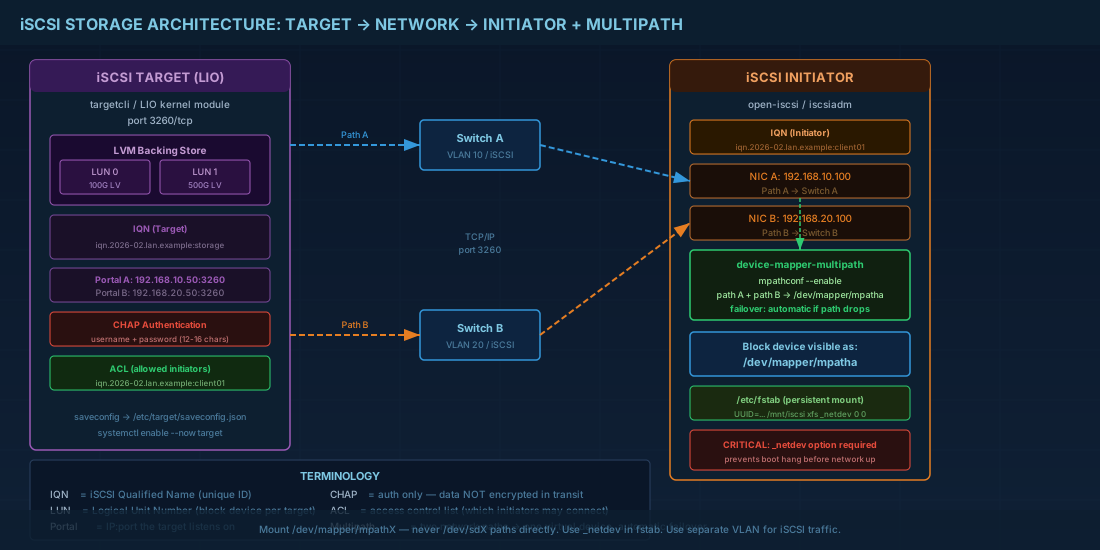
| Term | Meaning | Example |
|---|---|---|
| Target | The storage server exporting block devices | A Linux box running LIO with a LUN backed by an LV |
| Initiator | The client consuming the storage | A VM or bare metal host running open-iscsi |
| LUN | Logical Unit Number -- identifies a specific block device within a target | LUN 0 might be a 100GB LV; LUN 1 a 500GB LV |
| IQN | iSCSI Qualified Name -- unique identifier for targets and initiators | iqn.2026-02.lan.linuxprofessionals:storage.lun0 |
| Portal | IP address and port the target listens on | 192.168.10.50:3260 |
| CHAP | Challenge-Handshake Authentication Protocol for login security | Username/password pair validated at session start |
One detail that trips people up: iSCSI traffic is unencrypted by default. CHAP authenticates the session but does not encrypt data in transit. If you need encryption, run iSCSI over a VPN or VLAN, or use IPsec. For most internal data centre networks, CHAP plus network segmentation is considered acceptable.
Setting Up a LIO iSCSI Target with targetcli
LIO is the in-kernel iSCSI target framework on all modern Linux distributions. The old tgt (tgtd) userspace target is deprecated. Use targetcli to configure LIO interactively or script it.
# Install target packages
# Debian 13.3 / Ubuntu 24.04.3 LTS
sudo apt install -y targetcli-fb

# Fedora 43 / RHEL 10.1
sudo dnf install -y targetcli

# Create a backing store (using an LVM logical volume)
sudo lvcreate -n iscsi_lun0 -L 100G vg_storage

# Launch targetcli and configure
sudo targetcli

# Inside targetcli shell:
/> /backstores/block create lun0 /dev/vg_storage/iscsi_lun0
/> /iscsi create iqn.2026-02.lan.linuxprofessionals:storage
/> /iscsi/iqn.2026-02.lan.linuxprofessionals:storage/tpg1/luns create /backstores/block/lun0
/> /iscsi/iqn.2026-02.lan.linuxprofessionals:storage/tpg1/portals create 192.168.10.50

# Restrict access to a specific initiator IQN
/> /iscsi/iqn.2026-02.lan.linuxprofessionals:storage/tpg1/acls create iqn.2026-02.lan.linuxprofessionals:client01

# Save and exit
/> saveconfig
/> exit
The configuration is saved to /etc/target/saveconfig.json. On reboot, the target.service systemd unit restores it automatically. Verify with sudo systemctl enable --now target.
Using File-Based Backstores for Testing
When you do not have spare disks or LVM volumes available, targetcli supports file-based backstores. These create a regular file that acts as the block device, which is ideal for lab environments and learning.
# Inside targetcli, create a fileio backstore
sudo targetcli

/> /backstores/fileio create lun_test /srv/iscsi/test_lun.img 10G
/> /iscsi/iqn.2026-02.lan.linuxprofessionals:testlab/tpg1/luns create /backstores/fileio/lun_test
/> saveconfig
/> exit

# The file /srv/iscsi/test_lun.img is created automatically
# Performance is lower than block backstores but sufficient for testing
Adding CHAP Authentication to iSCSI Targets
Without CHAP, any machine that can reach port 3260 can connect and mount your storage. That is dangerous on shared networks.
# Inside targetcli, set CHAP on the ACL
sudo targetcli
/> /iscsi/iqn.2026-02.lan.linuxprofessionals:storage/tpg1/acls/iqn.2026-02.lan.linuxprofessionals:client01 set auth userid=iscsiuser
/> /iscsi/iqn.2026-02.lan.linuxprofessionals:storage/tpg1/acls/iqn.2026-02.lan.linuxprofessionals:client01 set auth password=S3cureP@ss2026
/> saveconfig
/> exit
CHAP passwords must be 12-16 characters. Shorter passwords are rejected by the kernel iSCSI stack. For mutual CHAP (where the initiator also authenticates the target), set additional mutual_userid and mutual_password fields. Mutual CHAP prevents rogue targets from impersonating your storage server.
Connecting an iSCSI Initiator with open-iscsi
On the client side, open-iscsi provides iscsiadm, the command-line tool for iSCSI discovery, login, and session management.
# Install open-iscsi
# Debian/Ubuntu
sudo apt install -y open-iscsi

# Fedora/RHEL
sudo dnf install -y iscsi-initiator-utils

# Set the initiator name (must match the ACL on the target)
echo "InitiatorName=iqn.2026-02.lan.linuxprofessionals:client01" | sudo tee /etc/iscsi/initiatorname.iscsi
sudo systemctl restart iscsid

# Discover targets on the storage server
sudo iscsiadm -m discovery -t sendtargets -p 192.168.10.50

# Configure CHAP credentials before login
sudo iscsiadm -m node -T iqn.2026-02.lan.linuxprofessionals:storage -p 192.168.10.50 \
  --op update -n node.session.auth.authmethod -v CHAP
sudo iscsiadm -m node -T iqn.2026-02.lan.linuxprofessionals:storage -p 192.168.10.50 \
  --op update -n node.session.auth.username -v iscsiuser
sudo iscsiadm -m node -T iqn.2026-02.lan.linuxprofessionals:storage -p 192.168.10.50 \
  --op update -n node.session.auth.password -v S3cureP@ss2026

# Log in to the target
sudo iscsiadm -m node -T iqn.2026-02.lan.linuxprofessionals:storage -p 192.168.10.50 --login

# Verify the new block device appeared
lsblk -S
lsblk -o NAME,SIZE,TYPE,TRAN,HCTL
Persistent iSCSI Mounts Across Reboots
By default, open-iscsi marks discovered nodes for automatic login. Verify this is set:
# Ensure automatic login on boot
sudo iscsiadm -m node -T iqn.2026-02.lan.linuxprofessionals:storage -p 192.168.10.50 \
  --op update -n node.startup -v automatic

# Enable the iSCSI services
sudo systemctl enable iscsid iscsi

# Format and mount the iSCSI disk
sudo mkfs.xfs /dev/sdc
sudo mkdir -p /mnt/iscsi-data
sudo mount /dev/sdc /mnt/iscsi-data

# Add to fstab with _netdev to ensure network is up first
# Use UUID from blkid, not device name (device names can change)
UUID=$(sudo blkid -s UUID -o value /dev/sdc)
echo "UUID=$UUID /mnt/iscsi-data xfs _netdev,defaults 0 0" | sudo tee -a /etc/fstab
The _netdev mount option is critical for iSCSI volumes. Without it, systemd tries to mount the filesystem before the network and iSCSI sessions are up, causing a boot hang or emergency mode.
Device-Mapper Multipath for iSCSI Path Failover
In production, you connect iSCSI targets through two or more network paths (separate NICs, switches, or subnets). If one path fails, multipath keeps the device accessible through the surviving path. Without multipath, a single cable pull takes your storage offline. For a deeper understanding of how multipath integrates with the device mapper layer, see the device mapper and storage virtualization guide.
# Install multipath tools
# Debian/Ubuntu
sudo apt install -y multipath-tools

# Fedora/RHEL
sudo dnf install -y device-mapper-multipath

# Generate a default configuration
sudo mpathconf --enable --with_multipathd y

# Start multipathd
sudo systemctl enable --now multipathd

# View multipath topology
sudo multipath -ll
Configuring multipath.conf for iSCSI LIO Targets
The default configuration works for many setups, but production environments typically need tuning. Here is a realistic /etc/multipath.conf snippet:
defaults {
    polling_interval     10
    path_selector        "round-robin 0"
    path_grouping_policy multibus
    failback             immediate
    no_path_retry        5
    user_friendly_names  yes
}

blacklist {
    devnode "^(ram|raw|loop|fd|md|dm-|sr|scd|st)[0-9]*"
    devnode "^sd[a-b]$"    # Exclude local OS disks
}

devices {
    device {
        vendor              "LIO-ORG"
        product             ".*"
        path_grouping_policy multibus
        path_selector        "round-robin 0"
        path_checker         tur
        failback             immediate
        no_path_retry        queue
    }
}
The no_path_retry queue setting tells the kernel to queue I/O when all paths are down instead of returning errors immediately. This is useful for brief network blips but dangerous for long outages because applications will hang indefinitely. Set it to a number (like 5) if you prefer I/O errors after a timeout.
# After editing multipath.conf, reconfigure
sudo systemctl restart multipathd
sudo multipath -ll

# Sample output showing two paths
mpatha (360000000000000001) dm-3 LIO-ORG,lun0
size=100G features='1 queue_if_no_path' hwhandler='1 alua' wp=rw
`-+- policy='round-robin 0' prio=50 status=active
  |- 3:0:0:0 sdc 8:32 active ready running
  `- 4:0:0:0 sdd 8:48 active ready running

# Mount using the multipath device, not the raw sd devices
sudo mount /dev/mapper/mpatha /mnt/iscsi-data
When using multipath, always mount /dev/mapper/mpathX and put that in fstab. Never use the underlying /dev/sdX paths directly, because they represent individual paths, not the aggregated device.
iSCSI Performance Tuning on Linux
iSCSI performance depends on network bandwidth, latency, and TCP settings. Here are the adjustments that make the biggest difference:
- Jumbo frames: Set MTU 9000 on iSCSI-dedicated NICs and switch ports. This reduces CPU overhead per byte transferred. Verify end-to-end with
ping -M do -s 8972 192.168.10.50. - Separate network: Dedicate a VLAN or physical network for iSCSI. Mixing iSCSI with general traffic causes latency spikes under load.
- Queue depth: Increase initiator queue depth for parallel I/O. Set in
/etc/iscsi/iscsid.conf:node.session.cmds_max = 128andnode.session.queue_depth = 64. - Multiple sessions: For single-path setups, multiple iSCSI sessions to the same target can improve throughput. Set
node.session.nr_sessions = 4in iscsid.conf.
Benchmarking iSCSI Throughput
After tuning, always measure actual performance to confirm improvements. Use fio to benchmark sequential and random I/O on the iSCSI device.
# Install fio
sudo apt install -y fio   # Debian/Ubuntu
sudo dnf install -y fio   # Fedora/RHEL

# Sequential read benchmark (1MB blocks, 4GB test)
sudo fio --name=seq-read --ioengine=libaio --direct=1 \
  --bs=1M --size=4G --numjobs=1 --rw=read \
  --filename=/dev/mapper/mpatha

# Random 4K write benchmark (simulates database workload)
sudo fio --name=rand-write --ioengine=libaio --direct=1 \
  --bs=4K --size=1G --numjobs=4 --rw=randwrite --iodepth=32 \
  --filename=/dev/mapper/mpatha

# Compare results before and after tuning changes
# Key metrics: bandwidth (BW), IOPS, and latency (clat)
A well-tuned iSCSI setup over 10GbE with jumbo frames should deliver 800-1000 MB/s sequential throughput and 50,000+ random 4K IOPS with sufficient queue depth. If your numbers are significantly lower, check for MTU mismatches, CPU saturation, or suboptimal queue depths.
iSCSI Command Quick Reference
| Task | Command |
|---|---|
| Configure LIO target interactively | sudo targetcli |
| Discover targets | iscsiadm -m discovery -t sendtargets -p IP:3260 |
| Log in to a target | iscsiadm -m node -T IQN -p IP --login |
| Log out from a target | iscsiadm -m node -T IQN -p IP --logout |
| List active sessions | iscsiadm -m session -P 3 |
| Set auto-login on boot | iscsiadm -m node -T IQN -p IP --op update -n node.startup -v automatic |
| Show multipath topology | multipath -ll |
| Flush and reconfigure multipath | multipath -F && multipath -v2 |
| Check multipath path status | multipathd show paths |
| Set initiator name | echo "InitiatorName=IQN" > /etc/iscsi/initiatorname.iscsi |
| View LIO target config | cat /etc/target/saveconfig.json |
Summary
iSCSI on Linux is a practical way to build shared block storage using commodity hardware and standard Ethernet. The target side uses LIO via targetcli on all current distributions. The initiator side uses open-iscsi with iscsiadm. CHAP authentication is a minimum requirement for any non-isolated network. Use _netdev in fstab, mount by UUID, and always test a reboot before declaring the setup production-ready.
For high availability, multipath is non-negotiable. Two paths through separate switches give you resilience against cable failures, NIC failures, and switch maintenance. Configure multipath.conf to match your target vendor (LIO-ORG for Linux targets), blacklist local disks, and mount the /dev/mapper/mpathX device. With jumbo frames, dedicated VLANs, and tuned queue depths, iSCSI can deliver performance that rivals low-end Fibre Channel at a fraction of the cost. To protect your iSCSI volumes at rest, consider layering LUKS encryption on top of the block device.


