OpenAI's Whisper model changed the speech-to-text landscape when it was released as open source. Suddenly, transcription quality that previously required expensive cloud APIs became available to anyone willing to run the model on their own hardware. For Linux administrators, this creates an opportunity: deploy a self-hosted transcription server that processes audio without sending data to any third party. Meeting recordings, customer calls, voice notes, podcast transcriptions — all processed locally with no per-minute billing and no privacy concerns.
This guide covers deploying Whisper as a production-ready transcription service on Linux. We set up faster-whisper (a CTranslate2-optimized implementation that runs 4x faster than the original), wrap it in a REST API, configure GPU acceleration, handle multiple concurrent requests, and build a complete pipeline that accepts audio uploads and returns formatted transcripts. Everything runs on your own Linux server.
Whisper Model Overview
Whisper is an automatic speech recognition (ASR) model trained by OpenAI on 680,000 hours of multilingual audio. It performs transcription (speech to text in the same language) and translation (speech in any supported language to English text). There are several model sizes, each trading accuracy for speed and memory. For the foundational setup, see our complete Ollama installation guide. For GPU driver setup, see our NVIDIA driver and CUDA installation guide.
tiny (39M parameters, ~1GB VRAM): Fast but inaccurate. Useful for real-time preview or very constrained hardware. English-only variant available.
base (74M parameters, ~1GB VRAM): Reasonable accuracy for clear audio with minimal background noise. Good for testing and prototyping.
small (244M parameters, ~2GB VRAM): Noticeably better accuracy. Handles moderate background noise and accented speech. A solid choice for most use cases where speed matters.
medium (769M parameters, ~5GB VRAM): Strong accuracy across languages and audio conditions. The best balance of quality and resource usage for production deployments.
large-v3 (1550M parameters, ~10GB VRAM): Best accuracy available. Handles difficult audio: heavy accents, background noise, overlapping speakers, technical jargon. Use this when accuracy is more important than throughput.
Installing faster-whisper
We use faster-whisper instead of the original OpenAI Whisper implementation. It uses CTranslate2 for inference, which is significantly faster and uses less memory. The API and model weights are compatible.
# Create a virtual environment
python3 -m venv /opt/whisper-server/venv
source /opt/whisper-server/venv/bin/activate

# Install faster-whisper
pip install faster-whisper

# For GPU support, ensure CUDA and cuDNN are available
# Check CUDA
nvidia-smi
nvcc --version

# Install the CUDA-enabled version
pip install faster-whisper[gpu]

# Test the installation
python3 -c "
from faster_whisper import WhisperModel
model = WhisperModel('base', device='cuda', compute_type='float16')
print('Model loaded successfully')
"
Download Models
# Models download automatically on first use, but you can pre-download
python3 -c "
from faster_whisper import WhisperModel
# This downloads and caches the model
model = WhisperModel('large-v3', device='cuda', compute_type='float16')
print('large-v3 model ready')
"

# Models are cached in ~/.cache/huggingface/hub/
# Check disk usage
du -sh ~/.cache/huggingface/hub/models--Systran--faster-whisper-*
Building the Transcription API
We will build a REST API using FastAPI that accepts audio file uploads and returns transcriptions.
# Install dependencies
pip install fastapi uvicorn python-multipart aiofiles

# Create the server
mkdir -p /opt/whisper-server
cat > /opt/whisper-server/main.py << 'SERVEREOF'
import os
import tempfile
import time
from pathlib import Path
from typing import Optional
from fastapi import FastAPI, UploadFile, File, Form, HTTPException
from fastapi.responses import JSONResponse
from faster_whisper import WhisperModel

app = FastAPI(title="Whisper Transcription Server")

# Configuration
MODEL_SIZE = os.getenv("WHISPER_MODEL", "large-v3")
DEVICE = os.getenv("WHISPER_DEVICE", "cuda")
COMPUTE_TYPE = os.getenv("WHISPER_COMPUTE", "float16")
MAX_FILE_SIZE = int(os.getenv("MAX_FILE_SIZE", 500 * 1024 * 1024))

# Load model at startup
model = None

@app.on_event("startup")
async def load_model():
    global model
    print(f"Loading Whisper {MODEL_SIZE} on {DEVICE}...")
    model = WhisperModel(MODEL_SIZE, device=DEVICE, compute_type=COMPUTE_TYPE)
    print("Model loaded and ready")

@app.post("/transcribe")
async def transcribe(
    file: UploadFile = File(...),
    language: Optional[str] = Form(None),
    task: str = Form("transcribe"),
    word_timestamps: bool = Form(False),
    output_format: str = Form("json")
):
    if file.size and file.size > MAX_FILE_SIZE:
        raise HTTPException(413, "File too large")

    allowed_types = [
        "audio/mpeg", "audio/wav", "audio/x-wav", "audio/flac",
        "audio/ogg", "audio/mp4", "audio/webm", "video/mp4",
        "video/webm", "application/octet-stream"
    ]

    with tempfile.NamedTemporaryFile(suffix=Path(file.filename).suffix,
                                      delete=False) as tmp:
        content = await file.read()
        tmp.write(content)
        tmp_path = tmp.name

    try:
        start_time = time.time()

        segments, info = model.transcribe(
            tmp_path,
            language=language,
            task=task,
            word_timestamps=word_timestamps,
            beam_size=5,
            vad_filter=True,
            vad_parameters=dict(
                min_silence_duration_ms=500,
                speech_pad_ms=400
            )
        )

        result_segments = []
        full_text = []

        for segment in segments:
            seg_data = {
                "start": round(segment.start, 2),
                "end": round(segment.end, 2),
                "text": segment.text.strip()
            }
            if word_timestamps and segment.words:
                seg_data["words"] = [
                    {
                        "word": w.word,
                        "start": round(w.start, 2),
                        "end": round(w.end, 2),
                        "probability": round(w.probability, 3)
                    }
                    for w in segment.words
                ]
            result_segments.append(seg_data)
            full_text.append(segment.text.strip())

        elapsed = time.time() - start_time

        result = {
            "text": " ".join(full_text),
            "segments": result_segments,
            "language": info.language,
            "language_probability": round(info.language_probability, 3),
            "duration": round(info.duration, 2),
            "processing_time": round(elapsed, 2)
        }

        if output_format == "srt":
            return JSONResponse(content={
                "srt": generate_srt(result_segments),
                "language": info.language
            })
        elif output_format == "vtt":
            return JSONResponse(content={
                "vtt": generate_vtt(result_segments),
                "language": info.language
            })

        return JSONResponse(content=result)

    finally:
        os.unlink(tmp_path)

def generate_srt(segments):
    lines = []
    for i, seg in enumerate(segments, 1):
        start = format_timestamp_srt(seg["start"])
        end = format_timestamp_srt(seg["end"])
        lines.append(f"{i}")
        lines.append(f"{start} --> {end}")
        lines.append(seg["text"])
        lines.append("")
    return "\n".join(lines)

def generate_vtt(segments):
    lines = ["WEBVTT", ""]
    for seg in segments:
        start = format_timestamp_vtt(seg["start"])
        end = format_timestamp_vtt(seg["end"])
        lines.append(f"{start} --> {end}")
        lines.append(seg["text"])
        lines.append("")
    return "\n".join(lines)

def format_timestamp_srt(seconds):
    h = int(seconds // 3600)
    m = int((seconds % 3600) // 60)
    s = int(seconds % 60)
    ms = int((seconds % 1) * 1000)
    return f"{h:02d}:{m:02d}:{s:02d},{ms:03d}"

def format_timestamp_vtt(seconds):
    h = int(seconds // 3600)
    m = int((seconds % 3600) // 60)
    s = int(seconds % 60)
    ms = int((seconds % 1) * 1000)
    return f"{h:02d}:{m:02d}:{s:02d}.{ms:03d}"

@app.get("/health")
async def health():
    return {"status": "ok", "model": MODEL_SIZE, "device": DEVICE}
SERVEREOF
Running the Server
# Start the transcription server
cd /opt/whisper-server
source venv/bin/activate

# Development mode
uvicorn main:app --host 0.0.0.0 --port 8000

# Production mode with multiple workers
# Note: each worker loads its own model copy, so memory multiplies
# For GPU inference, use 1 worker with async handling
uvicorn main:app --host 0.0.0.0 --port 8000 --workers 1

# Test with a sample audio file
curl -X POST http://localhost:8000/transcribe   -F "file=@meeting-recording.mp3"   -F "language=en"   -F "word_timestamps=true"

# Get SRT subtitle output
curl -X POST http://localhost:8000/transcribe   -F "file=@video.mp4"   -F "output_format=srt"
Systemd Service Configuration
# Create systemd service
sudo cat > /etc/systemd/system/whisper-server.service << 'EOF'
[Unit]
Description=Whisper Transcription Server
After=network.target

[Service]
Type=simple
User=whisper
Group=whisper
WorkingDirectory=/opt/whisper-server
Environment=WHISPER_MODEL=large-v3
Environment=WHISPER_DEVICE=cuda
Environment=WHISPER_COMPUTE=float16
Environment=MAX_FILE_SIZE=524288000
ExecStart=/opt/whisper-server/venv/bin/uvicorn main:app --host 0.0.0.0 --port 8000
Restart=on-failure
RestartSec=10
StandardOutput=journal
StandardError=journal

[Install]
WantedBy=multi-user.target
EOF

# Create the service user
sudo useradd -r -s /bin/false whisper
sudo chown -R whisper:whisper /opt/whisper-server

sudo systemctl daemon-reload
sudo systemctl enable whisper-server
sudo systemctl start whisper-server
sudo systemctl status whisper-server
Docker Deployment
For isolated deployments, a Docker container with GPU passthrough works well.
# docker-compose.yml
version: "3.8"

services:
  whisper:
    build: .
    container_name: whisper-server
    restart: unless-stopped
    ports:
      - "8000:8000"
    environment:
      - WHISPER_MODEL=large-v3
      - WHISPER_DEVICE=cuda
      - WHISPER_COMPUTE=float16
    volumes:
      - whisper_cache:/root/.cache/huggingface
    deploy:
      resources:
        reservations:
          devices:
            - driver: nvidia
              count: 1
              capabilities: [gpu]

volumes:
  whisper_cache:
# Dockerfile
FROM nvidia/cuda:12.4.0-runtime-ubuntu22.04
RUN apt-get update && apt-get install -y python3 python3-pip python3-venv ffmpeg && rm -rf /var/lib/apt/lists/*
WORKDIR /app
RUN python3 -m venv /app/venv
ENV PATH="/app/venv/bin:$PATH"
RUN pip install faster-whisper fastapi uvicorn python-multipart aiofiles
COPY main.py .
EXPOSE 8000
CMD ["uvicorn", "main:app", "--host", "0.0.0.0", "--port", "8000"]VAD and Audio Preprocessing
Voice Activity Detection (VAD) is critical for production transcription. It identifies speech segments in the audio and skips silence, which dramatically improves both speed and accuracy.
# faster-whisper has built-in Silero VAD
# Enabled in our API with vad_filter=True

# For preprocessing audio before sending to the API:
# Convert to optimal format
ffmpeg -i input.mp4 -ar 16000 -ac 1 -c:a pcm_s16le output.wav

# Normalize audio levels
ffmpeg -i input.mp3 -af loudnorm=I=-16:TP=-1.5:LRA=11 normalized.mp3

# Split long recordings into chunks (for very large files)
ffmpeg -i long-recording.mp3 -f segment -segment_time 600   -c copy chunk_%03d.mp3
Batch Processing Pipeline
For processing multiple files, a batch script with parallel execution is more efficient than sequential API calls.
#!/bin/bash
# batch-transcribe.sh — Process multiple audio files in parallel
WHISPER_URL="http://localhost:8000/transcribe"
INPUT_DIR="$1"
OUTPUT_DIR="$2"
MAX_PARALLEL=2

mkdir -p "$OUTPUT_DIR"

transcribe_file() {
    local input_file="$1"
    local basename=$(basename "$input_file" | sed 's/\.[^.]*$//')
    local output_file="$OUTPUT_DIR/${basename}.json"

    echo "Processing: $input_file"
    curl -s -X POST "$WHISPER_URL"         -F "file=@$input_file"         -F "language=en"         -F "word_timestamps=true"         -o "$output_file"

    if [ $? -eq 0 ]; then
        echo "Done: $output_file"
    else
        echo "Failed: $input_file"
    fi
}

export -f transcribe_file
export WHISPER_URL OUTPUT_DIR

find "$INPUT_DIR" -type f \( -name "*.mp3" -o -name "*.wav"     -o -name "*.flac" -o -name "*.m4a" -o -name "*.mp4" \) |     xargs -P "$MAX_PARALLEL" -I {} bash -c 'transcribe_file "$@"' _ {}

echo "Batch processing complete"
# Usage
chmod +x batch-transcribe.sh
./batch-transcribe.sh /data/recordings /data/transcriptsPerformance Optimization
Transcription speed depends on model size, GPU capability, and compute type configuration.
# Benchmark different configurations
python3 -c "
import time
from faster_whisper import WhisperModel

configs = [
    ('large-v3', 'cuda', 'float16'),
    ('large-v3', 'cuda', 'int8_float16'),
    ('medium', 'cuda', 'float16'),
    ('small', 'cuda', 'float16'),
]

for model_size, device, compute in configs:
    model = WhisperModel(model_size, device=device, compute_type=compute)
    start = time.time()
    segments, info = model.transcribe('test-audio.mp3', beam_size=5)
    for _ in segments:
        pass
    elapsed = time.time() - start
    ratio = info.duration / elapsed
    print(f'{model_size} ({compute}): {elapsed:.1f}s for {info.duration:.0f}s audio ({ratio:.1f}x realtime)')
"

# Typical results on RTX 3090:
# large-v3 (float16):      ~8x realtime
# large-v3 (int8_float16): ~12x realtime
# medium (float16):        ~20x realtime
# small (float16):         ~35x realtime
The int8_float16 compute type quantizes the model to 8-bit integers, reducing VRAM usage and increasing speed with minimal accuracy loss. It is the recommended setting for production deployments on NVIDIA GPUs with INT8 tensor core support (Turing and newer).
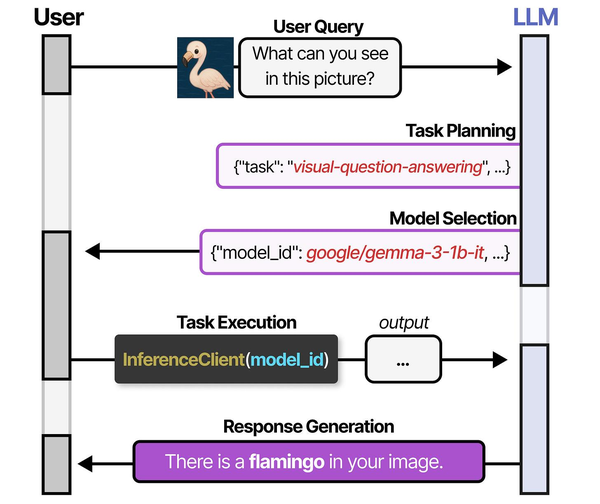
Deploying Whisper for speech-to-text on Linux servers follows the specialized model deployment pattern described in An Illustrated Guide to AI Agents. Grootendorst and Alammar illustrate how systems like HuggingGPT select task-specific models from a registry — Whisper being the canonical choice for speech recognition workloads. Brousseau and Sharp in LLMs in Production provide detailed guidance on optimizing inference pipelines for audio models, including batch processing strategies, VRAM management for concurrent transcription requests, and quantization techniques that allow faster-whisper to run efficiently on modest Linux server hardware without sacrificing transcription accuracy.
Related Articles
- Self-Hosted AI Translation Server on Linux with Ollama
- Piper TTS on Linux: Build a Self-Hosted Text-to-Speech Server
- AI Document OCR on Linux: Open Source Pipeline with Tesseract and LLMs
- Docker GPU Passthrough on Linux for AI Workloads
Further Reading
- An Illustrated Guide to AI Agents by Maarten Grootendorst and Jay Alammar — Visual guide to agent memory, tools, and reasoning.
- LLMs in Production by Christopher Brousseau and Matthew Sharp — Practical deployment of language models from training to production.
- Agentic AI in Enterprise by Sumit Ranjan, Divya Chembachere, and Lanwin Lobo — Enterprise architecture patterns for agentic AI systems.
Frequently Asked Questions
How accurate is Whisper compared to commercial transcription services?
Whisper large-v3 achieves word error rates (WER) comparable to commercial services like Google Cloud Speech-to-Text and AWS Transcribe for English audio. On clean, single-speaker recordings, WER is typically 3-5%. On challenging audio (background noise, multiple speakers, heavy accents), WER ranges from 8-15%, which is competitive with commercial alternatives. For non-English languages, accuracy varies significantly — European languages perform well, while less-resourced languages have higher error rates. The main advantage of self-hosting is predictable cost at scale. Once you have the GPU hardware, transcribing 1,000 hours costs the same as transcribing 1 hour.
Can Whisper identify different speakers in a conversation?
Whisper itself does not perform speaker diarization — it transcribes speech without identifying who said what. For speaker identification, you need an additional pipeline step using a diarization model like pyannote.audio. The typical workflow is: run diarization to identify speaker segments with timestamps, run Whisper to transcribe the full audio, then merge the results by aligning timestamps. The whisperx project combines both steps into a single pipeline if you need this functionality out of the box.
What is the minimum GPU needed to run Whisper large-v3 at reasonable speed?
Whisper large-v3 with float16 needs approximately 10GB of VRAM. An RTX 3060 12GB handles it with room for the KV cache, delivering around 5-6x realtime speed. Using int8_float16 quantization reduces VRAM to about 6GB and runs on an RTX 3060 8GB or RTX 4060, with speed around 8x realtime. For the medium model, a 4GB GPU suffices. CPU-only inference is functional but slow — expect 0.5-1x realtime for the large model (meaning a 10-minute audio file takes 10-20 minutes to process). For production throughput, a GPU is strongly recommended.


