Machine translation has reached a level where local LLMs produce usable results for many language pairs — not perfect, but good enough for internal documentation, customer support triage, and content localization workflows where sending text to Google Translate or DeepL is not an option. Running a translation server on your own Linux hardware means no per-character API costs, no data leaving your network, and the ability to customize the model for your specific domain terminology.
This guide covers building a self-hosted translation server using Ollama as the model backend. We set up a REST API that accepts text and returns translations, configure models for optimal translation quality, handle batch processing of documents, add language detection, and deploy the whole system as a production service with systemd and nginx.
Why Self-Hosted Translation
Commercial translation APIs work well, but they have limitations that matter in certain environments: For GPU driver setup, see our NVIDIA driver and CUDA installation guide.
- Data privacy. Legal, medical, and financial documents cannot always be sent to external services. GDPR and industry regulations may prohibit it.
- Cost at scale. Google Translate charges $20 per million characters. If you process 10 million characters per month, that is $200/month — more than the electricity cost of running a local GPU.
- Offline capability. Air-gapped environments, ships, remote facilities — anywhere without reliable internet needs local translation.
- Customization. Commercial APIs use generic models. A self-hosted model can be prompted (or fine-tuned) for your specific domain: legal terminology, medical jargon, software documentation.
The trade-off is quality. Cloud translation services, especially DeepL and Google, are still better for most language pairs. But local LLMs have improved dramatically, and for many practical use cases the quality gap is acceptable.
Choosing the Right Model
Not all LLMs are equally good at translation. Models trained on multilingual data with strong instruction-following capabilities perform best:
- Qwen 2.5 7B/14B: Excellent for Asian languages (Chinese, Japanese, Korean) and good for European languages. Strong instruction following.
- Llama 3.1 8B/70B: Good general-purpose translation for European languages. The 70B version handles nuanced translations noticeably better.
- Mistral 7B / Mixtral 8x7B: Strong for European languages, especially French, German, Spanish, Italian.
- Gemma 2 9B/27B: Good multilingual coverage with strong performance on formal text.
# Pull recommended models
ollama pull qwen2.5:14b
ollama pull llama3.1:8b

# Test translation quality
ollama run qwen2.5:14b "Translate to German: The server crashed because the disk was full. We need to clean up old log files and increase the partition size."
Building the Translation API
Create a FastAPI server that wraps Ollama and provides a clean translation interface:
#!/usr/bin/env python3
# translation_server.py

from fastapi import FastAPI, HTTPException
from pydantic import BaseModel
from typing import Optional
import httpx
import json

app = FastAPI(title="Self-Hosted Translation API")

OLLAMA_URL = "http://localhost:11434/api/generate"
DEFAULT_MODEL = "qwen2.5:14b"

LANGUAGE_NAMES = {
    "en": "English", "de": "German", "fr": "French", "es": "Spanish",
    "it": "Italian", "pt": "Portuguese", "nl": "Dutch", "pl": "Polish",
    "ja": "Japanese", "ko": "Korean", "zh": "Chinese (Simplified)",
    "ru": "Russian", "ar": "Arabic", "sv": "Swedish", "da": "Danish",
    "no": "Norwegian", "fi": "Finnish", "cs": "Czech", "uk": "Ukrainian",
}

class TranslationRequest(BaseModel):
    text: str
    source_lang: Optional[str] = None
    target_lang: str
    model: Optional[str] = None
    domain: Optional[str] = None

class TranslationResponse(BaseModel):
    translated_text: str
    source_lang: str
    target_lang: str
    model_used: str

class BatchRequest(BaseModel):
    texts: list[str]
    source_lang: Optional[str] = None
    target_lang: str

def build_translation_prompt(text, source_lang, target_lang, domain=None):
    src_name = LANGUAGE_NAMES.get(source_lang, source_lang) if source_lang else "the source language"
    tgt_name = LANGUAGE_NAMES.get(target_lang, target_lang)

    prompt = f"Translate the following text from {src_name} to {tgt_name}."

    if domain:
        prompt += f" This is {domain} text, so use appropriate terminology."

    prompt += " Output only the translation, nothing else."
    prompt += f"\n\nText to translate:\n{text}"

    return prompt

@app.post("/translate", response_model=TranslationResponse)
async def translate(req: TranslationRequest):
    model = req.model or DEFAULT_MODEL
    prompt = build_translation_prompt(req.text, req.source_lang, req.target_lang, req.domain)

    async with httpx.AsyncClient(timeout=120.0) as client:
        response = await client.post(OLLAMA_URL, json={
            "model": model,
            "prompt": prompt,
            "stream": False,
            "options": {"temperature": 0.1, "num_predict": 2000}
        })

    if response.status_code != 200:
        raise HTTPException(status_code=502, detail="Ollama backend error")

    result = response.json()
    translated = result["response"].strip()

    return TranslationResponse(
        translated_text=translated,
        source_lang=req.source_lang or "auto",
        target_lang=req.target_lang,
        model_used=model
    )

@app.post("/translate/batch")
async def translate_batch(req: BatchRequest):
    results = []
    for text in req.texts:
        single = TranslationRequest(
            text=text,
            source_lang=req.source_lang,
            target_lang=req.target_lang
        )
        result = await translate(single)
        results.append(result)
    return {"translations": results}

@app.get("/languages")
async def list_languages():
    return {"languages": LANGUAGE_NAMES}

@app.get("/health")
async def health():
    try:
        async with httpx.AsyncClient(timeout=5.0) as client:
            resp = await client.get("http://localhost:11434/api/tags")
        return {"status": "healthy", "ollama": "connected"}
    except Exception:
        return {"status": "degraded", "ollama": "unreachable"}
Install Dependencies and Run
pip install fastapi uvicorn httpx

# Test locally
uvicorn translation_server:app --host 127.0.0.1 --port 8200
Test the API
# Simple translation
curl -X POST http://localhost:8200/translate \
    -H "Content-Type: application/json" \
    -d '{
        "text": "The kernel panic occurred during the filesystem check. We need to boot into single-user mode and run fsck manually.",
        "source_lang": "en",
        "target_lang": "de",
        "domain": "technical IT documentation"
    }'

# Batch translation
curl -X POST http://localhost:8200/translate/batch \
    -H "Content-Type: application/json" \
    -d '{
        "texts": [
            "Connection refused on port 443",
            "Permission denied: insufficient privileges",
            "Disk quota exceeded for user www-data"
        ],
        "source_lang": "en",
        "target_lang": "fr"
    }'
Document Translation Pipeline
For translating entire documents (plain text, markdown, or structured files), split into manageable chunks to avoid context window limits:
#!/usr/bin/env python3
# translate_document.py

import sys
import httpx
import json

API_URL = "http://localhost:8200/translate"

def split_into_paragraphs(text):
    """Split text into paragraphs, preserving empty lines."""
    paragraphs = text.split("\n\n")
    return [p.strip() for p in paragraphs if p.strip()]

def translate_document(input_file, output_file, source_lang, target_lang):
    with open(input_file, "r") as f:
        text = f.read()

    paragraphs = split_into_paragraphs(text)
    translated_paragraphs = []

    for i, para in enumerate(paragraphs):
        print(f"Translating paragraph {i+1}/{len(paragraphs)}...")
        response = httpx.post(API_URL, json={
            "text": para,
            "source_lang": source_lang,
            "target_lang": target_lang
        }, timeout=120.0)

        result = response.json()
        translated_paragraphs.append(result["translated_text"])

    with open(output_file, "w") as f:
        f.write("\n\n".join(translated_paragraphs))

    print(f"Done. Translated {len(paragraphs)} paragraphs to {output_file}")

if __name__ == "__main__":
    translate_document(sys.argv[1], sys.argv[2], sys.argv[3], sys.argv[4])
# Usage
python3 translate_document.py report_en.txt report_de.txt en deAdding Language Detection
When the source language is unknown, use the LLM itself to detect it before translating:
async def detect_language(text: str) -> str:
    """Use the LLM to detect the language of the input text."""
    prompt = (
        "Identify the language of the following text. "
        "Reply with only the ISO 639-1 language code (e.g., en, de, fr, es, ja). "
        f"\n\nText: {text[:500]}"
    )

    async with httpx.AsyncClient(timeout=30.0) as client:
        response = await client.post(OLLAMA_URL, json={
            "model": DEFAULT_MODEL,
            "prompt": prompt,
            "stream": False,
            "options": {"temperature": 0.0, "num_predict": 10}
        })

    lang_code = response.json()["response"].strip().lower()[:2]
    return lang_code if lang_code in LANGUAGE_NAMES else "unknown"
Production Deployment
systemd Service
sudo tee /etc/systemd/system/translation-api.service > /dev/null << EOF
[Unit]
Description=Self-Hosted Translation API
After=network.target ollama.service

[Service]
Type=simple
User=translation
Group=translation
WorkingDirectory=/opt/translation-server
ExecStart=/opt/translation-server/venv/bin/uvicorn translation_server:app --host 127.0.0.1 --port 8200 --workers 2
Restart=always
RestartSec=5
Environment=PYTHONUNBUFFERED=1

[Install]
WantedBy=multi-user.target
EOF

sudo useradd -r -s /bin/false translation
sudo systemctl daemon-reload
sudo systemctl enable --now translation-api
nginx Reverse Proxy
server {
    listen 443 ssl http2;
    server_name translate.example.com;

    ssl_certificate /etc/letsencrypt/live/translate.example.com/fullchain.pem;
    ssl_certificate_key /etc/letsencrypt/live/translate.example.com/privkey.pem;

    location / {
        proxy_pass http://127.0.0.1:8200;
        proxy_set_header Host $host;
        proxy_read_timeout 120s;

        # Rate limiting
        limit_req zone=translate_limit burst=10 nodelay;
    }
}

limit_req_zone $binary_remote_addr zone=translate_limit:10m rate=20r/m;
Optimizing Translation Quality
Several techniques improve translation output from local models:
- Use low temperature (0.1-0.2). Translation is a deterministic task — you want consistent, accurate output, not creative variation.
- Provide domain context. Adding "This is legal documentation" or "This is a software error message" to the prompt significantly improves terminology accuracy.
- Use few-shot examples. Prepend 2-3 example translations in the prompt to guide the model's style and terminology choices.
- Translate in both directions and compare. For critical translations, translate the output back to the source language and check if the meaning is preserved. Large discrepancies indicate translation errors.
- Use larger models for important content. The quality difference between 7B and 70B models is significant for translation. Use the smaller model for high-volume, low-stakes content and the larger model for critical documents.
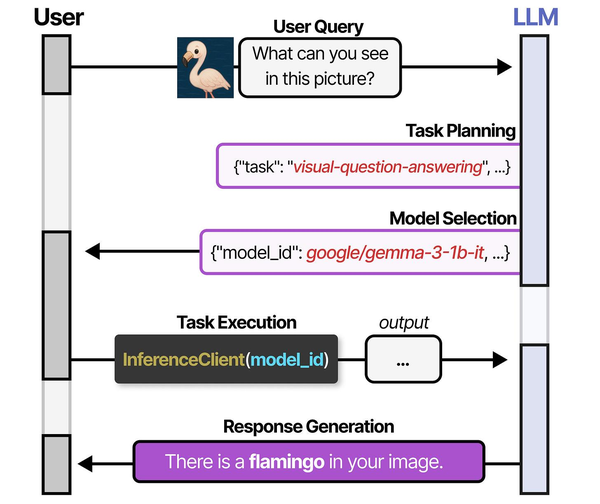
Self-hosted translation systems exemplify the model selection challenge described in An Illustrated Guide to AI Agents by Grootendorst and Alammar. Their analysis of the HuggingGPT architecture shows how a controller model can dynamically select specialized models for specific tasks — a pattern directly applicable to translation servers that must route between language-specific models for optimal quality. Running these pipelines on Linux with local inference engines like CTranslate2 or Ollama eliminates per-request API costs while maintaining the flexibility to swap models as better alternatives emerge from the open-source community.
Related Articles
- Whisper Speech-to-Text on Linux: Deploy a Self-Hosted Transcription Server
- Piper TTS on Linux: Build a Self-Hosted Text-to-Speech Server
- AI Document OCR on Linux: Open Source Pipeline with Tesseract and LLMs
- Build a Self-Hosted RAG Pipeline on Linux: Chat with Your Documentation
Further Reading
- An Illustrated Guide to AI Agents by Maarten Grootendorst and Jay Alammar — Visual guide to agent memory, tools, and reasoning.
- LLMs in Production by Christopher Brousseau and Matthew Sharp — Practical deployment of language models from training to production.
- Agentic AI in Enterprise by Sumit Ranjan, Divya Chembachere, and Lanwin Lobo — Enterprise architecture patterns for agentic AI systems.
Frequently Asked Questions
How does local LLM translation quality compare to Google Translate or DeepL?
For common European language pairs (English to German, French, Spanish), a 14B model like Qwen 2.5 produces translations that are roughly 80-90% as good as Google Translate for general text. The gap widens for rare language pairs, idiomatic expressions, and highly specialized terminology. DeepL remains noticeably better for nuanced, publication-quality translations. However, for internal documentation, error messages, log entries, and technical content, local models are often sufficient — and sometimes better at preserving technical terminology when properly prompted.
Can I fine-tune a model to improve translation for my specific domain?
Yes, and this is where self-hosted translation gains a real advantage. Collect parallel text samples from your domain (existing human translations of your documentation, for example), format them as instruction pairs, and fine-tune with tools like Unsloth or Axolotl. Even a few hundred high-quality domain-specific examples can dramatically improve terminology consistency. The fine-tuned model will use your organization's preferred terms and style, which no generic cloud API can match.
What hardware do I need for a translation server handling 100 requests per hour?
A single NVIDIA RTX 4060 Ti (16 GB) running a Qwen 2.5 14B model handles roughly 150-200 translation requests per hour, assuming average document sizes of 200-500 words. That is well within a single consumer GPU's capacity. For 1,000+ requests per hour, move to an RTX 4090 or run two instances with load balancing. CPU-only deployment works for low-volume use (under 20 requests per hour) but response times will be 30-60 seconds per translation versus 3-8 seconds on GPU.


