Training a large language model from scratch costs millions of dollars and requires thousands of GPUs. Fine-tuning an existing model on your own data used to require hundreds of GPUs and weeks of compute. LoRA (Low-Rank Adaptation) changed this equation dramatically. By training only a small number of additional parameters while keeping the original model weights frozen, LoRA lets you customize a 7B or 13B model on a single consumer GPU in a few hours. The result is a model that retains the original's general capabilities while gaining expertise in your specific domain, terminology, and task requirements.
This guide covers the practical workflow of LoRA fine-tuning on Linux. We go from preparing a training dataset through configuring the training run, monitoring GPU resources, evaluating the results, and deploying the fine-tuned model with Ollama. We use real examples — fine-tuning a model for a specific writing style, for technical documentation in a particular domain, and for structured output generation — to show what LoRA can and cannot achieve.
What LoRA Actually Does
A language model's knowledge lives in its weight matrices — large two-dimensional arrays of floating-point numbers. A 7B model has roughly 7 billion of these weights organized into attention and feed-forward matrices across 32 layers. Full fine-tuning updates every single weight, which requires storing gradients and optimizer states for all of them — consuming as much memory as the model itself, times 2-4x. For the foundational setup, see our complete Ollama installation guide. For GPU driver setup, see our NVIDIA driver and CUDA installation guide.
LoRA takes a different approach. Instead of modifying the original weights, it adds small trainable matrices alongside them. For a weight matrix W of size (d x d), LoRA adds two smaller matrices: A of size (d x r) and B of size (r x d), where r (the rank) is much smaller than d — typically 8, 16, or 32. The effective weight becomes W + BA. During inference, BA can be merged into W, so there is no performance penalty.
The parameter efficiency is dramatic. A 7B model has 7 billion parameters. With LoRA rank 16, you train roughly 10-50 million parameters — less than 1% of the original model. This means your gradients and optimizer states are tiny, the training fits in GPU memory, and the training runs fast.
Prerequisites
# System requirements:
# - NVIDIA GPU with at least 16GB VRAM (for 7B models)
#   - RTX 3090/4090 (24GB) is comfortable for 7B
#   - A100 40/80GB for 13B+ models
# - 32GB+ system RAM
# - 50GB+ disk space for model and training data

# Install the training stack
python3 -m venv /opt/lora-training
source /opt/lora-training/bin/activate

# Core packages
pip install torch torchvision torchaudio --index-url https://download.pytorch.org/whl/cu121
pip install transformers datasets accelerate peft
pip install bitsandbytes  # For QLoRA (quantized training)
pip install trl            # Transformer Reinforcement Learning library
pip install wandb          # Training monitoring (optional but recommended)

# Verify CUDA
python3 -c "import torch; print(f'CUDA: {torch.cuda.is_available()}, Device: {torch.cuda.get_device_name(0)}')"
Preparing Your Training Data
The quality of your fine-tuned model is directly proportional to the quality of your training data. LoRA is efficient in terms of compute, but it is not magic — garbage data produces garbage results.
Data Format
Training data for instruction-following models follows a conversation format. Each example contains a prompt (instruction) and a response (desired output).
# training_data.jsonl — one JSON object per line
{"instruction": "Explain how to check disk usage on a Linux server", "output": "Use the df command to check filesystem disk usage. Run 'df -h' for human-readable output showing used and available space for each mounted filesystem. For directory-level usage, use 'du -sh /path/to/directory'. To find the largest directories, combine with sort: 'du -sh /* | sort -rh | head -20'."}
{"instruction": "Write an Ansible task to install nginx on Ubuntu", "output": "- name: Install nginx\n  ansible.builtin.apt:\n    name: nginx\n    state: present\n    update_cache: yes\n  become: yes"}
{"instruction": "What causes 'Too many open files' error in Linux?", "output": "The 'Too many open files' error occurs when a process exceeds its file descriptor limit. Check current limits with 'ulimit -n'. The system-wide limit is in /proc/sys/fs/file-max. Increase per-process limits in /etc/security/limits.conf or the systemd service file with LimitNOFILE. Common causes include connection leaks in applications, log rotation issues, or applications that open files without closing them."}
Data Preparation Script
#!/usr/bin/env python3
"""Convert raw text data into training format."""
import json
import random

def prepare_dataset(input_file, output_file, val_split=0.1):
    examples = []
    with open(input_file, 'r') as f:
        for line in f:
            data = json.loads(line.strip())
            # Ensure required fields
            if 'instruction' in data and 'output' in data:
                examples.append(data)

    random.shuffle(examples)
    split_idx = int(len(examples) * (1 - val_split))

    train_data = examples[:split_idx]
    val_data = examples[split_idx:]

    with open(output_file.replace('.jsonl', '_train.jsonl'), 'w') as f:
        for ex in train_data:
            f.write(json.dumps(ex) + '\n')

    with open(output_file.replace('.jsonl', '_val.jsonl'), 'w') as f:
        for ex in val_data:
            f.write(json.dumps(ex) + '\n')

    print(f"Training examples: {len(train_data)}")
    print(f"Validation examples: {len(val_data)}")

prepare_dataset('raw_data.jsonl', 'training_data.jsonl')
LoRA Training Script
#!/usr/bin/env python3
"""LoRA fine-tuning script for Llama-family models."""
import torch
from datasets import load_dataset
from transformers import (
    AutoModelForCausalLM,
    AutoTokenizer,
    TrainingArguments,
    BitsAndBytesConfig,
)
from peft import LoraConfig, get_peft_model, prepare_model_for_kbit_training
from trl import SFTTrainer

# ===== Configuration =====
BASE_MODEL = "meta-llama/Meta-Llama-3.1-8B-Instruct"
OUTPUT_DIR = "./lora-output"
TRAIN_FILE = "./training_data_train.jsonl"
VAL_FILE = "./training_data_val.jsonl"

# LoRA hyperparameters
LORA_R = 16           # Rank — higher = more parameters, more capacity
LORA_ALPHA = 32       # Scaling factor — typically 2x rank
LORA_DROPOUT = 0.05   # Regularization
TARGET_MODULES = [     # Which layers to apply LoRA to
    "q_proj", "k_proj", "v_proj", "o_proj",
    "gate_proj", "up_proj", "down_proj"
]

# Training hyperparameters
EPOCHS = 3
BATCH_SIZE = 4
GRADIENT_ACCUMULATION = 4  # Effective batch = 4 * 4 = 16
LEARNING_RATE = 2e-4
MAX_SEQ_LENGTH = 2048
# ===========================

# QLoRA: 4-bit quantization for memory efficiency
bnb_config = BitsAndBytesConfig(
    load_in_4bit=True,
    bnb_4bit_quant_type="nf4",
    bnb_4bit_compute_dtype=torch.bfloat16,
    bnb_4bit_use_double_quant=True,
)

# Load the base model in 4-bit
print(f"Loading {BASE_MODEL}...")
model = AutoModelForCausalLM.from_pretrained(
    BASE_MODEL,
    quantization_config=bnb_config,
    device_map="auto",
    torch_dtype=torch.bfloat16,
    trust_remote_code=True,
)

tokenizer = AutoTokenizer.from_pretrained(BASE_MODEL)
tokenizer.pad_token = tokenizer.eos_token
tokenizer.padding_side = "right"

# Prepare model for training
model = prepare_model_for_kbit_training(model)

# Configure LoRA
lora_config = LoraConfig(
    r=LORA_R,
    lora_alpha=LORA_ALPHA,
    lora_dropout=LORA_DROPOUT,
    target_modules=TARGET_MODULES,
    bias="none",
    task_type="CAUSAL_LM",
)

model = get_peft_model(model, lora_config)

# Print trainable parameter count
trainable = sum(p.numel() for p in model.parameters() if p.requires_grad)
total = sum(p.numel() for p in model.parameters())
print(f"Trainable parameters: {trainable:,} ({100 * trainable / total:.2f}%)")

# Load datasets
train_dataset = load_dataset("json", data_files=TRAIN_FILE, split="train")
val_dataset = load_dataset("json", data_files=VAL_FILE, split="train")

def format_prompt(example):
    return f"""### Instruction:
{example['instruction']}

### Response:
{example['output']}"""

# Training arguments
training_args = TrainingArguments(
    output_dir=OUTPUT_DIR,
    num_train_epochs=EPOCHS,
    per_device_train_batch_size=BATCH_SIZE,
    gradient_accumulation_steps=GRADIENT_ACCUMULATION,
    learning_rate=LEARNING_RATE,
    weight_decay=0.01,
    warmup_ratio=0.03,
    lr_scheduler_type="cosine",
    logging_steps=10,
    save_strategy="epoch",
    evaluation_strategy="epoch",
    bf16=True,
    optim="paged_adamw_8bit",
    gradient_checkpointing=True,
    max_grad_norm=0.3,
    report_to="wandb",  # or "none" to disable
)

# Initialize trainer
trainer = SFTTrainer(
    model=model,
    args=training_args,
    train_dataset=train_dataset,
    eval_dataset=val_dataset,
    formatting_func=format_prompt,
    max_seq_length=MAX_SEQ_LENGTH,
    packing=False,
)

# Train
print("Starting training...")
trainer.train()

# Save the LoRA adapter
trainer.save_model(OUTPUT_DIR)
tokenizer.save_pretrained(OUTPUT_DIR)
print(f"LoRA adapter saved to {OUTPUT_DIR}")
Running the Training
# Start the training
source /opt/lora-training/bin/activate
python3 train_lora.py

# Monitor GPU usage during training
watch -n 1 nvidia-smi

# Expected GPU memory usage with QLoRA on a 7B model:
# ~6GB for the 4-bit quantized model
# ~2-4GB for gradients and optimizer states
# ~2-4GB for activations (with gradient checkpointing)
# Total: ~10-14GB — fits on a 16GB GPU

# Training time estimates (7B model, 1000 examples, 3 epochs):
# RTX 3090:  ~30-60 minutes
# RTX 4090:  ~20-40 minutes
# A100 40GB: ~15-25 minutes
Evaluating the Fine-Tuned Model
#!/usr/bin/env python3
"""Test the fine-tuned LoRA model."""
import torch
from transformers import AutoModelForCausalLM, AutoTokenizer
from peft import PeftModel

BASE_MODEL = "meta-llama/Meta-Llama-3.1-8B-Instruct"
LORA_PATH = "./lora-output"

# Load base model
model = AutoModelForCausalLM.from_pretrained(
    BASE_MODEL,
    torch_dtype=torch.bfloat16,
    device_map="auto",
)
tokenizer = AutoTokenizer.from_pretrained(BASE_MODEL)

# Load LoRA adapter
model = PeftModel.from_pretrained(model, LORA_PATH)

# Merge LoRA weights into the base model (optional, for inference speed)
model = model.merge_and_unload()

# Test with prompts
test_prompts = [
    "Explain how to configure log rotation on a Linux server",
    "Write an Ansible playbook for hardening SSH",
    "What causes high iowait on a Linux server?",
]

for prompt in test_prompts:
    formatted = f"### Instruction:
{prompt}

### Response:
"
    inputs = tokenizer(formatted, return_tensors="pt").to(model.device)

    with torch.no_grad():
        outputs = model.generate(
            **inputs,
            max_new_tokens=512,
            temperature=0.7,
            do_sample=True,
        )

    response = tokenizer.decode(outputs[0], skip_special_tokens=True)
    print(f"
{'='*60}")
    print(f"Prompt: {prompt}")
    print(f"Response: {response.split('### Response:')[-1].strip()}")
    print(f"{'='*60}")
Exporting to GGUF for Ollama
To use your fine-tuned model with Ollama, you need to merge the LoRA weights, convert to GGUF format, and create an Ollama model.
# Step 1: Merge and export to Hugging Face format
python3 -c "
import torch
from transformers import AutoModelForCausalLM, AutoTokenizer
from peft import PeftModel

model = AutoModelForCausalLM.from_pretrained(
    'meta-llama/Meta-Llama-3.1-8B-Instruct',
    torch_dtype=torch.float16,
    device_map='auto'
)
model = PeftModel.from_pretrained(model, './lora-output')
model = model.merge_and_unload()
model.save_pretrained('./merged-model')

tokenizer = AutoTokenizer.from_pretrained('meta-llama/Meta-Llama-3.1-8B-Instruct')
tokenizer.save_pretrained('./merged-model')
print('Merged model saved')
"

# Step 2: Convert to GGUF using llama.cpp
git clone https://github.com/ggerganov/llama.cpp.git
cd llama.cpp
pip install -r requirements.txt

python3 convert_hf_to_gguf.py ../merged-model --outtype f16 --outfile ../model-f16.gguf

# Step 3: Quantize to Q4_K_M for practical use
make quantize
./quantize ../model-f16.gguf ../model-q4_k_m.gguf Q4_K_M

# Step 4: Create Ollama model
cat > Modelfile << 'EOF'
FROM ../model-q4_k_m.gguf

TEMPLATE """{{ if .System }}<|begin_of_text|><|start_header_id|>system<|end_header_id|>
{{ .System }}<|eot_id|>{{ end }}{{ if .Prompt }}<|start_header_id|>user<|end_header_id|>
{{ .Prompt }}<|eot_id|>{{ end }}<|start_header_id|>assistant<|end_header_id|>
"""

PARAMETER stop "<|eot_id|>"
PARAMETER temperature 0.7
PARAMETER num_ctx 4096
EOF

ollama create my-finetuned-model -f Modelfile
ollama run my-finetuned-model "Test prompt from your domain"
Hyperparameter Tuning Guide
LoRA has several hyperparameters that affect training quality. Here is practical guidance on tuning them.
Rank (r): Controls the capacity of the LoRA adaptation. Rank 8 works for simple style transfer. Rank 16 is the general-purpose default. Rank 32 or 64 for complex domain adaptation. Higher rank means more trainable parameters, longer training, and more memory usage. Start with 16 and increase only if the model fails to learn your target behavior.
Alpha: Scaling factor, typically set to 2x the rank. Alpha=32 for rank=16. Higher alpha amplifies the LoRA adaptation's influence. If the model changes too much from the base (loses general capability), reduce alpha. If it does not change enough, increase it.
Learning rate: 2e-4 is a reliable starting point for QLoRA. If training loss decreases smoothly, the learning rate is fine. If loss is noisy or diverges, reduce to 1e-4. If loss plateaus early, try 3e-4.
Epochs: 1-3 epochs for datasets over 1,000 examples. 3-5 epochs for datasets of 100-1,000 examples. More than 5 epochs risks overfitting — the model memorizes training examples rather than learning patterns. Watch the validation loss: when it starts increasing while training loss continues decreasing, you are overfitting.
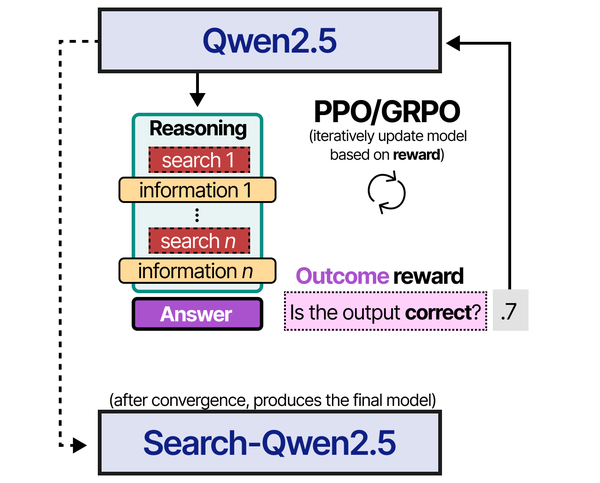
LoRA fine-tuning on Linux democratizes model customization by dramatically reducing the hardware requirements for training. As Brousseau and Sharp detail in LLMs in Production, LoRA's low-rank adaptation approach freezes the pre-trained model weights and trains only small rank-decomposition matrices, reducing trainable parameters by 10,000x while maintaining fine-tuning quality. Grootendorst and Alammar in An Illustrated Guide to AI Agents show how fine-tuned models improve agent performance on domain-specific tasks — the reinforcement learning and training pipelines they illustrate can be implemented on a single Linux workstation with a consumer GPU using tools like Unsloth, PEFT, and the Hugging Face ecosystem.
Related Articles
- GGUF Model Format Explained: Quantization Guide for Ollama Users
- Best GPU for Running LLMs Locally on Linux: 2026 Buyer's Guide
- Install NVIDIA Drivers and CUDA on Linux Server for AI: The No-Nonsense Guide (2026)
- Build a Self-Hosted RAG Pipeline on Linux: Chat with Your Documentation
Further Reading
- An Illustrated Guide to AI Agents by Maarten Grootendorst and Jay Alammar — Visual guide to agent memory, tools, and reasoning.
- LLMs in Production by Christopher Brousseau and Matthew Sharp — Practical deployment of language models from training to production.
- Agentic AI in Enterprise by Sumit Ranjan, Divya Chembachere, and Lanwin Lobo — Enterprise architecture patterns for agentic AI systems.
Frequently Asked Questions
How many training examples do I need for effective LoRA fine-tuning?
For style transfer (making the model adopt a specific tone or format), 50-200 high-quality examples often suffice. For domain knowledge (teaching the model about your specific technology stack or business processes), 500-2,000 examples produce noticeable improvement. For complex task-specific behavior (structured output generation, tool use patterns), 1,000-5,000 examples are typical. Quality matters far more than quantity — 200 carefully crafted examples outperform 2,000 sloppy ones. Every training example should represent the exact input-output behavior you want from the model. Remove duplicates, fix errors, and ensure consistent formatting across your dataset.
What is the difference between LoRA and QLoRA?
QLoRA (Quantized LoRA) loads the base model in 4-bit quantization during training, dramatically reducing memory requirements. Standard LoRA loads the full-precision model and adds trainable adapters — a 7B model needs about 28GB just for the frozen weights in FP16. QLoRA loads the same model at about 4-5GB in 4-bit, then adds the same LoRA adapters. The training quality is nearly identical; QLoRA's 4-bit base introduces minimal degradation because the LoRA adapters themselves train in full precision (bfloat16). QLoRA is what makes fine-tuning on consumer GPUs practical — it is the reason you can fine-tune a 7B model on a 16GB GPU.
Can I stack multiple LoRA adapters for different capabilities?
Yes, LoRA adapters are additive. You can train separate adapters for different capabilities (one for code generation, one for documentation style, one for your domain terminology) and combine them at inference time. The PEFT library supports loading multiple adapters and blending them with configurable weights. In practice, merged adapters sometimes interfere with each other if they modify the same attention layers in conflicting ways. Test adapter combinations before deploying. For Ollama deployment, you would merge all desired adapters into a single model, which simplifies serving but loses the ability to dynamically adjust the blend.


