The Linux kernel architecture follows a monolithic design, meaning all core subsystems run in a single address space with full hardware access. Despite this monolithic approach, loadable kernel modules give the Linux kernel flexibility that rivals microkernel designs in practice. Understanding how the kernel is structured, how modules extend it, and how the kernel version numbering scheme works is foundational for anyone managing production Linux systems at the LPIC-2 level. This knowledge ties directly into kernel modules and hardware detection basics, where these concepts are applied to real-world administration tasks.
Linux Monolithic Kernel with Loadable Modules

In a microkernel, drivers and filesystems run as separate user-space processes. In the Linux monolithic kernel design, they all share kernel space. The advantage is performance: there are no context switches or IPC overhead between, say, the VFS layer and a filesystem driver. The tradeoff is that a buggy driver can crash the entire kernel, not just its own process.
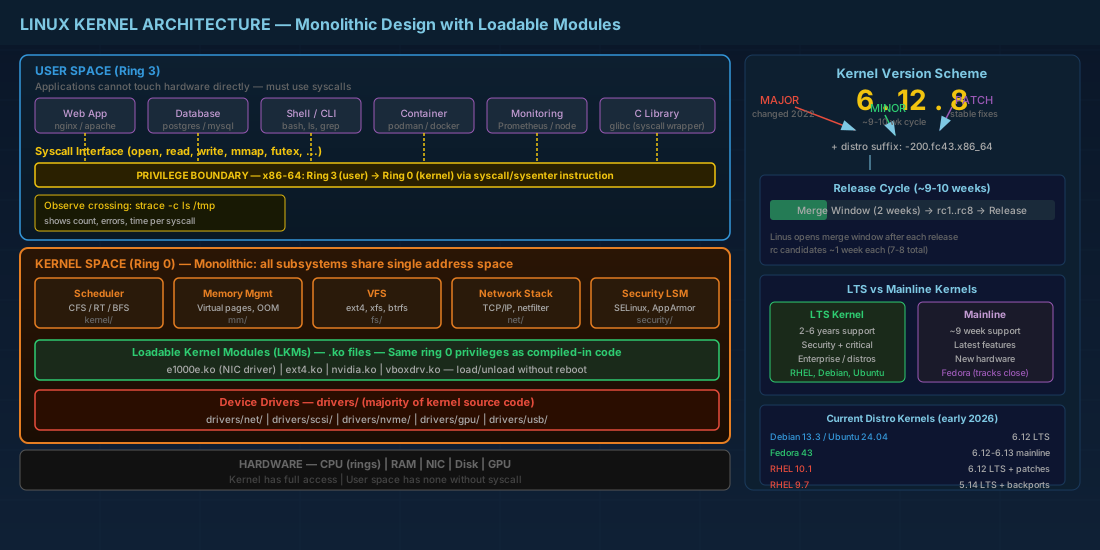
Loadable kernel modules (LKMs) solve the flexibility problem. Instead of compiling every possible driver into the kernel binary, you load modules at runtime. A fresh Debian 13.3 install might have 60-80 modules loaded, while the /lib/modules/$(uname -r)/ directory holds thousands of available .ko files. Only what the hardware and configuration need gets loaded.
# Count loaded modules
lsmod | wc -l

# Count available modules for the running kernel
find /lib/modules/$(uname -r) -name '*.ko*' | wc -l

# On a typical Fedora 43 system, you might see:
#   ~90 loaded modules
#   ~4500 available .ko.xz files
Modules are not second-class citizens. A compiled-in driver and a loadable module have the same kernel-space privileges. The practical difference is that modules can be loaded and unloaded without rebooting, which matters for production uptime. You can manage these modules using tools like modprobe and lsmod, which are covered in depth in the article on kernel module management with modprobe, DKMS, and blacklisting.
Kernel Space vs User Space in Linux
The CPU enforces a privilege boundary between kernel space and user space. On x86-64, ring 0 is kernel space and ring 3 is user space. Kernel code can access any memory address and any hardware register. User-space code cannot touch hardware directly; it must ask the kernel through system calls.
This separation protects the system. A crashing web server process does not take down the network stack. But it also means that performance-critical paths, like network packet processing or filesystem I/O, depend on efficient syscall handling and kernel scheduling.
The syscall interface
Every interaction between user applications and the kernel goes through the syscall table. When a program calls open(), read(), or write() in C, the C library translates that into a syscall number, loads registers, and triggers a CPU interrupt or the syscall instruction on x86-64.
# Trace syscalls made by a command
strace -c ls /tmp

# Output shows syscall counts, errors, and time spent:
# % time     seconds  usecs/call     calls    errors syscall
# ------ ----------- ----------- --------- --------- --------
#  35.71    0.000010           1         7           mmap
#  21.43    0.000006           1         5           openat
#  ...
For administrators, this matters when diagnosing slow applications. If strace shows thousands of futex calls or excessive read syscalls with small buffer sizes, the problem is application behavior, not kernel performance.
Practical example: tracing a slow process
Consider a scenario where a database process consumes high CPU but throughput is low. Using strace can reveal the root cause:
# Attach strace to a running process by PID
sudo strace -cp 12345 -e trace=read,write,futex
# Let it run for 10 seconds, then press Ctrl+C

# If you see thousands of futex calls:
# The process is contending on locks (thread synchronization issue)

# If you see millions of read calls with small byte counts:
# The process is doing I/O in tiny chunks (application buffering issue)

# Compare with a healthy process baseline to identify anomalies
Linux Kernel Version Numbering Scheme
The current Linux kernel version scheme is straightforward: MAJOR.MINOR.PATCH. Since version 5.x transitioned to 6.x in late 2022, all current mainline releases are in the 6.x series. As of early 2026, mainline kernels are in the 6.13-6.14 range.
# Check running kernel version
uname -r
# Example output: 6.12.8-200.fc43.x86_64

# Detailed version info
cat /proc/version
# Linux version 6.12.8-200.fc43.x86_64 (mockbuild@...) (gcc (GCC) 14.2.1 ...)

# Version components explained:
# 6        = major version
# 12       = minor (each minor is a new release, roughly every 9-10 weeks)
# 8        = stable patch number
# 200.fc43 = distribution-specific build/patch identifier
# x86_64   = architecture
LTS kernel vs mainline kernel
Greg Kroah-Hartman and the stable kernel team designate certain releases as Long Term Support (LTS). An LTS kernel receives security and critical bug fixes for 2-6 years, while a regular stable kernel is maintained only until the next minor release (roughly 9 weeks).
In practice, distributions pick an LTS kernel and backport patches on top of it:
- RHEL 10.1 ships a kernel based on the 6.12 LTS series, with Red Hat's own patch set. RHEL 9.7 runs a 5.14-based kernel with extensive backports.
- Debian 13.3 tracks a recent LTS kernel, currently the 6.12 series.
- Ubuntu 24.04.3 LTS offers both the GA kernel (6.8 at release) and HWE kernels from newer series.
- Fedora 43 tracks close to mainline, typically within one or two minor versions of the latest release.
The kernel.org release cycle works like this: Linus Torvalds opens a 2-week merge window after each release. Then 7-8 release candidates (rc1 through rc7/rc8) follow, each roughly a week apart. After the last RC, the stable release ships. Total cycle: roughly 9-10 weeks per minor version.
Choosing the right kernel for production
For production servers, the choice between an LTS kernel and a mainline kernel affects your patching and support strategy significantly:
- LTS kernels provide stability and longer support windows, making them ideal for enterprise environments where predictable behavior matters more than new features.
- Mainline kernels include the latest drivers and features, which is essential when running cutting-edge hardware that lacks backported driver support.
- Always check your distribution's kernel support policy before choosing. Running a vanilla kernel.org kernel on RHEL or Ubuntu means losing vendor support.
Linux Kernel Source Tree Layout
If you download the kernel source from kernel.org, the top-level directory structure tells you where everything lives:
# Major directories in the kernel source tree:
arch/           # Architecture-specific code (x86, arm64, riscv, etc.)
block/          # Block I/O layer
crypto/         # Cryptographic API
Documentation/  # Kernel documentation (restructured text)
drivers/        # Device drivers (largest directory by far)
fs/             # Filesystem implementations (ext4, xfs, btrfs, nfs, etc.)
include/        # Header files
init/           # Kernel initialization code (start_kernel lives here)
ipc/            # Inter-process communication (SysV IPC, POSIX mqueue)
kernel/         # Core kernel subsystems (scheduler, signals, time)
lib/            # Helper library routines
mm/             # Memory management
net/            # Networking stack (TCP/IP, netfilter, etc.)
scripts/        # Build scripts and configuration tools
security/       # Security frameworks (SELinux, AppArmor, etc.)
sound/          # ALSA sound subsystem
tools/          # Userspace tools bundled with kernel (perf, bpf, etc.)
virt/           # Virtualization support (KVM)
The drivers/ directory alone accounts for over half the kernel's source code. That reflects reality: most kernel development is driver work. On servers, you mostly care about drivers/net/, drivers/scsi/, drivers/nvme/, and drivers/gpu/ (for compute GPUs). The boot process that loads this kernel is detailed in the guide on the Linux boot process from BIOS/UEFI through GRUB to systemd.
Practical Kernel Inspection Commands
On a running system, several paths and tools expose kernel internals:
# Running kernel version and build info
uname -a

# Kernel configuration used to build the running kernel
# (if CONFIG_IKCONFIG_PROC was enabled)
zcat /proc/config.gz

# Or check the saved config shipped by the distribution
ls /boot/config-$(uname -r)

# Kernel command line passed by the bootloader
cat /proc/cmdline

# Kernel log ring buffer
dmesg | tail -30

# Module directory for the running kernel
ls /lib/modules/$(uname -r)/
# Subdirectories: kernel/, updates/, extra/, weak-updates/
In enterprise environments, knowing the exact kernel build (including the distro patch level) matters for support tickets, CVE assessments, and compliance audits. The version string from uname -r is the single most important piece of information when opening a kernel-related support case.
Examining kernel configuration options
When troubleshooting or planning a custom kernel compilation, checking the current kernel's configuration reveals which features are enabled, disabled, or built as modules:
# Check if a specific feature is enabled in the running kernel
grep CONFIG_BPF /boot/config-$(uname -r)
# CONFIG_BPF=y              (built-in)
# CONFIG_BPF_SYSCALL=y      (built-in)
# CONFIG_BPF_JIT=y          (built-in)

# Check how a driver is configured
grep CONFIG_E1000E /boot/config-$(uname -r)
# CONFIG_E1000E=m            (loadable module)

# Search for all network driver options
grep -c CONFIG_NET_VENDOR /boot/config-$(uname -r)
# Shows how many vendor-specific network drivers are configured
Quick Reference - Cheats
| Task | Command |
|---|---|
| Show kernel version | uname -r |
| Full version info | cat /proc/version |
| Kernel boot parameters | cat /proc/cmdline |
| List loaded modules | lsmod |
| Count available modules | find /lib/modules/$(uname -r) -name '*.ko*' | wc -l |
| Running kernel config | zcat /proc/config.gz |
| Distro-shipped config | cat /boot/config-$(uname -r) |
| Trace syscalls | strace -c <command> |
| Kernel log buffer | dmesg -T |
| Module search path | ls /lib/modules/$(uname -r)/ |
Summary
The Linux kernel is monolithic for performance but modular in practice. Loadable kernel modules let you extend the kernel without recompilation or reboots, which is why production servers rarely need custom-built kernels anymore. The kernel version scheme (6.MINOR.PATCH plus distro suffix) tells you exactly what you are running, and knowing whether your distribution tracks an LTS kernel or mainline kernel affects your patching and support strategy. For day-to-day administration, uname -r, lsmod, and the /proc filesystem give you the essential kernel visibility. The kernel source tree layout, while large, follows a logical structure where drivers/ dominates and arch/ handles platform-specific code. Understanding these fundamentals prepares you for the more hands-on tasks of compiling custom kernels, managing modules, and troubleshooting hardware detection with udev, sysfs, and procfs.


