Linux email architecture is built on three distinct software roles — MTA, MDA, and MUA — working together across standardized email protocols like SMTP, IMAP, and POP3. Understanding how these components interact is essential for anyone administering a production mail server on Linux. A user sends a message and it arrives somewhere else, but between those two events sit multiple protocol handshakes, DNS lookups, encryption negotiations, and queue management. This article maps the full email delivery chain so you can trace delivery failures instead of guessing.
Understanding the Linux Email Delivery Chain: MUA, MTA, and MDA
Every email passes through three functional roles. These are not always three separate programs, but the roles are always present in every Linux email system:
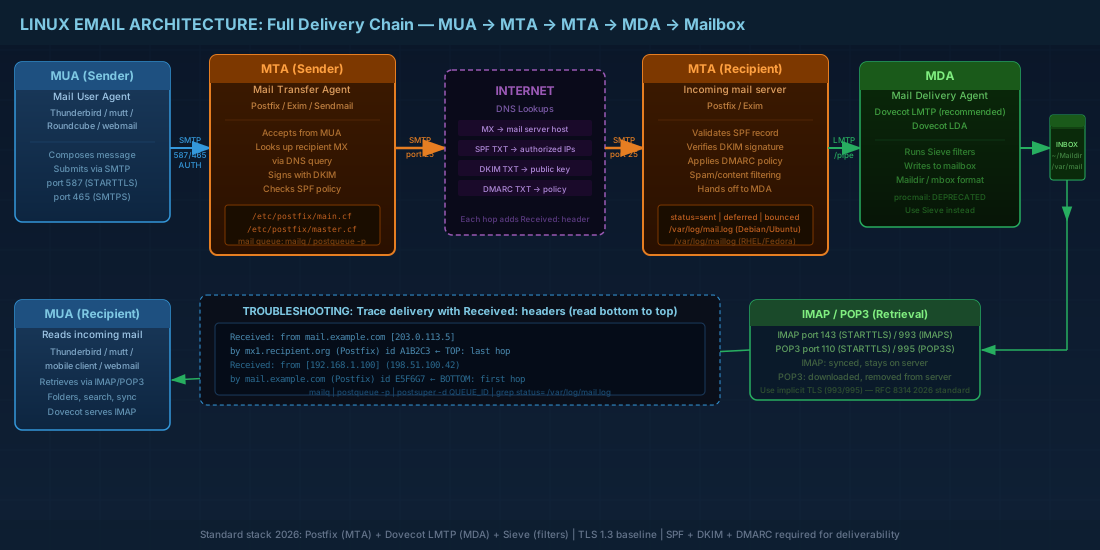
- MUA (Mail User Agent) — the client. Thunderbird, Evolution, mutt, or a webmail interface like Roundcube. The MUA composes and displays messages. It talks SMTP to send and IMAP or POP3 to retrieve.
- MTA (Mail Transfer Agent) — the relay and router. Postfix, Exim, and Sendmail are all MTAs. An MTA accepts mail via SMTP from MUAs or other MTAs, looks up where to deliver it (via DNS MX records), and forwards it. On a typical Linux server, the MTA is the core of the mail system.
- MDA (Mail Delivery Agent) — the final drop. The MDA takes a message from the MTA and writes it to the user's mailbox. Dovecot's LDA, Dovecot LMTP, or historically procmail (now replaced by Sieve-based filtering) serve this role.
The full flow for an internet email: MUA (sender) → MTA (sender's server) → MTA (recipient's server) → MDA → mailbox → MUA (recipient reads via IMAP/POP3).
In practice, the sender's MTA may relay through multiple hops (a smarthost, a filtering gateway, a load balancer) before reaching the recipient's MTA. Each hop adds a Received: header, which is how you trace the delivery path during troubleshooting.
How the Received header reveals the delivery path
When diagnosing delivery issues, the Received: headers are your primary forensic tool. Each MTA in the chain prepends its own header, so you read them bottom to top to reconstruct the message's journey:
# Simplified Received headers (read bottom to top)
Received: from mail.example.com (mail.example.com [203.0.113.5])
    by mx1.recipient.org (Postfix) with ESMTPS id A1B2C3D4
    for <user@recipient.org>; Thu, 27 Feb 2026 10:15:33 +0000
Received: from [192.168.1.100] (unknown [198.51.100.42])
    by mail.example.com (Postfix) with ESMTPSA id E5F6G7H8
    for <user@recipient.org>; Thu, 27 Feb 2026 10:15:31 +0000

# The bottom header shows the sender's MUA submitting to mail.example.com
# The top header shows mail.example.com delivering to mx1.recipient.org
# Time differences between hops help identify where delays occur
Email Protocols, Ports, and TLS Encryption
Three email protocols handle transport and retrieval on Linux. Each has both a legacy plaintext port and modern encrypted variants:
| Protocol | Purpose | Plaintext port | STARTTLS port | Implicit TLS port |
|---|---|---|---|---|
| SMTP | Server-to-server relay | 25 | 25 (STARTTLS upgrade) | — |
| Submission | MUA to MTA (authenticated) | 587 (STARTTLS) | 587 | 465 (SMTPS) |
| IMAP | Mailbox access (synced) | 143 | 143 (STARTTLS) | 993 (IMAPS) |
| POP3 | Mailbox retrieval (download) | 110 | 110 (STARTTLS) | 995 (POP3S) |
STARTTLS vs implicit TLS: STARTTLS starts as plaintext and upgrades mid-connection after a STARTTLS command. Implicit TLS (ports 465, 993, 995) starts encrypted from the first byte. As of 2026, the industry recommendation is implicit TLS for client connections (RFC 8314). Port 587 with STARTTLS remains widely used for submission. Port 25 stays for server-to-server relay with opportunistic STARTTLS.
For TLS 1.3 (the current baseline), both Postfix and Dovecot support it natively on Debian 13.3, Ubuntu 24.04.3 LTS, Fedora 43, and RHEL 10.1. On RHEL 9.7, TLS 1.3 is also supported but crypto policies may restrict certain cipher suites by default.
MTA Options on Modern Linux Distributions
Three Mail Transfer Agents dominate the Linux ecosystem. Choosing the right MTA depends on your deployment scale, configuration preferences, and hosting environment:
Postfix: the production standard
The default MTA on Debian, Ubuntu, and most RHEL-family installations. Modular architecture, well-documented, and actively maintained. Postfix handles the vast majority of production Linux mail servers in 2026. Its configuration lives in /etc/postfix/main.cf and /etc/postfix/master.cf. For a complete deployment guide, see the dedicated Postfix mail server installation and configuration article.
Exim: flexible but complex
Default on Debian historically (though Postfix is now more commonly chosen for new deployments). Exim uses a single monolithic configuration file with its own conditional logic syntax. Powerful and flexible, but the configuration language has a steeper learning curve. Common in cPanel/WHM hosting environments.
Sendmail: the legacy MTA
The original Unix MTA. Still available but rarely chosen for new deployments. Its sendmail.cf configuration is notoriously complex. You may encounter Sendmail on legacy systems, but for LPIC-2 purposes, Postfix is the focus.
Production note: regardless of which MTA you run, the sendmail command-line interface (the binary at /usr/sbin/sendmail) is a compatibility wrapper. Postfix, Exim, and the original Sendmail all provide this binary so that local programs like cron, PHP, and scripts can inject mail without knowing which MTA is installed.
MDA Options for Linux Mailbox Delivery
Once the MTA accepts a message destined for a local user, it hands it to a Mail Delivery Agent. The MDA is responsible for writing messages to the correct mailbox location:
- Dovecot LDA (
dovecot-lda) — invoked by Postfix via pipe transport. Handles Sieve filtering at delivery time. Simple to configure but runs as a separate process per message. - Dovecot LMTP — a lightweight LMTP (Local Mail Transfer Protocol) server built into Dovecot. Postfix connects to it over a Unix socket or TCP. More efficient than LDA for high-volume servers because it maintains persistent connections. This is the recommended delivery method for Dovecot in 2026.
- Sieve (not procmail) — procmail is deprecated and unmaintained. Sieve (RFC 5228) is the modern replacement for server-side mail filtering. Dovecot's Sieve plugin runs during LDA or LMTP delivery and provides a safe, sandboxed filtering language. See email filtering with Sieve and Rspamd for full configuration details.
DNS Records for Email: MX, SPF, DKIM, and DMARC
Email delivery depends heavily on DNS. Misconfigured DNS is the single most common cause of delivery failures and spam classification problems. A properly configured DNS server is the foundation of any working mail system. If you are running your own authoritative DNS, ensure your zones are properly signed with DNSSEC to prevent spoofing of your mail-related records.
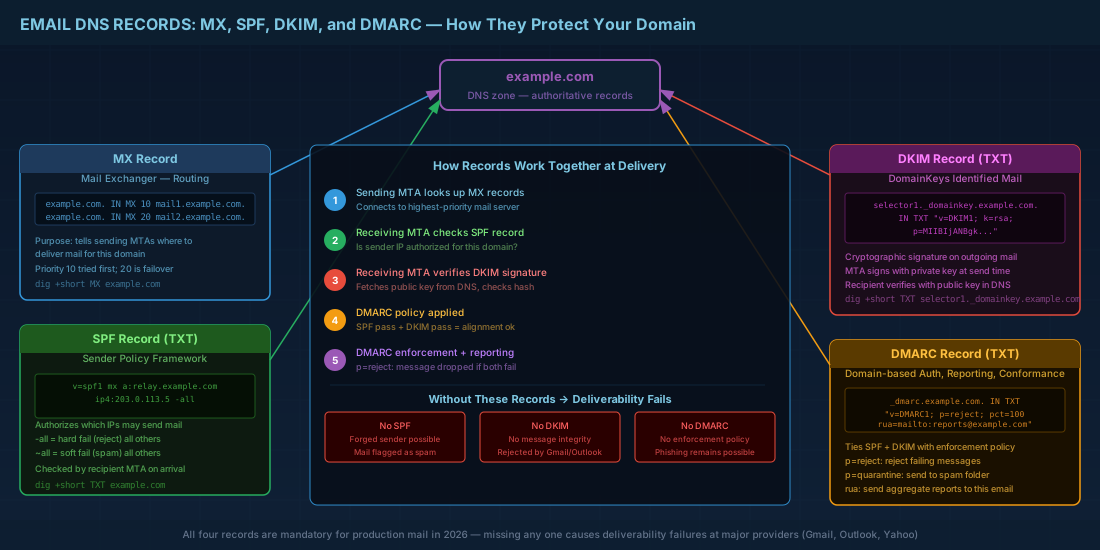
MX records for mail routing
MX (Mail Exchanger) records tell sending MTAs where to deliver mail for a domain. Multiple MX records with different priorities provide failover.
# Query MX records for a domain
dig +short MX example.com
10 mail1.example.com.
20 mail2.example.com.

# The lower priority number (10) is tried first.
# If mail1 is unreachable, the sender falls back to mail2 (priority 20).
SPF records for sender authorization
An SPF (Sender Policy Framework) record is a TXT record that lists which IP addresses and hostnames are authorized to send mail for the domain. Receiving MTAs check SPF to detect forged sender addresses.
# Example SPF record in DNS
example.com. IN TXT "v=spf1 mx a:relay.example.com ip4:203.0.113.5 -all"

# v=spf1     - SPF version
# mx         - allow servers listed in MX records
# a:host     - allow a specific hostname
# ip4:       - allow a specific IPv4 address
# -all       - hard fail everything else (reject)
DKIM for cryptographic message integrity
DKIM (DomainKeys Identified Mail) adds a cryptographic signature to outgoing messages. The sending MTA signs with a private key; the receiving MTA verifies using a public key published in DNS. This proves the message was not altered in transit and came from an authorized server.
# DKIM public key DNS record (TXT)
selector1._domainkey.example.com. IN TXT "v=DKIM1; k=rsa; p=MIIBIjANBg..."

# Check a DKIM record
dig +short TXT selector1._domainkey.example.com
DMARC policy for authentication enforcement
DMARC (Domain-based Message Authentication, Reporting, and Conformance) ties SPF and DKIM together with a policy that tells receivers what to do when checks fail. It also provides reporting so domain owners can monitor authentication failures.
# DMARC policy record
_dmarc.example.com. IN TXT "v=DMARC1; p=reject; rua=mailto:dmarc-reports@example.com; pct=100"

# p=reject  - reject mail that fails both SPF and DKIM alignment
# p=quarantine - send to spam folder
# p=none    - monitor only, take no action
Production consequence: without proper SPF, DKIM, and DMARC, your outgoing mail will land in spam at Gmail, Outlook, and other major providers. This is not optional for production mail servers in 2026.
Troubleshooting Email Delivery: Mail Queue and Log Analysis
When mail does not arrive, start with the queue and the logs. Effective email troubleshooting on Linux follows a systematic approach: check the queue state, read the log entries, and trace the delivery chain.
Inspecting the Postfix mail queue
# Show the Postfix mail queue
mailq
# Or equivalently:
postqueue -p

# Flush the queue (retry all deferred messages)
postqueue -f

# Delete a specific queued message by ID
postsuper -d QUEUE_ID

# Delete ALL queued messages (use carefully)
postsuper -d ALL
Analyzing mail logs with journalctl and grep
Mail logs on systemd-based distributions go to the journal and typically also to /var/log/mail.log (Debian/Ubuntu) or /var/log/maillog (RHEL/Fedora).
# Follow mail logs in real time (Debian/Ubuntu)
tail -f /var/log/mail.log

# RHEL/Fedora
tail -f /var/log/maillog

# Using journalctl (all distributions)
journalctl -u postfix@- -f

# Find delivery status for a specific recipient
grep "to=" /var/log/mail.log | tail -20

# Common status codes in Postfix logs:
# status=sent       - delivered successfully
# status=deferred   - temporary failure, will retry
# status=bounced    - permanent failure, returned to sender
# status=reject     - rejected at SMTP time (policy, relay denial, etc.)
When you see status=deferred, the log line also shows the reason: connection timeout, host not found, 4xx temporary rejection, etc. That reason tells you whether the problem is DNS, network, or the remote server.
Testing SMTP connectivity manually
When logs are not enough, test the SMTP conversation directly using openssl or swaks. This bypasses your MUA and lets you see exactly what the remote server responds to each command:
# Test implicit TLS connection to port 465
openssl s_client -connect mail.example.com:465

# Test STARTTLS on port 587
openssl s_client -connect mail.example.com:587 -starttls smtp

# Once connected, issue SMTP commands manually:
EHLO test.example.com
AUTH LOGIN
# (enter base64-encoded username and password)
MAIL FROM:<sender@example.com>
RCPT TO:<recipient@example.com>
DATA
Subject: Test message
This is a test.
.
QUIT

# Using swaks (Swiss Army Knife for SMTP) for a quick test:
swaks --to user@example.com --from admin@example.com --server mail.example.com:587 --tls
Quick Reference - Cheats
| Task | Command / Record |
|---|---|
| Show mail queue | mailq or postqueue -p |
| Flush deferred queue | postqueue -f |
| Delete specific queued message | postsuper -d QUEUE_ID |
| Query MX records | dig +short MX example.com |
| Check SPF record | dig +short TXT example.com |
| Check DKIM record | dig +short TXT selector._domainkey.example.com |
| Check DMARC policy | dig +short TXT _dmarc.example.com |
| Follow mail log (Debian/Ubuntu) | tail -f /var/log/mail.log |
| Follow mail log (RHEL/Fedora) | tail -f /var/log/maillog |
| SMTP submission (STARTTLS) | Port 587 |
| SMTP submission (implicit TLS) | Port 465 |
| IMAPS (implicit TLS) | Port 993 |
| POP3S (implicit TLS) | Port 995 |
| Test SMTP with openssl | openssl s_client -connect mail.example.com:465 |
Summary
Linux email architecture runs on a clear chain: the MUA sends via SMTP to an MTA, which relays to the recipient's MTA, which hands off to an MDA for final delivery into the mailbox. The recipient's MUA retrieves mail via IMAP or POP3. Each step involves specific protocols, ports, and encryption requirements.
DNS is the backbone of email routing. MX records direct delivery, SPF authorizes senders, DKIM provides cryptographic integrity, and DMARC sets enforcement policy. If any of these are missing or misconfigured, your mail will be rejected or flagged as spam by major providers.
For production mail servers on Debian 13.3, Ubuntu 24.04.3 LTS, Fedora 43, or RHEL 10.1, the standard stack in 2026 is Postfix as MTA, Dovecot with LMTP as MDA, and Sieve for filtering. Procmail is dead. TLS 1.3 is the baseline. And your first troubleshooting steps are always the queue (mailq) and the logs (/var/log/mail.log or journalctl).


