Dovecot handles the last mile of email on Linux: storing messages in mailboxes and serving them to clients over IMAP and POP3. On most production Linux mail servers in 2026, Dovecot also acts as the mail delivery agent (via LMTP), runs Sieve filters at delivery time, and provides the SASL authentication backend that Postfix delegates to. Getting Dovecot right means users can actually read their mail. Getting it wrong means authentication failures, missing messages, or quota limits that nobody notices until the CEO's mailbox is full.
Dovecot Architecture and Configuration Layout
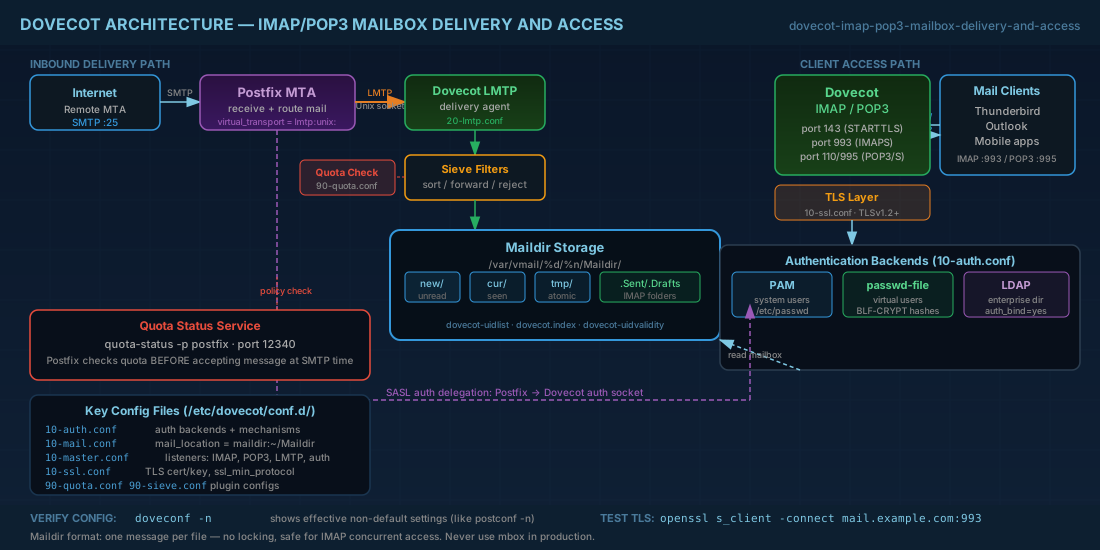
Dovecot uses a single master process that spawns worker processes on demand. The main configuration file is /etc/dovecot/dovecot.conf, but on Debian 13.3, Ubuntu 24.04.3 LTS, Fedora 43, and RHEL 10.1, the real configuration is split across /etc/dovecot/conf.d/. This modular layout is part of the broader Linux email architecture:
| File | Purpose |
|---|---|
10-auth.conf |
Authentication mechanisms and backends |
10-mail.conf |
Mail location, mailbox format (Maildir/mbox) |
10-master.conf |
Service listeners (IMAP, POP3, LMTP, auth sockets) |
10-ssl.conf |
TLS certificate and protocol settings |
15-mailboxes.conf |
Default mailbox folders (Sent, Drafts, Trash, Junk) |
20-imap.conf |
IMAP-specific settings |
20-lmtp.conf |
LMTP delivery settings |
90-quota.conf |
Quota plugin configuration |
90-sieve.conf |
Sieve filtering plugin |
The numbering controls include order. Dovecot reads all .conf files from conf.d/ in alphabetical order. Later files can override earlier settings. Use doveconf -n to see the effective (non-default) configuration, similar to postconf -n for Postfix.
Maildir vs mbox: Choosing the Right Mailbox Format
Two mailbox storage formats exist on Linux. The choice directly impacts reliability, performance, and concurrent access handling:
- mbox — all messages for a folder stored in a single file. Simple but has locking problems under concurrent access. A corrupted mbox file can lose an entire folder.
- Maildir — each message is a separate file in a directory structure (
cur/,new/,tmp/). No locking needed. Safer for IMAP with multiple simultaneous clients. This is the standard for production servers.
# 10-mail.conf - set Maildir as the storage format
mail_location = maildir:~/Maildir

# For virtual users with a base path:
# mail_location = maildir:/var/vmail/%d/%n/Maildir
Production consequence: always use Maildir for IMAP servers. mbox causes corruption and performance issues under load. The only reason mbox still exists in documentation is backward compatibility with legacy systems.
Maildir directory structure explained
Understanding the Maildir layout helps when troubleshooting missing messages or performing manual mailbox operations:
# Maildir directory structure for a user
/var/vmail/example.com/user/Maildir/
├── cur/          # Messages that have been read or seen by the client
├── new/          # Newly delivered messages not yet accessed
├── tmp/          # Temporary files during delivery (atomic writes)
├── .Drafts/      # IMAP subfolder (dot-prefix convention)
│   ├── cur/
│   ├── new/
│   └── tmp/
├── .Sent/
├── .Trash/
├── .Junk/
├── dovecot-uidlist    # Maps filenames to IMAP UIDs
├── dovecot-uidvalidity # UIDVALIDITY counter
└── dovecot.index*      # Index/cache files for fast IMAP access

# Message filenames encode flags:
# 1234567890.M123456P7890.hostname:2,S    (S = Seen)
# 1234567890.M123456P7890.hostname:2,ST   (S = Seen, T = Trashed)
Dovecot Authentication: PAM, passwd-file, and LDAP
Dovecot authentication supports multiple backends. The configuration in 10-auth.conf controls which mechanisms (PLAIN, LOGIN, CRAM-MD5) and which databases (system users, passwd-file, LDAP, SQL) are used.
System users (PAM authentication)
The default on most distributions. Dovecot authenticates against /etc/passwd and /etc/shadow via PAM. Simple for small servers where every email user has a Unix account.
# 10-auth.conf (default)
auth_mechanisms = plain login
!include auth-system.conf.ext

# auth-system.conf.ext contains:
passdb {
  driver = pam
}
userdb {
  driver = passwd
}
Virtual users with passwd-file
For virtual mail hosting where email users do not have Unix accounts. You manage users in a flat file.
# auth-passwdfile.conf.ext
passdb {
  driver = passwd-file
  args = scheme=BLF-CRYPT /etc/dovecot/users
}
userdb {
  driver = passwd-file
  args = /etc/dovecot/users
}

# /etc/dovecot/users format:
# user@example.com:{BLF-CRYPT}$2y$05$abc...xyz:5000:5000::/var/vmail/example.com/user::

# Generate password hash:
doveadm pw -s BLF-CRYPT
LDAP authentication for enterprise environments
For enterprise environments with centralized user directories:
# auth-ldap.conf.ext
passdb {
  driver = ldap
  args = /etc/dovecot/dovecot-ldap.conf.ext
}
userdb {
  driver = ldap
  args = /etc/dovecot/dovecot-ldap.conf.ext
}

# /etc/dovecot/dovecot-ldap.conf.ext
hosts = ldap.example.com
dn = cn=dovecot,ou=services,dc=example,dc=com
dnpass = secret
base = ou=users,dc=example,dc=com
auth_bind = yes
user_filter = (&(objectClass=inetOrgPerson)(mail=%u))
pass_attrs = mail=user,userPassword=password
user_attrs = mail=user,homeDirectory=home,uidNumber=uid,gidNumber=gid
Production note: always use auth_bind = yes with LDAP so Dovecot binds as the user during authentication rather than retrieving password hashes. This respects LDAP password policies and avoids storing LDAP admin credentials in Dovecot configs.
Dovecot SSL/TLS Setup for Secure IMAP and POP3
# 10-ssl.conf
ssl = required
ssl_cert = </etc/letsencrypt/live/mail.example.com/fullchain.pem
ssl_key = </etc/letsencrypt/live/mail.example.com/privkey.pem
ssl_min_protocol = TLSv1.2
ssl_prefer_server_ciphers = yes

# On RHEL 10.1 / Fedora 43, you can also use:
# ssl_min_protocol = TLSv1.2
# This allows TLS 1.2 and 1.3. Most clients in 2026 negotiate TLS 1.3 automatically.
The < prefix before file paths is Dovecot-specific syntax meaning "read the contents of this file." Do not omit it. Setting ssl = required forces all client connections to use TLS — plaintext IMAP on port 143 will still accept connections but immediately require STARTTLS before authentication. Proper TLS configuration is essential for server security and protecting user credentials in transit.
Testing Dovecot TLS connections
Verify that TLS is working correctly by connecting with openssl:
# Test implicit TLS on IMAPS port 993
openssl s_client -connect mail.example.com:993

# Test STARTTLS on IMAP port 143
openssl s_client -connect mail.example.com:143 -starttls imap

# Once connected, issue IMAP commands:
a LOGIN user@example.com password
b SELECT INBOX
c FETCH 1 (BODY[HEADER])
d LOGOUT

# Test POP3S on port 995
openssl s_client -connect mail.example.com:995
Configuring Dovecot as LMTP Delivery Agent for Postfix
LMTP (Local Mail Transfer Protocol) is the recommended way for Postfix to hand off mail to Dovecot. It is more efficient than piping to dovecot-lda because LMTP maintains persistent connections.
# 10-master.conf - enable LMTP listener
service lmtp {
  unix_listener /var/spool/postfix/private/dovecot-lmtp {
    mode = 0600
    user = postfix
    group = postfix
  }
}

# 20-lmtp.conf
protocol lmtp {
  mail_plugins = $mail_plugins sieve
  # This enables Sieve filtering during LMTP delivery
}

# Postfix side (main.cf):
virtual_transport = lmtp:unix:private/dovecot-lmtp
The Unix socket path must be inside /var/spool/postfix/ because Postfix runs chrooted on most distributions. If you use a TCP socket instead (e.g., inet_listener lmtp { port = 24 }), the chroot is not an issue, but you add network overhead and need to restrict access by IP.
Namespace Configuration and Default IMAP Mailboxes
Namespaces define how Dovecot organizes the mailbox hierarchy that IMAP clients see:
# 10-mail.conf
namespace inbox {
  inbox = yes
  separator = /

  # 15-mailboxes.conf
  mailbox Drafts {
    auto = subscribe
    special_use = \Drafts
  }
  mailbox Sent {
    auto = subscribe
    special_use = \Sent
  }
  mailbox Trash {
    auto = subscribe
    special_use = \Trash
  }
  mailbox Junk {
    auto = subscribe
    special_use = \Junk
  }
  mailbox Archive {
    auto = no
    special_use = \Archive
  }
}
The special_use flags (RFC 6154) tell IMAP clients which folder serves which purpose. Without these, Thunderbird and other clients may create their own "Sent" folder instead of using yours, resulting in duplicate folders that confuse users.
Dovecot Quota Plugin for Mailbox Size Limits
Without quotas, a single user can fill the disk and break delivery for everyone. Dovecot's quota plugin enforces per-user limits:
# 90-quota.conf
plugin {
  quota = maildir:User quota
  quota_rule = *:storage=2G
  quota_rule2 = Trash:storage=+100M
  quota_grace = 10%%
  quota_status_success = DUNNO
  quota_status_nouser = DUNNO
  quota_status_overquota = "552 5.2.2 Mailbox is full"
}

# Enable quota plugin for IMAP and LMTP
protocol imap {
  mail_plugins = $mail_plugins imap_quota quota
}
protocol lmtp {
  mail_plugins = $mail_plugins sieve quota
}

# Per-user quota override via userdb extra fields:
# In passwd-file:
# user@example.com:{BLF-CRYPT}$2y$...:5000:5000::/var/vmail/example.com/user::userdb_quota_rule=*:storage=5G
The quota status service integrates with Postfix to reject mail at SMTP time when the recipient's mailbox is full, rather than accepting the message and then bouncing it:
# 10-master.conf
service quota-status {
  executable = quota-status -p postfix
  inet_listener {
    port = 12340
  }
}

# Postfix main.cf
smtpd_recipient_restrictions =
    ...
    check_policy_service inet:127.0.0.1:12340
Shared Mailboxes and ACL Permission Management
For team mailboxes (support@, sales@), Dovecot's ACL plugin lets users share folders:
# 10-mail.conf
mail_plugins = $mail_plugins acl

# 90-acl.conf
plugin {
  acl = vfile
}

# Create shared namespace
namespace shared {
  type = shared
  separator = /
  prefix = shared/%%u/
  location = maildir:/var/vmail/%%d/%%n/Maildir:INDEXPVT=~/Maildir/shared/%%u
  subscriptions = no
  list = children
}

# Grant access via doveadm:
doveadm acl set -u user@example.com shared/support@example.com/INBOX user=reader@example.com lookup read write
doveadm: Essential Dovecot Administration Commands
The doveadm tool is the primary command-line interface for Dovecot administration. It covers everything from troubleshooting authentication to managing mailbox content:
# Search for messages in a user's mailbox
doveadm search -u user@example.com mailbox INBOX subject "invoice"

# Expunge (delete) old Trash messages
doveadm expunge -u user@example.com mailbox Trash savedbefore 30d

# Force resync of a corrupted mailbox index
doveadm force-resync -u user@example.com '*'

# Show quota usage
doveadm quota get -u user@example.com

# Recalculate quota (after manual file operations)
doveadm quota recalc -u user@example.com

# Move messages between folders
doveadm move -u user@example.com Archive/2025 mailbox INBOX before 2026-01-01

# Show who is connected
doveadm who

# Kick a user (disconnect active sessions)
doveadm kick user@example.com

# Test authentication
doveadm auth test user@example.com password123
Automated mailbox maintenance with cron
Use doveadm in cron jobs to automate routine mailbox maintenance tasks:
# /etc/cron.daily/dovecot-maintenance

#!/bin/bash
# Purge Trash older than 30 days for all users
doveadm expunge -A mailbox Trash savedbefore 30d

# Purge Junk older than 14 days for all users
doveadm expunge -A mailbox Junk savedbefore 14d

# Recalculate quotas for all users (fix drift from manual operations)
doveadm quota recalc -A

# The -A flag means "all users" - requires iteration over userdb
Quick Reference - Cheats
| Task | Command |
|---|---|
| Show effective config | doveconf -n |
| Check config syntax | doveconf -c /etc/dovecot/dovecot.conf |
| Test user authentication | doveadm auth test user@domain pass |
| Show connected users | doveadm who |
| Disconnect a user | doveadm kick user@domain |
| Check quota | doveadm quota get -u user@domain |
| Purge old Trash | doveadm expunge -u user@domain mailbox Trash savedbefore 30d |
| Fix corrupted index | doveadm force-resync -u user@domain '*' |
| Generate password hash | doveadm pw -s BLF-CRYPT |
| Reload Dovecot config | doveadm reload |
| IMAP port (implicit TLS) | 993 |
| POP3 port (implicit TLS) | 995 |
| LMTP default socket | /var/spool/postfix/private/dovecot-lmtp |
Summary
Dovecot is the standard IMAP/POP3 server and mail delivery agent for Linux in 2026. Its split configuration under conf.d/ handles authentication, TLS, mailbox storage, quota enforcement, and Sieve filtering as separate concerns. For production, use Maildir storage (never mbox), LMTP delivery from Postfix, TLS 1.2+ with ssl = required, and the quota plugin with Postfix integration to reject mail at SMTP time when mailboxes are full.
Authentication flexibility is one of Dovecot's strengths: PAM for system users, passwd-file for simple virtual hosting, or LDAP for enterprise directories. The doveadm tool covers day-to-day administration from testing auth to purging old messages to fixing corrupted indexes. Combined with ACLs for shared mailboxes and Sieve for server-side filtering, Dovecot provides everything the retrieval and delivery side of a mail server needs.


