A Linux box can route packets between networks, translate addresses with NAT, and build tunnels across the internet. These capabilities turn commodity hardware into a gateway, firewall, or VPN concentrator. Understanding Linux routing, network address translation, and IP packet forwarding is essential for building production network infrastructure. This article covers routing tables and policy routing, IP forwarding, SNAT/DNAT/MASQUERADE with nftables, port forwarding, GRE tunnels, and an overview of dynamic routing with FRRouting. All examples use modern tools (iproute2, nftables) on Debian 13.3, Ubuntu 24.04.3 LTS, Fedora 43, and RHEL 10.1. For foundational networking concepts, see our Linux networking basics: IP, subnets, routing, and DNS guide.
Linux IP Routing Fundamentals
Every Linux system has at least one routing table. When the kernel needs to forward a packet, it performs a longest-prefix-match lookup in the active table. The most specific matching route wins. If no route matches, the packet is dropped (or ICMP unreachable is sent if configured).
# View the main routing table
ip route show

# Typical output on a single-homed server:
# default via 10.0.1.1 dev enp3s0 proto static metric 100
# 10.0.1.0/24 dev enp3s0 proto kernel scope link src 10.0.1.50 metric 100

# Ask the kernel which route it would use for a specific destination
ip route get 8.8.8.8

# Add a static route to a remote network via a specific gateway
sudo ip route add 172.16.0.0/16 via 10.0.1.254 dev enp3s0

# Delete a static route
sudo ip route del 172.16.0.0/16 via 10.0.1.254

# Replace the default gateway
sudo ip route replace default via 10.0.1.1 dev enp3s0
Static routes added with ip route add are lost on reboot. For persistence, configure them through NetworkManager or Netplan. For detailed interface configuration, see configuring network interfaces with NetworkManager and CLI.
# Persistent static route with nmcli (RHEL 10.1, Fedora 43, Debian 13.3 with NM)
sudo nmcli con mod "Wired connection 1" +ipv4.routes "172.16.0.0/16 10.0.1.254"
sudo nmcli con up "Wired connection 1"

# Verify
nmcli con show "Wired connection 1" | grep ipv4.routes
Policy Routing with Multiple Routing Tables
Standard routing uses a single table for all decisions. Policy routing lets you maintain multiple routing tables and select between them based on source address, incoming interface, firewall mark, or other criteria. This is essential for multi-homed servers that connect to two ISPs or have separate management and data networks.
# View routing rules (policy database)
ip rule list

# Default output:
# 0:    from all lookup local
# 32766: from all lookup main
# 32767: from all lookup default

# Create a custom routing table (add a name for readability)
echo "100 isp2" | sudo tee -a /etc/iproute2/rt_tables

# Add a default route to the custom table
sudo ip route add default via 192.168.2.1 dev enp4s0 table isp2

# Add a rule: traffic from source 192.168.2.50 uses table isp2
sudo ip rule add from 192.168.2.50/32 table isp2 priority 100

# Add a rule: traffic marked with fwmark 2 uses table isp2
sudo ip rule add fwmark 2 table isp2 priority 200

# Verify the rule was added
ip rule list

# Test which route would be used for a source-specific lookup
ip route get 8.8.8.8 from 192.168.2.50
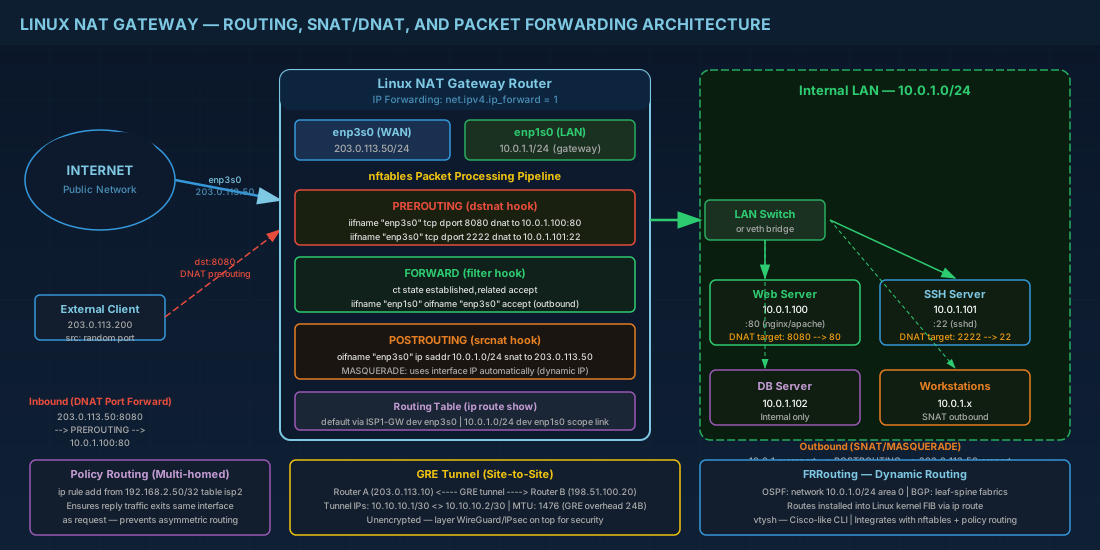
A real-world example: a server has enp3s0 (10.0.1.50, ISP1 via 10.0.1.1) and enp4s0 (192.168.2.50, ISP2 via 192.168.2.1). Without policy routing, all outgoing traffic uses the default route through ISP1 regardless of which interface received the request. Clients connecting via ISP2 send packets in through enp4s0 but replies go out through enp3s0 -- the reply gets dropped because the source IP does not match ISP1's network. Policy routing fixes this by ensuring traffic sourced from 192.168.2.50 always exits through ISP2.
Making policy routes persistent
Policy routing rules created with ip rule add are lost on reboot. Here is how to make them persistent across the major distributions:
# Method 1: NetworkManager routing rules (RHEL 10.1, Fedora 43)
# Create a rule file for the connection
sudo nmcli con mod "ISP2" +ipv4.routing-rules "priority 100 from 192.168.2.50/32 table 100"
sudo nmcli con up "ISP2"

# Method 2: systemd-networkd (Ubuntu with Netplan)
# In /etc/netplan/01-netcfg.yaml:
# enp4s0:
#   routing-policy:
#     - from: 192.168.2.50/32
#       table: 100

# Method 3: NetworkManager dispatcher script (universal)
# Create /etc/NetworkManager/dispatcher.d/10-policy-routes.sh
#!/bin/bash
if [ "$1" = "enp4s0" ] && [ "$2" = "up" ]; then
    ip rule add from 192.168.2.50/32 table isp2 priority 100
    ip route add default via 192.168.2.1 dev enp4s0 table isp2
fi
Enabling IP Forwarding on Linux
By default, Linux drops packets that are not destined for one of its own addresses. To act as a router or NAT gateway, you must enable IP forwarding:
# Check current status (0 = disabled, 1 = enabled)
sysctl net.ipv4.ip_forward

# Enable temporarily
sudo sysctl -w net.ipv4.ip_forward=1

# Enable permanently
echo "net.ipv4.ip_forward = 1" | sudo tee /etc/sysctl.d/90-ip-forward.conf
sudo sysctl --system

# For IPv6 forwarding (if needed)
sudo sysctl -w net.ipv6.conf.all.forwarding=1
On RHEL 10.1 and Fedora 43 with firewalld, enabling masquerade on a zone also enables forwarding for that zone. But the sysctl value must still be set globally for the kernel to forward packets between interfaces.
NAT with nftables: SNAT, DNAT, and MASQUERADE
Network Address Translation rewrites source or destination addresses as packets pass through the router. Linux implements NAT in the netfilter framework, and nftables is the current tool for configuring it. Forget raw iptables -- nftables has been the default on all major distributions since 2020. For comprehensive firewall configuration, see our guide on firewall management with nftables and firewalld.
Source NAT (SNAT) and MASQUERADE
SNAT changes the source address of outgoing packets. MASQUERADE is a special case of SNAT that automatically uses the outgoing interface's current IP address -- useful when the external IP is dynamic (DHCP, PPPoE).
# Create NAT table with postrouting chain
sudo nft add table ip nat
sudo nft add chain ip nat postrouting { type nat hook postrouting priority srcnat\; }

# MASQUERADE: traffic from 10.0.1.0/24 going out enp3s0 gets source-NATed
sudo nft add rule ip nat postrouting oifname "enp3s0" ip saddr 10.0.1.0/24 masquerade

# SNAT: same thing but with a fixed source address (use when IP is static)
sudo nft add rule ip nat postrouting oifname "enp3s0" ip saddr 10.0.1.0/24 \
  snat to 203.0.113.50
SNAT is more efficient than MASQUERADE because the kernel does not need to look up the interface address for every connection. Use SNAT on servers with static public IPs. Use MASQUERADE on home routers or cloud instances where the external IP may change.
Destination NAT (DNAT) and port forwarding
DNAT rewrites the destination address of incoming packets. This is how you expose internal services to the internet (port forwarding).
# Create prerouting chain for DNAT
sudo nft add chain ip nat prerouting { type nat hook prerouting priority dstnat\; }

# Forward incoming port 8080 on external interface to internal server 10.0.1.100:80
sudo nft add rule ip nat prerouting iifname "enp3s0" tcp dport 8080 \
  dnat to 10.0.1.100:80

# Forward port 2222 to internal SSH server
sudo nft add rule ip nat prerouting iifname "enp3s0" tcp dport 2222 \
  dnat to 10.0.1.101:22

# You also need a forwarding rule to allow the traffic
sudo nft add table ip filter
sudo nft add chain ip filter forward { type filter hook forward priority filter\; policy drop\; }
sudo nft add rule ip filter forward ct state established,related accept
sudo nft add rule ip filter forward iifname "enp3s0" oifname "enp1s0" \
  ip daddr 10.0.1.100 tcp dport 80 accept
sudo nft add rule ip filter forward iifname "enp1s0" oifname "enp3s0" accept
Complete NAT gateway example
Here is a practical end-to-end example of building a NAT gateway that lets an internal 10.0.1.0/24 network access the internet through a Linux router with a public IP on enp3s0:
# Step 1: Enable IP forwarding
echo "net.ipv4.ip_forward = 1" | sudo tee /etc/sysctl.d/90-ip-forward.conf
sudo sysctl --system

# Step 2: Create the full nftables ruleset
sudo nft flush ruleset
sudo nft -f - <<'EOF'
table ip nat {
    chain prerouting {
        type nat hook prerouting priority dstnat; policy accept;
        # Port forward: public port 8080 -> internal web server
        iifname "enp3s0" tcp dport 8080 dnat to 10.0.1.100:80
        # Port forward: public port 2222 -> internal SSH
        iifname "enp3s0" tcp dport 2222 dnat to 10.0.1.101:22
    }
    chain postrouting {
        type nat hook postrouting priority srcnat; policy accept;
        # SNAT for all internal traffic going out the public interface
        oifname "enp3s0" ip saddr 10.0.1.0/24 snat to 203.0.113.50
    }
}

table ip filter {
    chain input {
        type filter hook input priority filter; policy drop;
        ct state established,related accept
        iif "lo" accept
        iifname "enp1s0" accept
        iifname "enp3s0" tcp dport 22 accept
        iifname "enp3s0" icmp type echo-request accept
    }
    chain forward {
        type filter hook forward priority filter; policy drop;
        ct state established,related accept
        iifname "enp1s0" oifname "enp3s0" accept
        iifname "enp3s0" oifname "enp1s0" ip daddr 10.0.1.100 tcp dport 80 accept
        iifname "enp3s0" oifname "enp1s0" ip daddr 10.0.1.101 tcp dport 22 accept
    }
}
EOF

# Step 3: Save and enable
sudo nft list ruleset > /etc/nftables.conf
sudo systemctl enable nftables

# Step 4: Verify NAT is working from an internal host
# On 10.0.1.100: curl -s https://ifconfig.me
# Should show 203.0.113.50 (the public IP)
Making nftables rules persistent
# Save current ruleset
sudo nft list ruleset > /etc/nftables.conf

# On RHEL/Fedora, enable the nftables service to load rules at boot
sudo systemctl enable nftables

# On Debian/Ubuntu, same approach
sudo systemctl enable nftables

# Verify rules load after reboot
sudo nft list ruleset
On systems running firewalld (RHEL 10.1, Fedora 43), firewalld uses nftables as its backend. You can use firewalld's rich rules or direct rules for NAT instead of raw nft commands. However, mixing raw nft rules with firewalld can cause conflicts. Pick one approach and stick with it.
GRE Tunnels for Site-to-Site Connectivity
GRE (Generic Routing Encapsulation) wraps packets inside IP, creating a point-to-point tunnel between two Linux routers. It is unencrypted, so use it only over trusted networks or layer WireGuard/IPsec on top for security.
# On Router A (public IP 203.0.113.10, tunnel IP 10.10.10.1)
sudo ip tunnel add gre1 mode gre remote 198.51.100.20 local 203.0.113.10 ttl 255
sudo ip addr add 10.10.10.1/30 dev gre1
sudo ip link set gre1 up

# Add route to remote network through the tunnel
sudo ip route add 172.20.0.0/16 via 10.10.10.2 dev gre1

# On Router B (public IP 198.51.100.20, tunnel IP 10.10.10.2)
sudo ip tunnel add gre1 mode gre remote 203.0.113.10 local 198.51.100.20 ttl 255
sudo ip addr add 10.10.10.2/30 dev gre1
sudo ip link set gre1 up

# Add route to Router A's network through the tunnel
sudo ip route add 10.0.1.0/24 via 10.10.10.1 dev gre1

# Verify tunnel
ip tunnel show
ping -c 3 10.10.10.2
GRE tunnels have an overhead of 24 bytes per packet (20 bytes IP header + 4 bytes GRE header). If your physical MTU is 1500, the effective MTU inside the tunnel is 1476. Set the tunnel MTU explicitly to avoid fragmentation:
sudo ip link set gre1 mtu 1476Dynamic Routing with FRRouting (OSPF and BGP)
Static routes work for small, stable topologies. When you manage dozens of routes that change as links go up and down, you need a dynamic routing daemon. FRRouting (FRR) is the standard open-source routing suite for Linux, supporting OSPF, BGP, IS-IS, and more. It is packaged in EPEL for RHEL and in standard repositories for Debian, Ubuntu, and Fedora.
# Install FRRouting on RHEL 10.1 / Fedora 43
sudo dnf install frr frr-pythontools

# Install on Debian 13.3 / Ubuntu 24.04.3 LTS
sudo apt install frr frr-pythontools

# Enable the protocols you need in /etc/frr/daemons
# Set ospfd=yes and/or bgpd=yes

# Start FRR
sudo systemctl enable --now frr

# Enter the FRR shell (Cisco-like CLI)
sudo vtysh

# Example: configure OSPF
configure terminal
router ospf
  network 10.0.1.0/24 area 0
  network 10.10.10.0/30 area 0
  passive-interface enp3s0
exit
write memory
exit
FRR integrates with the Linux kernel routing table. Routes learned via OSPF or BGP are installed into the kernel FIB and appear in ip route show. This means nftables, policy routing, and all other kernel networking features work alongside dynamic routing. In production data centers, FRR with BGP is commonly used for leaf-spine fabrics and for announcing service IPs from servers to the network fabric.
Quick Reference - Cheats
| Task | Command |
|---|---|
| Show routing table | ip route show |
| Test route for destination | ip route get 8.8.8.8 |
| Add static route | ip route add 172.16.0.0/16 via 10.0.1.254 |
| Persistent route (nmcli) | nmcli con mod "conn" +ipv4.routes "172.16.0.0/16 10.0.1.254" |
| View policy rules | ip rule list |
| Add source-based rule | ip rule add from 192.168.2.50/32 table isp2 |
| Enable IP forwarding | sysctl -w net.ipv4.ip_forward=1 |
| nftables MASQUERADE | nft add rule ip nat postrouting oifname "eth0" masquerade |
| nftables DNAT (port forward) | nft add rule ip nat prerouting tcp dport 8080 dnat to 10.0.1.100:80 |
| Save nftables rules | nft list ruleset > /etc/nftables.conf |
| Create GRE tunnel | ip tunnel add gre1 mode gre remote <IP> local <IP> |
| FRR CLI | sudo vtysh |
Summary
Linux routing, NAT, and packet forwarding turn a standard server into a network device. The ip route and ip rule commands control how packets flow between interfaces and routing tables. Policy routing solves multi-homed asymmetry problems that break TCP connections. Nftables provides SNAT, DNAT, and MASQUERADE for NAT gateways and port forwarding, replacing the old iptables syntax with a cleaner, more consistent language. GRE tunnels connect remote sites over IP, and FRRouting adds dynamic protocol support (OSPF, BGP) when static routes are no longer manageable. All of these features are built into the kernel and available on every major distribution. The foundation is always the same: enable forwarding, define the routes, translate the addresses, and verify with ip route get and tcpdump.


