DNSSEC adds cryptographic signatures to DNS responses so resolvers can verify that the data has not been tampered with in transit. Without DNSSEC implementation, a man-in-the-middle can forge DNS answers and redirect traffic to malicious servers. With DNSSEC, the resolver checks a chain of trust from the root zone down to the queried domain and rejects anything that does not validate. This article covers the implementation side: key generation, zone signing with BIND 9.18+ inline signing, key rollovers, DS record submission, validation troubleshooting, and DANE/TLSA records.
DNSSEC Concepts and DNS Record Types
DNSSEC introduces four new record types that work together to establish cryptographic trust:
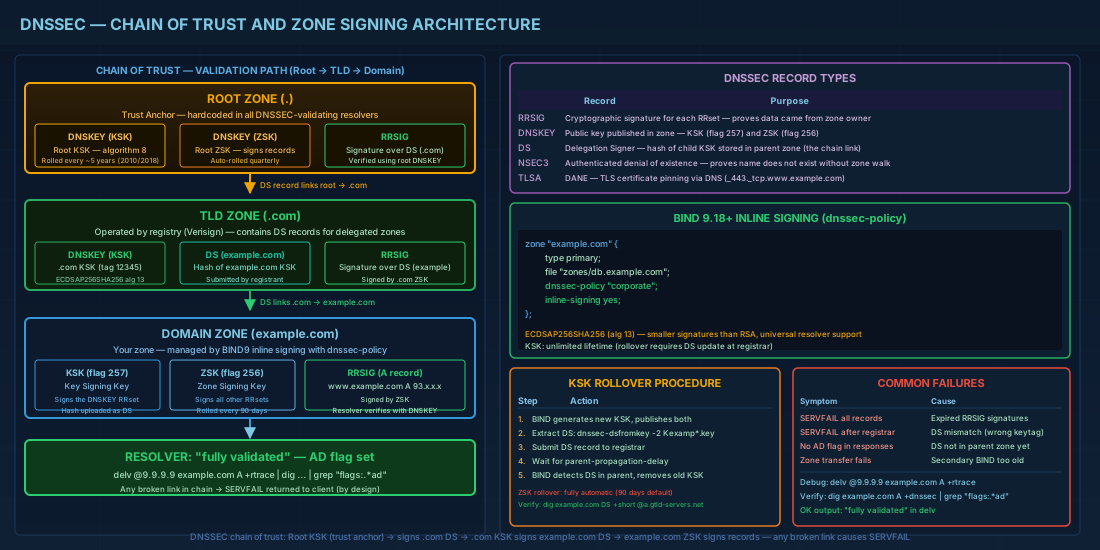
| Record | Purpose |
|---|---|
RRSIG |
Signature for each resource record set. Proves the data came from the zone owner. |
DNSKEY |
The public key used to verify RRSIG records. Published in the zone. |
DS |
Delegation Signer — a hash of the child's KSK, placed in the parent zone. Links child to parent in the chain of trust. |
NSEC / NSEC3 |
Authenticated denial of existence. Proves that a name does not exist without allowing full zone enumeration (NSEC3). |
The chain of trust explained
The DNSSEC chain of trust validation follows a path: the root zone is signed and its public keys are hardcoded in resolvers as trust anchors. When a resolver queries www.example.com, it verifies:
- The root zone's DNSKEY signs the DS record for
.com - The
.comzone's DNSKEY signs the DS record forexample.com - The
example.comDNSKEY signs the RRSIG for the requested A record
If any link in this chain fails — expired signature, missing DS record, wrong key — the resolver returns SERVFAIL to the client. This is deliberate: broken DNSSEC is treated as an attack, not a soft failure.
This entire mechanism depends on a properly configured authoritative DNS server. If you are setting up BIND9 for the first time, start with BIND DNS named.conf and zone management before implementing DNSSEC.
DNSSEC Key Generation and Zone Signing with BIND 9.18+
BIND 9.18 introduced the DNSSEC key and signing policy (dnssec-policy) directive, which replaces the older manual workflow of dnssec-keygen plus dnssec-signzone. The new approach handles key generation, signing, and rollovers automatically.
Inline signing with dnssec-policy
This is the recommended approach for DNSSEC zone signing on current distributions. In your zone declaration:
zone "example.com" {
    type primary;
    file "zones/db.example.com";
    dnssec-policy "default";
    inline-signing yes;
    allow-transfer { key "xfer-key"; };
};
The built-in "default" policy uses ECDSAP256SHA256 for both KSK and ZSK, with automated rollovers. BIND creates keys in its key directory (configured via key-directory in options) and signs the zone automatically. The unsigned zone file stays untouched; BIND maintains a separate signed version in memory and in journal files.
Custom dnssec-policy configuration
If you need different key parameters or rollover timings:
dnssec-policy "corporate" {
    keys {
        ksk key-directory lifetime unlimited algorithm ecdsap256sha256;
        zsk key-directory lifetime 90d algorithm ecdsap256sha256;
    };
    nsec3param iterations 0 optout no salt-length 0;
    dnskey-ttl 3600;
    max-zone-ttl 86400;
    zone-propagation-delay 300;
    parent-ds-ttl 3600;
    parent-propagation-delay 3600;
};
Key points on this configuration:
- The KSK (Key Signing Key) has an unlimited lifetime because KSK rollovers require DS record updates at the registrar, which is an external process.
- The ZSK (Zone Signing Key) rolls every 90 days automatically.
- NSEC3 with 0 iterations and no salt follows the current best practice from RFC 9276 (2022). Extra iterations waste CPU without meaningful security benefit.
Why ECDSAP256SHA256 over RSA
Older DNSSEC deployments commonly used RSA keys (algorithm 8, RSASHA256). Modern deployments should use ECDSA P-256 (algorithm 13) for several practical reasons:
- Smaller keys and signatures: ECDSA signatures are about 64 bytes versus 256+ bytes for RSA-2048. This keeps DNS response sizes smaller, reducing the risk of UDP fragmentation and falling back to TCP.
- Faster cryptographic operations: ECDSA signing and verification are computationally cheaper, which matters on busy authoritative servers.
- Universal resolver support: All major resolvers have supported algorithm 13 since 2017. There is no compatibility concern.
Manual key generation (legacy reference)
You may encounter environments still using the older workflow. For reference:
# Generate KSK
dnssec-keygen -a ECDSAP256SHA256 -f KSK example.com

# Generate ZSK
dnssec-keygen -a ECDSAP256SHA256 example.com

# Sign the zone manually
dnssec-signzone -A -N INCREMENT -o example.com -t db.example.com
This produces a signed zone file (db.example.com.signed) and a dsset-example.com. file containing the DS records. The drawback is that you must re-sign before signatures expire and manage rollovers by hand. Inline signing eliminates this burden.
DNSSEC Key Rollover: ZSK and KSK Procedures
ZSK rollover
With dnssec-policy, ZSK rollovers happen automatically. BIND pre-publishes the new ZSK, waits for the old DNSKEY TTL to expire from caches, switches signing to the new key, and then removes the old key. No operator action needed.
KSK rollover
KSK rollovers require coordination with the parent zone (your domain registrar). When BIND generates a new KSK, it writes the corresponding DS record to the key state files. The process:
- BIND generates a new KSK and publishes both old and new DNSKEYs.
- You extract the DS record for the new KSK:
# Find the new KSK key file
ls /var/cache/bind/keys/Kexample.com.+013+*

# Generate DS record from the KSK
dnssec-dsfromkey -2 /var/cache/bind/keys/Kexample.com.+013+12345.key
# Output: example.com. IN DS 12345 13 2 A1B2C3D4E5F6...- Submit the new DS record to your registrar (via their web panel or EPP API).
- Wait for the old DS to expire from parent zone caches.
- BIND detects that the new DS is published in the parent and completes the rollover by removing the old KSK.
The parent-propagation-delay setting in your policy tells BIND how long to wait for the DS change to propagate.
DS Record Submission to the Domain Registrar
Every registrar handles this differently. You need to provide:
- Key Tag: the numeric ID (e.g., 12345)
- Algorithm: 13 for ECDSAP256SHA256
- Digest Type: 2 for SHA-256
- Digest: the hex string
After submitting, verify the DS record appears in the parent zone:
dig example.com DS +short @a.gtld-servers.net
# Expected: 12345 13 2 A1B2C3D4E5F6...
If the DS record is wrong or missing, DNSSEC-validating resolvers will return SERVFAIL for your entire domain. Test thoroughly before and after submission.
DNSSEC Validation and Troubleshooting Guide
Enabling validation on a resolver
BIND 9.18 enables DNSSEC validation by default. Confirm with:
options {
    dnssec-validation auto;   # Uses built-in root trust anchors
};
The auto setting uses managed trust anchors that update via RFC 5011 key rollovers.
Troubleshooting with delv and dig
The delv tool is BIND's DNSSEC-aware lookup utility, purpose-built for validation debugging. It performs full chain-of-trust validation locally:
# Validate a domain
delv @9.9.9.9 example.com A +rtrace
# Look for: "fully validated" in the output

# If validation fails, you'll see:
# ;; resolution failed: SERVFAIL
# ;; validating example.com/A: no valid signature found
With dig, use the +dnssec flag to request DNSSEC records and check the ad (Authenticated Data) flag in the response header:
# Query with DNSSEC records
dig @9.9.9.9 example.com A +dnssec

# Check specifically for the AD flag
dig @9.9.9.9 example.com A +dnssec +short
# Then check the header:
dig @9.9.9.9 example.com A +dnssec | grep "flags:"
# flags: qr rd ra ad; — the "ad" flag means validation succeeded
Step-by-step DNSSEC deployment verification
After enabling DNSSEC zone signing, run through this verification checklist to confirm everything is working correctly:
# 1. Verify DNSKEY records are published
dig @localhost example.com DNSKEY +short
# Should return two keys (KSK flag 257, ZSK flag 256)

# 2. Verify RRSIG records exist
dig @localhost example.com A +dnssec +short
# Should show the A record plus RRSIG signature data

# 3. Verify DS record is in the parent zone
dig example.com DS +short @a.gtld-servers.net

# 4. Full validation test from an external resolver
delv @9.9.9.9 example.com A +rtrace
# Must show "fully validated"

# 5. Test NSEC3 denial of existence
dig @9.9.9.9 nonexistent.example.com A +dnssec
# Should return NXDOMAIN with NSEC3 records
Common DNSSEC failures
| Symptom | Likely Cause | Fix |
|---|---|---|
| SERVFAIL for all records | Expired RRSIG signatures | Re-sign zone or fix dnssec-policy timers |
| SERVFAIL after registrar change | DS record mismatch (wrong key tag or digest) | Verify DS with dnssec-dsfromkey, resubmit |
| No AD flag in responses | Resolver does not validate, or DS not in parent | Check dnssec-validation auto;, verify DS in parent |
| Zone transfer fails after signing | Secondary does not understand DNSSEC records | Update secondary BIND or use inline-signing on both |
DANE and TLSA Records for Certificate Pinning
DANE (DNS-Based Authentication of Named Entities) uses DNSSEC to publish TLS certificate information in DNS via TLSA records. This lets clients verify that a server's TLS certificate matches what the domain owner intended, without relying solely on certificate authorities.
A TLSA record for HTTPS on port 443:
# Format: _port._protocol.hostname TLSA usage selector matching-type certificate-data
_443._tcp.www.example.com. IN TLSA 3 1 1 2B1A3B...SHA256HASH...

# Generate the TLSA record from a certificate
openssl x509 -in /etc/letsencrypt/live/www.example.com/cert.pem \
  -noout -pubkey | \
  openssl pkey -pubin -outform DER | \
  openssl dgst -sha256 -binary | \
  xxd -p -c 64
The TLSA fields:
- Usage 3 (DANE-EE): domain-issued certificate, bypasses CA validation.
- Selector 1: match the SubjectPublicKeyInfo (public key only).
- Matching type 1: SHA-256 hash of the selected data.
DANE is most commonly deployed for SMTP servers (MTA-STS alternative) with _25._tcp.mail.example.com TLSA records. It requires DNSSEC to be fully deployed on the domain; without DNSSEC, TLSA records are ignored. If you run a Postfix mail server, adding DANE TLSA records significantly improves transport security for inbound mail by allowing sending MTAs to verify your server's certificate via DNS.
DNSSEC Quick Reference
| Task | Command / Directive |
|---|---|
| Enable inline signing | dnssec-policy "default"; inline-signing yes; |
| Enable validation on resolver | dnssec-validation auto; |
| Generate KSK (manual) | dnssec-keygen -a ECDSAP256SHA256 -f KSK example.com |
| Generate ZSK (manual) | dnssec-keygen -a ECDSAP256SHA256 example.com |
| Extract DS record | dnssec-dsfromkey -2 Kexample.com.+013+NNNNN.key |
| Validate with delv | delv @resolver example.com A +rtrace |
| Check AD flag with dig | dig @resolver example.com +dnssec |
| Verify DS in parent | dig example.com DS +short @a.gtld-servers.net |
| Check signature expiry | dig example.com RRSIG +short |
| Generate TLSA hash | openssl x509 -in cert.pem -noout -pubkey | openssl pkey -pubin -outform DER | openssl dgst -sha256 |
| NSEC3 best practice (RFC 9276) | nsec3param iterations 0 optout no salt-length 0; |
Summary
DNSSEC protects DNS integrity through a chain of cryptographic signatures from the root zone to your domain. With BIND 9.18+, the dnssec-policy directive handles key generation, zone signing, and ZSK rollovers automatically, so you can focus on the one manual step that remains: submitting DS records to your registrar during KSK rollovers. Use delv for validation debugging and dig +dnssec to verify the AD flag in responses. Deploy NSEC3 with zero iterations per RFC 9276 and consider DANE/TLSA records for SMTP servers where certificate pinning via DNS adds a real security layer. The most common production failures are expired signatures and mismatched DS records — both detectable with the tools covered here, and both preventable with inline signing and monitoring. For a holistic approach to securing your infrastructure, combine DNSSEC with proper firewall and port scanning defenses and SSH hardening practices.


