BIND DNS server is the most widely deployed authoritative and recursive DNS server on the internet, powering the majority of Linux-based name resolution infrastructure. If you administer Linux servers in production, you will encounter BIND9 and its named.conf configuration sooner or later, whether running your own DNS zones or debugging resolution problems caused by someone else's setup. This article covers the architecture of BIND 9.18+, the structure of named.conf, zone file syntax, zone transfers, TSIG authentication, and operational tools like rndc and the named-check utilities.
BIND9 Architecture and How the named Daemon Works
The named daemon is the BIND DNS server process that answers DNS queries. It reads its configuration from /etc/named.conf (RHEL/Fedora) or /etc/bind/named.conf (Debian/Ubuntu), loads zone data into memory, and listens on configured interfaces.
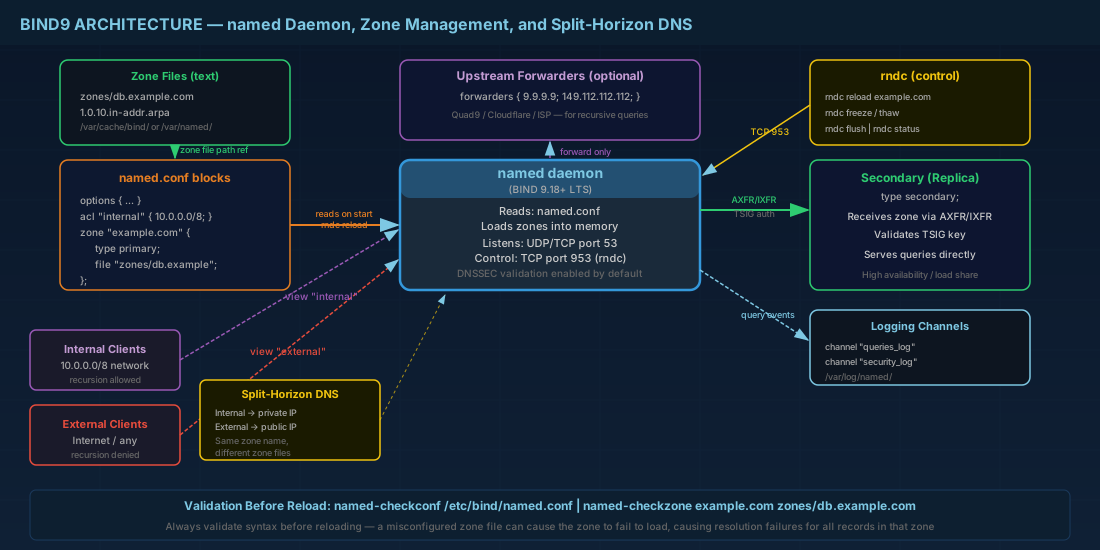
BIND 9.18 (the current LTS branch shipped with Debian 13.3, Ubuntu 24.04, and RHEL 10.1) introduced several defaults worth knowing:
- DNSSEC validation is enabled by default (
dnssec-validation auto;). - The
allow-recursiondirective defaults to localhost and localnets only, so a fresh install will not act as an open resolver. - The old
dnssec-enableoption was removed; DNSSEC support is always compiled in.
On systemd-based distributions, BIND runs as the named.service unit. On Debian/Ubuntu the package is bind9; on RHEL/Fedora it is bind.
# Install on Debian/Ubuntu
sudo apt install bind9 bind9-utils bind9-dnsutils

# Install on RHEL 10 / Fedora 43
sudo dnf install bind bind-utils
named.conf Structure: Options, Zone, ACL, and View Blocks
The main named.conf configuration file is modular. On Debian systems it uses include directives to split into named.conf.options, named.conf.local, and named.conf.default-zones. On RHEL the default is a single /etc/named.conf. Either approach works; the syntax is identical.
The options block
This controls global server behavior. A production-ready options block looks like this:
options {
    directory "/var/cache/bind";           # Working directory for zone files
    listen-on { 127.0.0.1; 10.0.1.5; };   # Only bind to specific IPs
    listen-on-v6 { ::1; };
    allow-recursion { 10.0.0.0/8; 127.0.0.1; };
    forwarders { 9.9.9.9; 149.112.112.112; };  # Quad9 as upstream
    forward only;                          # Do not fall back to root hints
    dnssec-validation auto;
    recursion yes;
    max-cache-size 256m;
    version "not disclosed";               # Hide BIND version from queries
};
Setting version "not disclosed"; prevents attackers from fingerprinting your BIND release via dig @server version.bind chaos txt. This is an important DNS server security hardening step that every production deployment should include.
ACLs (Access Control Lists)
Access control lists let you name groups of IP addresses and reference them throughout the config:
acl "internal" {
    10.0.0.0/8;
    172.16.0.0/12;
    192.168.0.0/16;
    localhost;
};

acl "dmz-servers" {
    10.0.2.10;
    10.0.2.11;
};
Then use them: allow-recursion { "internal"; };. This is cleaner than scattering CIDR blocks through multiple directives. Well-structured ACLs also tie in with your broader Linux networking and IP subnet design.
Zone declarations
Each DNS zone block tells named where to find the data and what role it plays (primary or secondary):
zone "example.com" {
    type primary;
    file "zones/db.example.com";
    allow-transfer { key "xfer-key"; };    # Only allow TSIG-authenticated transfers
    also-notify { 10.0.1.6; };             # Push notifications to secondary
};

zone "example.com" {
    type secondary;
    file "zones/db.example.com";
    primaries { 10.0.1.5 key "xfer-key"; };
};
Note: BIND 9.18 accepts both master/slave and primary/secondary keywords but the old terms are deprecated and will be removed in a future release. Use the new terms.
Views for split-horizon DNS
Split-horizon DNS lets a single BIND server return different answers depending on the source of the query. This is common when internal clients should resolve to private IPs while external clients get public addresses:
view "internal" {
    match-clients { "internal"; };
    recursion yes;

    zone "example.com" {
        type primary;
        file "zones/db.example.com.internal";
    };
};

view "external" {
    match-clients { any; };
    recursion no;

    zone "example.com" {
        type primary;
        file "zones/db.example.com.external";
    };
};
When using views, every zone (including the root hints and localhost zones) must be inside a view block. You cannot mix view and non-view zones in the same configuration.
DNS Zone File Format and Record Types
A DNS zone file starts with a SOA record and NS records, followed by the actual resource records. Here is a complete forward zone:
$TTL 3600
@   IN  SOA  ns1.example.com. admin.example.com. (
            2026022801  ; serial — YYYYMMDDNN format
            3600        ; refresh (1 hour)
            900         ; retry (15 minutes)
            1209600     ; expire (2 weeks)
            300         ; negative cache TTL (5 minutes)
)

; Name servers
        IN  NS      ns1.example.com.
        IN  NS      ns2.example.com.

; A and AAAA records
ns1     IN  A       10.0.1.5
ns2     IN  A       10.0.1.6
@       IN  A       93.184.216.34
@       IN  AAAA    2606:2800:220:1:248:1893:25c8:1946
www     IN  CNAME   example.com.

; Mail
@       IN  MX  10  mail.example.com.
@       IN  MX  20  backup-mail.example.com.
mail    IN  A       10.0.1.20

; SPF and DKIM
@       IN  TXT     "v=spf1 mx ip4:10.0.1.20 -all"
dkim._domainkey IN TXT "v=DKIM1; k=rsa; p=MIGfMA0GCS..."

; Service discovery
_sip._tcp  IN  SRV  10 60 5060 sip.example.com.
The MX records above are critical for mail delivery. If you are building out a complete mail infrastructure, the zone file must align with your email architecture and MTA/MDA setup.
Common zone file mistakes to avoid
Even experienced administrators encounter these zone file errors in production:
- Missing trailing dot on FQDNs: Writing
ns1.example.cominstead ofns1.example.com.causes BIND to append the zone origin, resulting inns1.example.com.example.com.— a record that will never resolve. - Forgetting to increment the serial: Secondary servers compare serials during zone transfers. If the serial has not changed, the secondary assumes the zone is unchanged and skips the transfer entirely.
- TTL values too low or too high: A 60-second TTL generates heavy query load on your authoritative servers. A 86400-second (1-day) TTL means DNS changes take 24 hours to propagate. The $TTL directive sets the default for all records; override it per-record when needed.
Reverse zone
Reverse DNS zones map IP addresses back to hostnames using PTR records. For the 10.0.1.0/24 network:
$TTL 3600
@   IN  SOA  ns1.example.com. admin.example.com. (
            2026022801 3600 900 1209600 300 )

    IN  NS   ns1.example.com.
    IN  NS   ns2.example.com.

5   IN  PTR  ns1.example.com.
6   IN  PTR  ns2.example.com.
20  IN  PTR  mail.example.com.
The zone name for this file would be 1.0.10.in-addr.arpa. The file is declared in named.conf like any other zone. Proper reverse DNS is essential for mail servers — many receiving MTAs reject connections from IP addresses without valid PTR records.
Zone Transfers, TSIG Authentication, and rndc Management
AXFR and IXFR zone transfers
A full zone transfer (AXFR) copies the entire zone from primary to secondary. An incremental transfer (IXFR) sends only the changes since the secondary's last known serial. BIND negotiates IXFR automatically when journal files exist. You trigger an immediate transfer on the secondary with:
rndc retransfer example.comTSIG authentication for secure zone transfers
Zone transfers should always be authenticated with TSIG keys to prevent unauthorized data exfiltration. Generate a key:
# Generate TSIG key using HMAC-SHA256
tsig-keygen -a hmac-sha256 xfer-key > /etc/bind/keys/xfer-key.conf
The generated file looks like:
key "xfer-key" {
    algorithm hmac-sha256;
    secret "r3aLBas364SeCr3tH3rE=";
};
Include this file on both primary and secondary, then reference the key in zone transfer directives as shown earlier. TSIG authentication is part of a broader server hardening strategy — see also nftables and firewalld security practices for securing the network layer around your DNS infrastructure.
rndc commands for BIND management
The rndc utility communicates with named over a control channel (TCP 953 by default). Common operations:
# Reload all zones
rndc reload

# Reload a specific zone
rndc reload example.com

# Freeze zone for manual editing, then thaw
rndc freeze example.com
# ... edit zone file, increment serial ...
rndc thaw example.com

# Flush resolver cache
rndc flush

# Dump statistics
rndc stats    # writes to /var/cache/bind/named.stats

# Show server status
rndc status
BIND DNS Validation Tools and Logging Configuration
named-checkconf and named-checkzone
Always validate before reloading:
# Check configuration syntax
named-checkconf /etc/bind/named.conf

# Validate a zone file
named-checkzone example.com /var/cache/bind/zones/db.example.com
# Output: zone example.com/IN: loaded serial 2026022801 — OK
Run these in your deployment pipeline. A single misplaced semicolon in named.conf will prevent named from starting, which takes your DNS offline.
Logging channels
BIND's default logging goes to syslog, which mixes DNS events with everything else. Configure dedicated log files for easier troubleshooting:
logging {
    channel queries_log {
        file "/var/log/named/queries.log" versions 5 size 50m;
        severity info;
        print-time yes;
        print-category yes;
    };
    channel xfer_log {
        file "/var/log/named/xfer.log" versions 3 size 10m;
        severity info;
        print-time yes;
    };
    category queries { queries_log; };
    category xfer-in { xfer_log; };
    category xfer-out { xfer_log; };
};
Create the log directory and set ownership before starting named:
sudo mkdir -p /var/log/named
sudo chown bind:bind /var/log/named   # 'named' user on RHEL
Enabling query logging in production generates enormous log volumes. On a busy recursive resolver, you can produce gigabytes per hour. Only enable it for targeted debugging, then disable it.
BIND DNS Server Quick Reference
| Task | Command / Directive |
|---|---|
| Install BIND (Debian) | sudo apt install bind9 bind9-utils |
| Install BIND (RHEL/Fedora) | sudo dnf install bind bind-utils |
| Check config syntax | named-checkconf /etc/bind/named.conf |
| Validate zone file | named-checkzone example.com db.example.com |
| Reload all zones | rndc reload |
| Reload one zone | rndc reload example.com |
| Freeze zone for editing | rndc freeze example.com |
| Thaw after editing | rndc thaw example.com |
| Flush cache | rndc flush |
| Generate TSIG key | tsig-keygen -a hmac-sha256 keyname |
| Force zone transfer | rndc retransfer example.com |
| Query with dig | dig @10.0.1.5 example.com A +short |
| Test zone transfer | dig @10.0.1.5 example.com AXFR |
| Hide BIND version | version "not disclosed"; in options |
Summary
BIND9 DNS server configuration comes down to a clean named.conf with well-defined ACLs, proper zone declarations with correct SOA serials, and TSIG-authenticated zone transfers between primary and secondary servers. Use named-checkconf and named-checkzone before every reload to catch syntax errors early. For environments where internal and external clients need different answers, split-horizon DNS views give you separate responses without running multiple servers. Keep query logging off in production unless you are actively debugging. And always increment the serial number when editing zone files — a forgotten serial increment is one of the most common causes of secondaries serving stale data. Once your DNS zones are correctly configured and secured with TSIG, you can extend your infrastructure with DNSSEC zone signing and chain of trust to protect DNS integrity end to end.


