Postfix is the production Mail Transfer Agent (MTA) on most Linux mail servers. It replaced Sendmail as the default on Debian, Ubuntu, and RHEL-family distributions because it is modular, secure by default, and straightforward to configure. But "straightforward" still means hundreds of parameters, a multi-process architecture, and relay controls that can lock you out of your own mail or turn your server into an open relay if you get them wrong. This article covers Postfix installation, core configuration, relay control, TLS encryption, SASL authentication, and queue management for a production deployment.
Postfix Architecture and Multi-Process Design
Postfix is not a single daemon. It is a collection of cooperating processes, each handling one part of the mail pipeline. The master process (master) supervises everything. Understanding this architecture is key to troubleshooting delivery issues in the broader Linux email architecture. Key components:
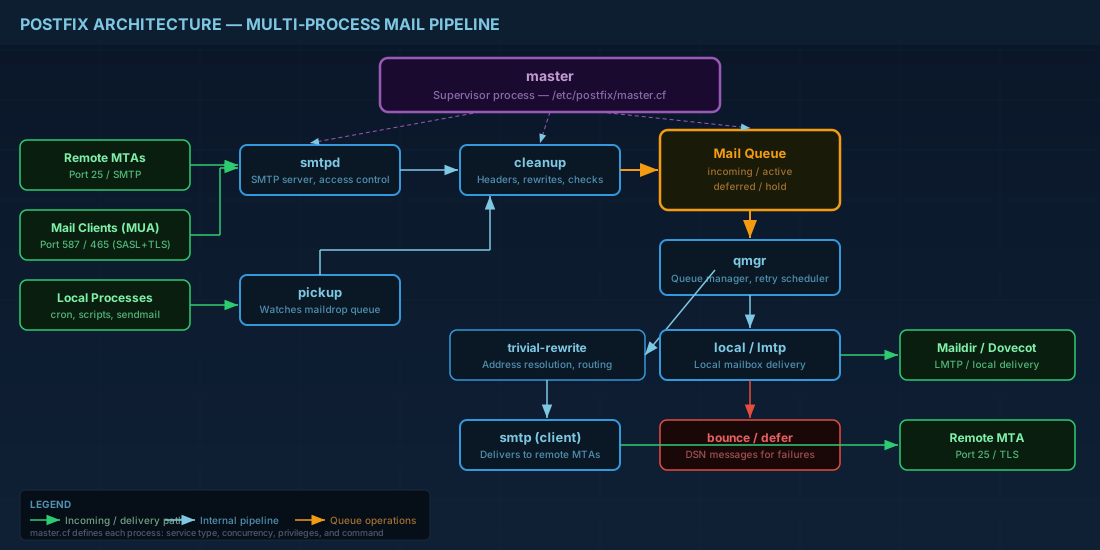
- smtpd — the SMTP server. Accepts incoming connections on ports 25, 587, and 465. Enforces access controls and relay restrictions.
- smtp — the SMTP client. Delivers outgoing mail to remote servers.
- pickup — monitors the maildrop directory for locally submitted messages (from
sendmailcommand, cron jobs, etc.). - cleanup — processes every message entering the queue: adds missing headers, rewrites addresses, runs header/body checks.
- qmgr — the queue manager. Schedules delivery attempts, manages deferred mail, and controls retry timing.
- trivial-rewrite — resolves addresses and determines routing (local vs. relay vs. transport maps).
- bounce — generates bounce (DSN) messages for undeliverable mail.
The master process configuration lives in /etc/postfix/master.cf. Each line defines a service, its type (inet, unix, fifo), privilege level, and command. You rarely edit master.cf for basic setups, but you will need it for enabling submission (port 587), SMTPS (port 465), or content filters.
Postfix Installation and Initial Configuration on Linux
# Debian 13.3 / Ubuntu 24.04.3 LTS
sudo apt install postfix
# During installation, select "Internet Site" and enter your mail hostname.

# Fedora 43 / RHEL 10.1
sudo dnf install postfix
sudo systemctl enable --now postfix
After installation, the main configuration file is /etc/postfix/main.cf. Here are the parameters you must set correctly for any production mail server:
# /etc/postfix/main.cf - key parameters

# Identity
myhostname = mail.example.com
mydomain = example.com
myorigin = $mydomain

# What interfaces and addresses to listen on
inet_interfaces = all
inet_protocols = ipv4

# Which domains this server is the final destination for
mydestination = $myhostname, localhost.$mydomain, localhost, $mydomain

# Trusted networks allowed to relay without authentication
mynetworks = 127.0.0.0/8, [::1]/128

# Mailbox delivery (use Dovecot LMTP for production)
# For simple setups:
home_mailbox = Maildir/
# For Dovecot LMTP (recommended):
# virtual_transport = lmtp:unix:private/dovecot-lmtp

# Queue and size limits
message_size_limit = 52428800
mailbox_size_limit = 0

# Banner (do not expose software version)
smtpd_banner = $myhostname ESMTP
Use postconf to inspect and modify parameters without editing the file directly:
# Show all non-default settings
postconf -n

# Show a specific parameter
postconf myhostname

# Set a parameter (writes to main.cf)
sudo postconf -e "myhostname = mail.example.com"

# After changes, reload (not restart, to avoid dropping active connections)
sudo postfix reload
Verifying Postfix configuration after changes
Always validate your configuration before reloading. A syntax error in main.cf can prevent Postfix from starting:
# Check for configuration errors
sudo postfix check

# Compare your settings against defaults to spot unintended changes
postconf -n | sort

# Test that Postfix can resolve its own hostname
postconf myhostname mydomain myorigin

# Verify listening sockets after reload
ss -tlnp | grep master
Postfix Relay Control: Preventing Open Relay Attacks
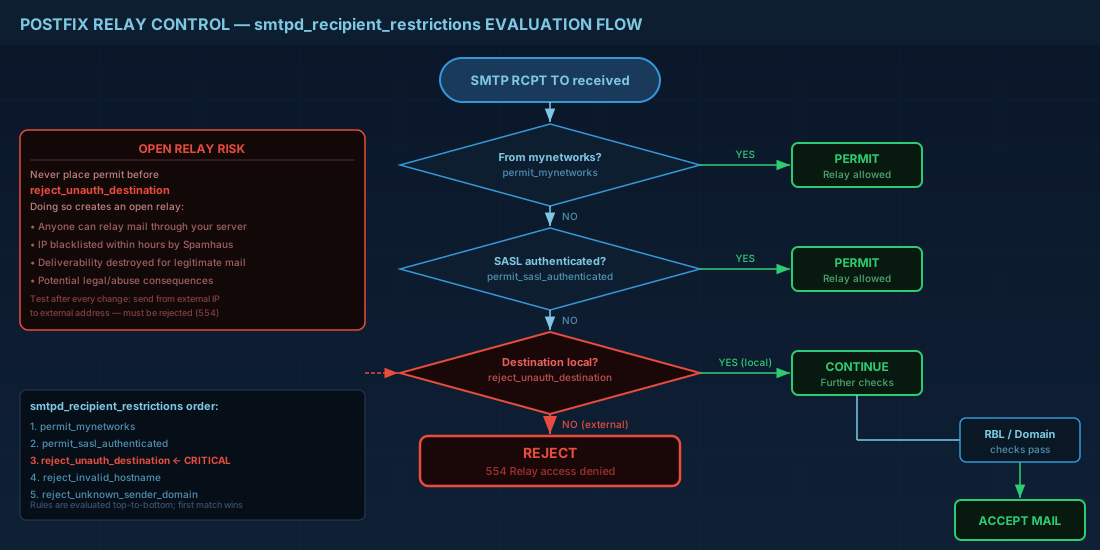
An open relay accepts and forwards mail from anyone to anywhere. Spammers scan for open relays constantly. Within hours of misconfiguring relay controls, your server IP will land on blacklists. These parameters control relay behavior and are critical for Linux server security:
Restricting relay with mynetworks
Clients connecting from IPs in mynetworks can relay without authentication. Keep this as tight as possible — typically just localhost.
# Only localhost can relay without auth
mynetworks = 127.0.0.0/8, [::1]/128

# If you have a trusted internal network (be very careful):
# mynetworks = 127.0.0.0/8, [::1]/128, 10.0.1.0/24
Controlling relay_domains
Domains that this server will relay for (accept mail from the internet and forward to another server). By default this is empty, meaning Postfix only relays for domains listed in mydestination or virtual domain maps.
Configuring smtpd_recipient_restrictions
This is the primary access control list evaluated when a client sends RCPT TO. Order matters. Postfix evaluates rules top to bottom and stops at the first match.
smtpd_recipient_restrictions =
    permit_mynetworks,
    permit_sasl_authenticated,
    reject_unauth_destination,
    reject_invalid_hostname,
    reject_non_fqdn_sender,
    reject_non_fqdn_recipient,
    reject_unknown_sender_domain,
    reject_unknown_recipient_domain,
    reject_rbl_client zen.spamhaus.org
reject_unauth_destination is the critical rule. It rejects any mail that is not destined for your local domains and did not come from a trusted network or authenticated user. Without this rule, you have an open relay.
Never place permit before reject_unauth_destination in the restriction list. Doing so creates an open relay. Always test relay behavior after any access control change by sending mail from an external host to an external destination through your server — it must be rejected.
Postfix TLS Configuration for Encrypted Email Transport
Postfix TLS support covers both incoming (smtpd) and outgoing (smtp) connections. On a 2026 production server, TLS is mandatory. Pair this with proper certificate management practices to ensure your encryption chain is solid.
# Incoming TLS (smtpd - server side)
smtpd_tls_cert_file = /etc/letsencrypt/live/mail.example.com/fullchain.pem
smtpd_tls_key_file = /etc/letsencrypt/live/mail.example.com/privkey.pem
smtpd_tls_security_level = may
smtpd_tls_protocols = >=TLSv1.2
smtpd_tls_mandatory_protocols = >=TLSv1.2
smtpd_tls_loglevel = 1

# Outgoing TLS (smtp - client side)
smtp_tls_security_level = may
smtp_tls_protocols = >=TLSv1.2
smtp_tls_loglevel = 1
smtp_tls_CApath = /etc/ssl/certs

# For port 587 submission and port 465 SMTPS, enable in master.cf:
# submission inet n - y - - smtpd
#   -o smtpd_tls_security_level=encrypt
#   -o smtpd_sasl_auth_enable=yes
#   -o smtpd_recipient_restrictions=permit_sasl_authenticated,reject

# smtps inet n - y - - smtpd
#   -o smtpd_tls_wrappermode=yes
#   -o smtpd_sasl_auth_enable=yes
The security_level=may on port 25 means Postfix will use TLS if the remote server supports it but will not require it (opportunistic TLS). This is correct for server-to-server relay because many legitimate servers still lack TLS. For submission ports (587, 465), set security_level=encrypt so clients must use TLS.
Enabling submission and SMTPS in master.cf
The master.cf file controls which services Postfix runs. To accept authenticated client submissions, uncomment and configure the submission and smtps services:
# /etc/postfix/master.cf - uncomment and configure these blocks

# Port 587 - STARTTLS submission
submission inet n       -       y       -       -       smtpd
  -o syslog_name=postfix/submission
  -o smtpd_tls_security_level=encrypt
  -o smtpd_sasl_auth_enable=yes
  -o smtpd_tls_auth_only=yes
  -o smtpd_reject_unlisted_recipient=no
  -o smtpd_recipient_restrictions=permit_sasl_authenticated,reject
  -o milter_macro_daemon_name=ORIGINATING

# Port 465 - implicit TLS (SMTPS)
smtps     inet  n       -       y       -       -       smtpd
  -o syslog_name=postfix/smtps
  -o smtpd_tls_wrappermode=yes
  -o smtpd_sasl_auth_enable=yes
  -o smtpd_reject_unlisted_recipient=no
  -o smtpd_recipient_restrictions=permit_sasl_authenticated,reject
  -o milter_macro_daemon_name=ORIGINATING
SASL Authentication with Dovecot Backend
SASL lets remote MUAs authenticate before relaying. Postfix itself does not handle authentication; it delegates to Dovecot's SASL implementation (recommended) or Cyrus SASL.
# main.cf - enable SASL via Dovecot
smtpd_sasl_type = dovecot
smtpd_sasl_path = private/auth
smtpd_sasl_auth_enable = yes
smtpd_sasl_security_options = noanonymous
smtpd_sasl_local_domain = $myhostname

# Dovecot side (/etc/dovecot/conf.d/10-master.conf)
# Add a service auth section:
# service auth {
#   unix_listener /var/spool/postfix/private/auth {
#     mode = 0660
#     user = postfix
#     group = postfix
#   }
# }
With SASL enabled and permit_sasl_authenticated in your recipient restrictions, authenticated users can relay through your server from any IP. This is how roaming email clients (phones, laptops) send mail through your server.
Virtual Domains, Mailbox Maps, and Alias Configuration
For hosting multiple domains on one Postfix instance, use virtual domain support instead of mydestination:
# main.cf
virtual_mailbox_domains = example.com, example.org, example.net
virtual_mailbox_maps = hash:/etc/postfix/vmailbox
virtual_alias_maps = hash:/etc/postfix/virtual

# /etc/postfix/vmailbox - maps addresses to mailbox locations
user@example.com    example.com/user/
info@example.org    example.org/info/

# /etc/postfix/virtual - aliases
admin@example.com   user@example.com
postmaster@example.com  user@example.com
@example.net        catchall@example.com

# After editing, rebuild the hash maps:
sudo postmap /etc/postfix/vmailbox
sudo postmap /etc/postfix/virtual
sudo postfix reload
The postmap command compiles text lookup tables into indexed .db files that Postfix reads at runtime. Always run postmap after editing any hash-type map file.
Using transport maps for per-domain routing
When different domains need different delivery backends (some to local Dovecot, some to an external server), use transport maps:
# main.cf
transport_maps = hash:/etc/postfix/transport

# /etc/postfix/transport
example.com         lmtp:unix:private/dovecot-lmtp
example.org         smtp:[backup-mx.example.org]:25
internal.example.com  lmtp:inet:10.0.1.50:24

# Rebuild and reload
sudo postmap /etc/postfix/transport
sudo postfix reload
Header and Body Checks for Content Filtering
Configuring header and body checks
Postfix can inspect message headers and body content using regular expressions. This provides a first layer of content filtering before messages reach Rspamd or Sieve for more advanced spam control.
# main.cf
header_checks = regexp:/etc/postfix/header_checks
body_checks = regexp:/etc/postfix/body_checks

# /etc/postfix/header_checks
/^Subject:.*\bviagra\b/i    REJECT Spam content detected
/^X-Mailer: SuperSpamBot/   REJECT Known spam tool

# /etc/postfix/body_checks
/click here to claim your prize/i   REJECT Spam body content
Connection rate limiting against brute-force attacks
Protect against brute-force attacks and excessive connections:
# main.cf - rate limiting
smtpd_client_connection_rate_limit = 30
smtpd_client_message_rate_limit = 60
smtpd_client_recipient_rate_limit = 120
smtpd_error_sleep_time = 5s
smtpd_soft_error_limit = 10
smtpd_hard_error_limit = 20

# anvil service tracks client connection rates
# Defined in master.cf (default is already present):
# anvil    unix  -       -       y       -       1       anvil
Postfix Mail Queue Management Commands
# View the queue
mailq

# Count queued messages
mailq | tail -1

# Flush all deferred mail (retry now)
postqueue -f

# Flush mail for a specific domain
postqueue -s example.com

# Put a message on hold
postsuper -h QUEUE_ID

# Release a held message
postsuper -H QUEUE_ID

# Delete a message from the queue
postsuper -d QUEUE_ID

# Delete ALL messages (nuclear option)
postsuper -d ALL

# Requeue messages (reprocess through cleanup)
postsuper -r ALL

# View the content of a queued message
postcat -q QUEUE_ID
Quick Reference - Cheats
| Task | Command |
|---|---|
| Show non-default config | postconf -n |
| Show all config (including defaults) | postconf |
| Set a parameter | postconf -e "param = value" |
| Rebuild lookup table | postmap /etc/postfix/virtual |
| Reload config (no downtime) | postfix reload |
| Check config syntax | postfix check |
| View mail queue | mailq |
| Flush deferred mail | postqueue -f |
| Delete queued message | postsuper -d QUEUE_ID |
| Read queued message | postcat -q QUEUE_ID |
| Test SMTP relay manually | openssl s_client -connect mail.example.com:587 -starttls smtp |
| Show TLS session info in logs | Set smtpd_tls_loglevel = 1 |
Summary
A production Postfix mail server deployment requires getting several things right simultaneously: identity parameters (myhostname, mydomain, myorigin), relay controls (mynetworks, smtpd_recipient_restrictions with reject_unauth_destination), TLS certificates for both incoming and outgoing connections, and SASL authentication for roaming clients.
The most dangerous misconfiguration is an open relay, which takes minutes to exploit and days to recover from (IP blacklist removal). Always test relay behavior from an external host after any access control change. Use postconf -n to audit your running configuration and postfix check to validate syntax before reloading.
For multi-domain hosting, virtual domains with postmap-compiled lookup tables give you flexible address routing. For delivery, hand off to Dovecot LMTP rather than writing to local mailboxes directly. And keep your queue clean — a growing deferred queue is almost always a sign of DNS problems, remote server issues, or a compromised account sending spam.


