Linux networking is easier to manage when you break it into four parts: IP address, subnet, routing, and DNS. Entry-level technicians often see a service outage and jump straight to restarting a daemon. In production, that wastes time. A cleaner approach is to verify each layer in order. If the server has the wrong subnet, DNS is not the real problem. If DNS is broken, pinging an IP may still work while package installs fail. This guide explains the core logic and gives commands you can run on real systems.
How IP addresses and subnets work on Linux
An IPv4 address identifies a host on a network, and the prefix length tells Linux which part is the network. For example, 192.168.50.14/24 means the first 24 bits are network bits. Hosts in the same /24 usually share the first three octets.
If your server is 192.168.50.14/24, Linux treats 192.168.50.0/24 as local. Traffic to 192.168.50.22 is sent directly using ARP. Traffic to 192.168.60.22 is remote and must go through a router. A wrong mask changes this behavior and can make local hosts look remote.
Host capacity in IPv4 is often 2^(32-prefix)-2. So a /24 has 254 usable host addresses. In production this matters for planning. If you run DHCP on a /27 and add more VMs than expected, clients start failing in a way that looks random.
# Show interface addresses in a compact format
ip -br -4 address

# Detailed view for one interface
ip -4 addr show dev eth0

# Typical output line
# inet 192.168.50.14/24 brd 192.168.50.255 scope global dynamic eth0
Routing: how Linux decides packet paths
Linux checks the routing table for every packet. The most important rule is longest prefix match. A route to 10.20.30.0/24 is more specific than 10.0.0.0/8, so the /24 wins. If prefixes are equal, metric and policy rules are used.
The default route is 0.0.0.0/0. It catches traffic for networks that are not local and not explicitly listed. If default route is missing, your server may still talk to nearby systems but fail to reach the internet.
# View main routing table
ip route show

# Ask kernel which route it would use for a destination
ip route get 1.1.1.1

# Add a temporary route (lost after reboot)
sudo ip route add 10.30.0.0/16 via 192.168.50.1 dev eth0

# Delete it again
sudo ip route del 10.30.0.0/16 via 192.168.50.1 dev eth0
Production consequence: route mistakes can create asymmetric paths. A request arrives through one firewall but reply leaves through another path and is dropped. This is common in dual-homed servers and VPN edge nodes.
DNS lookup flow and where it breaks
Applications usually call the system resolver, not dig directly. Resolver order is controlled by /etc/nsswitch.conf. A common line is hosts: files dns, which means Linux checks /etc/hosts first, then DNS servers.
On many modern distributions, systemd-resolved provides local stub resolution and caching. If that service is unhealthy, lookups fail even when upstream DNS servers are fine. Also note TTL behavior: if a bad record is cached, users keep seeing bad results until cache expires or is flushed.
# Check host resolution through libc path
getent hosts repo.example.com

# Query through systemd-resolved (if enabled)
resolvectl query repo.example.com

# Raw DNS answer (package: dnsutils on Debian/Ubuntu, bind-utils on Fedora/RHEL)
dig +noall +answer repo.example.com A

# Show current resolver status and servers
resolvectl status
Production consequence: DNS latency can look like application slowness. Package managers, container pulls, and API calls may pause before timing out. When users report "site is slow," always check resolver response time, not only CPU and RAM.
Practical troubleshooting sequence for beginners and operators
Use a fixed order so you do not skip layers.
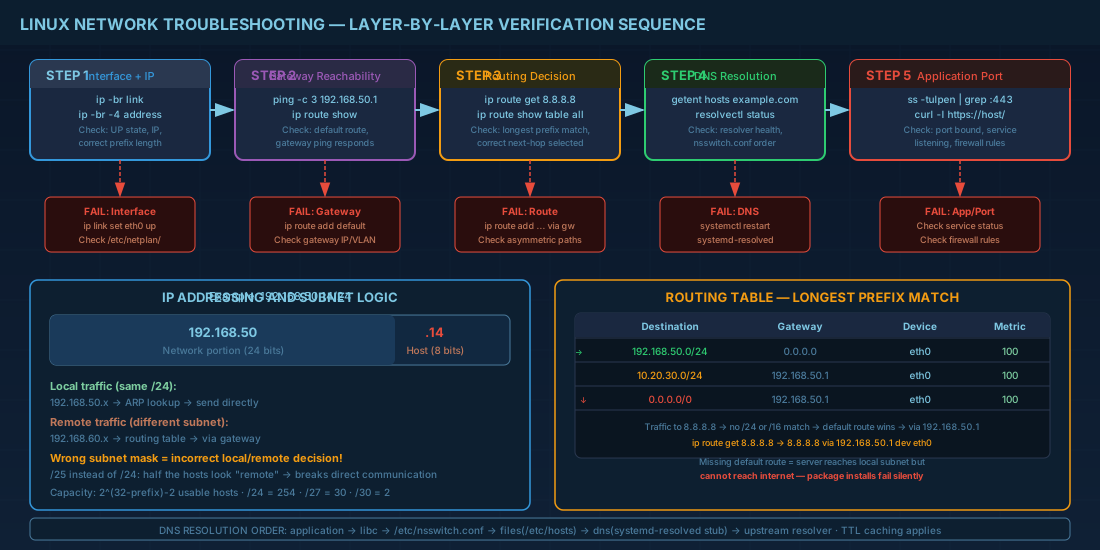
- Check link and address: interface up, expected IP, expected prefix.
- Check local gateway reachability.
- Check routing decision to target IP.
- Check DNS resolution and resolver service state.
- Test application port after network basics pass.
# 1) Interface and IP
ip -br link
ip -br -4 address

# 2) Gateway reachability
ping -c 3 192.168.50.1

# 3) Route decision
ip route get 8.8.8.8

# 4) DNS
getent hosts example.com
resolvectl status

# 5) App port (example: HTTPS)
ss -tulpen | grep :443
For beginners, this sequence builds confidence because each command has a clear purpose. For production operators, it reduces mean time to repair because it separates network faults from service faults early.
Distro notes: Debian 13.3, Ubuntu 24.04.3 LTS and 25.10, Fedora 43, RHEL 10.1 and RHEL 9.7
Core commands like ip, ss, ping, getent, and nmcli are available across these distributions, but persistent configuration paths differ.
- Debian 13.3: often managed by ifupdown or NetworkManager depending on install profile. Verify before editing. Minimal servers may still use
/etc/network/interfaces. - Ubuntu 24.04.3 LTS and 25.10: server installs typically use Netplan files in
/etc/netplan/, rendered tosystemd-networkdor NetworkManager. - Fedora 43: NetworkManager is default. Use
nmclifor persistent changes. - RHEL 10.1 and RHEL 9.7: NetworkManager is standard; most procedures are compatible between 10.1 and 9.7. Keyfiles live under
/etc/NetworkManager/system-connections/.
# NetworkManager example used on Fedora and RHEL
sudo nmcli con show
sudo nmcli con mod "Wired connection 1" ipv4.addresses 192.168.50.20/24
sudo nmcli con mod "Wired connection 1" ipv4.gateway 192.168.50.1
sudo nmcli con mod "Wired connection 1" ipv4.dns "1.1.1.1 8.8.8.8"
sudo nmcli con mod "Wired connection 1" ipv4.method manual
sudo nmcli con up "Wired connection 1"
Before changing production network settings, always keep out-of-band access ready (console, iLO, DRAC, or VM console). A single wrong gateway or DNS entry can lock you out remotely.
Summary
IP, subnet, routing, and DNS form one chain. Linux usually tells you what is wrong if you ask with the right command: ip for addresses and routes, getent and resolvectl for name resolution, and ss for listening ports. Learn the sequence and use it every time. Beginners avoid guesswork, and production teams cut outage time because they isolate the failure layer fast.


