On modern Linux systems, packet filtering usually happens through nftables in the kernel. The confusing part for beginners is that you can manage those rules in two different ways: directly with the nft command, or indirectly through firewalld. Both methods can work well. Problems start when teams mix them without a plan.
If a server blocks the wrong port, the result is immediate: broken SSH access, failed health checks, or downtime for customer traffic. This article shows a safe way to choose one management method per host, apply baseline rules, and verify changes before and after deployment.
How nftables and firewalld relate
nftables is the packet filtering framework in the Linux kernel. firewalld is a userspace service that writes nftables rules for you. In other words, firewalld is often a control layer on top of nftables.
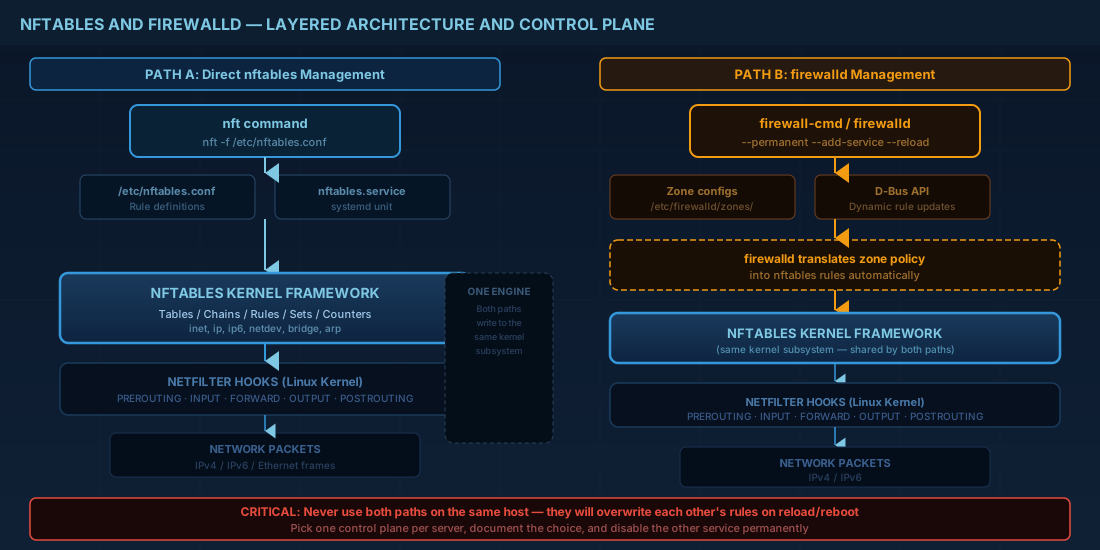
For entry-level technicians, this is the key model to remember: nftables is the engine, firewalld is one dashboard. If you write direct nft rules and also let firewalld run, each tool may overwrite parts of the ruleset. That can create hard-to-debug outages during restarts or reloads.
# Quick state check
sudo nft list ruleset
sudo systemctl is-active firewalld || true
sudo firewall-cmd --state 2>/dev/null || true
If firewalld is active on a production host, treat it as the owner unless your team has approved a migration window.
Choose one control plane per server
Use one of these patterns, not both on the same host:
- Direct nftables management: good for static hosts and teams that want full rule control in one config file.
- firewalld management: good for enterprise fleets, dynamic environments, and zone-based policy.
Production consequence: when ownership is clear, change reviews are simpler and rollback is faster. When ownership is unclear, engineers can pass health checks in staging but still fail in production after reboot because persistent rules are loaded by a different service.
Path A: direct nftables management
This path is common on Debian-style systems when administrators want explicit rule files. The example below sets a simple host firewall: allow loopback, established traffic, SSH, and HTTPS; deny everything else inbound.
# /etc/nftables.conf
#!/usr/sbin/nft -f
flush ruleset

table inet filter {
  chain input {
    type filter hook input priority 0;
    policy drop;

    iif "lo" accept
    ct state established,related accept

    tcp dport 22 accept
    tcp dport 443 accept

    # Optional: ICMP/ICMPv6 for troubleshooting and PMTU
    ip protocol icmp accept
    ip6 nexthdr icmpv6 accept
  }

  chain forward {
    type filter hook forward priority 0;
    policy drop;
  }

  chain output {
    type filter hook output priority 0;
    policy accept;
  }
}
# Apply and persist
sudo nft -f /etc/nftables.conf
sudo systemctl enable --now nftables
sudo nft list rulesetCompatibility notes: Debian 13.3 supports this workflow directly. Ubuntu 24.04.3 LTS and Ubuntu 25.10 can also run nftables directly, but many teams on Ubuntu prefer UFW or firewalld for easier operations. If you choose direct nftables, document that decision in runbooks so no one enables firewalld later by accident.
Path B: firewalld with nftables backend
Fedora 43, RHEL 10.1, and RHEL 9.7 commonly use firewalld as the standard interface. firewalld still programs nftables rules, but you manage policy using zones, services, and rich rules.
# Install/start if needed
sudo dnf install -y firewalld
sudo systemctl enable --now firewalld

# Basic public server profile
sudo firewall-cmd --set-default-zone=public
sudo firewall-cmd --permanent --add-service=ssh
sudo firewall-cmd --permanent --add-service=https
sudo firewall-cmd --permanent --remove-service=cockpit
sudo firewall-cmd --reload
sudo firewall-cmd --list-all
For segmented networks, assign trusted source ranges to internal zones instead of opening broad ports globally:
# Example: allow HTTP only from internal subnet
sudo firewall-cmd --permanent --zone=internal --add-source=10.20.30.0/24
sudo firewall-cmd --permanent --zone=internal --add-service=http
sudo firewall-cmd --reload
sudo firewall-cmd --get-active-zones
Operational consequence: zone-based rules reduce accidental exposure during urgent changes. A technician can add access for one subnet without touching internet-facing policy.
Compatibility notes for current distributions
| Distribution | Recommended default | Important note |
|---|---|---|
| Debian 13.3 | Direct nftables or firewalld | Keep one owner of rules; do not run competing automation. |
| Ubuntu 24.04.3 LTS | UFW or firewalld in many teams | If moving to nftables directly, retire old UFW/firewalld policy first. |
| Ubuntu 25.10 | Same operational model as 24.04.3 | Validate after upgrades because package defaults can change. |
| Fedora 43 | firewalld | Use zones and permanent rules, then reload. |
| RHEL 10.1 | firewalld | Follow change control for zone and rich-rule updates. |
| RHEL 9.7 (compatibility) | firewalld | Commands above are compatible with RHEL 10.1 baseline examples. |
Common mistakes and their production impact
First, avoid flush ruleset on a remote host unless console access is ready. One wrong apply can remove your SSH allow rule and lock you out.
Second, avoid opening raw ports when a service definition exists. Using --add-service=https is clearer than remembering custom port lists during audits.
Third, avoid temporary commands without persistence. If you add a runtime firewalld rule and forget --permanent, it disappears on reboot. The reverse is also true: editing /etc/nftables.conf without applying it leaves running policy unchanged until next service restart.
For beginners, these are common "works-now, fails-later" problems. For operators, they become incident tickets after maintenance windows. Good firewall work is mostly consistency.
Verification and rollback checklist
Do verification from two locations: on-host and from a separate test node. Always keep one rollback command or file copy prepared before reloading rules.
# On-host checks
sudo nft list ruleset
sudo firewall-cmd --list-all 2>/dev/null || true
sudo ss -tulpn

# Remote check from another Linux host
nmap -Pn -p 22,80,443 your-server.example.com

# Optional: snapshot current rules before major edits
sudo nft list ruleset > /root/nftables-prechange-$(date +%F-%H%M).txt
If a deployment fails, restore the previous saved ruleset or prior firewalld zone configuration immediately, then troubleshoot offline. Fast rollback is better than long live-debugging on a broken public server.
Summary
nftables and firewalld are not enemies. firewalld usually writes nftables rules for you. The practical rule is simple: pick one control plane per host, document it, and verify from outside the host after every change. Direct nftables gives precise control. firewalld gives easier day-to-day operations in many enterprise teams. Both approaches can protect production systems on Debian 13.3, Ubuntu 24.04.3 LTS, Ubuntu 25.10, Fedora 43, RHEL 10.1, and RHEL 9.7 when applied consistently.


