Nginx web server handles more internet traffic than any other web server. Its event-driven, non-blocking architecture makes it a natural fit for reverse proxying, load balancing, and serving static content at scale. This article covers Nginx 1.26+ configuration on current Linux distributions (Debian 13.3, Ubuntu 24.04, RHEL 10.1, Fedora 43), focusing on server blocks, location matching, reverse proxy setup, upstream load balancing, TLS termination, caching, rate limiting, and practical comparison with Apache.
Nginx Architecture: Master Process, Workers, and Events
Nginx uses a master process and multiple worker processes. The master reads configuration and manages workers. Each worker is a single-threaded event loop that handles thousands of connections simultaneously using epoll (Linux) or kqueue (BSD). There is no thread-per-connection overhead.
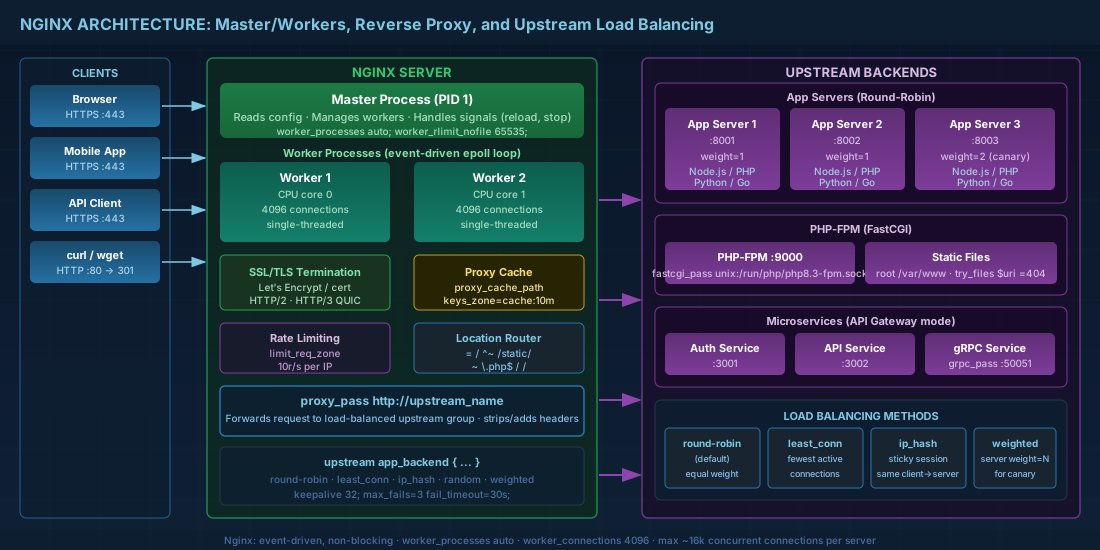
Key tuning parameters in the main context:
# /etc/nginx/nginx.conf
worker_processes auto;          # One worker per CPU core
worker_rlimit_nofile 65535;     # File descriptor limit per worker

events {
    worker_connections 4096;    # Max simultaneous connections per worker
    multi_accept on;            # Accept multiple connections at once
    use epoll;                  # Explicit on Linux (default anyway)
}
With worker_processes auto; on a 4-core server and worker_connections 4096, your theoretical maximum is 16,384 simultaneous connections. In practice, each proxied connection uses two file descriptors (client-side and backend-side), so the real limit is roughly half that for reverse proxy workloads.
Nginx Server Blocks and Location Matching Rules
Server blocks are Nginx's equivalent of Apache virtual hosts. They live in /etc/nginx/sites-available/ (Debian/Ubuntu) or /etc/nginx/conf.d/ (RHEL/Fedora). Understanding how Nginx processes server blocks is essential for hosting multiple sites on a single server. For Apache's approach to the same problem, see Apache virtual hosts and modules.
Basic server block configuration
server {
    listen 80;
    listen [::]:80;
    server_name example.com www.example.com;

    root /var/www/example.com/public;
    index index.html;

    # Redirect HTTP to HTTPS
    return 301 https://$host$request_uri;
}

server {
    listen 443 ssl http2;
    listen [::]:443 ssl http2;
    server_name example.com www.example.com;

    ssl_certificate /etc/letsencrypt/live/example.com/fullchain.pem;
    ssl_certificate_key /etc/letsencrypt/live/example.com/privkey.pem;

    root /var/www/example.com/public;
    index index.html;

    location / {
        try_files $uri $uri/ =404;
    }
}
Location matching order and priority
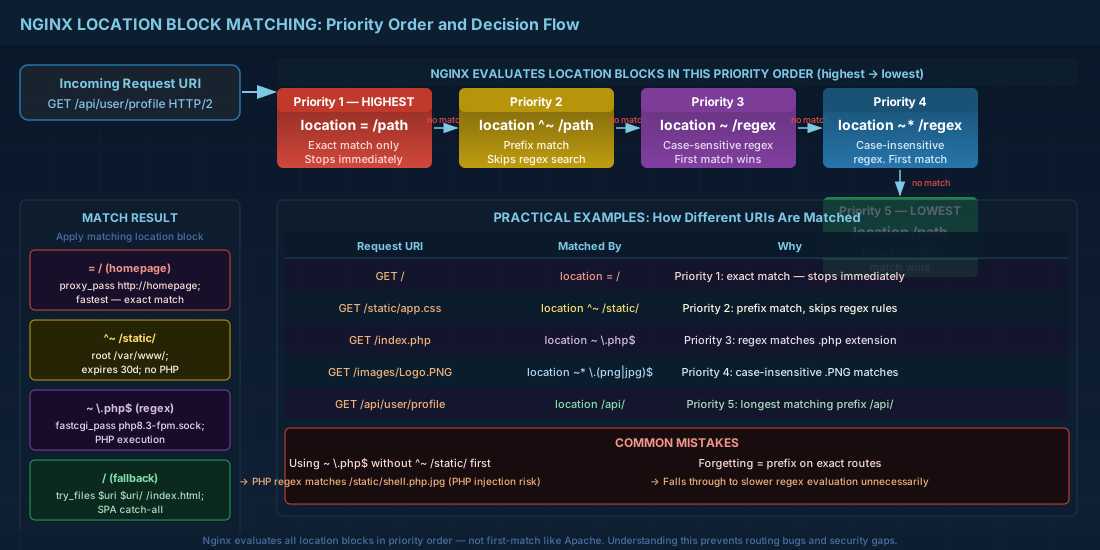
Nginx evaluates location blocks in a specific priority order. Understanding this prevents unexpected routing:
location = /path— exact match (highest priority)location ^~ /path— prefix match, stops regex searchlocation ~ /pattern— case-sensitive regexlocation ~* /pattern— case-insensitive regexlocation /path— standard prefix match (lowest priority)
A practical example showing how these interact:
# Exact match for the homepage — fastest
location = / {
    proxy_pass http://homepage_backend;
}

# Static assets — prefix match stops regex evaluation
location ^~ /static/ {
    root /var/www/example.com;
    expires 30d;
    add_header Cache-Control "public, immutable";
}

# PHP files — regex match
location ~ \.php$ {
    fastcgi_pass unix:/run/php/php8.3-fpm.sock;
    fastcgi_param SCRIPT_FILENAME $document_root$fastcgi_script_name;
    include fastcgi_params;
}

# Everything else — prefix fallback
location / {
    try_files $uri $uri/ /index.html;
}
Nginx Reverse Proxy Configuration with proxy_pass
Nginx excels as a reverse proxy. The basic setup forwards requests to a backend application:
server {
    listen 443 ssl http2;
    server_name api.example.com;

    ssl_certificate /etc/letsencrypt/live/api.example.com/fullchain.pem;
    ssl_certificate_key /etc/letsencrypt/live/api.example.com/privkey.pem;

    location / {
        proxy_pass http://127.0.0.1:3000;
        proxy_http_version 1.1;

        # Pass client information to backend
        proxy_set_header Host $host;
        proxy_set_header X-Real-IP $remote_addr;
        proxy_set_header X-Forwarded-For $proxy_add_x_forwarded_for;
        proxy_set_header X-Forwarded-Proto $scheme;

        # WebSocket support
        proxy_set_header Upgrade $http_upgrade;
        proxy_set_header Connection "upgrade";

        # Timeouts
        proxy_connect_timeout 10s;
        proxy_read_timeout 60s;
        proxy_send_timeout 60s;
    }
}
Important detail: the trailing slash on proxy_pass matters. proxy_pass http://backend/ (with slash) strips the matched location prefix. proxy_pass http://backend (without slash) passes the full URI. This is a frequent source of routing bugs.
Proxying to different backend types
Nginx can proxy to various backend protocols beyond plain HTTP. Here are the most common patterns:
# FastCGI for PHP-FPM
location ~ \.php$ {
    fastcgi_pass unix:/run/php/php8.3-fpm.sock;
    fastcgi_param SCRIPT_FILENAME $document_root$fastcgi_script_name;
    include fastcgi_params;
}

# uWSGI for Python/Django applications
location / {
    uwsgi_pass unix:/run/uwsgi/app.sock;
    include uwsgi_params;
}

# gRPC proxying (requires HTTP/2)
location /grpc.service/ {
    grpc_pass grpc://127.0.0.1:50051;
    error_page 502 = /error502grpc;
}
Upstream Load Balancing with Nginx
The upstream block defines a group of backend servers. Nginx load balancing distributes requests across them:
upstream app_cluster {
    # Load balancing method (default: round-robin)
    # least_conn;        # Send to server with fewest active connections
    # ip_hash;           # Sticky sessions based on client IP
    # hash $request_uri; # Consistent hashing by URI

    server 10.0.1.10:3000 weight=3;    # Gets 3x traffic
    server 10.0.1.11:3000 weight=1;
    server 10.0.1.12:3000 backup;      # Only used when others are down
    server 10.0.1.13:3000 down;        # Marked offline for maintenance

    # Health checks (passive)
    # After 3 failures within 30s, mark server as unavailable for 30s
    server 10.0.1.10:3000 max_fails=3 fail_timeout=30s;
}

server {
    listen 443 ssl http2;
    server_name app.example.com;

    location / {
        proxy_pass http://app_cluster;
        proxy_next_upstream error timeout http_502 http_503;
        proxy_next_upstream_tries 2;
    }
}
Choosing a load balancing method
| Method | Behavior | Best for |
|---|---|---|
| round-robin (default) | Rotates through servers sequentially | Stateless backends with similar capacity |
least_conn |
Sends to the server with fewest active connections | Backends with varying response times |
ip_hash |
Hashes client IP, same client always hits same server | Session-sticky applications without external session store |
hash $key |
Consistent hashing on any variable | Cache-friendly routing (same URI always hits same backend) |
The proxy_next_upstream directive is critical for resilience. When a backend returns 502 or 503, Nginx automatically retries on the next server instead of returning the error to the client. Make sure the backends in your upstream pool are reachable through properly configured Linux networking and routing.
SSL/TLS Termination, HTTP/2, and HTTP/3 with Nginx
Nginx handles TLS termination so backends can communicate in plain HTTP internally. Hardened SSL/TLS configuration for 2026:
# /etc/nginx/conf.d/ssl.conf
ssl_protocols TLSv1.2 TLSv1.3;
ssl_ciphers ECDHE-ECDSA-AES256-GCM-SHA384:ECDHE-RSA-AES256-GCM-SHA384:ECDHE-ECDSA-CHACHA20-POLY1305;
ssl_prefer_server_ciphers off;    # Let client choose for TLS 1.3
ssl_session_cache shared:SSL:10m;
ssl_session_timeout 1d;
ssl_session_tickets off;

# OCSP stapling
ssl_stapling on;
ssl_stapling_verify on;
resolver 9.9.9.9 149.112.112.112 valid=300s;
resolver_timeout 5s;

# HSTS
add_header Strict-Transport-Security "max-age=63072000; includeSubDomains; preload" always;
HTTP/2 and HTTP/3 (QUIC) configuration
HTTP/2 is enabled with the http2 parameter on the listen directive (shown in earlier examples). For HTTP/3 (QUIC), which uses UDP and provides faster connection establishment:
server {
    listen 443 ssl;
    listen 443 quic reuseport;
    listen [::]:443 ssl;
    listen [::]:443 quic reuseport;

    http2 on;
    http3 on;

    # Tell browsers HTTP/3 is available
    add_header Alt-Svc 'h3=":443"; ma=86400' always;

    ssl_certificate /etc/letsencrypt/live/example.com/fullchain.pem;
    ssl_certificate_key /etc/letsencrypt/live/example.com/privkey.pem;
    ssl_early_data on;    # 0-RTT for HTTP/3
}
HTTP/3 support requires Nginx 1.25+ compiled with the QUIC library. On Debian 13.3 and Ubuntu 24.04, the nginx package from the official nginx.org repository includes QUIC support. RHEL 10.1 ships it in the nginx package from AppStream.
The ssl_early_data on; setting enables TLS 1.3 0-RTT resumption, which is vulnerable to replay attacks. Only enable it for idempotent requests (GET). Your application backend should check the Early-Data header and reject non-idempotent 0-RTT requests.
Nginx Caching and Rate Limiting Configuration
Proxy caching to reduce backend load
Nginx proxy caching can cache backend responses to reduce load on application servers:
# Define cache zone in http context
proxy_cache_path /var/cache/nginx/api levels=1:2 keys_zone=api_cache:10m
                 max_size=1g inactive=60m use_temp_path=off;

server {
    location /api/ {
        proxy_pass http://app_cluster;
        proxy_cache api_cache;
        proxy_cache_valid 200 10m;
        proxy_cache_valid 404 1m;
        proxy_cache_use_stale error timeout updating http_502 http_503;
        proxy_cache_lock on;    # Prevent cache stampede

        # Add header showing cache status
        add_header X-Cache-Status $upstream_cache_status;
    }
}
The proxy_cache_use_stale directive is especially useful: when the backend is down, Nginx serves stale cached content instead of returning errors. The proxy_cache_lock prevents thundering herd when multiple clients request the same uncached resource simultaneously.
Rate limiting to protect against abuse
Nginx rate limiting protects against abuse and brute-force attacks:
# Define rate limit zone in http context
limit_req_zone $binary_remote_addr zone=login:10m rate=5r/s;
limit_req_zone $binary_remote_addr zone=api:10m rate=30r/s;

server {
    # Strict rate limit on login endpoints
    location /auth/login {
        limit_req zone=login burst=10 nodelay;
        limit_req_status 429;
        proxy_pass http://app_cluster;
    }

    # Moderate rate limit on API
    location /api/ {
        limit_req zone=api burst=50 nodelay;
        limit_req_status 429;
        proxy_pass http://app_cluster;
    }
}
The burst parameter allows short traffic spikes. With rate=5r/s and burst=10, a client can make 10 requests immediately, then is limited to 5 per second. The nodelay flag processes burst requests immediately instead of throttling them. Rate limiting works best as part of a layered defense that also includes nftables/firewalld rules for port-level protection.
Nginx Access Control
# IP-based access control
location /admin/ {
    allow 10.0.0.0/8;
    allow 192.168.1.0/24;
    deny all;
    proxy_pass http://admin_backend;
}

# Basic authentication
location /monitoring/ {
    auth_basic "Monitoring Access";
    auth_basic_user_file /etc/nginx/.htpasswd;
    proxy_pass http://grafana;
}
Nginx as a Lightweight API Gateway
Nginx can serve as a lightweight API gateway without dedicated gateway software. Combine reverse proxy routing, rate limiting, authentication, and response transformation:
map $uri $api_backend {
    ~^/api/v1/users   user_service;
    ~^/api/v1/orders  order_service;
    ~^/api/v1/search  search_service;
    default           fallback_service;
}

upstream user_service  { server 10.0.2.10:8080; server 10.0.2.11:8080; }
upstream order_service { server 10.0.2.20:8080; }
upstream search_service { server 10.0.2.30:8080; }

server {
    listen 443 ssl http2;
    server_name api.example.com;

    # Global rate limit
    limit_req zone=api burst=100 nodelay;

    # API key validation via subrequest
    location = /auth/validate {
        internal;
        proxy_pass http://auth_service/validate;
        proxy_pass_request_body off;
        proxy_set_header Content-Length "";
        proxy_set_header X-API-Key $http_x_api_key;
    }

    location /api/ {
        auth_request /auth/validate;
        proxy_pass http://$api_backend;
    }
}
Nginx vs Apache: Choosing the Right Web Server
| Criteria | Nginx | Apache |
|---|---|---|
| Static content | Faster, lower memory | Adequate with event MPM |
| Reverse proxy | Native strength, simpler config | Works via mod_proxy but more verbose |
| Dynamic content (PHP) | Via FastCGI to php-fpm | mod_php (prefork) or php-fpm (event) |
| .htaccess support | Not supported | Full support (at performance cost) |
| Module ecosystem | Compiled-in only (no runtime loading) | Dynamic DSO loading at runtime |
| HTTP/3 | Supported since 1.25 | Experimental via mod_http3 (not production-ready) |
| Configuration style | Declarative C-like blocks | XML-like directives with .htaccess overrides |
In many production environments, both run together: Nginx as the front-end reverse proxy handling TLS termination and static files, with Apache behind it running applications that depend on .htaccess or mod_php. This is a valid architecture, not a compromise.
Nginx Web Server Quick Reference
| Task | Command / Directive |
|---|---|
| Test config syntax | nginx -t |
| Reload without downtime | nginx -s reload |
| Show compiled modules | nginx -V 2>&1 | tr -- ' ' '\n' | grep module |
| Enable site (Debian) | ln -s /etc/nginx/sites-available/site.conf /etc/nginx/sites-enabled/ |
| Obtain Let's Encrypt cert | sudo certbot --nginx -d example.com |
| Check OCSP stapling | openssl s_client -connect host:443 -status |
| Show active connections | curl http://localhost/nginx_status (requires stub_status module) |
| Clear proxy cache | rm -rf /var/cache/nginx/* && nginx -s reload |
| Create htpasswd file | htpasswd -c /etc/nginx/.htpasswd admin |
| Test HTTP/3 | curl --http3 https://example.com/ |
| Log format with upstream time | log_format detailed '$remote_addr ... $upstream_response_time'; |
| Workers = CPU cores | worker_processes auto; |
Summary
The Nginx web server's event-driven architecture makes it the default choice for reverse proxying and load balancing on Linux. Server blocks with proper location matching handle routing; upstream blocks distribute traffic across backend servers with automatic failover. TLS termination with hardened cipher suites, HSTS, and OCSP stapling protects traffic in transit. HTTP/2 is standard; HTTP/3 is production-ready in Nginx 1.25+. Use proxy caching to offload backend servers and rate limiting to protect against abuse. For API gateway patterns, Nginx handles routing, authentication subrequests, and rate limiting without additional software. Whether you run Nginx standalone or in front of Apache HTTP Server, understanding its configuration patterns is a core skill for any Linux administrator managing web services in production.


