Linux server security depends on well-configured firewalls, and both nftables and firewalld are essential tools for hardening your network perimeter. At LPIC-2 level, you already know that nftables replaced iptables in the kernel and that firewalld sits on top as a management layer. This article goes deeper: writing nftables firewall rules by hand with sets and maps, configuring firewalld rich rules for granular access control, scanning your own servers with nmap port scanning to find gaps, and building automated defenses against scans with rate limiting, connection tracking, and fail2ban.
Everything here applies to Debian 13.3, Ubuntu 24.04.3 LTS, Fedora 43, and RHEL 10.1 (with RHEL 9.7 compatibility notes where relevant). All examples assume you have root access to a system you own or are authorized to test.
nftables Firewall Rules: Tables, Chains, Sets, and Syntax
nftables organizes rules in a hierarchy: tables contain chains, chains contain rules. Unlike iptables, table and chain names are arbitrary -- you pick names that make sense for your environment. The address family (inet, ip, ip6, arp, bridge, netdev) determines what traffic the table processes. For most Linux server firewalls, inet covers both IPv4 and IPv6 in a single table.
A production-grade nftables ruleset
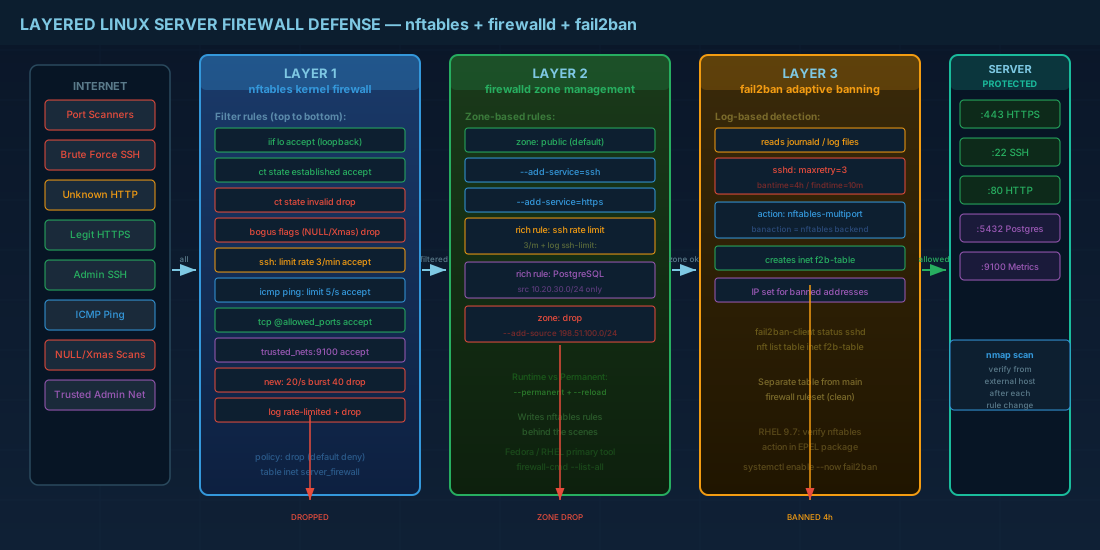
This ruleset goes beyond the basics. It uses named sets for allowed ports and trusted networks, applies rate limiting to SSH, and logs dropped packets before rejecting them.
# /etc/nftables.conf
#!/usr/sbin/nft -f
flush ruleset

table inet server_firewall {

  set allowed_tcp_ports {
    type inet_service
    elements = { 22, 80, 443, 8443 }
  }

  set trusted_nets {
    type ipv4_addr
    flags interval
    elements = { 10.0.0.0/8, 172.16.0.0/12, 192.168.0.0/16 }
  }

  chain input {
    type filter hook input priority 0; policy drop;

    # Loopback always allowed
    iif "lo" accept

    # Established/related connections pass through
    ct state established,related accept

    # Drop invalid state packets early
    ct state invalid drop

    # ICMP: allow ping, limit rate to prevent abuse
    ip protocol icmp icmp type echo-request limit rate 5/second accept
    ip6 nexthdr icmpv6 icmpv6 type { echo-request, nd-neighbor-solicit, nd-router-advert, nd-neighbor-advert } accept

    # SSH rate limiting: 3 new connections per minute per source IP
    tcp dport 22 ct state new limit rate 3/minute accept

    # Allowed TCP ports from any source
    tcp dport @allowed_tcp_ports ct state new accept

    # Internal monitoring from trusted networks only (example: Prometheus node_exporter)
    ip saddr @trusted_nets tcp dport 9100 accept

    # Log what gets dropped (rate-limited to avoid log flooding)
    limit rate 10/minute log prefix "nft-drop: " level info
    counter drop
  }

  chain forward {
    type filter hook forward priority 0; policy drop;
  }

  chain output {
    type filter hook output priority 0; policy accept;
  }
}
Managing nftables rules at runtime with the nft command
You do not need to reload the entire ruleset for small changes. The nft command lets you add, delete, and list rules interactively.
# List the full ruleset
nft list ruleset

# List a specific table
nft list table inet server_firewall

# Add a port to the named set at runtime
nft add element inet server_firewall allowed_tcp_ports { 8080 }

# Remove a port from the set
nft delete element inet server_firewall allowed_tcp_ports { 8080 }

# Add a new rule to allow SMTP from a specific host
nft add rule inet server_firewall input ip saddr 203.0.113.10 tcp dport 25 accept

# List rules with handles (needed for deletion)
nft -a list chain inet server_firewall input

# Delete rule by handle number (e.g., handle 15)
nft delete rule inet server_firewall input handle 15
Runtime changes are lost on reboot. To persist them, either edit /etc/nftables.conf directly or dump the running ruleset:
# Dump running rules to the config file
nft list ruleset > /etc/nftables.conf
systemctl enable nftables
Using nftables maps for dynamic verdict routing
Verdict maps let you match a packet field and jump to different actions or chains based on the value, all in a single rule. This is more efficient than writing individual rules per port and is particularly useful for servers that handle multiple services with different access policies.
# Define a verdict map that routes traffic to different chains based on port
table inet mapped_firewall {
  chain input {
    type filter hook input priority 0; policy drop;
    iif "lo" accept
    ct state established,related accept

    # Use a map to apply per-service policies
    tcp dport vmap {
      22 : jump ssh_policy,
      80 : accept,
      443 : accept,
      5432 : jump db_policy
    }
  }

  chain ssh_policy {
    # Rate limit SSH access
    ct state new limit rate 3/minute accept
    drop
  }

  chain db_policy {
    # Only allow database access from trusted subnets
    ip saddr { 10.0.0.0/8, 172.16.0.0/12 } accept
    drop
  }
}
Configuring firewalld Zones, Services, and Rich Rules
On Fedora 43, RHEL 10.1, and RHEL 9.7, firewalld is the standard firewall management tool. It writes nftables rules behind the scenes but gives you a zone-based abstraction that works well in enterprise environments where different network interfaces face different trust levels. For a broader introduction to firewall management concepts, see Firewall Management with nftables and firewalld.
Runtime vs. permanent rules
This distinction trips up even experienced administrators. A runtime rule takes effect immediately but disappears on reload or reboot. A permanent rule is written to XML config but does not take effect until the next reload. Best practice: always pass --permanent and then --reload.
# Add HTTPS permanently and reload
firewall-cmd --permanent --zone=public --add-service=https
firewall-cmd --reload

# Verify
firewall-cmd --zone=public --list-services
# Expected output includes: dhcpv6-client https ssh
Rich rules for fine-grained access control
Rich rules let you specify source addresses, rate limiting, logging, and accept/reject/drop actions in a single rule. They bridge the gap between simple service rules and raw nftables.
# Allow PostgreSQL only from the application subnet
firewall-cmd --permanent --zone=public --add-rich-rule='
  rule family="ipv4"
  source address="10.20.30.0/24"
  port port="5432" protocol="tcp"
  accept'

# Rate-limit SSH to 3 connections per minute and log excess attempts
firewall-cmd --permanent --zone=public --add-rich-rule='
  rule service name="ssh"
  log prefix="ssh-limit: " level="info"
  limit value="3/m"
  accept'

# Drop all traffic from a known bad network
firewall-cmd --permanent --zone=drop --add-source=198.51.100.0/24

firewall-cmd --reload
firewall-cmd --zone=public --list-rich-rules
Port Scanning with nmap: Verifying Your Linux Firewall Configuration
Scanning your own servers with nmap is not optional in a server security workflow -- it is the only way to verify that your firewall rules actually work from the outside. Use nmap from a different host (never scan systems you do not own). To understand the underlying network protocols that nmap leverages, review the TCP/IP Stack Deep Dive.
Common nmap scan types for security auditing
# TCP SYN scan (half-open, fast, requires root)
sudo nmap -sS -p 1-1024 target.example.com

# TCP connect scan (full handshake, no root needed)
nmap -sT -p 22,80,443,3306,5432 target.example.com

# UDP scan (slow, but catches DNS, SNMP, NTP exposure)
sudo nmap -sU -p 53,123,161,162 target.example.com

# Service version detection on open ports
sudo nmap -sV -p 22,80,443 target.example.com

# Full scan with OS detection and script scanning
sudo nmap -A -T4 target.example.com
After every firewall change, run at least a targeted SYN scan from an external host. Compare the results against your intended open ports list. If nmap shows a port as "open" that should be closed, your rules have a gap.
Interpreting nmap scan output
Understanding what nmap reports is just as important as running the scan. The tool classifies each port into one of six states, and each state tells you something different about your firewall configuration:
- open -- A service is listening and accepting connections. If this port should not be open, your firewall rules are missing a deny entry or the service should be stopped.
- closed -- The port is accessible (firewall allows the packet through) but no service is listening. The host responds with a TCP RST. This leaks information that the host is alive.
- filtered -- The firewall is dropping packets silently (no response). This is the ideal state for ports you do not want exposed -- attackers cannot distinguish between a filtered port and a non-existent host.
- open|filtered -- nmap cannot determine if the port is open or filtered, common with UDP scans where no response could mean either state.
# Example: Compare a scan against expected open ports
# Run the scan and save output
sudo nmap -sS -p 1-65535 -oN /tmp/scan-results.txt target.example.com

# Compare with your expected ports list
# Expected open: 22, 80, 443
# If the scan shows 3306 (MySQL) as open, investigate immediately
Defending against port scans with nftables
You cannot prevent someone from sending packets to your server, but you can make port scanning slow and unrewarding. Rate limiting and connection tracking are the primary defensive tools.
# nftables: rate limit new connections per source IP across all ports
table inet scan_defense {
  chain input {
    type filter hook input priority -10; policy accept;

    # Drop TCP packets with bogus flag combinations (common in Xmas/NULL scans)
    tcp flags & (fin|syn|rst|psh|ack|urg) == 0 drop
    tcp flags & (fin|syn) == (fin|syn) drop
    tcp flags & (syn|rst) == (syn|rst) drop

    # Limit new TCP connections: 20 per second per source, burst 40
    ct state new limit rate over 20/second burst 40 packets drop
  }
}
The bogus flag rules catch common evasion techniques: NULL scans (no flags set), Xmas scans (FIN+PSH+URG), and impossible flag combinations. The rate limit on new connections makes full port scans take hours instead of seconds.
Logging dropped packets without filling your disk
Logging without rate limiting can fill your disk during a scan. Always cap log output.
# In your nftables input chain, before the final drop:
limit rate 15/minute burst 30 packets log prefix "dropped: " level info counter
drop
Logs go to the kernel ring buffer and from there to journald or rsyslog depending on your setup. On RHEL 10.1 and Fedora 43, use journalctl -k --grep="dropped:" to review. On Debian 13.3, check /var/log/kern.log or journald depending on your syslog configuration.
Integrating fail2ban with the nftables Firewall Backend
fail2ban reads log files (or journald), matches patterns of failed authentication, and creates temporary ban rules. Since version 0.11, fail2ban can write bans directly as nftables rules. For more details on configuring fail2ban alongside AIDE and auditd, see Intrusion Detection with AIDE, fail2ban, and auditd.
# Install on Debian/Ubuntu
apt install fail2ban

# Install on RHEL/Fedora
dnf install fail2ban
Configure the nftables backend in a local override file so package upgrades do not overwrite your settings:
# /etc/fail2ban/jail.local
[DEFAULT]
banaction = nftables-multiport
banaction_allports = nftables-allports
backend = systemd
bantime = 1h
findtime = 10m
maxretry = 5

[sshd]
enabled = true
port = ssh
filter = sshd
maxretry = 3
bantime = 4h
# Start and enable
systemctl enable --now fail2ban
# Check jail status
fail2ban-client status sshd
# Manually unban an IP if needed
fail2ban-client set sshd unbanip 192.168.1.50
# Verify nftables rules created by fail2ban
nft list table inet f2b-tablefail2ban creates its own nftables table (typically inet f2b-table) with sets for banned IPs. This keeps fail2ban rules separate from your main firewall ruleset, which is exactly the separation you want. On RHEL 9.7, verify that the fail2ban package version supports nftables actions -- older EPEL packages may default to iptables.
Linux Server Firewall Best Practices for Production
Rules alone are not enough. These firewall best practices prevent the common failure modes that cause outages and security breaches. Building on a solid Linux security baseline, these practices harden your network perimeter:
- Default deny inbound, allow outbound. Start with policy drop on input and forward chains. Explicitly allow only what is needed.
- Never flush rules remotely without a safety net. Use
ator a cron job to restore a known-good ruleset 5 minutes after you apply experimental rules. If you lose access, the rollback fires automatically. - Test from outside. Firewall verification from the same host is unreliable because loopback traffic often bypasses filter chains. Always scan from a separate machine.
- Version control your rulesets. Treat
/etc/nftables.confor firewalld zone XML files as infrastructure code. Store them in git. - Separate management traffic. Put SSH and monitoring on a dedicated zone or trusted network set. Do not expose management ports to the public internet.
- Audit regularly. Schedule monthly nmap scans against your own infrastructure and compare results against the last baseline.
# Safety net: restore known-good rules in 5 minutes
cp /etc/nftables.conf /tmp/nftables-backup.conf
echo "nft -f /tmp/nftables-backup.conf" | at now + 5 minutes

# Apply experimental rules
nft -f /etc/nftables-experimental.conf

# If everything works, cancel the safety restore
atrm $(atq | tail -1 | awk '{print $1}')
nftables and firewalld Quick Reference Commands
| Task | Command |
|---|---|
| List full nftables ruleset | nft list ruleset |
| Add port to nftables set | nft add element inet server_firewall allowed_tcp_ports { 8080 } |
| Delete nftables rule by handle | nft -a list chain inet tbl input then nft delete rule inet tbl input handle N |
| firewalld add service permanently | firewall-cmd --permanent --add-service=https && firewall-cmd --reload |
| firewalld add rich rule | firewall-cmd --permanent --add-rich-rule='rule family="ipv4" source address="10.0.0.0/8" port port="5432" protocol="tcp" accept' |
| TCP SYN scan | sudo nmap -sS -p 1-1024 target |
| UDP scan | sudo nmap -sU -p 53,123,161 target |
| fail2ban check jail status | fail2ban-client status sshd |
| fail2ban unban IP | fail2ban-client set sshd unbanip 192.168.1.50 |
| View fail2ban nftables rules | nft list table inet f2b-table |
| Log dropped packets (nftables) | limit rate 15/minute log prefix "dropped: " level info |
| Safety net for remote rule changes | echo "nft -f /tmp/backup.conf" | at now + 5 minutes |
Summary
Linux server security starts at the packet filter. nftables gives you direct, precise control with named sets, verdict maps, and rate limiting built in. firewalld gives you zone-based management that scales across enterprise fleets on RHEL 10.1, RHEL 9.7, and Fedora 43. Both produce the same kernel-level filtering -- the difference is the management interface.
Scanning your own servers with nmap is how you verify that firewall rules work from the outside, not just in theory. Rate limiting new connections and filtering bogus TCP flag combinations make port scans slow and expensive for attackers. fail2ban with the nftables backend automates banning repeat offenders without polluting your main ruleset.
The consistent thread through all of this: default deny, test from outside, log what you drop, automate what you can, and keep your rulesets in version control. A firewall that nobody reviews is a firewall that drifts into uselessness.


