Apache HTTP Server remains the web server behind a large portion of production Linux deployments, and it is the default in RHEL and many enterprise stacks. This article covers the parts that matter for professional Linux administration: MPM selection, virtual host configuration, essential modules like mod_rewrite and mod_proxy, SSL/TLS with Let's Encrypt, and performance tuning for real traffic loads. All examples target Apache 2.4 as shipped in Debian 13.3, Ubuntu 24.04, RHEL 10.1, and Fedora 43.
Apache MPM Models: Event, Worker, and Prefork

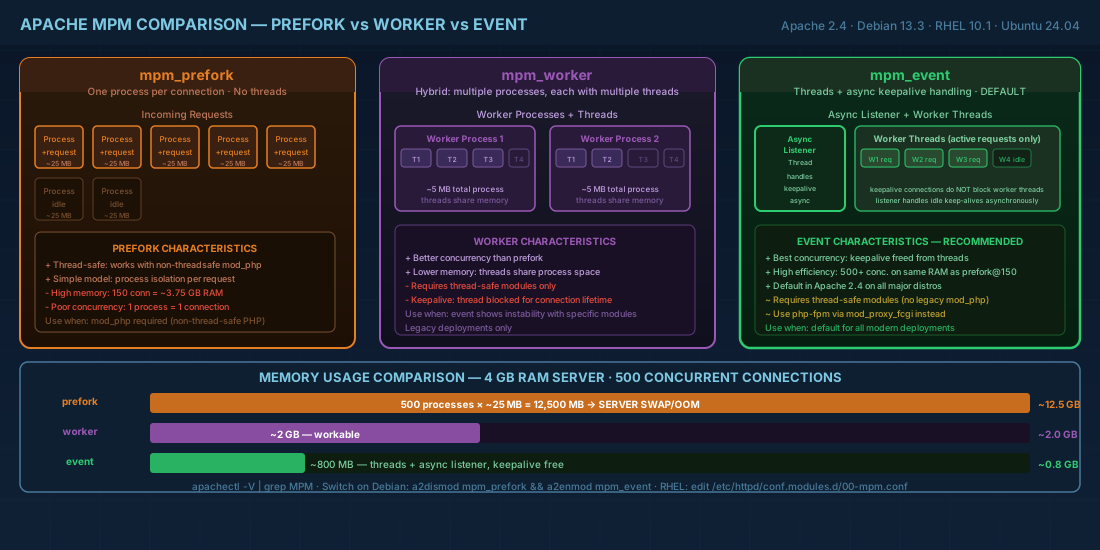
Apache's Multi-Processing Module (MPM) determines how the server handles concurrent connections. Choosing the right MPM affects memory use, throughput, and module compatibility.
| MPM | Model | Use when |
|---|---|---|
event |
Threads with async keepalive handling | Default choice for most workloads. Handles high concurrency with low memory. |
worker |
Hybrid multi-process/multi-thread | Legacy deployments or when event MPM shows instability with specific modules. |
prefork |
One process per connection, no threads | Required when using mod_php (non-thread-safe). Avoid otherwise — high memory cost. |
On Debian/Ubuntu, check and switch MPMs:
# Check current MPM
apachectl -V | grep MPM
# Server MPM: event

# Switch MPMs on Debian/Ubuntu
sudo a2dismod mpm_event
sudo a2enmod mpm_worker
sudo systemctl restart apache2
On RHEL/Fedora, the MPM is set in /etc/httpd/conf.modules.d/00-mpm.conf by commenting/uncommenting the relevant LoadModule line.
Production consequence: running prefork with mod_php for a site that could use php-fpm wastes memory. A server with 4 GB of RAM running prefork might handle 150 concurrent connections before swapping. The same server with event MPM proxying to php-fpm can handle 500+ because threads are much lighter than processes.
Apache Virtual Host Configuration
Name-based virtual hosts
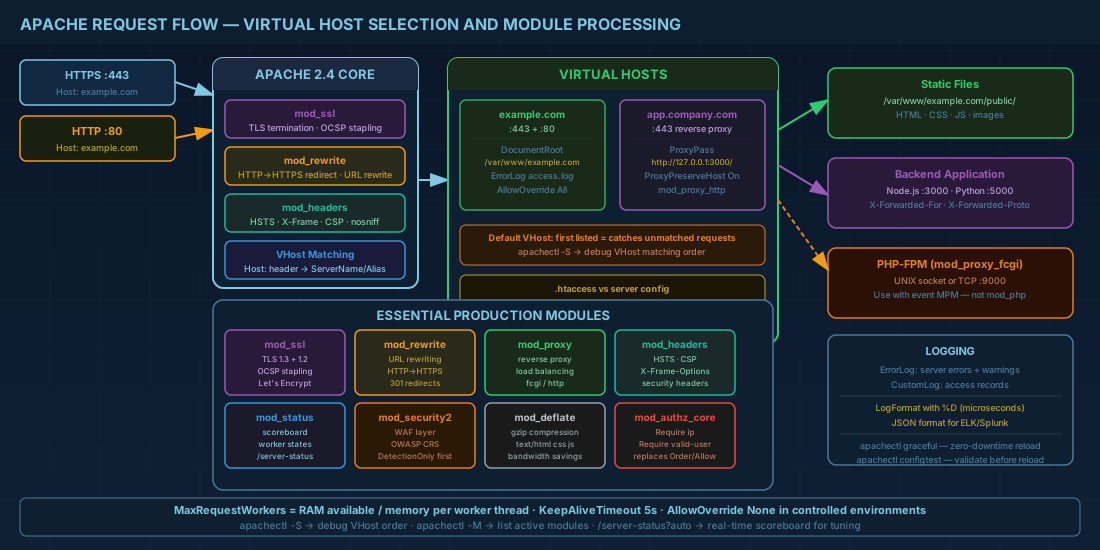
Name-based virtual hosting is the standard approach. Apache uses the Host header to route requests to the correct VirtualHost block:
# /etc/apache2/sites-available/example.com.conf (Debian/Ubuntu)
# /etc/httpd/conf.d/example.com.conf (RHEL/Fedora)

<VirtualHost *:80>
    ServerName example.com
    ServerAlias www.example.com
    DocumentRoot /var/www/example.com/public

    <Directory /var/www/example.com/public>
        Options -Indexes +FollowSymLinks
        AllowOverride All
        Require all granted
    </Directory>

    ErrorLog ${APACHE_LOG_DIR}/example.com-error.log
    CustomLog ${APACHE_LOG_DIR}/example.com-access.log combined
</VirtualHost>
On Debian/Ubuntu, enable with sudo a2ensite example.com.conf && sudo systemctl reload apache2. On RHEL, any .conf file in /etc/httpd/conf.d/ is loaded automatically.
IP-based virtual hosts
Used when you need different SSL certificates on the same port without SNI (rare today), or when regulatory requirements mandate IP-level separation:
<VirtualHost 10.0.1.10:443>
    ServerName secure.example.com
    DocumentRoot /var/www/secure
    SSLEngine on
    SSLCertificateFile /etc/letsencrypt/live/secure.example.com/fullchain.pem
    SSLCertificateKeyFile /etc/letsencrypt/live/secure.example.com/privkey.pem
</VirtualHost>
Debugging virtual host resolution
When requests hit the wrong virtual host, use Apache's built-in diagnostic to see how VirtualHost matching is processed:
# Show all configured virtual hosts and their matching order
apachectl -S

# Example output:
# *:80   is a NameVirtualHost
#   port 80 namevhost example.com (/etc/apache2/sites-enabled/example.com.conf:1)
#     alias www.example.com
#   port 80 namevhost other.com (/etc/apache2/sites-enabled/other.com.conf:1)

# Test a specific request to see which VHost it matches
curl -H "Host: example.com" http://localhost/ -I
The first VirtualHost listed for a given port serves as the default when no ServerName matches. If you see unexpected responses, check whether your default VHost is catching traffic intended for another site.
.htaccess vs server config
The .htaccess file lets you override directives per-directory without editing the main server config. It is convenient for shared hosting but has a performance cost: Apache checks for .htaccess files in every directory in the path for every request. In environments you control, set AllowOverride None and put all directives in the VirtualHost block. This eliminates the per-request filesystem lookups.
Essential Apache Modules for Production
mod_rewrite for URL rewriting
mod_rewrite handles URL rewriting for redirects, clean URLs, and routing. The most common pattern is redirecting HTTP to HTTPS:
<VirtualHost *:80>
    ServerName example.com
    RewriteEngine On
    RewriteCond %{HTTPS} off
    RewriteRule ^ https://%{HTTP_HOST}%{REQUEST_URI} [L,R=301]
</VirtualHost>
mod_proxy and mod_proxy_http for reverse proxying
mod_proxy turns Apache into a reverse proxy, commonly used to front application servers (Node.js, Python, Java):
<VirtualHost *:443>
    ServerName app.example.com
    SSLEngine on
    SSLCertificateFile /etc/letsencrypt/live/app.example.com/fullchain.pem
    SSLCertificateKeyFile /etc/letsencrypt/live/app.example.com/privkey.pem

    ProxyPreserveHost On
    ProxyPass / http://127.0.0.1:3000/
    ProxyPassReverse / http://127.0.0.1:3000/

    # Pass real client IP to backend
    RequestHeader set X-Forwarded-For "%{REMOTE_ADDR}s"
    RequestHeader set X-Forwarded-Proto "https"
</VirtualHost>
For comparison, see how Nginx handles reverse proxying and load balancing with a more concise configuration syntax.
mod_ssl for TLS configuration
mod_ssl provides TLS support. Modern hardened configuration for TLS 1.3 and 1.2:
# /etc/apache2/conf-available/ssl-hardening.conf
SSLProtocol -all +TLSv1.3 +TLSv1.2
SSLCipherSuite TLSv1.3 TLS_AES_256_GCM_SHA384:TLS_CHACHA20_POLY1305_SHA256:TLS_AES_128_GCM_SHA256
SSLCipherSuite SSL ECDHE-ECDSA-AES256-GCM-SHA384:ECDHE-RSA-AES256-GCM-SHA384:ECDHE-ECDSA-CHACHA20-POLY1305
SSLHonorCipherOrder on
SSLSessionTickets off
mod_headers for security headers
Security headers protect against common web attacks and should be present on every production Apache HTTP Server:
Header always set Strict-Transport-Security "max-age=63072000; includeSubDomains; preload"
Header always set X-Content-Type-Options "nosniff"
Header always set X-Frame-Options "SAMEORIGIN"
Header always set Referrer-Policy "strict-origin-when-cross-origin"
These headers are part of a broader server hardening strategy. For firewall and network-level defenses that complement web server hardening, see Linux server security with nftables and firewalld.
mod_security2 as a web application firewall
mod_security2 is a web application firewall (WAF) module. On Debian/Ubuntu:
sudo apt install libapache2-mod-security2
sudo cp /etc/modsecurity/modsecurity.conf-recommended /etc/modsecurity/modsecurity.conf
# Edit modsecurity.conf: change SecRuleEngine DetectionOnly to SecRuleEngine On
sudo systemctl restart apache2
For meaningful protection, install the OWASP Core Rule Set (CRS). Running in DetectionOnly mode first is wise — review the audit log before switching to blocking mode to avoid false positives breaking legitimate traffic.
Apache SSL/TLS with Let's Encrypt Certificates
Certbot automates certificate issuance and renewal for HTTPS on Apache:
# Install certbot
sudo apt install certbot python3-certbot-apache   # Debian/Ubuntu
sudo dnf install certbot python3-certbot-apache   # RHEL/Fedora

# Obtain and configure certificate automatically
sudo certbot --apache -d example.com -d www.example.com

# Verify auto-renewal
sudo certbot renew --dry-run

# Renewal runs via systemd timer
systemctl list-timers | grep certbot
OCSP stapling for faster TLS handshakes
OCSP stapling lets Apache fetch the certificate's revocation status and include it in the TLS handshake, so the client does not need to contact the CA separately:
SSLUseStapling on
SSLStaplingCache shmcb:/var/run/apache2/ssl_stapling(128000)
SSLStaplingResponderTimeout 5
SSLStaplingReturnResponderErrors off
Place these directives in your global SSL config, not inside individual VirtualHost blocks. Verify with:
openssl s_client -connect example.com:443 -status < /dev/null 2>&1 | grep -A 3 "OCSP Response"Apache Logging and Access Control
Apache provides two log types per VirtualHost:
- ErrorLog: server errors, module warnings, application failures.
- CustomLog: access records in configurable format.
# Custom log format with response time (microseconds)
LogFormat "%h %l %u %t \"%r\" %>s %O \"%{Referer}i\" \"%{User-Agent}i\" %D" detailed
CustomLog ${APACHE_LOG_DIR}/example.com-access.log detailed
The %D field (response time in microseconds) is valuable for spotting slow requests. For JSON-format logs compatible with log aggregators like the ELK stack:
LogFormat "{\"time\":\"%{%Y-%m-%dT%H:%M:%S}t\",\"remote\":\"%a\",\"method\":\"%m\",\"uri\":\"%U\",\"status\":%>s,\"bytes\":%O,\"duration_us\":%D}" json
CustomLog ${APACHE_LOG_DIR}/example.com-access.json json
Access control with Require directives
Apache 2.4 uses Require directives (mod_authz_core) instead of the deprecated Order/Allow/Deny:
# Allow only internal network
<Directory /var/www/internal>
    Require ip 10.0.0.0/8 192.168.0.0/16
</Directory>

# Require authentication
<Directory /var/www/admin>
    AuthType Basic
    AuthName "Admin Area"
    AuthUserFile /etc/apache2/.htpasswd
    Require valid-user
</Directory>
For sensitive admin areas, consider combining IP restrictions with SSH tunneling for an additional security layer. Learn how to set up secure tunnels in OpenSSH advanced tunneling and hardening.
Apache Performance Tuning for Production
Key tuning parameters for the event MPM under load:
<IfModule mpm_event_module>
    StartServers             4
    MinSpareThreads         75
    MaxSpareThreads        250
    ThreadLimit             64
    ThreadsPerChild         25
    MaxRequestWorkers      400
    MaxConnectionsPerChild   0
</IfModule>

# KeepAlive settings
KeepAlive On
MaxKeepAliveRequests 100
KeepAliveTimeout 5
The MaxRequestWorkers setting is your hard ceiling for concurrent connections. Calculate it based on available RAM: if each worker thread uses about 10 MB and you have 4 GB available for Apache, set it to roughly 400. Going higher leads to swapping, which is worse than queuing.
KeepAliveTimeout 5 (seconds) is a good balance. Too high (like the old default of 15) wastes threads on idle connections. Too low forces clients to renegotiate connections constantly.
Monitoring Apache under load
Enable mod_status to get real-time server metrics for tuning decisions:
<Location "/server-status">
    SetHandler server-status
    Require ip 10.0.0.0/8 127.0.0.1
</Location>

# Enable extended status for detailed per-request info
ExtendedStatus On
Access http://yourserver/server-status?auto for machine-readable output that monitoring tools like Prometheus (with the Apache exporter) can scrape. Watch for the scoreboard showing workers in "W" (writing) state — a high count indicates slow backend responses or undersized worker pools.
Apache HTTP Server Quick Reference
| Task | Command |
|---|---|
| Check config syntax | apachectl configtest |
| Show loaded modules | apachectl -M |
| Show active MPM | apachectl -V | grep MPM |
| Enable site (Debian) | sudo a2ensite example.com.conf |
| Enable module (Debian) | sudo a2enmod rewrite |
| Obtain Let's Encrypt cert | sudo certbot --apache -d example.com |
| Test renewal | sudo certbot renew --dry-run |
| Check OCSP stapling | openssl s_client -connect host:443 -status |
| Test TLS config | openssl s_client -connect host:443 -tls1_3 |
| Graceful restart | apachectl graceful |
| Create htpasswd file | htpasswd -c /etc/apache2/.htpasswd admin |
| Show active connections | ss -tlnp | grep apache2 |
| Redirect HTTP to HTTPS | RewriteRule ^ https://%{HTTP_HOST}%{REQUEST_URI} [L,R=301] |
Summary
Apache 2.4 on modern Linux distributions defaults to the event MPM, which handles high concurrency well when properly tuned. Name-based virtual hosts cover most hosting scenarios. Use mod_proxy to front application backends, mod_rewrite for URL routing, and mod_ssl with Let's Encrypt for automated TLS certificates. Set AllowOverride None in environments you control to avoid the performance cost of .htaccess lookups. Harden your TLS configuration to TLS 1.2+ with strong ciphers, enable HSTS and OCSP stapling, and consider mod_security2 with the OWASP CRS for WAF protection. Size MaxRequestWorkers based on actual memory, not guesswork, and keep KeepAliveTimeout low. These settings, tested on Debian 13.3, Ubuntu 24.04, RHEL 10.1, and Fedora 43, will give you a solid production baseline. For high-traffic sites requiring advanced load balancing, consider pairing Apache with an Nginx reverse proxy front end.


