NFS (Network File System) remains the standard file-sharing protocol for Linux-to-Linux environments. While Samba handles Windows interoperability, NFS is what you deploy when the clients and servers are all running Linux or other Unix-like systems. This article covers NFSv4 exports, Kerberos-secured mounts, NFS performance tuning, and automounting -- the topics that matter when you move from lab experiments to production storage. Since NFS relies on underlying file permissions, you should be comfortable with Linux permissions including chmod, chown, and umask before diving into export configuration.
NFS Version Differences: Comparing NFSv3, NFSv4, and NFSv4.2
Understanding the version differences matters because they affect security, performance, and how you configure NFS exports.
| Feature | NFSv3 | NFSv4 | NFSv4.2 |
|---|---|---|---|
| Transport | UDP or TCP | TCP only | TCP only |
| Port | 2049 + rpcbind + mountd (multiple) | 2049 only | 2049 only |
| Authentication | IP-based (AUTH_SYS) | Kerberos supported | Kerberos supported |
| ID mapping | Numeric UID/GID | user@domain strings | user@domain strings |
| Server-side copy | No | No | Yes (copy_file_range) |
| Sparse files | No | No | Yes |
Production takeaway: use NFSv4 or NFSv4.2 for new deployments. NFSv4 simplifies firewall rules (single port), supports Kerberos authentication, and handles ID mapping by name instead of raw UIDs. NFSv3 still exists in legacy environments and you may encounter it, but there is no good reason to deploy it fresh in 2026.
Configuring NFS Exports on Linux with /etc/exports
/etc/exports syntax and options
NFS exports are defined in /etc/exports, one line per exported directory:
# Basic export: /srv/data available to a single subnet
/srv/data    192.168.10.0/24(rw,sync,no_subtree_check,root_squash)

# Export to a specific host with all_squash (map everything to anon user)
/srv/public  webserver.corp.lan(ro,sync,all_squash,anonuid=1001,anongid=1001)

# NFSv4 pseudo filesystem root
/srv/nfs4    *(ro,fsid=0,no_subtree_check)
Key options to understand:
syncvs.async-- sync writes data to disk before acknowledging the write to the client. async is faster but risks data loss during a server crash. Production servers should always use sync.root_squash-- maps root on the client (UID 0) to the anonymous user (typically nobody). This is the default and the correct setting for security.no_root_squashis dangerous and only justified in narrow cases like diskless boot environments.no_subtree_check-- disables subtree checking, which improves reliability when exporting subdirectories of a filesystem. The kernel documentation recommends this setting for most exports.fsid=0-- marks this export as the NFSv4 pseudo filesystem root. More on this below.
After editing /etc/exports, apply the changes:
# Re-export all directories
sudo exportfs -ra

# Show currently active exports
sudo exportfs -v
The NFSv4 pseudo filesystem
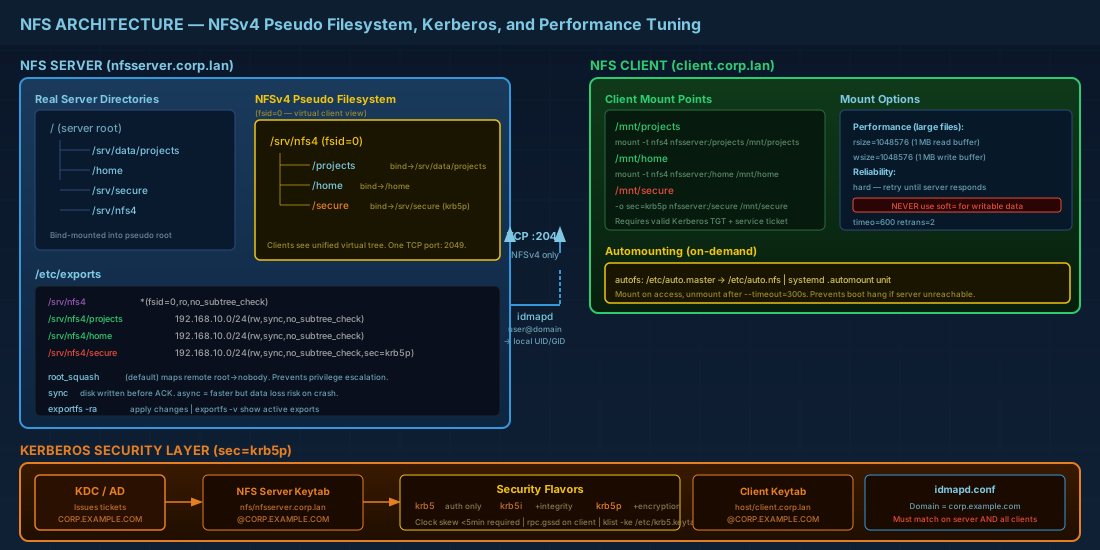
NFSv4 introduces a pseudo filesystem: a virtual directory tree that clients see, independent of the actual server paths. The export with fsid=0 becomes the root of this virtual tree. Other exports are bind-mounted under it.
# Server directory structure
sudo mkdir -p /srv/nfs4/projects /srv/nfs4/home

# Bind mount real directories into the pseudo root
sudo mount --bind /srv/data/projects /srv/nfs4/projects
sudo mount --bind /home /srv/nfs4/home
# /etc/exports for NFSv4 pseudo filesystem
/srv/nfs4 *(fsid=0,ro,no_subtree_check)
/srv/nfs4/projects 192.168.10.0/24(rw,sync,no_subtree_check)
/srv/nfs4/home 192.168.10.0/24(rw,sync,no_subtree_check)Make the bind mounts persistent in /etc/fstab:
/srv/data/projects  /srv/nfs4/projects  none  bind  0  0
/home               /srv/nfs4/home      none  bind  0  0
Clients then mount relative to the NFSv4 root:
# Client mounts the "projects" export
sudo mount -t nfs4 nfsserver:/ /mnt/nfs4root
sudo mount -t nfs4 nfsserver:/projects /mnt/projects
Restricting NFS access with firewall rules
Even with proper export restrictions in /etc/exports, you should also restrict access at the network layer. NFSv4 only requires TCP port 2049, making firewall configuration straightforward. For detailed firewall configuration examples, see Linux server security with nftables and firewalld:
# Allow NFS from the trusted subnet only (nftables example)
nft add rule inet filter input ip saddr 192.168.10.0/24 tcp dport 2049 accept
nft add rule inet filter input tcp dport 2049 drop

# firewalld equivalent
sudo firewall-cmd --permanent --zone=trusted --add-source=192.168.10.0/24
sudo firewall-cmd --permanent --zone=trusted --add-service=nfs
sudo firewall-cmd --reload
NFSv4 ID Mapping with idmapd
NFSv4 transmits user and group ownership as user@domain strings rather than numeric UIDs. The idmapd service translates these strings to local UIDs/GIDs on both the server and client. If idmapd is misconfigured, files appear owned by nobody:nogroup or 4294967294.
# /etc/idmapd.conf — must match on server and all clients
[General]
Verbosity = 0
Domain = corp.example.com

[Mapping]
Nobody-User = nobody
Nobody-Group = nogroup
The Domain value must be identical across all machines. It does not need to match the DNS domain, but it must be consistent. After changing this file, restart the NFS services:
sudo systemctl restart nfs-idmapd
# On RHEL/Fedora, also:
sudo nfsidmap -c    # clear the ID mapping cache
Kerberos Authentication for Secure NFS Mounts
Without Kerberos, NFS relies on AUTH_SYS, which trusts the client to report its UID correctly. Any root user on any client can claim to be any user. Kerberos authentication fixes this by requiring cryptographic proof of identity.
Three security levels are available:
sec=krb5-- Kerberos authentication only. Data travels unencrypted.sec=krb5i-- Authentication plus integrity checking. Data is not encrypted but tampering is detected.sec=krb5p-- Authentication, integrity, and privacy (encryption). Most secure but adds CPU overhead.
Setting up Kerberos-secured NFS step by step
Prerequisites: a working Kerberos KDC (or AD domain controller), keytab files for the NFS server and clients, and the rpc.gssd daemon running on clients. For more detail on how Kerberos integrates with the Linux authentication stack, see PAM authentication policy and account locking.
# Export with Kerberos security
# /etc/exports
/srv/nfs4/secure  192.168.10.0/24(rw,sync,no_subtree_check,sec=krb5p)

# Enable gssd on both server and client
sudo systemctl enable --now rpc-gssd

# Verify the server keytab contains the nfs service principal
sudo klist -ke /etc/krb5.keytab | grep nfs
The server needs a principal like nfs/nfsserver.corp.example.com@CORP.EXAMPLE.COM in its keytab. The client also needs its own host principal. Without these, the mount will fail with "permission denied" or "no supported authentication" errors.
Client mount with Kerberos:
sudo mount -t nfs4 -o sec=krb5p nfsserver:/secure /mnt/secureTroubleshooting Kerberos NFS mount failures
When a Kerberos-secured NFS mount fails, work through these checks in order:
- Verify the keytab -- run
klist -ke /etc/krb5.keytabon both server and client. The NFS service principal must appear in the server keytab, and the host principal must appear in the client keytab. - Check time synchronization -- Kerberos fails silently when clocks drift more than 5 minutes. Verify with
chronyc tracking. - Test Kerberos independently -- run
kinit username@REALMto confirm the KDC is reachable and credentials work before troubleshooting NFS. - Check rpc.gssd logs -- run
journalctl -u rpc-gssd -fwhile attempting the mount. Error messages identify whether the issue is a missing keytab, expired ticket, or network problem.
NFS Performance Tuning: Mount Options That Matter
Default NFS mount options are conservative. For large file transfers or high-throughput workloads, tuning read/write buffer sizes and timeout behavior makes a measurable difference.
# Tuned mount for large file workloads
sudo mount -t nfs4 -o rsize=1048576,wsize=1048576,hard,timeo=600,retrans=2 \
  nfsserver:/projects /mnt/projects
What each option does:
rsize=1048576/wsize=1048576-- read and write buffer sizes in bytes. 1 MB is a common production value. The default is often 64 KB or 256 KB, which limits throughput on fast networks. Maximum negotiated size depends on the server and kernel but 1 MB works on all modern kernels.hardvs.soft-- a hard mount retries indefinitely when the server is unreachable. A soft mount gives up after a timeout and returns I/O errors to applications. Usehardfor production data. Soft mounts can corrupt files silently when a temporary network glitch causes a write to fail.timeo=600-- timeout before the first retransmission, in tenths of a second (60 seconds here). Relevant for hard mounts on unreliable networks.retrans=2-- number of retransmissions before a hard mount reports the server as not responding (it still keeps trying, but logs a warning).
Never use soft mounts for writable data in production. A brief network interruption during a write with soft can result in corrupted files or partial writes with no warning to the application.
NFS Automounting with autofs and systemd
Permanent NFS mounts in /etc/fstab block the boot process if the server is unreachable. Automounting mounts shares on demand and unmounts them after a period of inactivity.
autofs configuration
# Install autofs
sudo apt install autofs    # Debian/Ubuntu
sudo dnf install autofs    # Fedora/RHEL

# /etc/auto.master — define mount point and map file
/mnt/nfs  /etc/auto.nfs  --timeout=300

# /etc/auto.nfs — define individual mounts
projects  -rw,hard,rsize=1048576,wsize=1048576  nfsserver:/projects
home      -rw,hard                               nfsserver:/home
sudo systemctl enable --now autofsWhen a user accesses /mnt/nfs/projects, autofs automatically mounts it. After 300 seconds of inactivity, it unmounts.
systemd automount units
systemd provides a native automount alternative. Create two unit files:
# /etc/systemd/system/mnt-projects.mount
[Unit]
Description=NFS mount for projects
After=network-online.target

[Mount]
What=nfsserver:/projects
Where=/mnt/projects
Type=nfs4
Options=rw,hard,rsize=1048576,wsize=1048576

[Install]
WantedBy=multi-user.target
# /etc/systemd/system/mnt-projects.automount
[Unit]
Description=Automount NFS projects
[Automount]
Where=/mnt/projects
TimeoutIdleSec=300
[Install]
WantedBy=multi-user.targetsudo systemctl enable --now mnt-projects.automountThe .automount unit name must match the .mount unit name exactly, and both must match the mount path with dashes replacing slashes.
NFS Monitoring and Troubleshooting Commands
# Show active NFS mounts and statistics
nfsstat -c          # client-side stats
nfsstat -s          # server-side stats
nfsstat -m          # mount info with negotiated options

# List shares exported by a server (NFSv3 only — uses rpcbind)
showmount -e nfsserver

# Check what the server is currently exporting
sudo exportfs -v

# Monitor NFS traffic and retransmissions
mountstats /mnt/projects
If nfsstat -c shows a high retransmission count, you have network issues between client and server. If files show nobody ownership, check that idmapd.conf has matching Domain values on both sides.
NFS Exports and Mounts Quick Reference
| Task | Command / Config |
|---|---|
| Apply export changes | exportfs -ra |
| Show current exports | exportfs -v |
| Mount NFSv4 share | mount -t nfs4 server:/path /mnt |
| Mount with Kerberos encryption | mount -t nfs4 -o sec=krb5p server:/path /mnt |
| Clear ID mapping cache | nfsidmap -c |
| Client NFS stats | nfsstat -c |
| Server NFS stats | nfsstat -s |
| Show negotiated mount options | nfsstat -m |
| List remote exports (NFSv3) | showmount -e server |
| Enable NFS gssd for Kerberos | systemctl enable --now rpc-gssd |
Summary
NFSv4 is the right choice for Linux-to-Linux file sharing in 2026. It simplifies firewall configuration to a single port (2049), provides proper identity mapping through idmapd, and supports Kerberos authentication that eliminates the UID-trust problem of AUTH_SYS. For performance, always specify rsize and wsize at 1 MB for bulk data workloads and use hard mounts for anything where data integrity matters. Automounting through autofs or systemd-automount prevents boot hangs when NFS servers are temporarily unreachable. The most common production issues come down to mismatched idmapd Domain values (files owned by nobody), missing Kerberos keytabs (permission denied on krb5 mounts), and using soft mounts where hard mounts are required.


