PAM (Pluggable Authentication Modules) is the policy layer behind logins on Linux. When you sign in through SSH, run sudo, or unlock a desktop session, PAM decides whether the action is allowed. Most new admins touch PAM only when something breaks, but clear PAM policy prevents many security and outage problems.
This guide explains PAM in plain language and then moves into production consequences. The examples are aligned with Debian 13.3, Ubuntu 24.04.3 LTS and 25.10, Fedora 43, RHEL 10.1, and RHEL 9.7 (compatibility behavior is mostly the same between 10.1 and 9.7).
How PAM decides who gets access
PAM rules are stored in /etc/pam.d/. Each service has its own file, such as sshd, sudo, or login. Inside each file, rules are grouped by type:
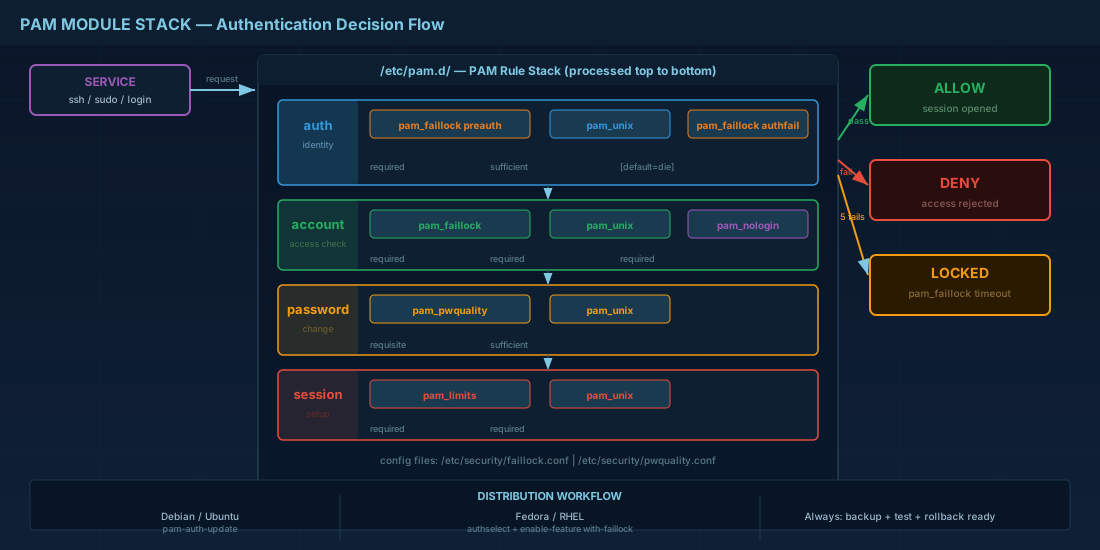
auth: check identity (password, key, token)account: check whether the account is allowed now (expiry, lock state, login hours)password: control password changessession: setup and cleanup after login
Each rule also has a control flag. The most used are required, requisite, and sufficient. Order matters. If a blocking module is in the wrong place, valid users can get denied, or failed attempts can bypass lockout logic.
# Typical Debian/Ubuntu style include flow
# /etc/pam.d/sshd
@include common-auth
account required pam_nologin.so
@include common-account
session required pam_limits.so
@include common-session

# Typical RHEL/Fedora style include flow
# /etc/pam.d/sshd
auth substack password-auth
account required pam_nologin.so
account include password-auth
session include password-auth
Production consequence: if you edit common-auth or password-auth, you usually change behavior for multiple services at once. Treat PAM edits like firewall edits: backup first, test immediately, keep one root shell open until validation is done.
Building a basic authentication policy
A practical baseline policy has two parts: password quality checks and predictable hash settings. For local accounts, pam_pwquality enforces password rules, then pam_unix stores the hash. On domain-managed accounts (for example via SSSD/AD), local password modules may not be used for user password changes, so scope your policy to the account types you actually run.
# Password quality policy example
# /etc/security/pwquality.conf
minlen = 14
minclass = 3
difok = 4
maxrepeat = 3
retry = 3
enforce_for_root

# PAM password stack order (conceptual)
password requisite pam_pwquality.so retry=3
password sufficient pam_unix.so use_authtok yescrypt
password required pam_deny.so
For beginners: avoid setting rules so strict that people write passwords on paper. For operators: check how policy impacts automation and service accounts. A forced rotation rule that works for human users can break unattended jobs if credential update procedures are missing.
Account locking with pam_faillock
pam_faillock tracks failed authentication attempts and can lock accounts for a period. This reduces brute-force success, especially on exposed SSH services. A common baseline is 5 failures inside 15 minutes, then a 15-minute lock.
Current PAM implementations on Debian 13.3, Ubuntu 24.04.3 LTS/25.10, Fedora 43, and RHEL 10.1/9.7 support this model. The control point is usually /etc/security/faillock.conf, plus PAM stack lines that call the module.
# /etc/security/faillock.conf
deny = 5
fail_interval = 900
unlock_time = 900
audit

# PAM auth/account lines (conceptual placement)
auth required pam_faillock.so preauth silent
auth [default=die] pam_faillock.so authfail
auth sufficient pam_faillock.so authsucc
account required pam_faillock.so

# Inspect and reset counters during testing
sudo faillock --user testuser
sudo faillock --user testuser --reset
If you decide to lock root after failures (even_deny_root), do it only when you have a tested break-glass path such as console/IPMI access and a second admin account. Teams without a recovery path can lock themselves out during an incident.
Distribution workflow differences that matter
The PAM concepts are shared, but the safe editing workflow differs by distribution family.
| Platform | Preferred workflow | What to watch |
|---|---|---|
| Debian 13.3 | Use pam-auth-update for managed profiles, then verify common-auth and common-account. |
Direct manual edits can be overwritten by package/profile updates. |
| Ubuntu 24.04.3 LTS / 25.10 | Same model as Debian: profile-driven updates via pam-auth-update. |
Cloud images may ship minimal auth tooling; install required PAM modules explicitly. |
| Fedora 43 | Use authselect to manage system-auth/password-auth features. |
Manual edits in generated files are replaced when profiles are re-applied. |
| RHEL 10.1 / 9.7 | Use authselect; pam_faillock behavior is compatible between 10.1 and 9.7. |
Keep profile backups before enabling lockout features on production nodes. |
# Debian 13.3 / Ubuntu 24.04.3 LTS / Ubuntu 25.10
sudo apt update
sudo apt install -y libpam-modules libpam-pwquality
sudo pam-auth-update

# Fedora 43 / RHEL 10.1 / RHEL 9.7
sudo dnf install -y authselect libpwquality
sudo authselect current
sudo authselect enable-feature with-faillock
sudo authselect apply-changes
Safe testing and rollback routine
Never push PAM changes blind. Use a repeatable checklist and document evidence. This is where many production lockouts are prevented.
# 1) Backup PAM and faillock policy files
sudo cp -a /etc/pam.d /root/pam.d.backup.$(date +%F-%H%M%S)
sudo cp -a /etc/security/faillock.conf /root/faillock.conf.backup.$(date +%F-%H%M%S)

# 2) Keep one root shell open, test from a second terminal
for i in 1 2 3 4 5; do
  ssh testuser@localhost
done

# 3) Verify lockout evidence
sudo faillock --user testuser
sudo journalctl -b | grep -E "pam_faillock|Failed password" | tail -n 20

# 4) Reset only test account after validation
sudo faillock --user testuser --reset
For beginners: always test with a non-admin account first. For operators: add PAM validation to change tickets and include rollback commands in the same ticket. That turns a risky change into a controlled change.
Summary
PAM is the rule engine behind Linux authentication. Start with clear module order, apply password quality settings that users can follow, and use pam_faillock to reduce brute-force risk. On Debian 13.3, Ubuntu 24.04.3 LTS/25.10, Fedora 43, and RHEL 10.1 with RHEL 9.7 compatibility, the main difference is workflow tooling (pam-auth-update vs authselect). In every case, backup first, test with evidence, and keep a rollback path ready.


