Every Kubernetes cluster runs CoreDNS. Every pod's /etc/resolv.conf points to it. Every kubectl exec container uses it to resolve service names. Yet most platform engineers never look at the Corefile, never tune the cache, and never understand why their cluster generates 5x more DNS queries than expected. This guide takes you from default CoreDNS to a production-tuned DNS layer that scales to thousands of pods.
How Kubernetes DNS Works
When a pod resolves my-service.default.svc.cluster.local, this happens:
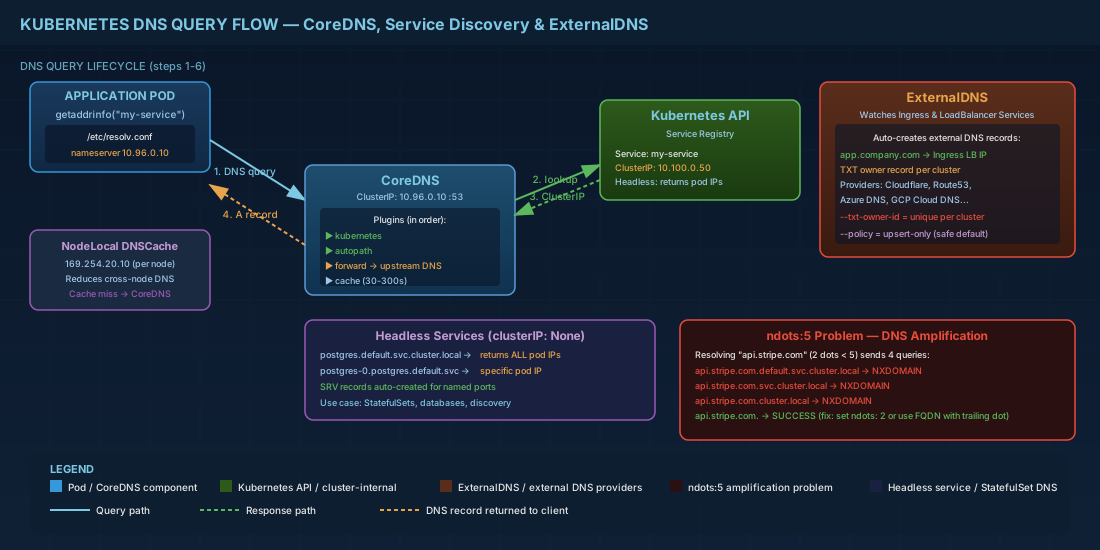
- The application calls
getaddrinfo("my-service") - glibc reads
/etc/resolv.confwhich points to the CoreDNS ClusterIP (typically 10.96.0.10) - Because
ndots:5is set, glibc appends search domains and tries multiple queries - CoreDNS receives the query, checks its kubernetes plugin, and returns the Service ClusterIP
- For headless services, CoreDNS returns individual pod IPs
The ndots:5 Problem
This is the single most impactful DNS performance issue in Kubernetes. By default, every pod gets this /etc/resolv.conf:
# Default pod /etc/resolv.conf
nameserver 10.96.0.10
search default.svc.cluster.local svc.cluster.local cluster.local
options ndots:5
ndots:5 means: if the hostname has fewer than 5 dots, try ALL search domains before querying it as-is. When your app resolves api.stripe.com (2 dots, which is less than 5):
# Actual queries generated for "api.stripe.com":
# 1. api.stripe.com.default.svc.cluster.local  → NXDOMAIN
# 2. api.stripe.com.svc.cluster.local          → NXDOMAIN
# 3. api.stripe.com.cluster.local              → NXDOMAIN
# 4. api.stripe.com.                           → SUCCESS

# That is 4 queries instead of 1!
# And each query is sent for both A and AAAA records = 8 queries total
# For every single external hostname resolution
Solutions to ndots Amplification
# Solution 1: Set dnsConfig in your pod spec
apiVersion: v1
kind: Pod
metadata:
  name: app
spec:
  dnsConfig:
    options:
      - name: ndots
        value: "2"
  containers:
    - name: app
      image: myapp:latest

# Solution 2: Use trailing dot in code for external domains
# In your app config, use "api.stripe.com." (note the dot)
# This tells glibc: this is already a FQDN, don't append search domains

# Solution 3: Use CoreDNS autopath plugin (recommended)
# This transparently rewrites queries to try the most likely
# search domain first, reducing failed attempts
CoreDNS Corefile Deep Dive
# View the current CoreDNS configuration
kubectl -n kube-system get configmap coredns -o yaml
# Default Corefile
.:53 {
errors
health {
lameduck 5s
}
ready
kubernetes cluster.local in-addr.arpa ip6.arpa {
pods insecure
fallthrough in-addr.arpa ip6.arpa
ttl 30
}
prometheus :9153
forward . /etc/resolv.conf {
max_concurrent 1000
}
cache 30
loop
reload
loadbalance
}Production-Tuned Corefile
# kubectl edit configmap coredns -n kube-system
apiVersion: v1
kind: ConfigMap
metadata:
  name: coredns
  namespace: kube-system
data:
  Corefile: |
    .:53 {
        errors
        health {
            lameduck 5s
        }
        ready

        kubernetes cluster.local in-addr.arpa ip6.arpa {
            pods verified
            fallthrough in-addr.arpa ip6.arpa
            ttl 30
        }

        # Autopath: smart search domain optimization
        autopath @kubernetes

        # Increased cache with serve-stale
        cache 300 {
            success 9984 300
            denial 9984 60
            servfail 5
            prefetch 10 1m 10%
            serve_stale 60s
        }

        # Forward to upstream with health checks
        forward . 10.0.0.1 10.0.0.2 {
            max_concurrent 2000
            health_check 5s
            policy round_robin
        }

        prometheus :9153
        loop
        reload 10s
        loadbalance round_robin

        # Log slow queries (>500ms) for debugging
        log . {
            class denial error
        }
    }

    # Stub domain: forward internal.company.com to on-prem DNS
    internal.company.com:53 {
        errors
        cache 120
        forward . 10.0.0.2 10.0.0.3 {
            health_check 10s
        }
    }
pods verified vs pods insecure
# pods insecure (default):
# CoreDNS answers A record queries for pod IPs without verifying
# the pod actually exists. Any query for 1-2-3-4.ns.pod.cluster.local
# returns 1.2.3.4, even if no such pod exists.

# pods verified:
# CoreDNS checks the Kubernetes API to confirm the pod exists before
# answering. More secure, but adds ~1-2ms latency per query.

# pods disabled:
# Do not respond to pod DNS queries at all. Only service DNS works.

# Recommendation: use "pods verified" in production
# The security benefit outweighs the minor latency increase
NodeLocal DNSCache: Reduce Cross-Node DNS Traffic
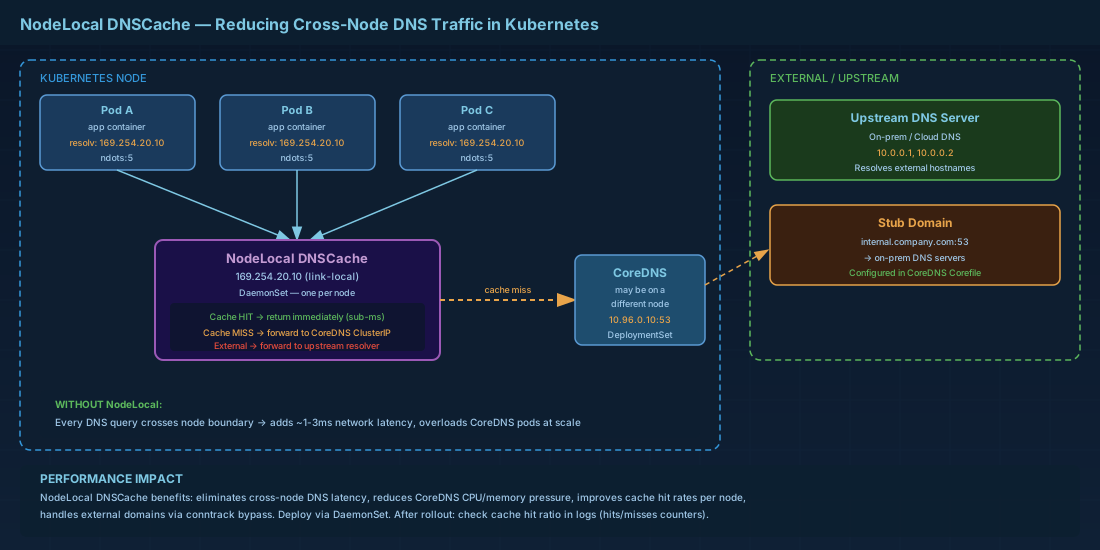
In large clusters, every pod sends DNS queries to CoreDNS pods which may be on different nodes. NodeLocal DNSCache runs a caching DNS proxy on every node, dramatically reducing network latency and CoreDNS load.
# Deploy NodeLocal DNSCache
kubectl apply -f https://raw.githubusercontent.com/kubernetes/kubernetes/master/cluster/addons/dns/nodelocaldns/nodelocaldns.yaml

# This creates:
# 1. A DaemonSet running a DNS cache on every node
# 2. A local link address (169.254.20.10) that pods use
# 3. Cache miss → forwarded to CoreDNS ClusterIP
# 4. External domains → forwarded to upstream DNS

# Verify it is running
kubectl -n kube-system get pods -l k8s-app=node-local-dns

# Check cache hit ratio
kubectl -n kube-system logs -l k8s-app=node-local-dns | \
    grep -oP 'hits:\d+|misses:\d+'
ExternalDNS: Auto-Create DNS Records from Kubernetes
ExternalDNS watches your Kubernetes Ingress and Service resources and automatically creates DNS records at your DNS provider. Deploy a LoadBalancer Service and the A record appears automatically.
# Install ExternalDNS for Cloudflare
apiVersion: apps/v1
kind: Deployment
metadata:
  name: external-dns
  namespace: kube-system
spec:
  replicas: 1
  selector:
    matchLabels:
      app: external-dns
  template:
    metadata:
      labels:
        app: external-dns
    spec:
      serviceAccountName: external-dns
      containers:
        - name: external-dns
          image: registry.k8s.io/external-dns/external-dns:v0.14.2
          args:
            - --source=ingress
            - --source=service
            - --provider=cloudflare
            - --cloudflare-proxied
            - --policy=upsert-only
            - --registry=txt
            - --txt-owner-id=k8s-prod-cluster
            - --domain-filter=company.com
            - --log-level=info
          env:
            - name: CF_API_TOKEN
              valueFrom:
                secretKeyRef:
                  name: cloudflare-credentials
                  key: api-token
# Now annotate your Ingress to auto-create DNS records
apiVersion: networking.k8s.io/v1
kind: Ingress
metadata:
name: webapp
annotations:
external-dns.alpha.kubernetes.io/hostname: app.company.com
external-dns.alpha.kubernetes.io/ttl: "300"
spec:
ingressClassName: nginx
rules:
- host: app.company.com
http:
paths:
- path: /
pathType: Prefix
backend:
service:
name: webapp
port:
number: 80
# ExternalDNS sees this Ingress and creates:
# app.company.com A
# at Cloudflare automatically Multi-Cluster ExternalDNS: The txt-owner-id Pattern
# When multiple clusters share a DNS zone, ExternalDNS uses TXT records
# to track which cluster "owns" each DNS record

# Cluster A creates:
# app.company.com     A     203.0.113.50
# app.company.com     TXT   "heritage=external-dns,external-dns/owner=cluster-a"

# Cluster B creates:
# api.company.com     A     203.0.113.60
# api.company.com     TXT   "heritage=external-dns,external-dns/owner=cluster-b"

# Cluster A will NEVER modify api.company.com because the TXT owner doesn't match
# This prevents clusters from stepping on each other's records

# IMPORTANT: Always set --txt-owner-id to a unique identifier per cluster
# --txt-owner-id=k8s-prod-eu-west-1
# --txt-owner-id=k8s-prod-us-east-1
Headless Services and SRV Records
# Headless service: returns individual pod IPs instead of ClusterIP
apiVersion: v1
kind: Service
metadata:
  name: postgres
spec:
  clusterIP: None  # This makes it headless
  selector:
    app: postgres
  ports:
    - port: 5432

# DNS resolution for headless service:
# postgres.default.svc.cluster.local → returns ALL pod IPs
# postgres-0.postgres.default.svc.cluster.local → specific pod

# SRV records are auto-created for named ports:
# _tcp-postgresql._tcp.postgres.default.svc.cluster.local
#   → SRV 0 33 5432 postgres-0.postgres.default.svc.cluster.local
CoreDNS Monitoring with Prometheus
# CoreDNS exposes metrics on :9153 by default
# Add a ServiceMonitor for Prometheus Operator:
apiVersion: monitoring.coreos.com/v1
kind: ServiceMonitor
metadata:
  name: coredns
  namespace: monitoring
spec:
  selector:
    matchLabels:
      k8s-app: kube-dns
  namespaceSelector:
    matchNames:
      - kube-system
  endpoints:
    - port: metrics
      interval: 15s
# Key Prometheus queries for CoreDNS:
# Query rate
rate(coredns_dns_requests_total[5m])
# Cache hit ratio
sum(rate(coredns_cache_hits_total[5m])) /
(sum(rate(coredns_cache_hits_total[5m])) + sum(rate(coredns_cache_misses_total[5m])))
# SERVFAIL rate (indicates problems)
rate(coredns_dns_responses_total{rcode="SERVFAIL"}[5m])
# Query latency P99
histogram_quantile(0.99, rate(coredns_dns_request_duration_seconds_bucket[5m]))
# Alerting rules
groups:
- name: coredns
rules:
- alert: CoreDNSHighSERVFAIL
expr: rate(coredns_dns_responses_total{rcode="SERVFAIL"}[5m]) > 10
for: 5m
labels:
severity: warning
annotations:
summary: "CoreDNS SERVFAIL rate is elevated"
- alert: CoreDNSCacheHitLow
expr: |
sum(rate(coredns_cache_hits_total[5m])) /
(sum(rate(coredns_cache_hits_total[5m])) +
sum(rate(coredns_cache_misses_total[5m]))) < 0.5
for: 10m
labels:
severity: warningDebugging Kubernetes DNS
# Deploy a debug pod with DNS tools
kubectl run dnsutils --image=registry.k8s.io/e2e-test-images/jessie-dnsutils:1.3 \
    --restart=Never -- sleep infinity

# Test service discovery
kubectl exec dnsutils -- nslookup kubernetes.default
kubectl exec dnsutils -- nslookup my-service.my-namespace.svc.cluster.local

# Check what resolv.conf looks like inside the pod
kubectl exec dnsutils -- cat /etc/resolv.conf

# Test external resolution
kubectl exec dnsutils -- dig google.com

# Trace the full resolution path
kubectl exec dnsutils -- dig +trace example.com @10.96.0.10

# Check CoreDNS pod logs for errors
kubectl -n kube-system logs -l k8s-app=kube-dns --tail=100

# Enable CoreDNS query logging temporarily
# Add "log" plugin to Corefile, then:
kubectl -n kube-system rollout restart deployment coredns

# Clean up
kubectl delete pod dnsutils
CoreDNS is the invisible backbone of every Kubernetes cluster. When it is slow, everything is slow — every API call, every database connection, every external request starts with a DNS query. Understanding ndots, tuning the cache, deploying NodeLocal DNSCache, and monitoring query rates transforms DNS from a mystery black box into a well-understood, well-tuned infrastructure layer. And ExternalDNS closes the loop — your Kubernetes resources automatically create the DNS records they need, eliminating the manual step that most teams still rely on.