Why Your DNS Traffic Is Probably Naked
Run tcpdump -i eth0 port 53 on any production server and watch. Every DNS query — every hostname your server resolves — flies across the network in cleartext UDP. Your ISP sees it. Anyone on the network path sees it. Every hostname your monitoring system checks, every API endpoint your application calls, every package repository your server updates from. All of it, readable by anyone with a packet sniffer.
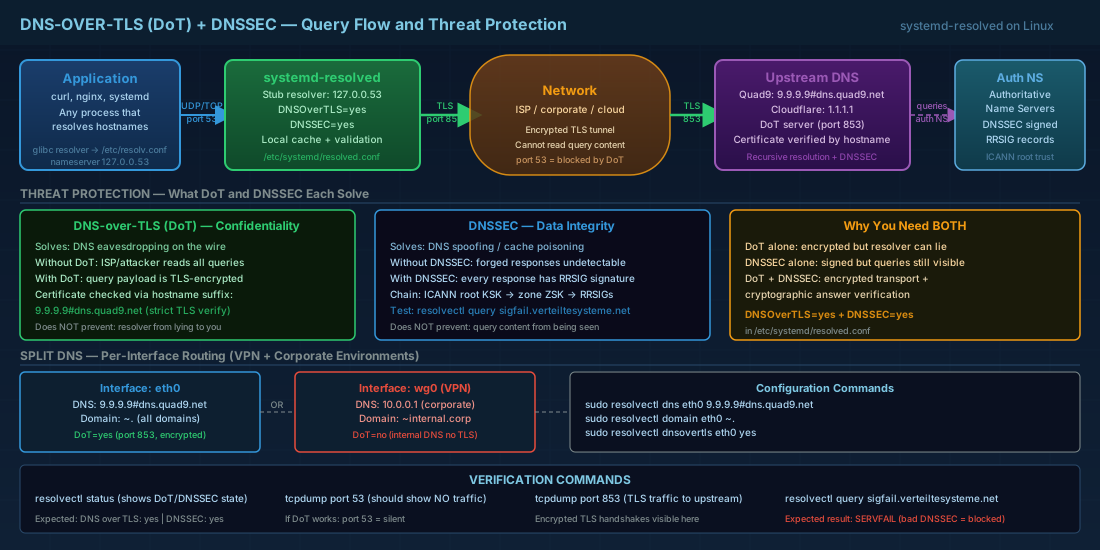
DNS-over-TLS (DoT) wraps DNS queries in TLS encryption on port 853. DNSSEC adds cryptographic signatures to DNS responses, proving they have not been tampered with. Together, they provide confidentiality and integrity for the most fundamental protocol on the internet.
The Threat Model
- DNS spoofing / cache poisoning — an attacker injects a forged DNS response, redirecting your traffic to a malicious server. DNSSEC prevents this.
- DNS eavesdropping — anyone on the network path reads your queries to profile your infrastructure, discover internal hostnames, or identify software versions. DoT prevents this.
- DNS tunnelling — attackers encode data in DNS queries to exfiltrate information. Encrypted DNS makes this harder to detect but also harder to execute without the right keys.
Configuring systemd-resolved for DNS-over-TLS
# Check if systemd-resolved is running
systemctl status systemd-resolved

# If not, enable it
sudo systemctl enable --now systemd-resolved

# Check current DNS configuration
resolvectl status
The Configuration File
# /etc/systemd/resolved.conf
sudo tee /etc/systemd/resolved.conf <<CONF
[Resolve]
# Primary DNS servers with DoT (hostname after # for certificate verification)
DNS=9.9.9.9#dns.quad9.net 149.112.112.112#dns.quad9.net
DNS=1.1.1.1#cloudflare-dns.com 1.0.0.1#cloudflare-dns.com

# Fallback DNS (used if primary fails)
FallbackDNS=8.8.8.8#dns.google 8.8.4.4#dns.google

# Enable DNS-over-TLS
# "yes"           = strict mode (fail if TLS unavailable)
# "opportunistic" = try TLS, fall back to cleartext
DNSOverTLS=yes

# Enable DNSSEC validation
# "yes"             = strict (fail on invalid signatures)
# "allow-downgrade" = validate when available, allow unsigned
DNSSEC=yes

# Use the stub resolver
DNSStubListener=yes

# Domains to route to specific DNS servers (optional)
# Domains=~.
CONF

# Restart to apply
sudo systemctl restart systemd-resolved
Strict vs. Opportunistic Mode
Warning: DNSOverTLS=yes (strict mode) means DNS resolution fails entirely if TLS cannot be established. Test with opportunistic first, then switch to yes once you have confirmed connectivity.
# Test strict mode before committing:
# Temporarily set strict mode
sudo resolvectl dns eth0 9.9.9.9#dns.quad9.net
sudo resolvectl dnsovertls eth0 yes

# Try resolving
resolvectl query kernel.org

# If it works, you are good. If it hangs, your network
# blocks port 853 (common in corporate environments).
Linking /etc/resolv.conf
# systemd-resolved provides a stub resolver at 127.0.0.53.
# Link resolv.conf to use it:
sudo ln -sf /run/systemd/resolve/stub-resolv.conf /etc/resolv.conf

# Verify
cat /etc/resolv.conf
# nameserver 127.0.0.53
# options edns0 trust-ad
# search .
Verifying DNS-over-TLS
# Method 1: Check resolvectl status
resolvectl status
# Look for:
#   DNS over TLS: yes
#   DNSSEC: yes

# Method 2: Packet capture — should see NO port 53 traffic
sudo tcpdump -i eth0 port 53 -c 5 &
resolvectl query example.com
# If DoT is working, tcpdump captures nothing.
# All traffic goes to port 853 instead.

# Method 3: Verify on port 853
sudo tcpdump -i eth0 port 853 -c 5 &
resolvectl query example.com
# You should see TLS-encrypted packets to your DNS server.

# Method 4: Test DNSSEC validation
resolvectl query sigfail.verteiltesysteme.net
# Should FAIL — this domain has intentionally broken DNSSEC.
# Status: SERVFAIL (DNSSEC validation failed)

resolvectl query sigok.verteiltesysteme.net
# Should SUCCEED — valid DNSSEC signatures.
# Status: success
NetworkManager Integration
# If using NetworkManager (most desktops, many servers):
# Tell NetworkManager to push DNS config to systemd-resolved

# /etc/NetworkManager/conf.d/dns.conf
sudo tee /etc/NetworkManager/conf.d/dns.conf <<NMCONF
[main]
dns=systemd-resolved
NMCONF

sudo systemctl restart NetworkManager

# Verify the chain:
# NetworkManager → systemd-resolved → DoT → upstream DNS
Per-Interface and Split DNS
# Route specific domains to specific DNS servers
# Useful for VPNs, internal domains, etc.

# Route .internal.corp queries to the corporate DNS
sudo resolvectl dns wg0 10.0.0.1
sudo resolvectl domain wg0 ~internal.corp
sudo resolvectl dnsovertls wg0 no  # Internal DNS probably lacks DoT

# Route everything else through Quad9 with DoT
sudo resolvectl dns eth0 9.9.9.9#dns.quad9.net
sudo resolvectl domain eth0 ~.
sudo resolvectl dnsovertls eth0 yes
The ICANN Root Key Rollover (October 2026)
ICANN is rolling the DNSSEC root trust anchor for the first time since 2018. If your resolver has a stale trust anchor, DNSSEC validation will break completely after the rollover.
# Check your current trust anchor
cat /var/lib/systemd/resolve/trust-anchors.d/*.positive

# systemd-resolved handles RFC 5011 automatic trust anchor
# updates, but verify it is actually working:
journalctl -u systemd-resolved | grep -i "trust anchor"

# Manual update if needed:
sudo resolvectl reset-statistics
sudo systemctl restart systemd-resolved
Things Most Engineers Do Not Know
- The
#hostnamesyntax is critical —9.9.9.9#dns.quad9.nettells systemd-resolved to verify the TLS certificate againstdns.quad9.net. Without it, strict mode cannot validate the server identity and falls back or fails. - DNSSEC and DoT solve different problems — DoT encrypts the transport (confidentiality). DNSSEC signs the data (integrity). You need both. DoT without DNSSEC still allows a compromised resolver to return forged answers. DNSSEC without DoT still leaks what you are querying.
- Port 853 is often blocked — many corporate firewalls and captive portals block port 853. DNS-over-HTTPS (DoH, port 443) is harder to block but systemd-resolved does not support DoH natively. Use
dnscrypt-proxyorcloudflaredas a local DoH proxy if 853 is blocked. - Stub resolver latency — the 127.0.0.53 stub adds ~0.1ms per query. Negligible for applications, but if you run a high-QPS DNS-heavy service, consider pointing directly at a local caching resolver like Unbound.
- DNSSEC can break resolution — some domains have misconfigured DNSSEC (expired signatures, missing DS records). In strict mode, these domains become unreachable. Monitor
resolvectl statisticsfor DNSSEC failures.
Summary
Encrypting DNS is no longer optional. With DNSOverTLS=yes and DNSSEC=yes in systemd-resolved, you get both confidentiality and integrity with a single configuration file. Test with opportunistic mode, verify with packet captures, and switch to strict when ready. The October 2026 root key rollover makes this the right time to audit your DNS security.