You have a web application at app.company.com. External users hit the public IP through your load balancer. Internal users on the office network should hit the private IP directly — skipping the firewall, saving bandwidth, and reducing latency. This is the hairpin NAT problem, and the clean solution is split-horizon DNS: the same domain name resolves to different addresses depending on where the query comes from.
The Hairpin NAT Problem Explained
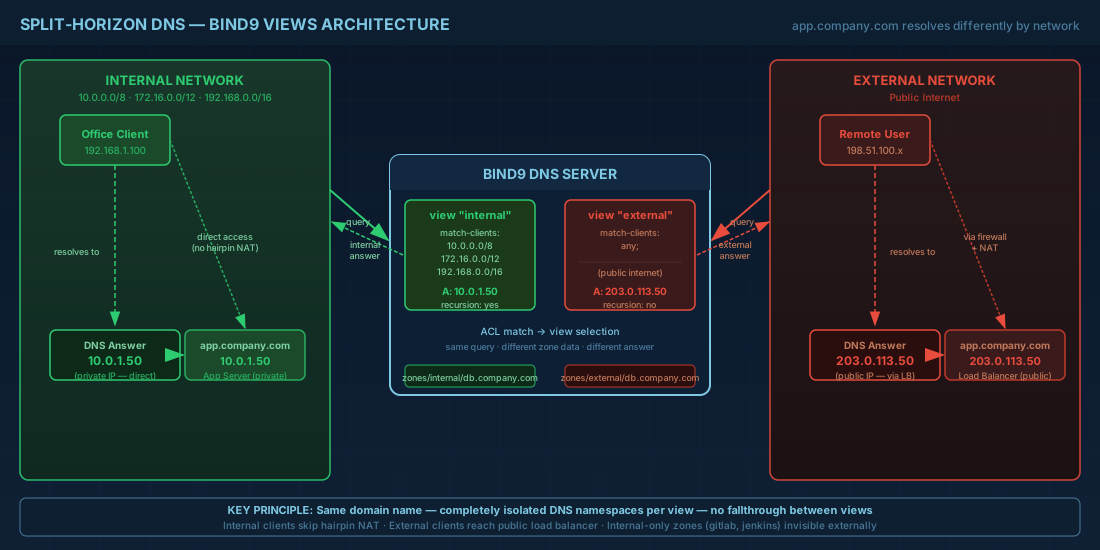
Without split-horizon DNS, when an internal client resolves app.company.com, it gets the public IP (e.g., 203.0.113.50). The client sends the request to the public IP, which hits your firewall's external interface. The firewall has to NAT the packet back inside the network (hairpin). This adds latency, consumes firewall state table entries, and breaks when the firewall does not support hairpin NAT — which many do not by default.
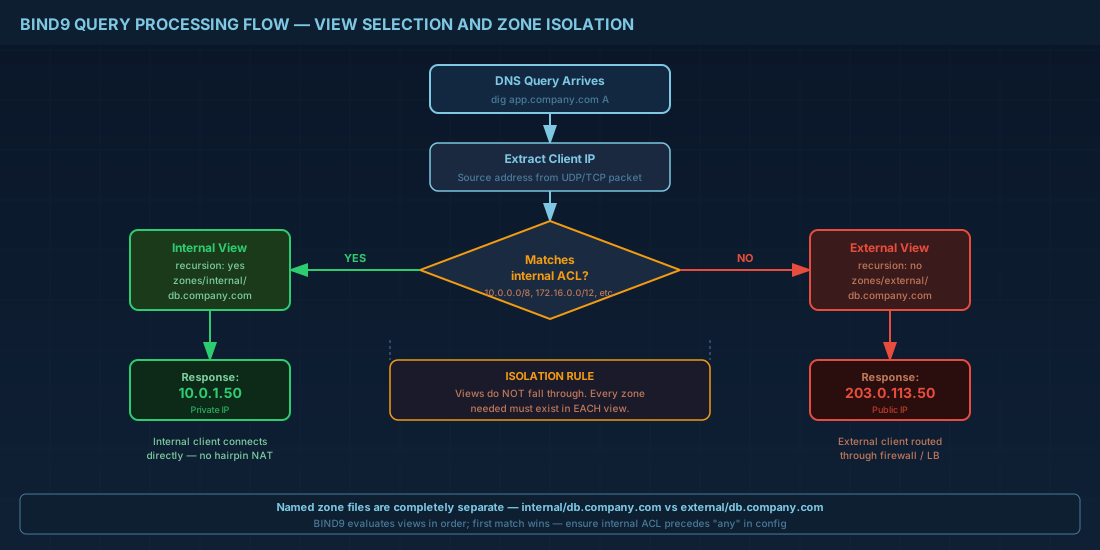
With split-horizon DNS: internal clients get 10.0.1.50 (the private IP). External clients get 203.0.113.50. Same domain, different answers, no hairpin.
BIND9 Views: The Architecture
BIND9 views evaluate queries against ACLs and serve different zone data based on the match. Each view is a self-contained DNS namespace — it has its own zones, its own cache, and its own recursion settings.
# Install BIND9
# RHEL 9 / Rocky / Alma
sudo dnf install -y bind bind-utils

# Debian 12 / Ubuntu 24.04
sudo apt install -y bind9 bind9utils dnsutils

# Enable and start
sudo systemctl enable --now named  # RHEL
sudo systemctl enable --now bind9  # Debian
Complete Split-Horizon Configuration
# /etc/named.conf (RHEL) or /etc/bind/named.conf (Debian)

# Define ACLs for network classification
acl "internal-networks" {
    10.0.0.0/8;
    172.16.0.0/12;
    192.168.0.0/16;
    localhost;
};

acl "vpn-networks" {
    10.99.0.0/24;  # WireGuard mesh
};

# Logging configuration
logging {
    channel default_log {
        file "/var/log/named/default.log" versions 5 size 50m;
        severity info;
        print-time yes;
        print-severity yes;
        print-category yes;
    };
    channel query_log {
        file "/var/log/named/queries.log" versions 5 size 100m;
        severity dynamic;
        print-time yes;
    };
    category default { default_log; };
    category queries { query_log; };
};

# ==========================================
# INTERNAL VIEW — for office/VPN clients
# ==========================================
view "internal" {
    match-clients { internal-networks; vpn-networks; };
    match-destinations { any; };

    # Allow recursion for internal clients
    recursion yes;
    allow-recursion { internal-networks; vpn-networks; };

    # Internal version of the zone
    zone "company.com" IN {
        type master;
        file "/etc/named/zones/internal/db.company.com";
        allow-update { none; };
    };

    # Reverse DNS for internal networks
    zone "0.10.in-addr.arpa" IN {
        type master;
        file "/etc/named/zones/internal/db.10.0";
        allow-update { none; };
    };

    # Internal-only zones (not visible externally)
    zone "internal.company.com" IN {
        type master;
        file "/etc/named/zones/internal/db.internal.company.com";
        allow-update { none; };
    };

    # Forward everything else to upstream
    zone "." IN {
        type forward;
        forwarders { 10.0.0.1; };  # Your Unbound resolver
    };
};

# ==========================================
# EXTERNAL VIEW — for the public internet
# ==========================================
view "external" {
    match-clients { any; };
    match-destinations { any; };

    # No recursion for external clients
    recursion no;

    # External version of the zone
    zone "company.com" IN {
        type master;
        file "/etc/named/zones/external/db.company.com";
        allow-update { none; };
    };

    # No access to internal zones from external view
};
Zone Files: Internal vs External
# /etc/named/zones/internal/db.company.com
$TTL 3600
@   IN  SOA ns1.company.com. admin.company.com. (
        2026022501  ; Serial (YYYYMMDDNN)
        3600        ; Refresh
        900         ; Retry
        604800      ; Expire
        300         ; Negative TTL
)

; Name servers
@       IN  NS  ns1.company.com.
@       IN  NS  ns2.company.com.

; Name server addresses (INTERNAL)
ns1     IN  A   10.0.0.2
ns2     IN  A   10.0.0.3

; Web services — INTERNAL IPs
@       IN  A   10.0.1.50
www     IN  A   10.0.1.50
app     IN  A   10.0.1.51
api     IN  A   10.0.1.52

; Mail
mail    IN  A   10.0.2.10
@       IN  MX  10 mail.company.com.

; Internal services (not in external zone)
gitlab    IN  A   10.0.3.10
jenkins   IN  A   10.0.3.11
grafana   IN  A   10.0.3.12
vault     IN  A   10.0.3.13

; Wildcard for internal apps
*.apps    IN  A   10.0.1.60
# /etc/named/zones/external/db.company.com
$TTL 3600
@ IN SOA ns1.company.com. admin.company.com. (
2026022501 ; Serial — MUST match internal for sanity
3600
900
604800
300
)
; Name servers
@ IN NS ns1.company.com.
@ IN NS ns2.company.com.
; Name server addresses (PUBLIC)
ns1 IN A 203.0.113.2
ns2 IN A 203.0.113.3
; Web services — PUBLIC IPs
@ IN A 203.0.113.50
www IN A 203.0.113.50
app IN A 203.0.113.51
api IN A 203.0.113.52
; Mail
mail IN A 203.0.113.60
@ IN MX 10 mail.company.com.
; SPF, DKIM, DMARC for email
@ IN TXT "v=spf1 mx ip4:203.0.113.60 -all"
_dmarc IN TXT "v=DMARC1; p=reject; rua=mailto:dmarc@company.com"
; CAA record — restrict certificate issuance
@ IN CAA 0 issue "letsencrypt.org"
; NO gitlab, jenkins, grafana, vault — internal onlyThe Gotcha: Every Zone in Every View
This is the single most common mistake with BIND9 views. If a zone exists in the internal view but not the external view, external clients querying for that zone get a REFUSED response instead of being forwarded. BIND9 does not fall through from one view to another — each view is completely isolated.
# WRONG — internal.company.com only in internal view
# External clients get REFUSED for *.internal.company.com

# CORRECT — add a stub or empty zone to external view
view "external" {
    # Return NXDOMAIN for internal domains (don't leak info)
    zone "internal.company.com" IN {
        type master;
        file "/etc/named/zones/external/db.internal.empty";
    };
};

# /etc/named/zones/external/db.internal.empty
$TTL 300
@   IN  SOA ns1.company.com. admin.company.com. (
        1 3600 900 604800 300
)
@   IN  NS  ns1.company.com.
; Empty zone — all queries return NXDOMAIN
Automation: Keep Internal and External Zones Synchronized
#!/bin/bash
# sync-dns-zones.sh — Generate internal/external zones from a single source

set -euo pipefail

DOMAIN="company.com"
SERIAL=$(date +%Y%m%d)01
INTERNAL_DIR="/etc/named/zones/internal"
EXTERNAL_DIR="/etc/named/zones/external"

# Source of truth: a YAML file with all records
# records.yaml:
# - name: www
#   internal: 10.0.1.50
#   external: 203.0.113.50
#   type: A
# - name: gitlab
#   internal: 10.0.3.10
#   external: null  # internal only
#   type: A

generate_zone() {
    local view="$1"
    local file="$2"

    cat > "$file" << EOF
\$TTL 3600
@   IN  SOA ns1.${DOMAIN}. admin.${DOMAIN}. (
        ${SERIAL} 3600 900 604800 300
)
@   IN  NS  ns1.${DOMAIN}.
@   IN  NS  ns2.${DOMAIN}.
EOF

    # Parse records and output the appropriate IP for the view
    python3 -c "
import yaml, sys
with open('records.yaml') as f:
    records = yaml.safe_load(f)
for r in records:
    ip = r.get('${view}')
    if ip:
        print(f\"{r['name']:12s} IN  {r['type']}  {ip}\")
" >> "$file"
}

generate_zone "internal" "$INTERNAL_DIR/db.$DOMAIN"
generate_zone "external" "$EXTERNAL_DIR/db.$DOMAIN"

# Verify syntax
named-checkzone "$DOMAIN" "$INTERNAL_DIR/db.$DOMAIN"
named-checkzone "$DOMAIN" "$EXTERNAL_DIR/db.$DOMAIN"

# Reload BIND
rndc reload
echo "DNS zones updated and reloaded (serial: $SERIAL)"
Testing Split-Horizon from Different Vantage Points
# Query from the internal network perspective
dig @10.0.0.2 app.company.com +short
# Expected: 10.0.1.51

# Query from the external network perspective
# (use a public IP or test from outside)
dig @203.0.113.2 app.company.com +short
# Expected: 203.0.113.51

# Force BIND to show which view served the query
dig @10.0.0.2 app.company.com +nsid

# Check the cache for each view
rndc dumpdb -all
# View-specific caches are separated in the dump file
grep -A5 "view internal" /var/cache/bind/named_dump.db
grep -A5 "view external" /var/cache/bind/named_dump.db

# Verify internal-only records are NOT visible externally
dig @203.0.113.2 gitlab.company.com +short
# Expected: empty (NXDOMAIN)

dig @10.0.0.2 gitlab.company.com +short
# Expected: 10.0.3.10
Let's Encrypt DNS-01 with Split-Horizon
Split-horizon creates a challenge for automated TLS certificates. Let's Encrypt's DNS-01 challenge requires a _acme-challenge TXT record visible from the public internet. If your external view does not include it, validation fails.
# Solution: Delegate _acme-challenge to an external DNS provider
# In your EXTERNAL zone file:
_acme-challenge     IN  NS  ns1.acme-provider.com.
_acme-challenge.www IN  NS  ns1.acme-provider.com.

# Now certbot/acme.sh creates TXT records at the provider,
# Let's Encrypt queries the provider directly, bypassing your BIND views

# Using acme.sh with Cloudflare for DNS-01:
acme.sh --issue \
    --dns dns_cf \
    -d company.com \
    -d "*.company.com" \
    --server letsencrypt
Split-Horizon with Alternatives to BIND9
# dnsmasq (simpler, for small environments)
# dnsmasq returns different answers based on the requesting interface

# /etc/dnsmasq.conf
listen-address=10.0.0.1
listen-address=203.0.113.2

# Internal answers (served to 10.x clients)
address=/app.company.com/10.0.1.51

# For external, use a separate dnsmasq instance or iptables DNAT

# ---

# CoreDNS (cloud-native, plugin-based)
# Corefile with view plugin:
company.com {
    view internal {
        expr incidr(client_ip(), '10.0.0.0/8')
    }
    file /etc/coredns/zones/internal/db.company.com {
        upstream
    }
}

company.com {
    file /etc/coredns/zones/external/db.company.com
}
DNSSEC and Split-Horizon: The Complexity
DNSSEC with split-horizon is technically possible but operationally complex. The internal and external views return different A records for the same name, which means they need different RRSIG signatures. You must sign each view's zone independently with the same KSK (so the DS record in the parent zone works) but different ZSKs for the different record sets.
# If you need DNSSEC with split-horizon:
# 1. Generate a single KSK for the domain
dnssec-keygen -a ECDSAP256SHA256 -fKSK company.com

# 2. Generate separate ZSKs for each view
dnssec-keygen -a ECDSAP256SHA256 company.com  # internal
dnssec-keygen -a ECDSAP256SHA256 company.com  # external

# 3. Sign each view's zone separately
dnssec-signzone -o company.com -k Kcompany.com.+013+xxxxx \
    /etc/named/zones/internal/db.company.com \
    Kcompany.com.+013+yyyyy  # internal ZSK

dnssec-signzone -o company.com -k Kcompany.com.+013+xxxxx \
    /etc/named/zones/external/db.company.com \
    Kcompany.com.+013+zzzzz  # external ZSK

# IMPORTANT: This is error-prone. Most teams choose NOT to DNSSEC-sign
# split-horizon zones unless compliance requires it.
Split-horizon DNS is one of those patterns that sounds complicated until you set it up — then you wonder why you tolerated hairpin NAT for so long. BIND9 views give you complete isolation between internal and external DNS namespaces with a single server. The key discipline is keeping both views synchronized and testing from both vantage points after every change.