DNS is the last piece of infrastructure most teams still manage by clicking through a web UI. Every other part of the stack — servers, networking, load balancers, monitoring — is defined in code, version-controlled, and deployed through CI/CD. But DNS records? Someone logs into Cloudflare, types an IP, and hopes they got it right. One typo in a CNAME and your application is unreachable. No audit trail. No rollback. No peer review. This guide shows you how to bring DNS under the same engineering discipline as the rest of your infrastructure.
Why DNS-as-Code Matters
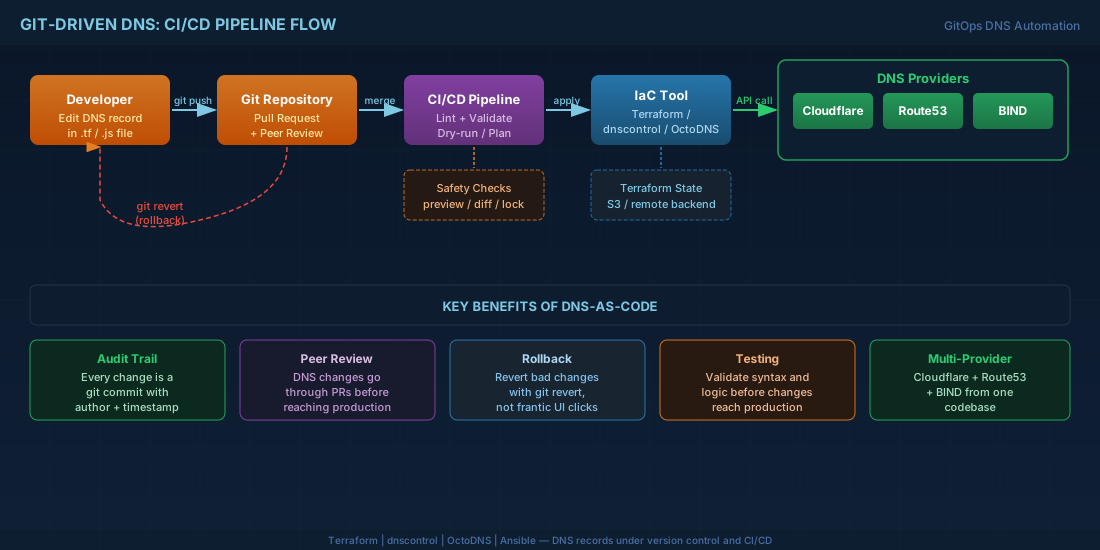
- Audit trail — every change is a git commit with author, timestamp, and reason
- Peer review — DNS changes go through pull requests before applying
- Rollback — revert a bad change with
git revert, not frantic UI clicking - Testing — validate syntax and logic before changes reach production
- Multi-provider — manage Cloudflare, Route53, and BIND from one codebase
- Disaster recovery — rebuild your entire DNS infrastructure from a git repo
Tool Comparison: Choose Your Approach
Three primary approaches exist, each with different tradeoffs:
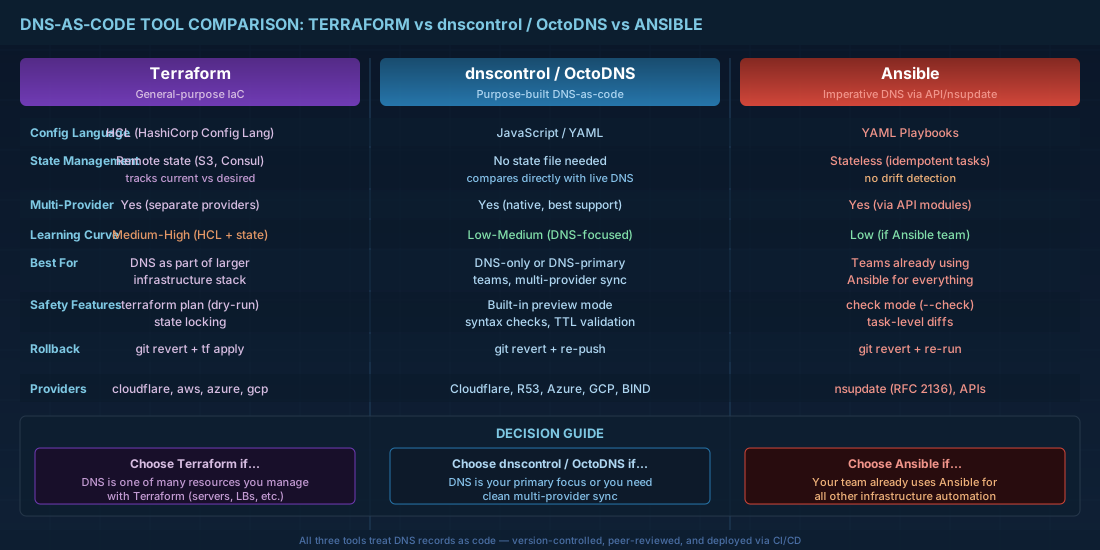
- Terraform — general-purpose IaC; manages DNS as one resource among many; best when DNS is part of a larger infrastructure stack
- OctoDNS / dnscontrol — purpose-built DNS-as-code tools; simpler than Terraform for DNS-only workflows; better multi-provider sync
- Ansible — imperative DNS management via nsupdate or API modules; best for teams already using Ansible for everything
Terraform: DNS Records as Infrastructure
Cloudflare Provider
# providers.tf
terraform {
  required_providers {
    cloudflare = {
      source  = "cloudflare/cloudflare"
      version = "~> 4.0"
    }
  }

  backend "s3" {
    bucket = "company-terraform-state"
    key    = "dns/terraform.tfstate"
    region = "eu-west-1"
  }
}

provider "cloudflare" {
  api_token = var.cloudflare_api_token
}

variable "cloudflare_api_token" {
  type      = string
  sensitive = true
}

variable "zone_id" {
  type    = string
  default = "abc123def456..."
}
# records.tf — Define all DNS records
resource "cloudflare_record" "root_a" {
zone_id = var.zone_id
name = "@"
content = "203.0.113.50"
type = "A"
ttl = 3600
proxied = true
}
resource "cloudflare_record" "www" {
zone_id = var.zone_id
name = "www"
content = "company.com"
type = "CNAME"
ttl = 1 # Auto TTL when proxied
proxied = true
}
resource "cloudflare_record" "api" {
zone_id = var.zone_id
name = "api"
content = "203.0.113.51"
type = "A"
ttl = 300 # Lower TTL for API endpoint (faster failover)
proxied = false
}
# MX records
resource "cloudflare_record" "mx_primary" {
zone_id = var.zone_id
name = "@"
content = "mail.company.com"
type = "MX"
ttl = 3600
priority = 10
}
# SPF
resource "cloudflare_record" "spf" {
zone_id = var.zone_id
name = "@"
content = "v=spf1 mx ip4:203.0.113.60 include:_spf.google.com -all"
type = "TXT"
ttl = 3600
}
# DMARC
resource "cloudflare_record" "dmarc" {
zone_id = var.zone_id
name = "_dmarc"
content = "v=DMARC1; p=reject; rua=mailto:dmarc@company.com"
type = "TXT"
ttl = 3600
}
# Dynamic records from a map (DRY pattern)
variable "services" {
type = map(object({
ip = string
ttl = number
proxied = bool
}))
default = {
"grafana" = { ip = "203.0.113.70", ttl = 3600, proxied = true }
"jenkins" = { ip = "203.0.113.71", ttl = 3600, proxied = true }
"registry" = { ip = "203.0.113.72", ttl = 300, proxied = false }
"vpn" = { ip = "203.0.113.80", ttl = 300, proxied = false }
}
}
resource "cloudflare_record" "services" {
for_each = var.services
zone_id = var.zone_id
name = each.key
content = each.value.ip
type = "A"
ttl = each.value.proxied ? 1 : each.value.ttl
proxied = each.value.proxied
}AWS Route53 Provider
# route53.tf
resource "aws_route53_record" "app" {
  zone_id = data.aws_route53_zone.main.zone_id
  name    = "app.company.com"
  type    = "A"

  alias {
    name                   = aws_lb.app.dns_name
    zone_id                = aws_lb.app.zone_id
    evaluate_target_health = true
  }
}

# Weighted routing for canary deployments
resource "aws_route53_record" "api_stable" {
  zone_id = data.aws_route53_zone.main.zone_id
  name    = "api.company.com"
  type    = "A"
  ttl     = 60

  weighted_routing_policy {
    weight = 90
  }

  set_identifier = "stable"
  records        = ["203.0.113.51"]
}

resource "aws_route53_record" "api_canary" {
  zone_id = data.aws_route53_zone.main.zone_id
  name    = "api.company.com"
  type    = "A"
  ttl     = 60

  weighted_routing_policy {
    weight = 10
  }

  set_identifier = "canary"
  records        = ["203.0.113.52"]
}
dnscontrol: Purpose-Built DNS-as-Code
dnscontrol was built by StackExchange specifically for managing DNS across multiple providers. It uses JavaScript for configuration and has built-in safety checks that Terraform lacks.
// dnsconfig.js
var REG_NONE = NewRegistrar("none");
var DSP_CF = NewDnsProvider("cloudflare");
var DSP_R53 = NewDnsProvider("route53");

// Convenience functions
var defined_ttl = 3600;

D("company.com", REG_NONE, DnsProvider(DSP_CF),
    DefaultTTL(defined_ttl),

    // Web
    A("@", "203.0.113.50", CF_PROXY_ON),
    CNAME("www", "company.com.", CF_PROXY_ON),
    A("api", "203.0.113.51", TTL(300)),

    // Mail
    MX("@", 10, "mail.company.com."),
    TXT("@", "v=spf1 mx ip4:203.0.113.60 -all"),
    TXT("_dmarc", "v=DMARC1; p=reject; rua=mailto:dmarc@company.com"),

    // Services
    A("grafana", "203.0.113.70", CF_PROXY_ON),
    A("jenkins", "203.0.113.71", CF_PROXY_ON),
    A("vpn", "203.0.113.80", TTL(300)),

    // CAA
    CAA("@", "issue", "letsencrypt.org"),

    END
);

// Secondary zone on Route53 for redundancy
D("company.com", REG_NONE, DnsProvider(DSP_R53),
    DefaultTTL(defined_ttl),
    A("@", "203.0.113.50"),
    // ... same records but for Route53
    END
);
# Preview changes (dry run)
dnscontrol preview
# Output:
# ******************** Domain: company.com
# ----- Getting nameservers from: cloudflare
# ----- DNS Provider: cloudflare... 2 corrections
# #1: CREATE A api.company.com 203.0.113.51 ttl=300
# #2: MODIFY TXT _dmarc.company.com ...
# Apply changes
dnscontrol push
# Check for configuration errors
dnscontrol checkOctoDNS: Multi-Provider Sync
# config.yaml
providers:
  config:
    class: octodns_bind.ZoneFileSource
    directory: ./zones
    file_extension: .zone

  cloudflare:
    class: octodns_cloudflare.CloudflareProvider
    token: env/CLOUDFLARE_TOKEN

  route53:
    class: octodns_route53.Route53Provider
    access_key_id: env/AWS_ACCESS_KEY_ID
    secret_access_key: env/AWS_SECRET_ACCESS_KEY

zones:
  company.com.:
    sources:
      - config
    targets:
      - cloudflare
      - route53
# zones/company.com.zone — BIND-format zone file as source of truth
$TTL 3600
@ IN A 203.0.113.50
www IN CNAME company.com.
api IN A 203.0.113.51
mail IN A 203.0.113.60
@ IN MX 10 mail.company.com.
@ IN TXT "v=spf1 mx ip4:203.0.113.60 -all"
# Sync (dry run)
octodns-sync --config-file config.yaml
# Sync (apply)
octodns-sync --config-file config.yaml --doitAnsible: Dynamic Updates with nsupdate
# dns-records.yml — Ansible playbook for BIND9 dynamic updates
---
- name: Manage DNS records via nsupdate
  hosts: localhost
  vars:
    dns_server: "10.0.0.2"
    tsig_key_name: "ansible-update"
    tsig_key_secret: "{{ vault_tsig_secret }}"
    tsig_algorithm: "hmac-sha256"
    zone: "company.com"

    records:
      - name: "web01"
        type: "A"
        value: "10.0.1.10"
        ttl: 3600
      - name: "web02"
        type: "A"
        value: "10.0.1.11"
        ttl: 3600
      - name: "db01"
        type: "A"
        value: "10.0.2.10"
        ttl: 3600
      - name: "lb"
        type: "CNAME"
        value: "web01.company.com."
        ttl: 300

  tasks:
    - name: Update DNS A records
      community.general.nsupdate:
        server: "{{ dns_server }}"
        zone: "{{ zone }}"
        record: "{{ item.name }}.{{ zone }}"
        type: "{{ item.type }}"
        value: "{{ item.value }}"
        ttl: "{{ item.ttl }}"
        key_name: "{{ tsig_key_name }}"
        key_secret: "{{ tsig_key_secret }}"
        key_algorithm: "{{ tsig_algorithm }}"
        state: present
      loop: "{{ records }}"
      tags: [dns-update]
CI/CD Pipeline: Review, Test, Deploy
# .github/workflows/dns.yml
name: DNS Changes
on:
  pull_request:
    paths: ['dns/**']
  push:
    branches: [main]
    paths: ['dns/**']

jobs:
  validate:
    runs-on: ubuntu-latest
    steps:
      - uses: actions/checkout@v4

      - name: Install dnscontrol
        run: |
          curl -fsSL https://github.com/StackExchange/dnscontrol/releases/latest/download/dnscontrol-Linux -o dnscontrol
          chmod +x dnscontrol && sudo mv dnscontrol /usr/local/bin/

      - name: Syntax check
        run: dnscontrol check

      - name: Preview changes
        run: dnscontrol preview
        env:
          CLOUDFLARE_API_TOKEN: ${{ secrets.CF_TOKEN }}

      - name: Comment PR with preview
        if: github.event_name == 'pull_request'
        uses: actions/github-script@v7
        with:
          script: |
            const { execSync } = require('child_process');
            const preview = execSync('dnscontrol preview 2>&1').toString();
            github.rest.issues.createComment({
              issue_number: context.issue.number,
              owner: context.repo.owner,
              repo: context.repo.repo,
              body: `## DNS Preview\n\`\`\`\n${preview}\n\`\`\``
            });

  apply:
    needs: validate
    if: github.ref == 'refs/heads/main'
    runs-on: ubuntu-latest
    environment: production
    steps:
      - uses: actions/checkout@v4

      - name: Install dnscontrol
        run: |
          curl -fsSL https://github.com/StackExchange/dnscontrol/releases/latest/download/dnscontrol-Linux -o dnscontrol
          chmod +x dnscontrol && sudo mv dnscontrol /usr/local/bin/

      - name: Apply DNS changes
        run: dnscontrol push
        env:
          CLOUDFLARE_API_TOKEN: ${{ secrets.CF_TOKEN }}

      - name: Verify critical records
        run: |
          for domain in company.com www.company.com api.company.com; do
            result=$(dig +short "$domain" @1.1.1.1)
            if [ -z "$result" ]; then
              echo "ALERT: $domain returned empty!" && exit 1
            fi
            echo "OK: $domain → $result"
          done
RFC 2136: TSIG-Authenticated Dynamic Updates
# Generate a TSIG key for authenticated updates
tsig-keygen -a hmac-sha256 ansible-update > /etc/named/keys/ansible-update.key

# Output:
# key "ansible-update" {
#     algorithm hmac-sha256;
#     secret "base64encodedkey==";
# };

# Add to BIND9 config
include "/etc/named/keys/ansible-update.key";

zone "company.com" {
    type master;
    file "/var/named/db.company.com";
    allow-update { key "ansible-update"; };
};

# Test with nsupdate
nsupdate -y hmac-sha256:ansible-update:base64encodedkey== << 'EOF'
server 10.0.0.2
zone company.com
update add test.company.com 300 A 10.0.99.1
send
EOF

# Verify
dig @10.0.0.2 test.company.com +short
# 10.0.99.1
Safety Patterns for DNS Automation
# 1. TTL lowering before migrations
# Before changing an IP, lower TTL 48 hours in advance
# Old: api.company.com  3600  A  203.0.113.51
# Step 1: api.company.com  60  A  203.0.113.51  (wait 48h)
# Step 2: api.company.com  60  A  203.0.113.52  (new IP)
# Step 3: api.company.com  3600  A  203.0.113.52  (restore TTL)

# 2. Change velocity limits
# Alert if a single commit modifies more than N records
CHANGED=$(dnscontrol preview 2>&1 | grep -c "CREATE\|MODIFY\|DELETE")
if [ "$CHANGED" -gt 10 ]; then
    echo "SAFETY: $CHANGED records changed. Manual approval required."
    exit 1
fi

# 3. Critical record protection
# Never delete records matching these patterns without manual approval
PROTECTED="^@ IN (A|MX|NS|SOA)|^www IN|^mail IN"
DELETIONS=$(dnscontrol preview 2>&1 | grep "DELETE" | grep -cE "$PROTECTED")
if [ "$DELETIONS" -gt 0 ]; then
    echo "BLOCKED: Attempting to delete protected records."
    exit 1
fi
DNS-as-code is not about making DNS management fancy — it is about making it safe. When DNS changes go through pull requests, get syntax-checked in CI, show a preview of what will change, and can be reverted with git revert, you eliminate the entire class of "someone fat-fingered a DNS record and the site was down for an hour" incidents. Pick any tool from this guide — Terraform, dnscontrol, OctoDNS, Ansible — and stop managing DNS through a web UI.