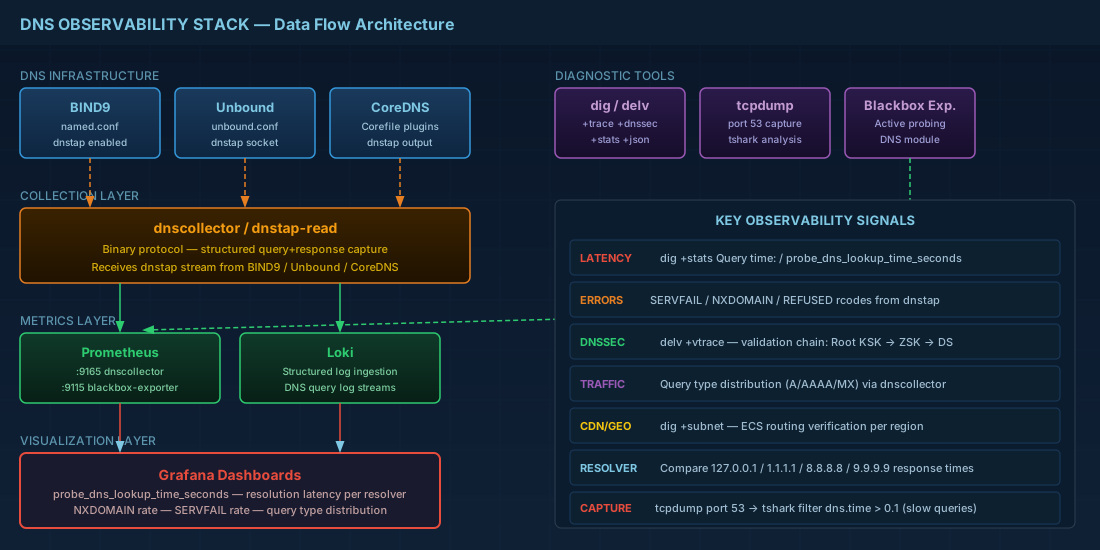
When your application is slow, you check CPU, memory, disk, and network. You check the database query log. You check the application traces. But how often do you check DNS? A misconfigured resolver, a failing DNSSEC chain, or a flapping upstream server can add hundreds of milliseconds to every request — and most monitoring stacks have zero DNS visibility. This guide builds a complete DNS observability practice: from expert-level dig techniques through dnstap streaming to Prometheus dashboards that catch problems before users notice.
dig Mastery: Beyond the Basics
Every engineer knows dig example.com. Here is what most do not know:
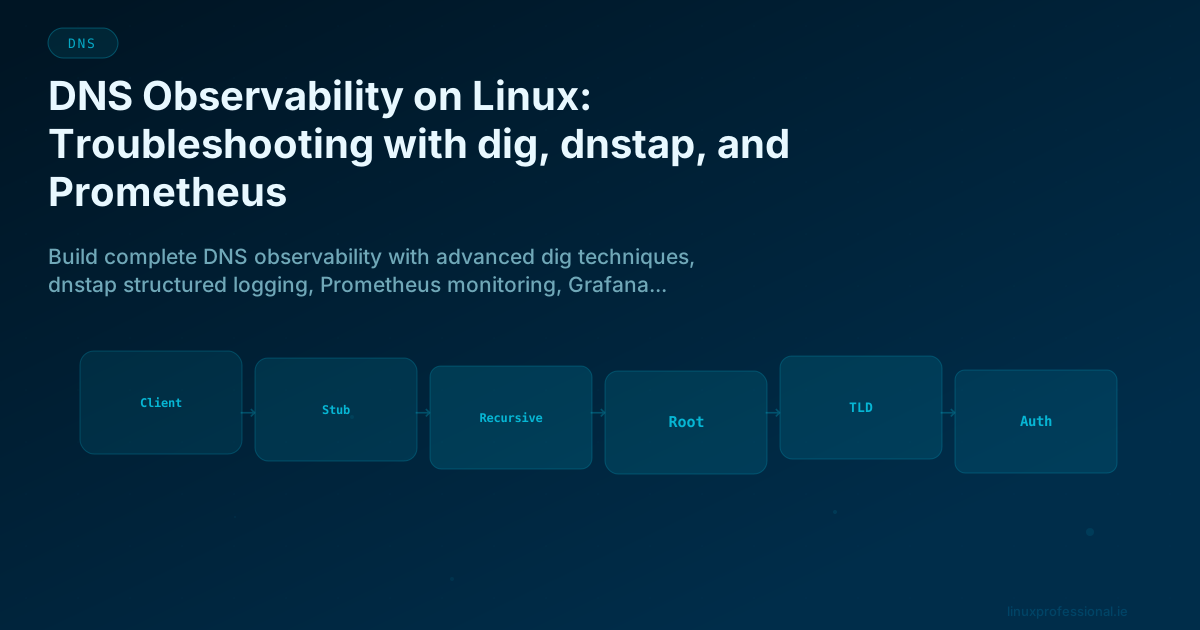
Trace the Full Resolution Path
# +trace follows the entire resolution chain from root servers
dig +trace example.com

# Output shows each delegation step:
# .                   518400 IN NS a.root-servers.net.
# com.                172800 IN NS a.gtld-servers.net.
# example.com.        172800 IN NS ns1.example.com.
# example.com.        300    IN A  93.184.216.34

# This is invaluable for diagnosing delegation failures
Measure Resolution Time at Every Hop
# Query specific servers to isolate where latency lives
dig @a.root-servers.net com. NS +norecurse +stats | grep "Query time"
# Query time: 12 msec

dig @a.gtld-servers.net example.com NS +norecurse +stats | grep "Query time"
# Query time: 24 msec

dig @ns1.example.com example.com A +norecurse +stats | grep "Query time"
# Query time: 45 msec

# Compare recursive resolver performance
for ns in 127.0.0.1 1.1.1.1 8.8.8.8 9.9.9.9; do
    time=$(dig @$ns example.com +stats | grep "Query time" | awk '{print $4}')
    echo "$ns: ${time}ms"
done
EDNS Client Subnet Testing
# Test how CDNs route based on your source IP
# +subnet tells the resolver to include your subnet in the query
dig @8.8.8.8 cdn.example.com +subnet=203.0.113.0/24
# Shows what IP the CDN would return for clients in that subnet

dig @8.8.8.8 cdn.example.com +subnet=198.51.100.0/24
# Different subnet may get a different answer (geo-routing)
Identify Which Server Answered
# +nsid requests the Name Server Identifier
dig @1.1.1.1 example.com +nsid
# Shows which Cloudflare PoP answered (e.g., "NSID: lhr01" for London)

# +identify shows the server address in the response
dig @1.1.1.1 example.com +identify

# Check for EDNS cookie support
dig @1.1.1.1 example.com +cookie
Batch Queries from a File
# Create a query file
cat > /tmp/queries.txt << 'EOF'
example.com A
example.com AAAA
example.com MX
example.com TXT
mail.example.com A
www.example.com CNAME
_dmarc.example.com TXT
EOF

# Run all queries
dig -f /tmp/queries.txt +short

# With timing for each
dig -f /tmp/queries.txt +stats 2>&1 | grep -E "(^;|Query time)"
YAML/JSON Output for Scripting
# JSON output (dig 9.18+)
dig example.com +json | jq '.[] | .answer_section[]'

# Compact output for scripting
dig example.com +short +ttlid

# Specific field extraction
dig example.com MX +short | sort -n
# 10 mail.example.com.
# 20 mail2.example.com.
delv: DNSSEC Chain Validation
delv (DNS Evaluation Lookup Validation) does what dig +dnssec cannot — it validates the entire DNSSEC trust chain and reports exactly where validation fails.
# Full DNSSEC validation
delv example.com

# Output for valid DNSSEC:
# ; fully validated
# example.com.    300 IN A 93.184.216.34
# example.com.    300 IN RRSIG A ...

# Output for broken DNSSEC:
delv dnssec-failed.org
# ;; resolution failed: SERVFAIL
# ;; validating dnssec-failed.org/A: no valid signature found

# Trace the validation chain
delv +vtrace example.com
# Shows each step of DNSSEC validation:
# - Root KSK → Root ZSK → .com DS
# - .com KSK → .com ZSK → example.com DS
# - example.com KSK → example.com ZSK → A RRSIG

# Test specific trust anchor
delv @127.0.0.1 +trust-anchor=/var/lib/unbound/root.key example.com
drill: Lightweight Alternative to dig
# Install drill (part of ldns tools)
sudo dnf install -y ldns-utils  # RHEL
sudo apt install -y ldnsutils   # Debian

# Basic query
drill example.com

# DNSSEC trace
drill -DT example.com
# Shows DNSSEC trust chain with visual indicators

# Chase DNSSEC signatures
drill -S example.com
# Follows the chain of trust and validates signatures

# Reverse lookup
drill -x 93.184.216.34
dnstap: Structured DNS Logging
Traditional DNS logging (query logs) produces massive text files that are difficult to parse. dnstap is a binary protocol that captures DNS queries and responses in a structured, efficient format. It is supported by BIND9, Unbound, CoreDNS, and Knot Resolver.
Enable dnstap in Unbound
# /etc/unbound/unbound.conf
dnstap:
    dnstap-enable: yes
    dnstap-socket-path: "/var/run/unbound/dnstap.sock"
    dnstap-send-identity: yes
    dnstap-send-version: yes
    dnstap-log-resolver-query-messages: yes
    dnstap-log-resolver-response-messages: yes
    dnstap-log-client-query-messages: yes
    dnstap-log-client-response-messages: yes
Enable dnstap in BIND9
# /etc/named.conf
dnstap {
    client;
    resolver;
    auth;
    forwarder;
};
dnstap-output unix "/var/run/named/dnstap.sock";
Process dnstap with dnstap-read and dnscollector
# Read dnstap data directly
dnstap-read /var/log/dns/dnstap.log

# Install dnscollector for production processing
go install github.com/dmachard/go-dnscollector@latest

# dnscollector config: receive dnstap, export to Prometheus + Loki
cat > /etc/dnscollector/config.yml << 'EOF'
global:
  trace:
    verbose: false

multiplexer:
  collectors:
    - name: dnstap-collector
      dnstap:
        listen-ip: 0.0.0.0
        listen-port: 6000

  loggers:
    - name: prometheus-logger
      prometheus:
        listen-ip: 0.0.0.0
        listen-port: 9165

    - name: loki-logger
      lokiclient:
        server-url: "http://loki:3100/loki/api/v1/push"
        job-name: "dnscollector"

  routes:
    - from: [dnstap-collector]
      to: [prometheus-logger, loki-logger]
EOF

# Run dnscollector
dnscollector -config /etc/dnscollector/config.yml
tcpdump and tshark: When dnstap Is Not Available
# Capture DNS packets on port 53
sudo tcpdump -i any port 53 -nn -l

# Capture to file for analysis
sudo tcpdump -i any port 53 -w /tmp/dns-capture.pcap -c 10000

# Parse with tshark (Wireshark CLI)
tshark -r /tmp/dns-capture.pcap -T fields \
    -e frame.time \
    -e ip.src \
    -e dns.qry.name \
    -e dns.qry.type \
    -e dns.flags.rcode \
    -e dns.time \
    -Y "dns.flags.response == 1" | \
    sort -t$'\t' -k6 -rn | head -20

# Real-time DNS query monitoring
sudo tshark -i any -f "port 53" -T fields \
    -e ip.src -e dns.qry.name -e dns.qry.type \
    -Y "dns.flags.response == 0" 2>/dev/null

# Find slow DNS responses (>100ms)
tshark -r /tmp/dns-capture.pcap \
    -Y "dns.flags.response == 1 && dns.time > 0.1" \
    -T fields -e dns.qry.name -e dns.time | sort -t$'\t' -k2 -rn
Prometheus DNS Monitoring
Blackbox Exporter: Active DNS Probing
# /etc/blackbox_exporter/config.yml
modules:
  dns_internal:
    prober: dns
    timeout: 5s
    dns:
      query_name: "example.com"
      query_type: "A"
      transport_protocol: "udp"
      preferred_ip_protocol: "ip4"
      valid_rcodes:
        - NOERROR
      validate_answer_rrs:
        fail_if_not_matches_regexp:
          - ".*93\\.184\\.216\\.34.*"

  dns_mx:
    prober: dns
    dns:
      query_name: "company.com"
      query_type: "MX"
      valid_rcodes:
        - NOERROR

  dns_soa:
    prober: dns
    dns:
      query_name: "company.com"
      query_type: "SOA"
      valid_rcodes:
        - NOERROR
# Prometheus scrape config
scrape_configs:
- job_name: 'dns-probes'
metrics_path: /probe
params:
module: [dns_internal]
static_configs:
- targets:
- '10.0.0.1' # Internal resolver
- '10.0.0.2' # Secondary resolver
- '1.1.1.1' # Cloudflare (baseline)
- '8.8.8.8' # Google (baseline)
relabel_configs:
- source_labels: [__address__]
target_label: __param_target
- source_labels: [__param_target]
target_label: instance
- target_label: __address__
replacement: blackbox-exporter:9115Grafana Dashboard Queries
# DNS resolution latency by resolver
probe_dns_lookup_time_seconds{job="dns-probes"}

# DNS probe success rate
avg_over_time(probe_success{job="dns-probes"}[5m]) * 100

# Unbound cache hit ratio (via unbound_exporter)
unbound_response_total{type="cache_hit"} /
(unbound_response_total{type="cache_hit"} + unbound_response_total{type="cache_miss"})

# BIND9 query rate by type (via bind_exporter)
rate(bind_incoming_queries_total[5m])

# CoreDNS SERVFAIL rate
rate(coredns_dns_responses_total{rcode="SERVFAIL"}[5m])
Application-Level DNS Measurement
# Measure DNS impact on HTTP requests with curl
curl -w "DNS: %{time_namelookup}s\nConnect: %{time_connect}s\nTLS: %{time_appconnect}s\nTotal: %{time_total}s\n" \
    -o /dev/null -s https://api.company.com/health

# Output:
# DNS: 0.023s
# Connect: 0.045s
# TLS: 0.089s
# Total: 0.124s

# DNS is 18% of total request time in this example

# Batch test across multiple endpoints
for url in api.company.com app.company.com cdn.company.com mail.company.com; do
    dns_time=$(curl -w "%{time_namelookup}" -o /dev/null -s "https://$url/")
    echo "$url: ${dns_time}s"
done

# Build SLIs around DNS resolution time
# SLI: 99th percentile of DNS resolution time < 50ms
# SLO: 99.9% of requests meet the SLI over a rolling 30-day window
Systematic Troubleshooting Workflow
#!/bin/bash
# dns-troubleshoot.sh — Systematic DNS diagnosis
# Usage: ./dns-troubleshoot.sh example.com

DOMAIN="${1:?Usage: $0 }"
RESOLVER=$(awk '/^nameserver/ {print $2; exit}' /etc/resolv.conf)

echo "=== DNS Troubleshooting: $DOMAIN ==="
echo "System resolver: $RESOLVER"
echo ""

# Step 1: Can the system resolver resolve it?
echo "--- Step 1: Local resolution ---"
RESULT=$(dig @$RESOLVER "$DOMAIN" +short +time=5)
RCODE=$(dig @$RESOLVER "$DOMAIN" +noall +comments | grep -oP 'status: \K\w+')
echo "Result: $RESULT"
echo "RCODE: $RCODE"

if [ "$RCODE" == "SERVFAIL" ]; then
    echo "SERVFAIL — possible DNSSEC failure or upstream timeout"
    echo "Testing without DNSSEC validation:"
    dig @$RESOLVER "$DOMAIN" +cd +short
fi

# Step 2: Can a public resolver resolve it?
echo ""
echo "--- Step 2: Public resolver test ---"
for ns in 1.1.1.1 8.8.8.8 9.9.9.9; do
    result=$(dig @$ns "$DOMAIN" +short +time=3 2>/dev/null)
    echo "$ns: ${result:-FAILED}"
done

# Step 3: Query the authoritative servers directly
echo ""
echo "--- Step 3: Authoritative server test ---"
NS_SERVERS=$(dig NS "$DOMAIN" +short 2>/dev/null)
if [ -z "$NS_SERVERS" ]; then
    # Try parent zone
    PARENT=$(echo "$DOMAIN" | cut -d. -f2-)
    NS_SERVERS=$(dig NS "$PARENT" +short 2>/dev/null | head -2)
    echo "No NS for $DOMAIN, checking parent: $PARENT"
fi

for ns in $NS_SERVERS; do
    result=$(dig @$ns "$DOMAIN" A +norecurse +short +time=3 2>/dev/null)
    echo "$ns: ${result:-NO_ANSWER}"
done

# Step 4: DNSSEC validation
echo ""
echo "--- Step 4: DNSSEC check ---"
delv "$DOMAIN" 2>&1 | head -5

# Step 5: Latency
echo ""
echo "--- Step 5: Resolution latency ---"
dig @$RESOLVER "$DOMAIN" +stats 2>&1 | grep "Query time"

echo ""
echo "=== Diagnosis complete ==="
Detecting DNS Security Threats
# Detect DNS tunneling (abnormally long subdomains)
# Legitimate: www.example.com (15 chars)
# Tunnel: aGVsbG8gd29ybGQ.t.example.com (30+ chars per label)

# Alert on queries with labels longer than 50 characters
tshark -i any -f "port 53" -T fields -e dns.qry.name \
    -Y "dns.flags.response == 0" 2>/dev/null | \
    awk -F. '{for(i=1;i<=NF;i++) if(length($i)>50) print}'

# Detect DGA (Domain Generation Algorithm) domains
# High entropy domain names indicate malware C2
tshark -i any -f "port 53" -T fields -e dns.qry.name \
    -Y "dns.flags.response == 0 and dns.flags.rcode == 3" 2>/dev/null | \
    sort | uniq -c | sort -rn | head -20
# High NXDOMAIN rate for random-looking domains = potential DGA

# Monitor for unexpected zone transfers
tshark -i any -f "port 53" -T fields -e ip.src -e dns.qry.name \
    -Y "dns.qry.type == 252" 2>/dev/null
# Type 252 = AXFR (zone transfer) — should only come from known secondaries
DNS observability turns "the network is slow" from a mystery into a diagnosis. When you can see resolution latency per resolver, cache hit ratios over time, SERVFAIL spikes correlated with upstream changes, and query patterns that indicate misconfiguration or attack — you stop guessing and start fixing. Build the dashboard, set the alerts, and never debug a "DNS problem" blind again.