Every DNS query your servers make goes through a resolver. Most teams point /etc/resolv.conf at 8.8.8.8 or 1.1.1.1 and forget about it. That means every hostname your infrastructure resolves — every API call, every package download, every certificate check — is visible to Google or Cloudflare. Running your own recursive resolver with Unbound eliminates that dependency entirely. Your resolver talks directly to the authoritative root servers, caches aggressively, and gives you complete control over DNS behaviour.
Why Unbound Over BIND9 for Recursion
BIND9 can do everything — authoritative serving, recursion, DNSSEC signing, views. Unbound does one thing: recursive resolution. It does it faster, with less memory, and with a dramatically smaller attack surface. The entire Unbound codebase is roughly 100,000 lines versus BIND9's 500,000+. For a security-critical piece of infrastructure that processes every network request, that difference matters.
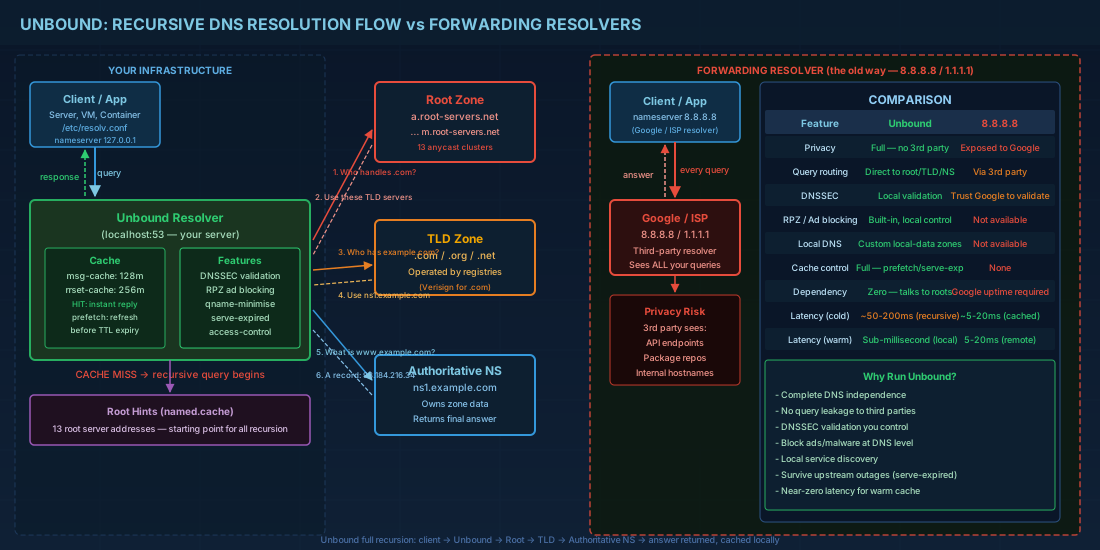
- Memory efficiency — Unbound's cache is hash-table based with configurable slabs, not the tree structure BIND uses
- Thread safety — each thread gets its own cache slab, eliminating lock contention
- Prefetch — Unbound refreshes popular cache entries before they expire, eliminating cold-cache latency
- serve-expired — serves stale data during upstream outages while refreshing in background
Installation on Major Distributions
# RHEL 9 / Rocky / Alma
sudo dnf install -y unbound
sudo systemctl enable --now unbound

# Debian 12 / Ubuntu 24.04
sudo apt install -y unbound
sudo systemctl enable --now unbound

# Alpine (containers)
apk add unbound

# Verify it is running
unbound-control status

# Test a query through Unbound
dig @127.0.0.1 example.com
Full Recursive Configuration
The default configuration usually forwards to upstream resolvers. Here is a production configuration that performs full recursion from the root servers — no third-party resolver involved.
# /etc/unbound/unbound.conf
server:
    # Network settings
    interface: 0.0.0.0
    interface: ::0
    port: 53

    # Access control — who can query this resolver
    access-control: 127.0.0.0/8 allow
    access-control: 10.0.0.0/8 allow
    access-control: 172.16.0.0/12 allow
    access-control: 192.168.0.0/16 allow
    access-control: ::1/128 allow
    access-control: 0.0.0.0/0 refuse
    access-control: ::/0 refuse

    # Performance tuning
    num-threads: 4
    msg-cache-slabs: 4
    rrset-cache-slabs: 4
    infra-cache-slabs: 4
    key-cache-slabs: 4

    # Cache sizes — rrset should be ~2x msg-cache
    msg-cache-size: 128m
    rrset-cache-size: 256m
    key-cache-size: 32m
    neg-cache-size: 16m

    # Socket buffer (requires kernel tuning: net.core.rmem_max)
    so-rcvbuf: 4m
    so-sndbuf: 4m

    # Prefetch: refresh popular entries BEFORE they expire
    prefetch: yes
    prefetch-key: yes

    # Serve expired: return stale data during upstream failures
    serve-expired: yes
    serve-expired-ttl: 86400
    serve-expired-client-timeout: 1800
    serve-expired-reply-ttl: 30

    # Minimal responses (smaller packets, faster)
    minimal-responses: yes
    qname-minimisation: yes

    # DNSSEC validation
    auto-trust-anchor-file: "/var/lib/unbound/root.key"
    val-clean-additional: yes

    # Hardening
    hide-identity: yes
    hide-version: yes
    harden-glue: yes
    harden-dnssec-stripped: yes
    harden-referral-path: yes
    harden-algo-downgrade: yes
    use-caps-for-id: yes

    # Root hints — the starting point for recursion
    root-hints: "/etc/unbound/root.hints"

    # Logging
    verbosity: 1
    log-queries: no
    log-replies: no
    log-servfail: yes
    logfile: ""  # Empty = syslog/journald

    # Private addresses — never return these for public queries
    private-address: 10.0.0.0/8
    private-address: 172.16.0.0/12
    private-address: 192.168.0.0/16
    private-address: fd00::/8
    private-address: fe80::/10

remote-control:
    control-enable: yes
    control-interface: 127.0.0.1
    control-port: 8953
Root Hints: The Foundation of Recursion
# Download the latest root hints from IANA
sudo curl -o /etc/unbound/root.hints \
    https://www.internic.net/domain/named.cache

# Set up a monthly cron to keep them updated
cat > /etc/cron.monthly/update-root-hints << 'EOF'
#!/bin/bash
curl -s -o /tmp/root.hints https://www.internic.net/domain/named.cache
if [ -s /tmp/root.hints ]; then
    mv /tmp/root.hints /etc/unbound/root.hints
    unbound-control reload
fi
EOF
chmod +x /etc/cron.monthly/update-root-hints

# Initialize the DNSSEC root trust anchor
sudo unbound-anchor -a /var/lib/unbound/root.key
Kernel Tuning for High-Performance DNS
# Unbound needs larger socket buffers for high query rates
cat >> /etc/sysctl.d/99-unbound.conf << 'EOF'
# UDP receive/send buffer maximums
net.core.rmem_max = 8388608
net.core.wmem_max = 8388608

# Increase conntrack table for DNS-heavy servers
net.netfilter.nf_conntrack_max = 262144

# Faster TIME_WAIT recycling
net.ipv4.tcp_tw_reuse = 1
EOF
sudo sysctl -p /etc/sysctl.d/99-unbound.conf
Response Policy Zones: DNS-Level Blocking Without Pi-hole
RPZ lets you override DNS responses for specific domains — block malware, ads, tracking, or redirect corporate domains. It is Pi-hole functionality built directly into your resolver without an extra service.
# Add to /etc/unbound/unbound.conf
server:
    # Load RPZ blocklists as local-zone overrides
    # Method 1: Local blocklist file
    include: "/etc/unbound/blocklist.conf"

    # Method 2: Redirect specific domains
    local-zone: "ads.example.com." redirect
    local-data: "ads.example.com. A 0.0.0.0"

    local-zone: "tracking.analytics.com." always_nxdomain

    # Block entire TLDs known for abuse
    local-zone: "zip." always_nxdomain
    local-zone: "mov." always_nxdomain
# Generate blocklist from popular sources
#!/bin/bash
# update-blocklist.sh — Convert ad/malware lists to Unbound format
SOURCES=(
"https://raw.githubusercontent.com/StevenBlack/hosts/master/hosts"
"https://adaway.org/hosts.txt"
)
OUTFILE="/etc/unbound/blocklist.conf"
TMPFILE=$(mktemp)
for url in "${SOURCES[@]}"; do
curl -s "$url" >> "$TMPFILE"
done
# Convert hosts format to Unbound local-zone format
grep -E "^0\.0\.0\.0" "$TMPFILE" | \
awk '{print "local-zone: \""$2".\" always_nxdomain"}' | \
sort -u > "$OUTFILE"
rm "$TMPFILE"
COUNT=$(wc -l < "$OUTFILE")
echo "Blocklist updated: $COUNT domains blocked"
# Reload Unbound
unbound-control reload
echo "Unbound reloaded"Local Service Discovery Without an Authoritative Server
# Add internal DNS records directly in Unbound
# No need for a separate BIND9 authoritative server for simple cases

server:
    # Define a local zone for your internal domain
    local-zone: "internal.lab." static

    # A records
    local-data: "web01.internal.lab. IN A 10.0.1.10"
    local-data: "web02.internal.lab. IN A 10.0.1.11"
    local-data: "db01.internal.lab. IN A 10.0.2.10"
    local-data: "cache01.internal.lab. IN A 10.0.3.10"

    # PTR records for reverse DNS
    local-data-ptr: "10.0.1.10 web01.internal.lab."
    local-data-ptr: "10.0.1.11 web02.internal.lab."
    local-data-ptr: "10.0.2.10 db01.internal.lab."
    local-data-ptr: "10.0.3.10 cache01.internal.lab."

    # CNAME records
    local-data: "api.internal.lab. IN CNAME web01.internal.lab."

    # SRV records for service discovery
    local-data: "_http._tcp.internal.lab. IN SRV 10 0 80 web01.internal.lab."
    local-data: "_http._tcp.internal.lab. IN SRV 20 0 80 web02.internal.lab."
Combining Unbound with DoT Upstream
For environments where full recursion is not possible (firewall restrictions on outbound port 53), you can forward to a trusted resolver over TLS while still getting Unbound's caching and RPZ features.
# Forward mode with DNS-over-TLS
server:
    # All settings from above still apply (cache, prefetch, RPZ, etc.)
    tls-cert-bundle: "/etc/pki/tls/certs/ca-bundle.crt"

forward-zone:
    name: "."
    forward-tls-upstream: yes

    # Cloudflare
    forward-addr: 1.1.1.1@853#cloudflare-dns.com
    forward-addr: 1.0.0.1@853#cloudflare-dns.com

    # Quad9 (malware filtering included)
    forward-addr: 9.9.9.9@853#dns.quad9.net
    forward-addr: 149.112.112.112@853#dns.quad9.net
Monitoring with unbound-control and Prometheus
# Setup unbound-control (required for stats and runtime management)
sudo unbound-control-setup
sudo systemctl restart unbound

# View live statistics
unbound-control stats_noreset

# Key metrics to watch:
# total.num.queries — total queries received
# total.num.cachehits — queries answered from cache
# total.num.cachemiss — queries requiring recursion
# total.num.recursivereplies — completed recursive lookups
# total.requestlist.avg — average outstanding queries
# mem.cache.rrset — memory used by RRset cache
# mem.cache.message — memory used by message cache

# Calculate cache hit ratio
unbound-control stats_noreset | awk -F= '
    /total.num.cachehits/ {hits=$2}
    /total.num.cachemiss/ {miss=$2}
    END {printf "Cache hit ratio: %.1f%%\n", hits/(hits+miss)*100}'

# Install Prometheus exporter
# Option 1: unbound_exporter (Go binary)
go install github.com/letsencrypt/unbound_exporter@latest
unbound_exporter -unbound.host "tcp://127.0.0.1:8953" \
    -unbound.cert /etc/unbound/unbound_control.pem \
    -unbound.key /etc/unbound/unbound_control.key \
    -web.listen-address ":9167"

# Option 2: Query stats via cron to a log file
cat > /etc/cron.d/unbound-stats << 'EOF'
*/5 * * * * root unbound-control stats | logger -t unbound-stats
EOF
Benchmarking Your Resolver
# Install dnsperf from DNS-OARC
sudo dnf install -y dnsperf  # or apt install dnsperf

# Create a query file
cat > /tmp/queries.txt << 'EOF'
google.com A
github.com A
cloudflare.com A
amazon.com A
microsoft.com A
linux.org A
kernel.org A
debian.org A
redhat.com A
stackoverflow.com A
EOF

# Benchmark: 10 clients, 30 seconds
dnsperf -s 127.0.0.1 -d /tmp/queries.txt -c 10 -T 30

# Compare against a public resolver
dnsperf -s 8.8.8.8 -d /tmp/queries.txt -c 10 -T 30

# For sustained load testing
resperf -s 127.0.0.1 -d /tmp/queries.txt -m 10000
Validation and Testing
# Check configuration syntax
unbound-checkconf /etc/unbound/unbound.conf

# Test DNSSEC validation is working
dig @127.0.0.1 sigfail.verteiltesysteme.net A
# Should return SERVFAIL (deliberately broken DNSSEC)

dig @127.0.0.1 sigok.verteiltesysteme.net A
# Should return an A record with ad flag (Authenticated Data)

# Verify Unbound is doing full recursion (not forwarding)
dig @127.0.0.1 +trace example.com

# Check what is in the cache
unbound-control dump_cache | head -50

# Flush a specific domain from cache
unbound-control flush example.com
unbound-control flush_zone example.com
Running your own recursive resolver is not paranoia — it is operational independence. When Cloudflare had a 30-minute outage in 2024, every organisation using 1.1.1.1 lost DNS resolution. Organisations running Unbound with serve-expired never noticed. The resolver kept serving cached answers while the internet sorted itself out. That is the difference between depending on someone else's infrastructure and controlling your own.