What is DNS?
The Domain Name System (DNS) is the internet's directory service. It translates human-readable domain names like linuxprofessional.ie into IP addresses that computers use to communicate. Without DNS, you'd need to memorize IP addresses for every website you visit.
DNS is a distributed, hierarchical database that handles billions of queries daily. Understanding its architecture is essential for any Linux engineer managing servers or troubleshooting connectivity issues.
DNS Hierarchy
DNS operates as a tree structure with multiple levels:
                    . (Root)
                    |
        ┌───────┬──┴──┬───────┐
        |       |     |       |
       .com    .ie   .org    .net
        |       |     |
    ┌───┴───┐   |     |
    |       |   |     |
 google  github |   linux
                |
         linuxprofessional
The Root Zone
At the top sits the root zone, managed by 13 root server clusters (labeled A through M). These servers know where to find the authoritative nameservers for every top-level domain.
Top-Level Domains (TLDs)
TLDs come in several categories:
- Generic TLDs (gTLDs):
.com,.org,.net,.info - Country Code TLDs (ccTLDs):
.ie(Ireland),.uk,.de,.jp - Sponsored TLDs:
.edu,.gov,.mil - New gTLDs:
.dev,.app,.cloud,.tech
DNS Record Types
DNS uses various record types to store different kinds of information:
# A Record — Maps hostname to IPv4 address
linuxprofessional.ie.  IN  A  93.184.216.34

# AAAA Record — Maps hostname to IPv6 address
linuxprofessional.ie.  IN  AAAA  2606:2800:220:1:248:1893:25c8:1946

# CNAME Record — Alias pointing to another hostname
www.linuxprofessional.ie.  IN  CNAME  linuxprofessional.ie.

# MX Record — Mail server with priority
linuxprofessional.ie.  IN  MX  10  mail.linuxprofessional.ie.

# NS Record — Authoritative nameserver
linuxprofessional.ie.  IN  NS  ns1.provider.com.

# TXT Record — Arbitrary text (used for SPF, DKIM, verification)
linuxprofessional.ie.  IN  TXT  "v=spf1 include:_spf.google.com ~all"

# SOA Record — Start of Authority (zone metadata)
linuxprofessional.ie.  IN  SOA  ns1.provider.com. admin.linuxprofessional.ie. (
    2024010101  ; Serial
    3600        ; Refresh
    900         ; Retry
    1209600     ; Expire
    86400       ; Minimum TTL
)
How DNS Resolution Works
When you type a URL into your browser, a multi-step resolution process begins:
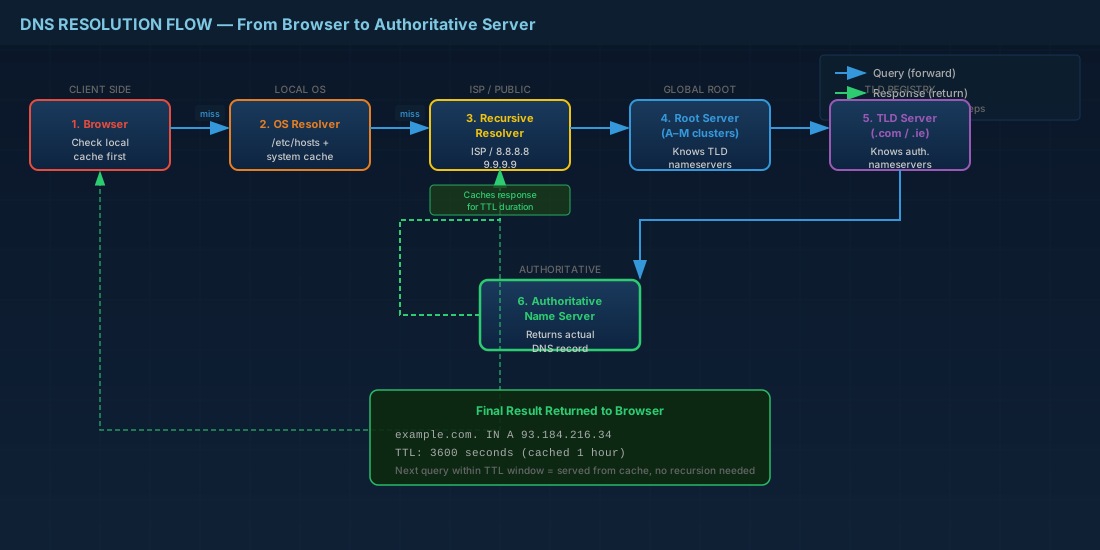
- Browser Cache — checks if the answer is already cached locally
- OS Resolver — checks
/etc/hostsand the system DNS cache - Recursive Resolver — your ISP's or configured DNS server (e.g., 8.8.8.8)
- Root Server — directs to the appropriate TLD server
- TLD Server — directs to the authoritative nameserver
- Authoritative Server — returns the actual DNS record
Essential DNS Tools for Linux
# Query DNS records with dig
dig linuxprofessional.ie A +short
dig linuxprofessional.ie MX
dig @8.8.8.8 linuxprofessional.ie ANY

# Trace the full resolution path
dig +trace linuxprofessional.ie

# Quick lookups with host
host linuxprofessional.ie
host -t MX linuxprofessional.ie

# Check reverse DNS
dig -x 93.184.216.34

# Test DNS propagation
nslookup linuxprofessional.ie ns1.provider.com
TTL and Caching
The Time To Live (TTL) value determines how long DNS records are cached. Understanding TTL is crucial for planning migrations:
- High TTL (86400s / 24h): Good for stable records — reduces DNS query load
- Low TTL (300s / 5min): Use before migrations — allows quick cutover
- Strategy: Lower TTL 48 hours before a migration, perform the change, then raise TTL again
DNS may seem like simple address translation, but its distributed, hierarchical design is one of the most elegant and resilient systems in computing. Master it, and you'll troubleshoot network issues faster than most engineers can open a ticket.