SELinux and AppArmor are Linux security modules. They limit what a process can do even after a user account or service is already running. This matters because file permissions alone are often too broad for modern services. If nginx is compromised, normal Unix permissions may still allow it to read more data than it should. A policy layer reduces that blast radius.
What SELinux and AppArmor actually do
Both systems enforce mandatory access control (MAC). With MAC, rules are set by security policy, not by each process. A process cannot decide to ignore those rules. In practice, this blocks actions like reading unexpected directories, opening restricted network ports, or loading unsafe helper binaries.
SELinux labels files, processes, and ports with security contexts. Policy rules define which context can talk to which other context. AppArmor attaches path-based profiles to programs. A profile says which paths and capabilities that program can use.
Production consequence: when one service is exploited, the attacker often hits a second barrier. The service can still crash or leak some data, but it is much harder to pivot into full host compromise.
How they differ in daily operations
SELinux is usually stricter and more detailed. That helps on high-risk hosts, but troubleshooting can feel harder at first because labels must match.
AppArmor is often easier for beginners because profiles are readable path rules and tools like aa-logprof can suggest updates.
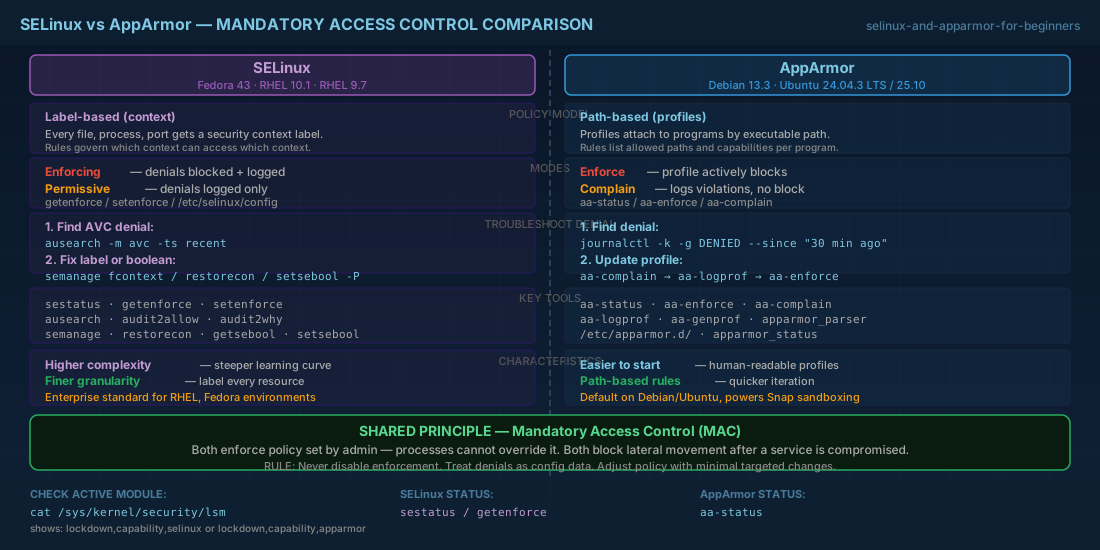
In both models, disabling enforcement to "make it work" is a short-term fix that creates long-term risk. Keep enforcement on, read denial logs, and adjust policy with small, deliberate changes.
Distro compatibility notes for Debian, Ubuntu, Fedora, and RHEL
| Distribution | Default in common installs | Operator notes |
|---|---|---|
| Debian 13.3 | AppArmor is the usual default | Good for beginner profile tuning; SELinux packages exist but are less common in Debian operations. |
| Ubuntu 24.04.3 LTS / 25.10 | AppArmor by default | Snap packages rely heavily on AppArmor policy. Avoid disabling AppArmor globally. |
| Fedora 43 | SELinux enforcing by default | Use SELinux tools first; many server guides and policy examples target this model. |
| RHEL 10.1 | SELinux enforcing by default | Primary supported hardening path in enterprise support workflows. |
| RHEL 9.7 compatibility | Same SELinux model and core admin workflow | Policy handling, booleans, and labeling commands stay compatible for most day-to-day tasks. |
First checks on a new server
Before changing policy, confirm which module is active. Do not assume based on distro name alone, especially on cloud images or upgraded hosts.
# Check Linux Security Modules loaded by the kernel
cat /sys/kernel/security/lsm

# SELinux state (Fedora/RHEL and some custom installs)
getenforce
sestatus

# AppArmor state (Debian/Ubuntu and some custom installs)
aa-status
If output says SELinux is Permissive, denials are logged but not blocked. That is useful for debugging, but not a final secure state.
For AppArmor, if profiles are loaded in complain mode, logs appear without hard enforcement.
Common production issue: web app cannot read deployed files
A classic incident happens after moving app files from /var/www to /srv/myapp. The service starts, but requests fail with
"permission denied" in logs. Standard file ownership looks correct, yet access still fails because MAC policy does not match the new path.
SELinux fix path
# 1) Check recent AVC denials
sudo ausearch -m avc -ts recent

# 2) Label the new directory tree for web content
sudo semanage fcontext -a -t httpd_sys_content_t '/srv/myapp(/.*)?'
sudo restorecon -Rv /srv/myapp

# 3) If app needs outbound DB/API calls, allow httpd network connect
sudo setsebool -P httpd_can_network_connect on

# 4) Confirm enforcing mode after fix
getenforce
Real impact: without relabeling, deployments may pass CI but fail in production after cutover. Teams sometimes roll back good releases because policy drift was not handled in the deployment script.
AppArmor fix path
# 1) Inspect denials in kernel log
sudo journalctl -k -g DENIED --since "30 min ago"

# 2) Temporarily switch one profile to complain mode for learning
sudo aa-complain /etc/apparmor.d/usr.sbin.nginx

# 3) Exercise the app, then generate profile updates
sudo aa-logprof

# 4) Re-enable enforcement
sudo aa-enforce /etc/apparmor.d/usr.sbin.nginx
Real impact: if you leave a profile in complain mode after an emergency change, the host looks healthy but protections are weaker than your runbook says. Track mode changes in incident notes and close them before sign-off.
Safe troubleshooting workflow for beginners and operators
Use this sequence to avoid two bad outcomes: permanent policy disablement and random allow rules you cannot explain later.
- Reproduce the denied action with one clear test.
- Collect denial logs first, then map them to the exact service unit and file path.
- Apply the smallest policy change that solves that denial.
- Retest only the affected function, then retest a normal user flow.
- Return to full enforcing mode and document the command used.
For beginners, this builds a reliable habit: logs first, policy second. For operators, it keeps audit evidence clean and keeps emergency fixes from turning into permanent security debt.
Conclusion
Pick the tool that matches your platform defaults and support model. On Ubuntu and Debian fleets, AppArmor is usually the practical starting point. On Fedora and RHEL fleets, SELinux is the normal production path and the one most enterprise procedures expect.
The core lesson is the same on every distro version listed here: do not disable MAC for convenience. Treat denials as configuration data, not as noise. When policy is maintained with the same discipline as application config, incidents are easier to contain and postmortems are shorter.


