User and group administration is one of the first Linux skills that affects real uptime and security. If account data is wrong, people lose access, services fail to start, and privilege boundaries break. This guide explains how /etc/passwd, /etc/shadow, groups, and sudo fit together on modern systems, using commands you can run on Debian 13.3, Ubuntu 24.04.3 LTS and 25.10, Fedora 43, RHEL 10.1, and RHEL 9.7.
How passwd and shadow actually work

Linux stores account identity and authentication data in separate places. The split is intentional.
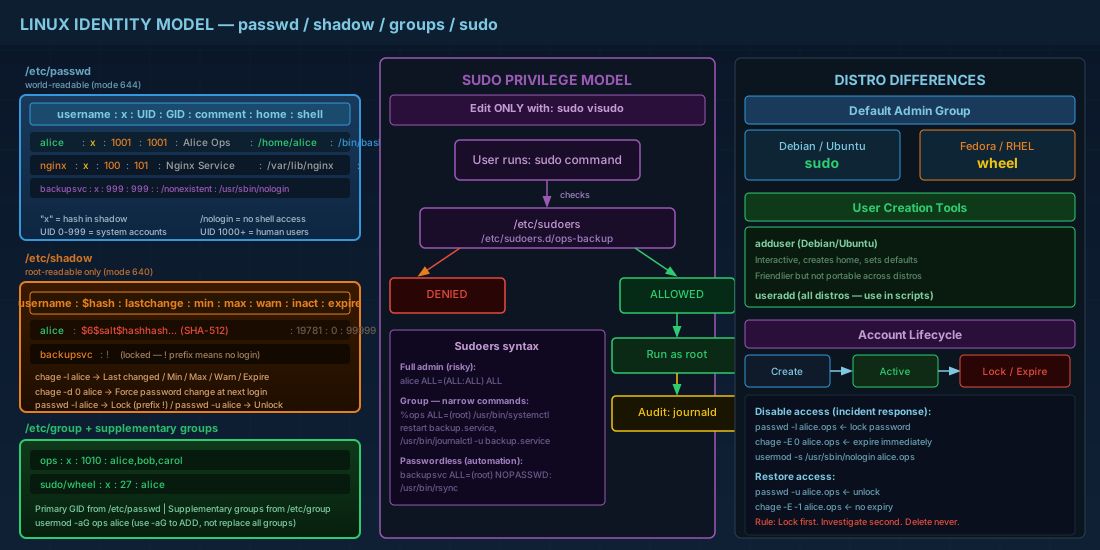
/etc/passwd is world-readable because many programs need user IDs and home directories. It does not store usable password hashes on modern systems. /etc/shadow is readable only by root and holds password hashes and password aging settings.
A single /etc/passwd line has seven fields:
username:x:UID:GID:comment:home:shellThe x means the hash is stored in /etc/shadow. If a shell is /usr/sbin/nologin or /bin/false, the account cannot log in interactively, which is normal for service users.
Use these commands to inspect account records safely:
# Show local account database entries
getent passwd

# Show one user
getent passwd alice
sudo getent shadow alice

# Show password aging status
sudo chage -l alice
Production consequence: if permissions on /etc/shadow are too open, hashed passwords can be copied for offline cracking. If UIDs are duplicated by mistake, file ownership can map to the wrong person and incident response becomes hard.
Create and change users without breaking access
Most distributions provide two common tools: useradd and passwd. Debian and Ubuntu also ship a friendlier wrapper called adduser. In scripts and automation, useradd is usually preferred because options are consistent and non-interactive.
# Create a normal login user with home directory and bash shell
sudo useradd -m -s /bin/bash alice
sudo passwd alice

# Force password change at next login
sudo chage -d 0 alice

# Create a service account with no interactive login
sudo useradd -r -M -s /usr/sbin/nologin backupsvc
Key flags matter:
-mcreates the home directory.-rcreates a system account (service-style UID range).-Mavoids home directory creation.-ssets login shell explicitly.
When changing existing users, avoid manual edits in /etc/passwd unless recovery is needed in single-user mode. Use management commands so file ownership and metadata stay consistent.
# Rename account and move home directory
sudo usermod -l alice.ops alice
sudo usermod -d /home/alice.ops -m alice.ops

# Set account expiration date for temporary contractors
sudo chage -E 2026-12-31 alice.ops
Production consequence: forgetting -m during a home path change leaves old files behind and user login profiles appear "missing." That usually becomes a support ticket and data recovery task.
Groups, file ownership, and least privilege
Groups control shared access to files and commands. Every user has one primary group and can belong to supplementary groups. The kernel checks UID, GID, and mode bits on each file access.
# Show identity and groups
id alice.ops
groups alice.ops

# Create an operations group and add user to it
sudo groupadd ops
sudo usermod -aG ops alice.ops

# Verify membership after re-login
id alice.ops
Use usermod -aG. If you run only -G, you replace all supplementary groups and can remove needed access silently.
For shared directories, combine group ownership with setgid:
sudo mkdir -p /srv/shared-reports
sudo chown root:ops /srv/shared-reports
sudo chmod 2770 /srv/shared-reports

# New files inherit group "ops" because of setgid bit (2)
Production consequence: bad group design creates either permission sprawl or blocked teams. Permission sprawl increases blast radius during account compromise.
Sudo design: controlled privilege escalation
sudo lets a trusted user run selected commands as root, with audit logs. This is safer than sharing the root password. On Debian and Ubuntu, admin users are often in group sudo. On Fedora and RHEL, the default admin group is commonly wheel.
Edit policy with visudo only. It checks syntax before saving. A syntax error in sudoers can lock out admin access.
# Open main sudoers safely
sudo visudo

# Better pattern: use a drop-in file
sudo visudo -f /etc/sudoers.d/ops-backup

# Example content for /etc/sudoers.d/ops-backup
%ops ALL=(root) /usr/bin/systemctl restart backup.service, /usr/bin/journalctl -u backup.service
Defaults:%ops !requiretty
Keep rules narrow. Grant specific commands, not ALL, unless the role is full administrator. Also use absolute command paths to prevent path-hijack mistakes.
Production consequence: broad sudo rights turn a single stolen account into full root compromise. Tight sudo policies reduce damage and make logs easier to review.
Compatibility notes for Debian, Ubuntu, Fedora, and RHEL
Core account files and command names are stable across current major releases, but defaults differ. These differences matter when you move scripts between systems.
| Distribution | Default admin group | User creation habit | Notes |
|---|---|---|---|
| Debian 13.3 | sudo | adduser for interactive admin tasks, useradd for scripts | Shadow password model unchanged; PAM handles complexity rules. |
| Ubuntu 24.04.3 LTS / 25.10 | sudo | adduser common in docs | Cloud images often rely on sudo + SSH keys; local passwords may be locked initially. |
| Fedora 43 | wheel | useradd in automation | SELinux defaults can block actions even when UNIX permissions look correct. |
| RHEL 10.1 | wheel | useradd/usermod in enterprise scripts | Use authselect and PAM policy carefully in centralized identity environments. |
| RHEL 9.7 | wheel | Same command set as RHEL 10.1 | Most account and sudo procedures are directly compatible with RHEL 10.1. |
Account lifecycle and incident response basics
Good administration includes offboarding and emergency control. You should be able to disable access quickly without deleting evidence.
# Lock password login but keep files and UID
sudo passwd -l alice.ops

# Also expire account immediately
sudo chage -E 0 alice.ops

# Optional: set non-login shell
sudo usermod -s /usr/sbin/nologin alice.ops

# Later, unlock if needed
sudo passwd -u alice.ops
sudo chage -E -1 alice.ops
For incident handling, lock first, investigate second. Deleting the account immediately can remove useful forensic context from process ownership and audit trails.
Summary
/etc/passwd identifies accounts, /etc/shadow protects password hashes, groups shape day-to-day access, and sudo defines controlled privilege. If you use command-line tools instead of manual file edits, set narrow sudo rules, and follow a clear lock/offboard process, you reduce outages and security risk on every Linux distribution listed above.