systemctl is the daily control tool for services on modern Linux systems that use systemd. Entry-level technicians use it to start and stop services, but real operations work also includes boot behavior, failure analysis, and safe restart habits. This playbook gives you a repeatable workflow that works on Debian 13.3, Ubuntu 24.04.3 LTS, Ubuntu 25.10, Fedora 43, RHEL 10.1, and RHEL 9.7.
Practical consequence: if you treat service control as random one-off commands, incidents take longer. If you use a standard flow with checks before and after each action, you reduce downtime and make handoffs easier between shifts.
how systemctl sees a service
A service is a unit, usually named something.service. When you check status, systemd reports three useful pieces:
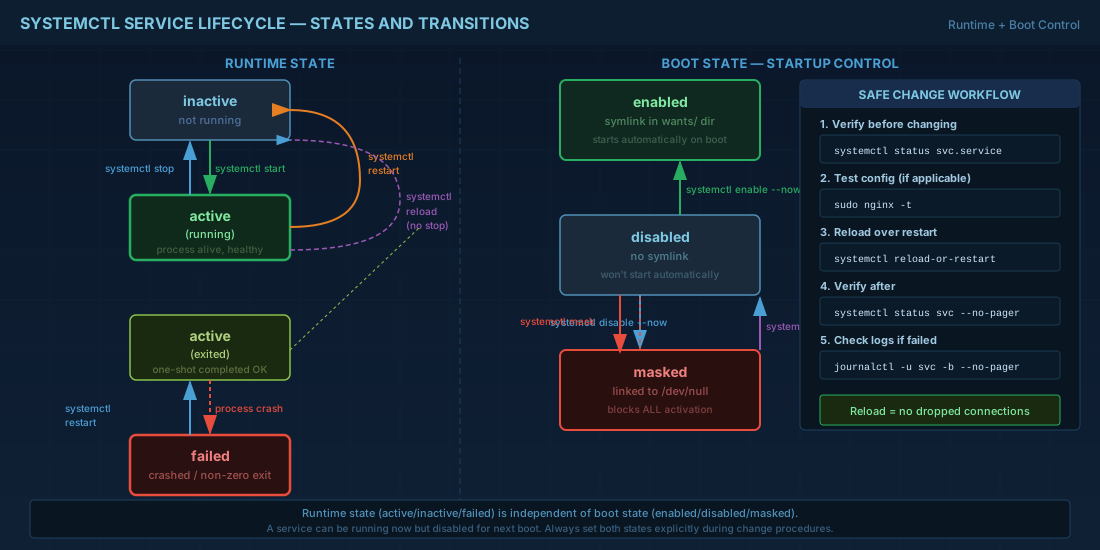
Loaded: whether systemd can read the unit file and from where.Active: broad runtime state, such asactive,inactive, orfailed.Sub: finer runtime detail, such asrunningorexited.
# First check: is the unit known and running?
systemctl status sshd.service

# Script-friendly checks
systemctl is-active sshd.service
systemctl is-enabled sshd.service

# Show only selected properties (good for automation)
systemctl show sshd.service -p ActiveState -p SubState -p UnitFileState
Use the exact unit name when possible. On Debian and Ubuntu, OpenSSH is commonly ssh.service. On Fedora and RHEL, it is usually sshd.service. Confirm with systemctl list-unit-files | grep -E 'ssh|sshd' before writing scripts for mixed fleets.
start, stop, restart, reload: choose the right action
These commands are not interchangeable:
start: launches a stopped service.stop: stops it.restart: full stop and start cycle, which can drop active connections.reload: asks the service to re-read config without full restart, if supported.reload-or-restart: reload when possible, restart otherwise.
# Safe change flow for a web service
sudo nginx -t
sudo systemctl reload-or-restart nginx.service
systemctl status nginx.service --no-pager
For production, prefer reload after configuration changes when the service supports it. A full restart may interrupt sessions. If a unit has no reload handler, reload-or-restart gives a predictable fallback.
You can also avoid hanging terminals during slow starts:
# Queue restart and return immediately
sudo systemctl restart --no-block myapp.service

# Watch until it is active or failed
watch -n 1 'systemctl is-active myapp.service'
control boot behavior with enable, disable, and mask
Runtime state and boot state are different. A service can be running now but not enabled for next boot.
# Start now and enable for next boot
sudo systemctl enable --now chronyd.service

# Stop now and disable for next boot
sudo systemctl disable --now chronyd.service

# Prevent any start, even manual start through dependencies
sudo systemctl mask firewalld.service

# Remove mask later
sudo systemctl unmask firewalld.service
enable creates symlinks in target directories (such as multi-user.target.wants). mask links the unit to /dev/null, which blocks activation. Mask is strong control and should be change-reviewed, because it can break dependency chains if used carelessly.
find failures fast with status, journalctl, and dependency checks
When a service fails, do not loop restart blindly. Collect evidence first.
# 1) Current state and recent log lines
systemctl status myapp.service --no-pager

# 2) Full logs for this boot
journalctl -u myapp.service -b --no-pager

# 3) Last 50 lines from previous boot (if a reboot happened)
journalctl -u myapp.service -b -1 -n 50 --no-pager

# 4) Unit dependency chain
systemctl list-dependencies myapp.service
Common root causes include wrong file permissions, missing environment files, port conflicts, and bad unit ordering. For example, if your app needs network and database first, missing After=network-online.target postgresql.service can produce race-condition failures at boot.
Production consequence: restarting without log review can hide recurring faults. Teams then mark incidents as "fixed" while the same unit fails again after reboot or patch windows.
edit unit behavior safely with drop-in overrides
Do not edit vendor unit files under /usr/lib/systemd/system or /lib/systemd/system directly. Package updates can overwrite them. Use drop-in overrides in /etc/systemd/system.
# Open an override file for a service
sudo systemctl edit myapp.service

# Example content to add:
# [Service]
# Restart=on-failure
# RestartSec=5s
# Environment="APP_ENV=production"

# Apply updated unit metadata
sudo systemctl daemon-reload

# Restart and verify
sudo systemctl restart myapp.service
systemctl show myapp.service -p Restart -p RestartUSec -p Environment
If you need to inspect merged configuration (vendor file plus overrides), use:
systemctl cat myapp.serviceThis is important for handover. Another technician can see exactly which settings are custom and which come from the package default.
compatibility notes for Debian, Ubuntu, Fedora, and RHEL
| Distribution | Practical note |
|---|---|
| Debian 13.3 | Systemd is default. Vendor units are often under /lib/systemd/system (frequently symlinked). Use systemctl cat to confirm final unit source. |
| Ubuntu 24.04.3 LTS | Same systemctl workflow as Debian. LTS operations benefit from documenting overrides because services may run unchanged for years. |
| Ubuntu 25.10 | Newer package set can introduce unit changes. Recheck custom overrides after major package upgrades. |
| Fedora 43 | Fast release cadence means unit defaults can change earlier than enterprise distros. Validate restart policies in staging first. |
| RHEL 10.1 | Commands are compatible with Fedora basics. Use drop-ins for compliance-friendly change history and predictable rollback. |
| RHEL 9.7 compatibility | Core service lifecycle commands match RHEL 10.1. Always test unit dependencies when moving templates between 9.7 and 10.1 hosts. |
summary
For beginners, the key habit is sequence: check status, make one controlled change, then verify state and logs. For operators, the key habit is durability: keep boot behavior explicit, use drop-in overrides, and collect evidence before restarting failed services. systemctl becomes reliable when you treat it as a workflow, not just a command list.


